top10alternative

Top 10 Graphic Design Software (2026)

Ten graphic design tools compared on what they do and what they cost, ranked by how many of 21 common design capabilities each one covers.

The best graphic design software for your situation

Each line matches a situation with the tool whose published facts fit it. The score on this page counts how many of 21 common design capabilities a tool covers. It measures coverage, not quality.

  • You make social posts, flyers and slides from templates, alone or as a teamCanva · Canva covers 20 of the 21 capabilities in full, and its free plan works for one person. Pro costs $18 a month, a price read on Moda because Canva's own site could not be read.
  • You retouch photos and work with layered Photoshop filesAdobe Photoshop · Photoshop retouches photos and fills part of an image from a text prompt. It costs $22.99 a month on an annual plan paid monthly, a price read on Dupple.
  • Your team designs together and shares files with many reviewersFigma · Figma scores 93, and viewers who only comment are free on a paid plan. Each person who edits needs a Full seat at $20 a month billed monthly.
  • You sell shirts, posters or stickers and design them yourselfKittl · Kittl starts from print templates and exports PDF in CMYK for printers. Pro costs $19 a month, and the free plan is for personal use only.
  • You make presentations, reports and infographics, not illustrationsVisme · Visme is built around documents and slides. Starter costs $29 a month per person billed monthly, and video downloads start on Business.
  • You prepare files for print shops and want to own your softwareCorelDRAW Graphics Suite · CorelDRAW sets crop marks on export and is sold as a one-time licence, at $549 list price (the standard price before offers). The monthly plan costs $39.
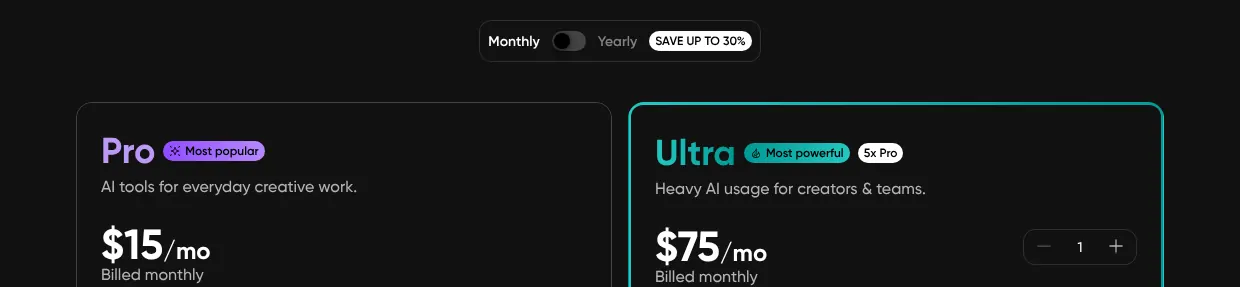
  • You edit photos and social posts from your phonePicsart · Picsart runs on iOS, Android, the web and Windows, with AI background removal. Pro costs $15 a month billed monthly.
  • You draw logos and icons that must stay sharp at any sizeAdobe Illustrator · Illustrator draws vector art and exports SVG and print PDF with bleed. It costs $22.99 a month on an annual plan paid monthly, a price read on ThePricer.
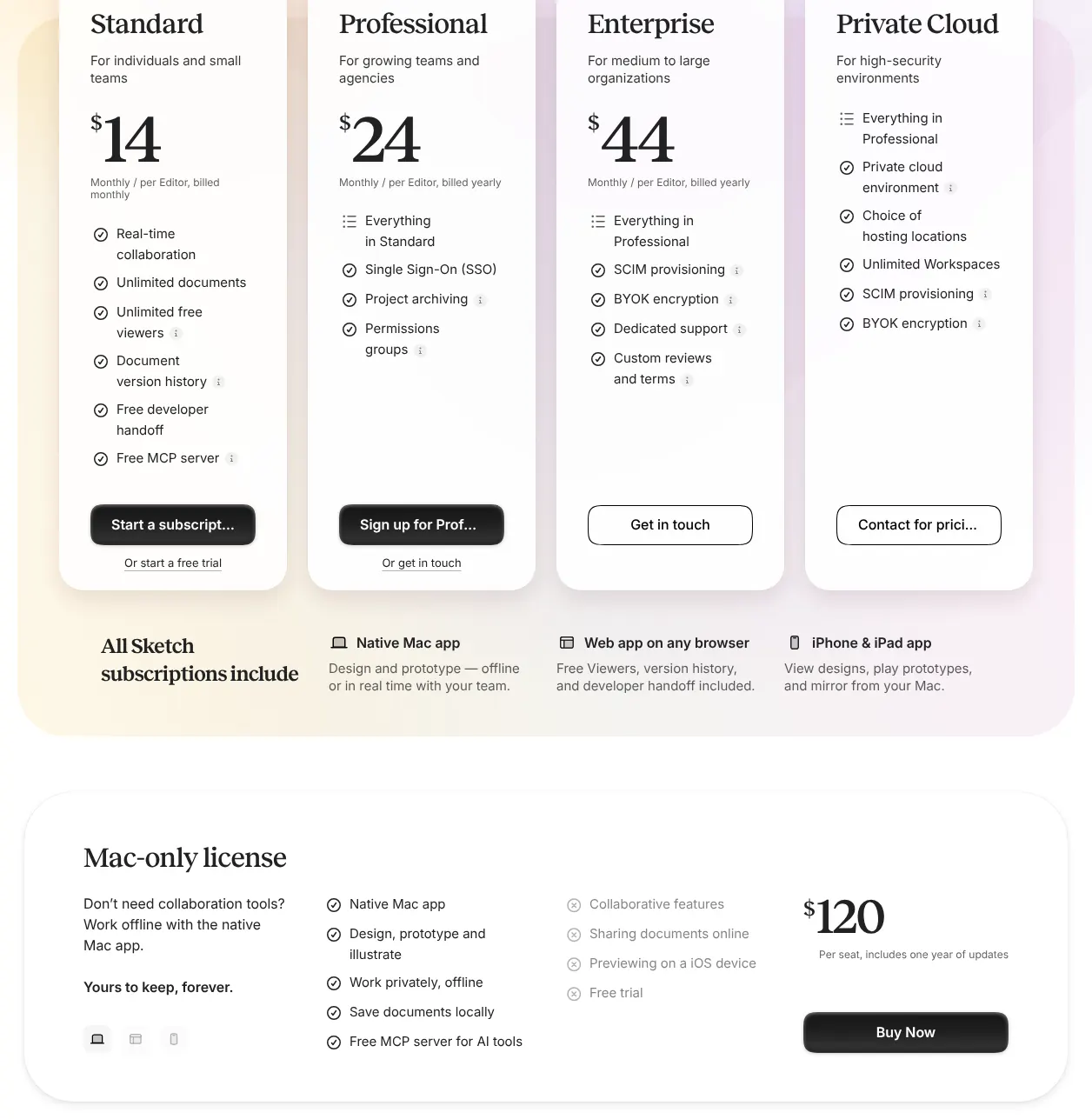
  • Your team works on Macs and needs to design offlineSketch · Sketch is a native Mac app with real-time co-editing. Standard costs $14 per editor a month, and a Mac-only licence costs $120 once.
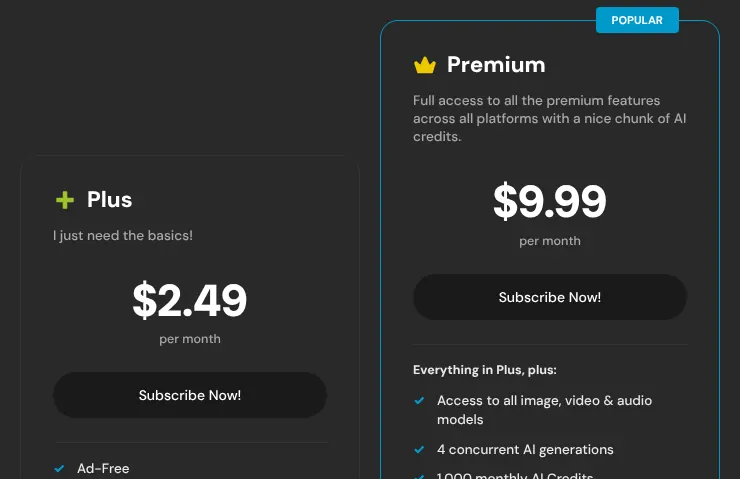
  • You only need quick photo edits and want the lowest pricePixlr · Pixlr Plus costs $2.49 a month and removes the ads. Its web editors save at 72 dpi, so keep it for screens, not print.

How to choose graphic design software

The score only shortlists: it counts capabilities, and the right tool depends on the work. Six checks narrow the list to one or two tools. Each one rests on facts read on 12 November 2026, on vendor pages or, for Canva and Adobe's prices, on two other sites.

1. Start from the kind of work you do

Graphic design software splits into three kinds, and you should pick the kind before the tool. Vector tools draw shapes from curves, so a logo stays sharp at any size. Photo editors change the pixels of a picture. Template tools start from a ready-made layout that you fill in.

Logos and illustrations call for a vector tool such as Adobe Illustrator or CorelDRAW. Photo retouching calls for Adobe Photoshop, Picsart or Pixlr. Social posts and slides go faster from templates, in Canva, Visme or Kittl. A high score means a tool covers all three kinds, not that it goes as deep in each one as a specialist.

2. Check where the tool runs

Check your computers before anything else, because some tools leave out a common system. Sketch needs a Mac to design. Kittl runs only in a browser, with no app to install and no phone editor. CorelDRAW lists no phone app, and Illustrator's browser version is still a beta with fewer tools.

The Figma phone app views and comments but cannot edit design files. If you edit on a phone, look at Canva, Picsart and Pixlr, the free Photoshop mobile app, or Visme on iOS.

3. Check the files you receive and send

List the file types you exchange, because two gaps recur on this page. Six of the ten tools open Photoshop (PSD) files: Photoshop, Canva, Illustrator, CorelDRAW, Picsart and Pixlr. Sketch opens them as one flat image, and Figma, Kittl and Visme do not open them.

SVG is the vector format that websites and cutting machines use. Visme and Pixlr do not export it. For print, look for CMYK, the colour mode that printers use, for bleed or crop marks, or for PDF/X, a PDF standard for printing. Canva, Photoshop, Illustrator, CorelDRAW, Kittl and Visme document at least one of them. A designer who sends 50 flyers a year to a print shop should start from those six.

4. Count the AI credits, not just the AI tools

Most of these tools generate images, but each image spends credits, and each plan includes a fixed number. Kittl Pro includes 2,000 AI tokens a month. The Figma Full seat includes 3,000 AI credits a month. Pixlr Plus includes 80 AI credits a month, and Premium 1,000. The Illustrator plan includes 25 generative credits a month, according to Photutorial.

Sketch is the exception: no built-in AI image tools were found on its site. If you generate many images, compare the credits included in the plan you would buy, then read the vendor's price of extra credits.

5. Compare monthly and annual billing, and one-time licences

Most prices on this page have a lower annual figure, and two tools still sell a licence you keep. Annual billing commits you for twelve months. Kittl Pro costs $19 a month billed monthly and $14 billed annually. Over a year, that is $228 against $168.

The $22.99 of Photoshop and Illustrator is already an annual plan, paid in twelve monthly instalments. Adobe sells both only by subscription. A one-time licence is paid once and works without a subscription. Sketch sells a Mac-only licence at $120 per seat, with one year of updates. CorelDRAW sells one at $549 list price. Pay monthly while you are still judging a tool, then switch.

6. Read the limits of the free plan

Six of the ten tools can be used free, but each caps what you can keep or export. The Figma Starter plan holds 3 design files. The Kittl free plan holds 5 projects and exports 800-pixel images for personal use only. Visme Basic allows 50 pages per project and 500MB of storage. Pixlr is free with ads and a daily save limit.

The Canva free plan serves one person, with 5GB of storage and 1 brand kit of 3 colours, according to Moda. Picsart's free plan covers its core photo tools. Photoshop, Illustrator, CorelDRAW and Sketch offer a trial, not a free plan. Only the Photoshop phone app is free, with paid premium features.

The 10 Graphic design software

by overall score
  1. 1. Canva

    Canva has the highest score and suits a team that makes marketing material from templates, but a designer who draws logos with precise curves needs a vector tool next to it.

    Score
    96/100
    Best for
    Teams and non-designers who make social posts, presentations and marketing material from templates
    From
    $18/mo
    Free plan
    Yes · 1 person, 5GB storage

    Canva has the highest score on this page, 96. It covers 20 of the 21 capabilities in full. It is built on templates: the free plan alone holds more than 1.6 million, according to Moda. It runs in a browser, as a desktop app for Windows and Mac, and on phones and tablets. Several people can edit the same design at once.

    Canva's site answered every request with a bot check on 12 November 2026, so its facts come from other sites and from Canva's own app store listings. Each price was confirmed on a second site. Pro costs $18 a month for one person, as read on Moda and SocialRails. A Pro account serves one person only. A team pays for Business, at $25 per person a month.

    The free plan serves one person, with 5GB of storage and 1 brand kit, the saved colours, fonts and logos of a brand, limited to 3 colours. Font upload, one-click resize, SVG export and print PDF in CMYK need Pro. The one gap is precise vector drawing: the sources read describe no pen tool, the tool that draws curves point by point, in Canva itself. For that work they point to Affinity, a separate free app from the same company.

  2. 2. Adobe Photoshop

    Photoshop suits anyone whose work is mostly photos and layered files; a team that wants to co-edit live or start from social templates should look at Canva or Figma.

    Score
    94/100
    Best for
    Photographers and designers who retouch images and work with layered files
    From
    $22.99/mo, annual plan
    Free plan
    No · trial; free phone app

    Adobe Photoshop is a photo editor at its core, and it covers 19 of the 21 capabilities in full. It retouches, removes backgrounds and fills part of an image from a text prompt, a tool Adobe calls Generative Fill. It works in layers, stacked sheets that each hold one part of the image and change on their own. Its pen tool draws vector paths. It exports SVG, print PDF in PDF/X (a standard that print shops accept) and video from a timeline.

    Adobe's plan pages refused the browser used by this site, so the prices come from other sites. Photoshop alone costs $22.99 a month on an annual plan paid monthly, as read on Dupple and confirmed by Joseph Nilo. That price is a one-year commitment paid in twelve instalments. Dupple notes that Adobe's Photoshop page lists no month-to-month option. The Photography plan, at $19.99 a month, adds Lightroom. A team licence costs $37.99 a month.

    Photoshop runs as a desktop app, in Chrome, Edge and Firefox, and on phones. The web version is included in every plan. Real-time co-editing exists only as a public beta. No one-click resize to other formats was found in Adobe's help pages. The desktop app has a free trial, not a free plan, and the phone app is free with paid premium features.
  3. 3. Figma

    Figma suits a team that edits together in the browser, but a studio that receives Photoshop files or prints a lot needs a second tool.

    Score
    93/100
    Best for
    Teams that design together in the browser and share files with many people
    From
    $20/mo per Full seat
    Free plan
    Yes · Starter, 3 design files

    Figma scores 93, just behind Canva and Photoshop. Of the 21 capabilities checked, it has 18 in full and 2 in part. It runs in a browser and as a desktop app for macOS and Windows. Its drawing tools, called Figma Draw, add brushes and textures inside a design file. Its templates and stock photos come through Figma Buzz, a part of Figma still in beta.

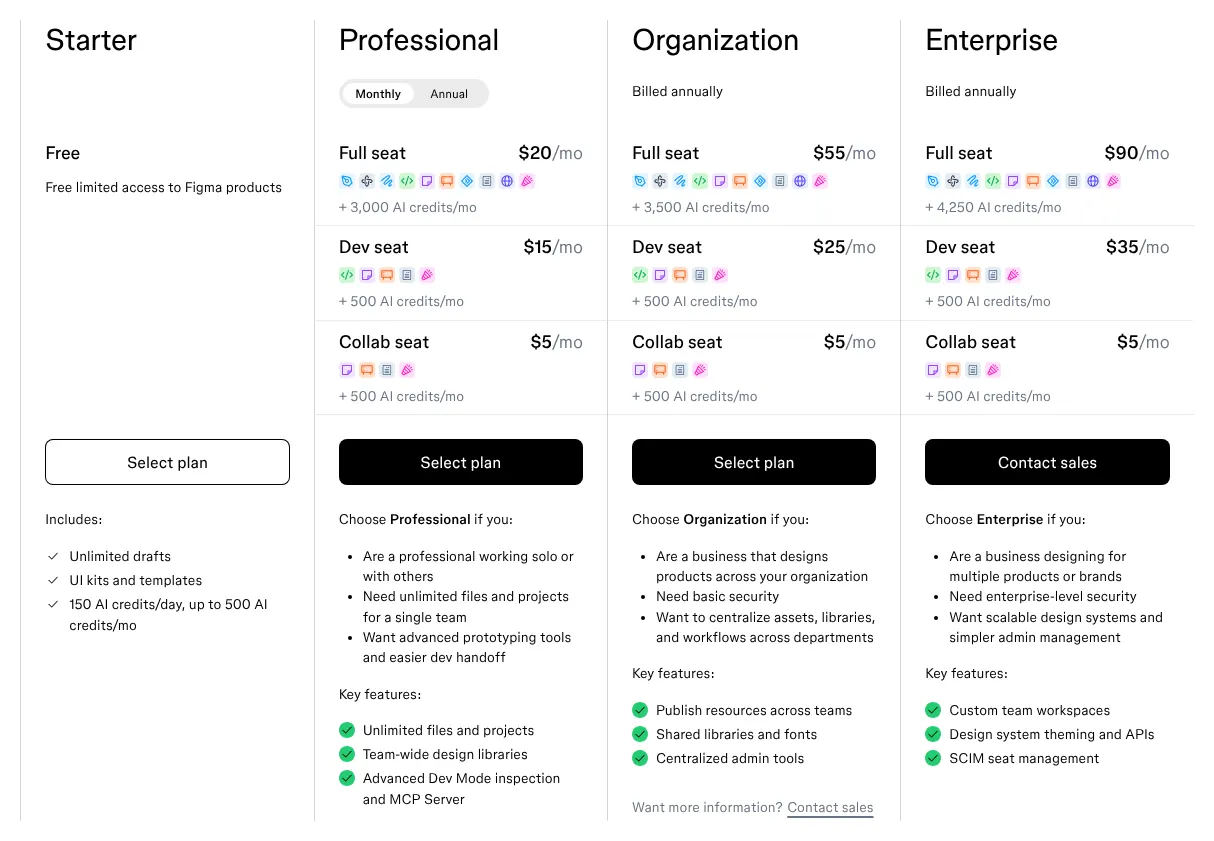
    Only the Full seat can edit design files. A seat is one paid user account. On the Professional plan the Full seat is $20 a month on monthly billing, or $16 a month on annual billing. The Collab seat, at $5, works fully in FigJam boards and Figma Slides but can only view and comment in design files. People who only view and comment need no paid seat at all.

    The free Starter plan holds 3 design files and keeps 30 days of version history. That is enough to try Figma, not to run a project. Figma does not open Photoshop files. Its PDF export has no documented print settings, so a print shop may ask for a different file.

    Figma plans with Monthly selected. Professional: Full seat 20 dollars a month, Dev seat 15, Collab seat 5. Organization and Enterprise billed annually, Starter free.
    With Monthly selected, the Professional Full seat reads $20/mo; Organization and Enterprise are billed annually only. Source: figma.com, captured on 12 Nov 2026.
  4. 4. Kittl

    Kittl suits a seller who designs print products in the browser, but anyone who works offline, on a phone or from Photoshop files should look elsewhere.

    Score
    89/100
    Best for
    Print-on-demand sellers and small brands that make logos, shirts and posters in the browser
    From
    $19/mo
    Free plan
    Yes · 5 projects, personal use only

    Kittl is a browser design tool built around print products: its templates start from shirts, posters, social posts and packaging. It pairs a pen tool for vector paths with AI image and video tools. It exports PDF and JPEG in CMYK, the colour mode print shops ask for. Kittl scores 89, with only 3 of the capabilities missing.

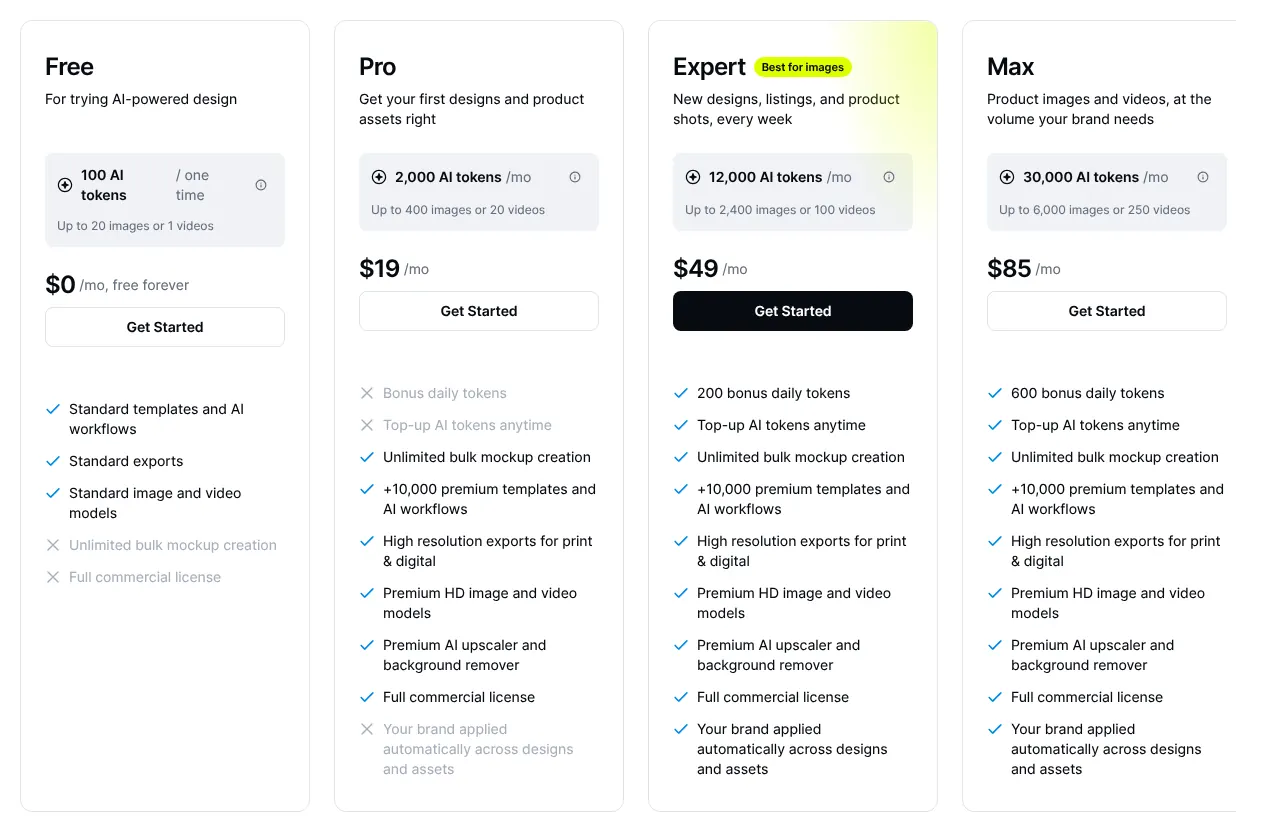
    Pro costs $19 a month, or $14 a month when paid for a year. It includes 2,000 AI tokens a month, the units that each AI image or video spends. Each extra editor pays the same plan price, and viewers are free.

    The free plan is narrow. It holds 5 projects and exports PNG or JPG at 800 pixels and 72 dpi, too small for print. It is for personal use only. Kittl has no app to install and no mobile editor, and it does not open Photoshop files: uploads are SVG, PNG and JPEG.

    Kittl plan cards: Free at 0 dollars, Pro at 19 dollars a month, Expert at 49, Max at 85, with AI tokens and features listed under each.
    Pro reads $19/mo on the monthly view; the crossed-out lines under Pro mark what only Expert and Max include. Source: kittl.com, captured on 12 Nov 2026.
  5. 5. Visme

    Visme suits a team that turns content into slides and reports, not a designer who draws logos or hands SVG files to developers.

    Score
    87/100
    Best for
    Non-designers who make presentations, infographics and reports
    From
    $29/mo per person
    Free plan
    Yes · Basic, 500MB storage

    Visme is made for documents more than illustrations: presentations, infographics and reports built from templates. It has animation, version history and live co-editing, and misses only 2 of the 21 capabilities outright. Its drawing covers shapes, lines and freehand strokes; no pen tool for precise curves is documented. It does not export SVG, and it does not open Photoshop files.

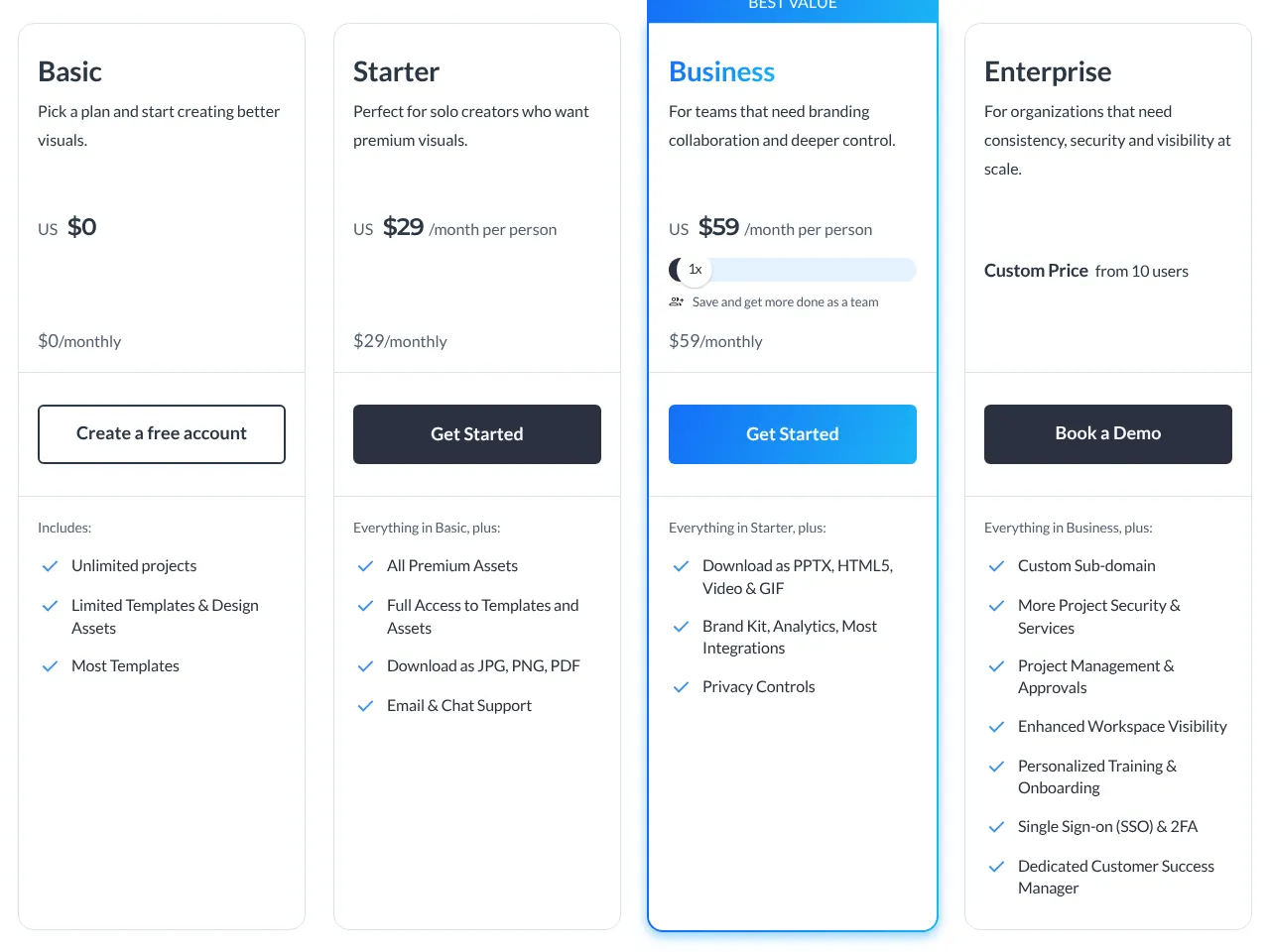
    Starter is priced at $29 a month per person when paid monthly. Billed annually, the same plan costs $12.25 a month, or $147 a year. Starter downloads JPG, PNG and PDF only. Video, GIF and PowerPoint downloads start with Business, at $59 a month per person.

    The free Basic plan has 500MB of storage, 50 pages per project and 10 AI credits a month. Its card lists no download format: downloads start with Starter. Visme runs in a browser and as a desktop app for Mac and Windows. Its phone app is on iOS only.

    Visme plan cards: Basic 0 dollars, Starter 29 dollars a month per person, Business 59 dollars a month per person, Enterprise custom price from 10 users.
    On the monthly view Starter reads US $29 and Business US $59 per person; the yearly view shows lower monthly figures billed for a full year. Source: visme.co, captured on 12 Nov 2026.
  6. 6. CorelDRAW Graphics Suite

    CorelDRAW suits a print-focused designer who wants to own the software, but a team that co-edits or makes social posts and animations will miss those tools.

    Score
    81/100
    Best for
    Sign makers, print shops and illustrators on Windows or Mac who want a licence they own
    From
    $39/mo
    Free plan
    No · 15-day trial

    CorelDRAW Graphics Suite is a desktop suite for Windows and Mac aimed at print work. It pairs vector drawing with Corel PHOTO-PAINT for photos. Its print export sets crop marks, the lines that show where to cut the paper. It opens Photoshop files, although some layer effects do not survive the import. Of the 21 capabilities checked, 15 are fully there.

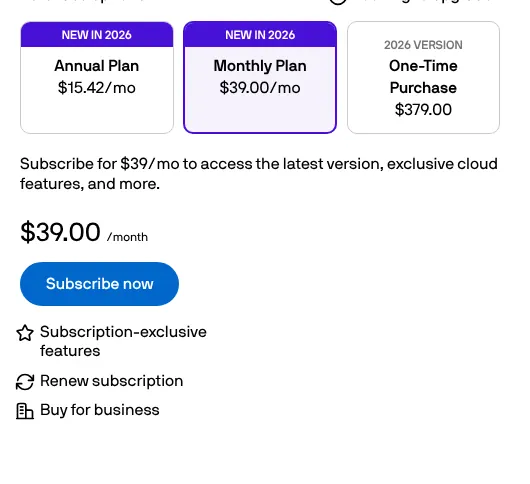
    The Monthly Plan costs $39 a month. The Annual Plan has a list price of $269 a year, the standard price before offers. On 12 November 2026 the page showed 30% off its first year. That offer brings the first year to $185. The one-time licence, paid once and kept, was offered at $379 instead of $549. There is no free plan, only a 15-day trial without a card.

    Subscribers also get CorelDRAW Web, a browser version, and 2,000 AI credits a month. No brand kit, one-click resize, animation or live co-editing was found on Corel's site. No phone app is listed.

    CorelDRAW Graphics Suite purchase options: Annual Plan 15.42 dollars a month, Monthly Plan 39.00 dollars a month selected, One-Time Purchase 379.00 dollars.
    The selected Monthly Plan reads $39/mo in the line under the cards; the Annual Plan and One-Time Purchase figures beside it are reduced prices from a 30% offer. Source: coreldraw.com, captured on 12 Nov 2026.
  7. 7. Picsart

    Picsart suits one person who edits photos and social posts with AI, not a team that needs to co-edit or a designer who needs clean vector files.

    Score
    80/100
    Best for
    Creators who edit photos and make social posts with AI, often from a phone
    From
    $15/mo
    Free plan
    Yes · core photo tools

    Picsart is a photo editor first, with AI tools for removing backgrounds, generating images and making short videos. It runs on the web, on iOS and Android, and as a free Windows app. It opens Photoshop files, which six of the ten tools here do. Its score of 80 mixes 13 capabilities in full with 7 in part.

    Pro costs $15 a month on monthly billing. The page shows a saving of $54 with yearly billing. Ultra costs $75 a month and is the only plan that adds team seats. Picsart does not publish a price per extra seat.

    The partial points matter for design work. Vector tools are described only for the Windows app. The editor exports PNG and PDF, with no print settings listed. Real-time co-editing in the editor is announced as coming soon. No version history was found on Picsart's site.

    Picsart pricing with the Monthly toggle on: Pro at 15 dollars a month billed monthly, Ultra at 75 dollars a month billed monthly with a seat counter set to 1.
    With the toggle on Monthly, Pro reads $15/mo and Ultra $75/mo, both billed monthly; the seat counter appears only on Ultra. Source: picsart.com, captured on 12 Nov 2026.
  8. 8. Adobe Illustrator

    For logos and vector artwork bound for print, Illustrator fits; a team that edits together or retouches photos needs another tool.

    Score
    80/100
    Best for
    Designers who draw logos, icons and illustrations as vector files for print and screen
    From
    $22.99/mo, annual plan
    Free plan
    No · 7-day trial

    Adobe Illustrator is a vector drawing app: shapes are drawn from curves, so a logo stays sharp at any size. It draws with a pen tool, opens Photoshop files with their layers and exports SVG. Its print PDF sets printer's marks and bleed, the margin printed past the cut line. Its AI tool Text to Vector Graphic turns a text prompt into editable vector art. It covers 14 of the 21 capabilities in full and 5 in part.

    Adobe's plan pages refused the browser used by this site, so the prices come from other sites. Illustrator costs $22.99 a month on an annual plan paid monthly, as read on ThePricer and confirmed by Photutorial. A team licence costs $37.99 a month on an annual contract. The plan includes 25 generative credits a month, according to Photutorial. There is no free plan, only a 7-day trial.

    The partial points show where Illustrator stops. It crops photos but has no retouching tools. Its browser version is a beta with fewer tools, and artboards, the pages of a design, are resized by hand. It exports no animation, and only one person at a time can edit a shared file.

  9. 9. Sketch

    A Mac team that works offline gets what it needs from Sketch; anyone on Windows, or who needs AI image tools, should pick another tool.

    Score
    79/100
    Best for
    Mac-based teams that design screens and want an app that also works offline
    From
    $14/mo per editor
    Free plan
    No · 30-day trial

    Sketch is a design app for the Mac that works offline or in real time with a team. It has a pen tool, real-time co-editing and comments. Its templates cover presentations, social posts and business cards. No built-in AI image tools were found on its site. Its score is 79.

    Designing needs a Mac running macOS 15 or newer. On Windows or Linux, people can only view, inspect and comment in the web app. Photoshop files open as one flattened image, without their layers.

    Standard costs $14 per editor a month billed monthly, or $144 a year. An editor is a person who can change designs, and viewers are free. Sketch also sells a Mac-only licence at $120 per seat, paid once, with one year of updates. That licence leaves out collaboration and the web app.

    Sketch pricing: Standard 14 dollars per editor billed monthly, Professional 24 and Enterprise 44 billed yearly, and a Mac-only license at 120 dollars per seat.
    Standard is the only plan billed monthly; Professional and Enterprise stay billed yearly, and the Mac-only license lists collaboration features as not included. Source: sketch.com, captured on 12 Nov 2026.
  10. 10. Pixlr

    Cheapest

    On a tight budget, Pixlr covers occasional photo edits and social images, but not print work or files that a team edits together.

    Score
    74/100
    Best for
    Occasional users who edit photos and simple designs in a browser on a small budget
    From
    $2.49/mo
    Free plan
    Yes · with ads and daily save limit

    Pixlr is a set of photo editors that run in a browser, with desktop apps for Windows and Mac and phone apps. Its paid plans start at the lowest price on this page. It opens layered Photoshop files and removes backgrounds in one click. Its score is 74: it exports no SVG, has no live co-editing, and no comments or brand kit were found on its site.

    Plus is $2.49 per month on the monthly plan. It removes ads, lifts the daily save limit and adds 80 AI credits a month. Premium, at $9.99 a month, adds 1,000 AI credits and the library of fonts, templates and animations. The free version has ads and a daily limit on saves, whose number Pixlr does not publish.

    The limits are on output. Pixlr exports JPEG, PNG and WebP, not SVG. Its help centre says the web editors compress images to 72 dpi, which is too low for most print. Pixlr does not offer real-time co-editing, and no comment feature was found on its site. Pixlr refunds no subscription once paid, so the free version is the place to test it first.

    Pixlr plan cards: Plus at 2.49 dollars per month, described as just the basics, and Premium at 9.99 dollars per month.
    Plus reads $2.49 per month and Premium $9.99 per month on the monthly view; the yearly view shows a reduced monthly figure. Source: pixlr.com, captured on 12 Nov 2026.

Summary table

The table sets the ten tools side by side. Prices are those of the first paid plan, billed monthly where the vendor offers it; Adobe's are annual plans paid monthly. A capability that comes only through another app, a paid extra or a plugin counts for half in the score.

The 10 graphic design tools side by side: score, entry price, billing, free plan and platforms
ToolScoreEntry priceBilling of that priceFree planPlatforms
01Canva96$18/moMonthlyYes · 1 person, 5GBBrowser, Windows, Mac, iOS, Android
02Adobe Photoshop94$22.99/moAnnual plan, paid monthlyNo · trial; free phone appDesktop, browser, mobile
03Figma93$20/mo per Full seatMonthlyYes · 3 design filesBrowser, Mac, Windows
04Kittl89$19/moMonthlyYes · 5 projectsBrowser
05Visme87$29/mo per personMonthlyYes · 500MBBrowser, Mac, Windows, iOS
06CorelDRAW Graphics Suite81$39/moMonthlyNo · 15-day trialWindows, Mac, browser
07Picsart80$15/moMonthlyYes · core photo toolsBrowser, iOS, Android, Windows
08Adobe Illustrator80$22.99/moAnnual plan, paid monthlyNo · 7-day trialWindows, Mac, iPad, browser (beta)
09Sketch79$14/mo per editorMonthlyNo · 30-day trialMac (browser to view)
10Pixlr74$2.49/moMonthlyYes · with adsBrowser, Windows, Mac, iOS, Android

Prices in USD for the first paid plan, read on 12 November 2026. Canva's price was read on Moda and confirmed on SocialRails, Photoshop's on Dupple and Joseph Nilo, Illustrator's on ThePricer and Photutorial, because those vendors' pages could not be read. The other prices were read on vendor pages.

What graphic design software costs for your team

For 5 people, the bill runs from $70 a month on Sketch to $295 a month on Visme. Each line multiplies the monthly price of one user by the head count. Four tools in the table price a team on a different plan than one person. A Canva Pro account serves one person, so teams are priced on Business at $25 per person. Adobe's team licences for Photoshop and Illustrator cost $37.99 a month each, on an annual contract. Visme describes Starter as a plan for solo creators, so teams are priced on Business at $59 per person. Taxes, extra AI credits and add-ons are left out.

Monthly cost of each tool at 1, 5 and 20 users, billed monthly (Adobe: annual plans paid monthly)
ToolPlan used1 user5 users20 users
01CanvaPro, then Business$18/mo$125/mo$500/mo
02Adobe PhotoshopPhotoshop, then Photoshop for teams$22.99/mo$189.95/mo$759.80/mo
03FigmaProfessional, Full seat$20/mo$100/mo$400/mo
04KittlPro$19/mo$95/mo$380/mo
05VismeStarter, then Business$29/mo$295/mo$1,180/mo
06CorelDRAW Graphics SuiteMonthly Plan$39/moOn quoteOn quote
07PicsartPro$15/moNot publishedNot published
08Adobe IllustratorIllustrator, then Illustrator for teams$22.99/mo$189.95/mo$759.80/mo
09SketchStandard$14/mo$70/mo$280/mo
10PixlrPlus$2.49/moNot publishedNot published

Canva and Adobe: prices read on other sites, named in the entries. Figma: viewers and commenters are free on a paid plan. Kittl and Sketch: each extra editor pays the plan price; viewers are free. Visme: Enterprise is priced on quote from 10 users, so 20 users may be offered another price. CorelDRAW: 5 seats and more are priced on quote. Picsart and Pixlr: no price per extra person is published.

How we rank

  1. The ten tools are ranked by a category score out of 100. The score measures how many of 21 capabilities expected of graphic design software each vendor documents on its own site. It does not measure quality, ease of use, speed or support.Editing tools 34% · 5 featuresTemplates and assets 20% · 4 featuresAI tools 9% · 2 featuresFiles and output 17% · 4 featuresCollaboration 11% · 3 featuresPlatforms 9% · 3 features
  2. The 21 capabilities form a grid in six groups: editing tools, templates and assets, AI tools, files and output, collaboration, and platforms. The four that define the category weigh 3: vector drawing, photo editing, layers and ready-made templates. The others weigh 2 or 1. A tool receives 1 for a capability documented as native on any plan. A capability with a limit counts for half, 0.5: a limit the vendor states, a separate app or a third-party plugin the vendor lists. It receives 0 when the capability is absent from the vendor's feature lists or help pages, or could not be verified. The score is the weighted sum divided by the total weight, rounded to the nearest integer. Picsart and Adobe Illustrator share a score of 80; at equal scores the lower entry price ranks first, so Picsart comes seventh.
  3. Eighteen tools were scored. Canva's site and Adobe's plan pages refused the browser used by this site on 12 November 2026. These three tools, Canva, Photoshop and Illustrator, lead the category, so their facts were read elsewhere. Adobe's features come from Adobe's own help pages. Canva's facts and every Canva and Adobe price come from other sites, named in the entries, and each price was confirmed by a second site. Linearity Curve (73), Affinity (70), Penpot (66), Fotor (61), Microsoft Designer (53), GIMP (49) and Inkscape (44) score below the ten. Photopea scores 66 but is not ranked: it publishes no current price on its site. Adobe Express and VistaCreate were not scored: their pricing pages could not be read, and at most three tools per page are read on other sites. The other prices, limits and features were read on vendor pages on 12 November 2026.
  4. No entry on this page is sponsored. A sponsored entry is marked Sponsored and holds the position paid for; its score stays the computed one.

FAQ

Why do the Canva and Adobe prices come from other sites?

Canva's site answered with a bot check on 12 November 2026, and Adobe's plan pages refused the browser used by this site. Both lead the category, so their prices were read on other sites, each one confirmed by a second site. Canva's $18 comes from Moda and SocialRails. Photoshop's $22.99 comes from Dupple and Joseph Nilo, and Illustrator's from ThePricer and Photutorial. Adobe Express is not on the page because its pricing page also refused the browser, and at most three tools per page are read on other sites. Check the price on the vendor's page before you pay.

Which graphic design software is completely free?

None of the ten is free without limits. Canva, Figma, Kittl, Visme, Picsart and Pixlr have free plans that cap files, storage, exports or use. Just below the ten, Affinity has no paid plan for its editor, and Penpot is free for up to 8 team members; they score 70 and 66. GIMP and Inkscape are free and open source too (their code is public and free to reuse), but they score 49 and 44 here. GIMP's templates are only page sizes, and Inkscape's are mostly page formats rather than finished designs. Neither documents AI image tools or real-time co-editing on its site.

Which tools open Photoshop files?

Besides Photoshop itself, Canva, Illustrator, CorelDRAW, Picsart and Pixlr open PSD files. Illustrator offers import options for files with several layers. CorelDRAW warns that some layer effects cannot be imported. Sketch opens PSD files only as one flattened layer. Figma, Kittl and Visme do not open them.

Can I buy graphic design software once instead of paying every month?

Yes, from two vendors on this page. CorelDRAW Graphics Suite sells a one-time licence at $549 list price. On 12 November 2026 it was offered at $379. Sketch sells a Mac-only licence at $120 per seat, with one year of updates and without collaboration. Adobe sells Photoshop and Illustrator only by subscription.

Which tool should I use for print work such as flyers and packaging?

Pick a tool that exports print-ready PDF. CorelDRAW sets crop marks, and Illustrator sets printer's marks and bleed. Photoshop saves PDF/X files, a standard for print. Kittl and Canva Pro export PDF in CMYK, and Visme adds bleed marks to its high-quality PDF. Avoid the Pixlr web editors for print: they compress images to 72 dpi.