top10alternative

Top 10 Video Editing Software for Marketing (2026)

Ten video editors for marketing videos, such as ads, social clips and product demos, compared on features and price. They are ranked by how many of 19 features a marketing team needs each one documents.

The best video editing software for your situation

Each line matches a marketing situation with the tool whose published facts fit it. The score out of 100 counts how many of 19 features a marketing team expects a tool documents. It measures coverage, not video quality or ease of use.

  • You publish short vertical videos for social media every weekCapCut · Templates, captions and a clip cutter in one app; Pro costs $19.99 a month.
  • Your team edits the same videos together in a browserKapwing · Live co-editing and comments on every plan; Pro exports 4K for $24 per member a month.
  • You already make your posts and slides in CanvaCanva · Your brand kit and templates carry over; Pro costs $18 a month for one person.
  • You edit interviews, webinars or podcastsDescript · You cut the video by deleting words from its transcript.
  • You want to pay nothing for nowMicrosoft Clipchamp · The free plan exports 1080p with no watermark and no export limit.
  • You record product demos or tutorialsCamtasia · It records the screen up to 4K, and the webcam too; Essentials costs $179.88 a year.
  • You edit on a phone as often as on a laptopVEED · Browser, iPhone and Android apps on one account; Creator costs $25 a month.
  • You are a team of threeWeVideo · Teams costs $75 a month for three seats, with real-time co-editing.
  • You want AI to draft the video for youinvideo AI · Timeline edits are free; credits pay for generation, from $20 a month.

How to choose video editing software for marketing

The score shortlists, but the right editor depends on what a team publishes and who edits it. Six checks narrow the list to one or two tools. Each rests on facts read on 14 November 2026, on vendor pages or, for Canva, on two other sites.

1. Start from where the video will be published

Pick the tool that matches your main channel, because the ten split on format. For short vertical videos, CapCut, VEED and Kapwing resize to social formats and cut long videos into short clips. For recorded demos, Camtasia records the screen and webcam up to 4K. If a weekly one-hour webinar becomes five short clips, you need the clip cutter, which WeVideo, Clipchamp and Camtasia do not document.

2. Check the export quality of the plan you buy

Read the export line of the exact plan, because the first paid plan is often capped. Resolution is the sharpness of the video: 720p is standard definition, 1080p is full HD and 4K is ultra HD. VEED Creator at $25 and Descript Hobbyist at $24 stop at 1080p. Kapwing Pro exports 4K for $24. If your ads run on large screens, budget $45 on VEED or $35 on Descript for 4K.

3. Check the rights to music and templates

Before you run an ad, confirm that its music and assets are cleared for commercial use. Canva licenses its Popular music for personal, non-commercial use only. CapCut keeps assets cleared for commercial use for Pro. Filmora asks for its Team & Business plan, at $155.88 per user a year, for marketing use. WeVideo states that its music can be used in commercial videos.

4. Count the people who will edit

Most tools charge per seat, meaning per paid user, and several cap the team size. VEED allows 3 editors up to Pro, Descript 5 on Business and WeVideo 3 on Teams. Kapwing bills each member with no stated limit. Take a team of 5 billed monthly. It pays $120 on Kapwing Pro, $125 on Canva Business and $325 on Descript Business.

5. Check the devices you will edit on

Decide whether you need a browser, a desktop app or a phone, because coverage is uneven. Kapwing, Descript and Clipchamp have no phone app. Filmora has no browser editor, and Camtasia keeps only simple 1080p edits in the browser. If you post from a phone, CapCut, VEED, Canva, WeVideo and invideo AI offer both a browser editor and phone apps.

6. Read the AI credit limits

Check what the AI tools cost after the first week, because many run on credits. Credits are a monthly allowance that each AI action uses up. Descript Hobbyist gives 400 AI credits a month, and invideo AI credits do not roll over to the next month. Filmora Basic includes no AI credits; they start with Advanced at $59.99 a year. Clipchamp makes all its AI tools free, so you can test captions and noise removal there at no cost.

The 10 Video editing software for marketing

by overall score
  1. 1. CapCut

    CapCut covers the whole list of features for $19.99 a month, and its brand kit needs the Teams plan.

    Score
    100/100
    Best for
    Social media teams that want templates, captions and clip cutting in one app
    From
    $19.99/mo
    Free plan
    Yes · basic editing tools and free templates

    CapCut and VEED are the only two of the 15 tools checked that document all 19 features. CapCut runs in a web browser, on Windows and Mac, and on iPhone and Android. Templates, automatic captions and a tool that cuts a long video into short clips sit in the same editor. The brand kit (saved logos, fonts and colours) appears only on the Teams plan card.

    On monthly billing, Pro is $19.99; paid yearly, it is $179.99. Premium templates and assets cleared for commercial use come with Pro, which matters for ads and client work. A 7-day Pro trial needs no credit card. CapCut states that the prices shown are for reference only, and that the final price appears after sign-in.

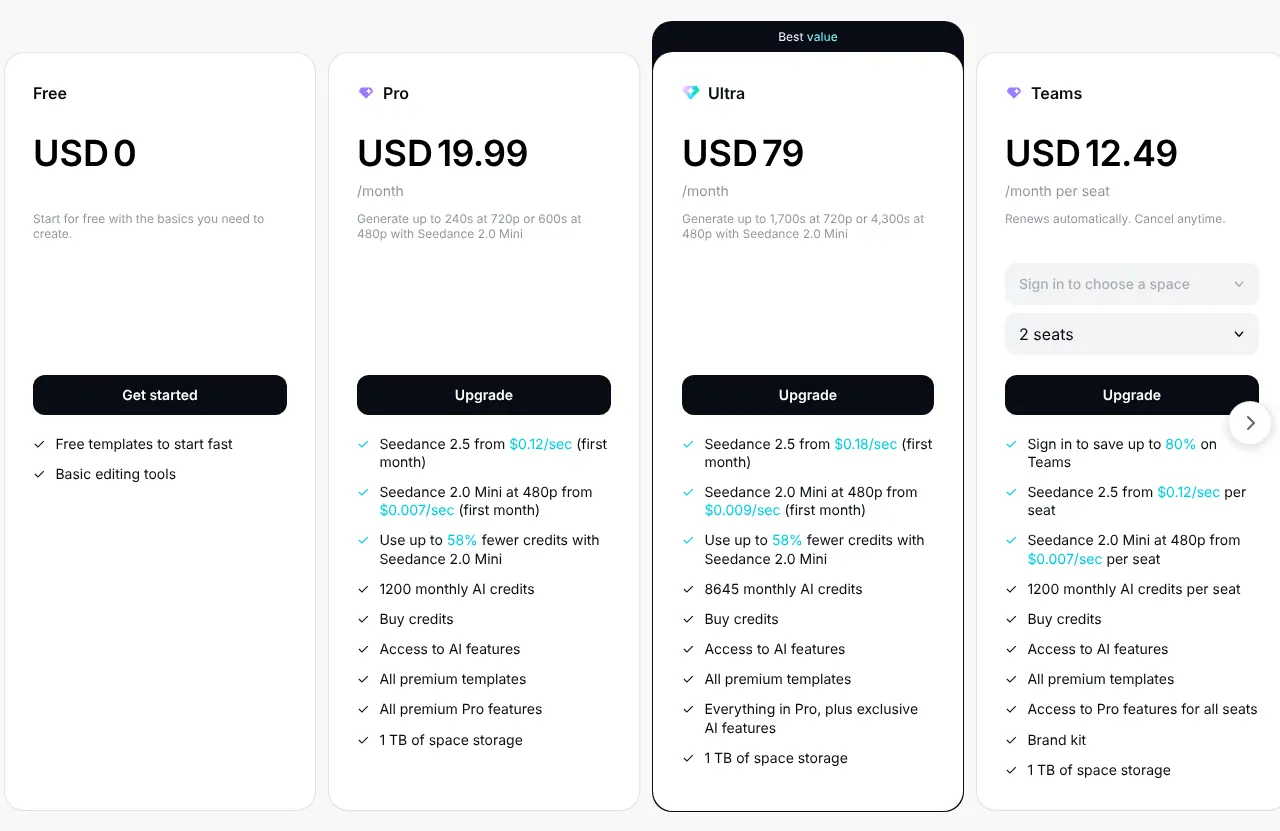
    CapCut plans on monthly billing: Free at 0, Pro at 19.99 US dollars a month, Ultra at 79 and Teams at 12.49 per seat, with the features of each plan.
    Pro, the second card, is the first paid plan at USD 19.99 a month; the brand kit is listed on the Teams card only. Source: capcut.com, captured on 14 Nov 2026.
  2. 2. VEED

    VEED suits a small team that edits on phones as often as on laptops, as long as 1080p exports are enough on Creator.

    Score
    100/100
    Best for
    Marketers who switch between a laptop browser and a phone
    From
    $25/mo
    Free plan
    Yes · 720p, VEED.IO watermark, 10 minutes per video

    VEED also documents all 19 features, in the browser and in iPhone and Android apps on the same account. Automatic subtitles are unlimited on paid plans. Some tools are only a sample on the free plan: background noise removal, for example, can be used once per account.

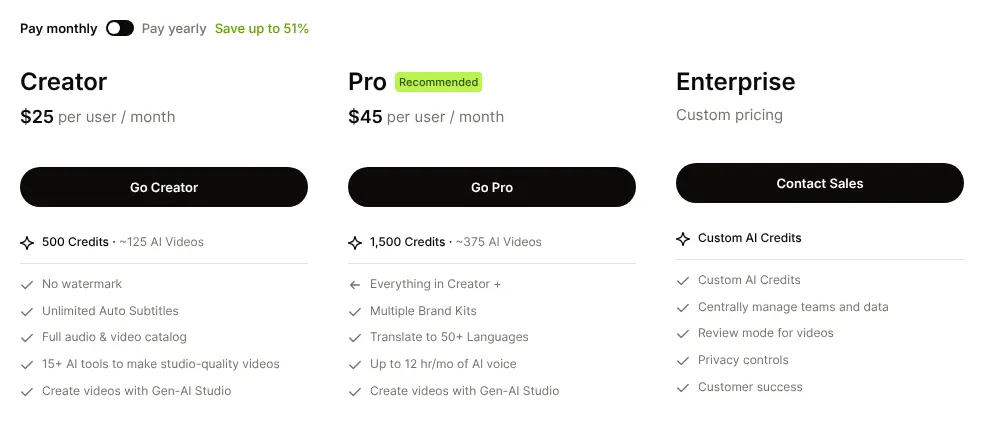
    The first paid plan, Creator, is $25 per user on monthly billing and drops to $12.25 a month when paid yearly. It exports up to 1080p (full HD), while 4K (ultra HD) starts with Pro at $45 a month. The full brand kit also starts with Pro, and Creator keeps fonts and colours only. A workspace holds at most 3 editors up to Pro, and 5 on Studio. Free exports stop at 720p and carry a VEED.IO watermark, the vendor's name stamped on the video.

    VEED plans with Pay monthly selected: Creator at 25 dollars and Pro at 45 dollars per user a month, Enterprise on custom pricing, with credits and features.
    With Pay monthly selected, Creator is the first paid plan, priced per user, with no watermark. Source: veed.io, captured on 14 Nov 2026.
  3. 3. Kapwing

    Kapwing suits a team that edits together in the browser and wants 4K from its $24 plan, with nothing to install on a phone.

    Score
    97/100
    Best for
    Teams that edit together in the browser and need 4K on the first paid plan
    From
    $24/mo
    Free plan
    Yes · 720p, watermark, videos up to 4 minutes

    Kapwing documents 18 of the 19 features; the missing one is a phone app. It works only in the web browser, and phone users open kapwing.com in the phone's browser. Real-time co-editing is included on every plan, the free one too.

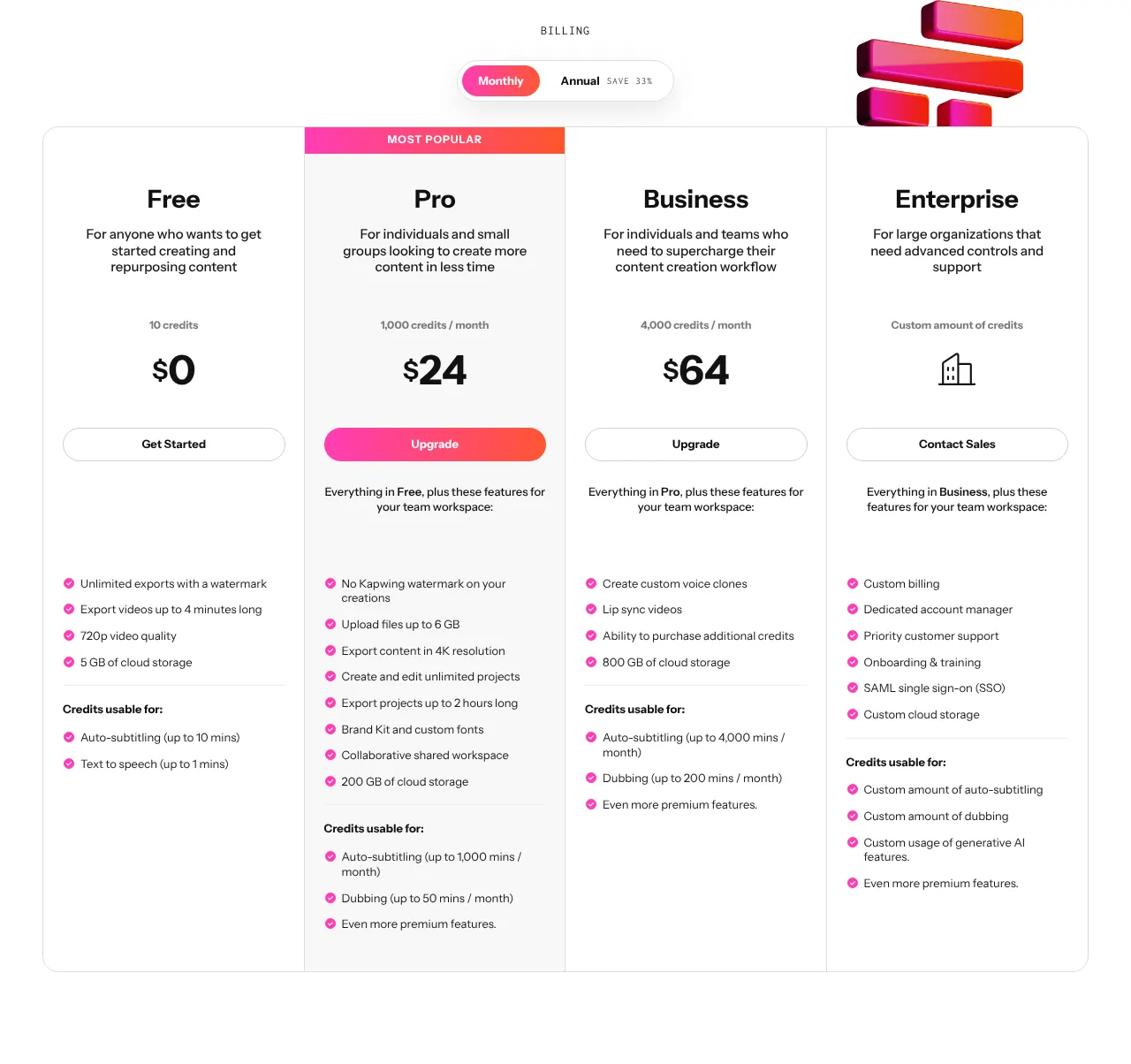
    Each member on Pro pays $24 a month, or $16 with yearly billing. It already exports in 4K, with no watermark and videos up to 2 hours long, and it adds the brand kit. Every member of a workspace is billed, and Kapwing states no member limit. There is no free trial of paid plans. The free plan adds a watermark, exports at 720p and caps each video at 4 minutes.

    Kapwing plans with Monthly selected: Free at 0, Pro at 24 dollars and Business at 64 dollars a month, Enterprise on contact, with the features of each plan.
    With Monthly selected, Pro is the first paid plan and lists 4K export, no watermark and the brand kit. Source: kapwing.com, captured on 14 Nov 2026.
  4. 4. Canva

    Canva has the second-lowest monthly price of the ten, after Clipchamp, but it is not a tool for detailed colour or green-screen work.

    Score
    94/100
    Best for
    Teams that already make their social posts and slides in Canva
    From
    $18/mo
    Free plan
    Yes · 1080p, videos up to 30 minutes

    Canva is a design app that also edits video, in the browser and in Windows, Mac, iPhone and Android apps. It documents a brand kit, templates, a stock library and a resize tool for social formats. Two editing features are partial: it removes backgrounds with AI rather than by chroma key (removing a solid green or blue backdrop), and it offers filters and simple adjustments rather than colour grading. Editing by deleting words from a transcript was not found.

    Pro costs $18 a month for one person. canva.com refused automated reading, so this price was read on Jonathan Montoya's site, confirmed on BudgetPixel, and matches the $18.00 in-app price on Canva's App Store listing. Business costs $25 per person a month, with no seat minimum. Free downloads reach 1080p and 30 minutes, but Pro content adds a watermark until it is paid for. Canva's Popular music is licensed for personal, non-commercial use only.

  5. 5. WeVideo

    WeVideo prices a team of three at $75 a month for all three seats, while its single-user plan is the highest monthly price of the ten.

    Score
    94/100
    Best for
    Small teams of up to three people who publish often
    From
    $28/mo
    Free plan
    No · 7-day trial with watermark; the phone app is free

    WeVideo is a browser editor with iPhone and Android apps. Its first paid plan, Creator, exports in 4K, publishes without a time limit and opens a stock library. Music from that library is licensed to subscribers, and WeVideo states that videos made with it can be used commercially. Two features were not found: editing by transcript and cutting a long video into short clips.

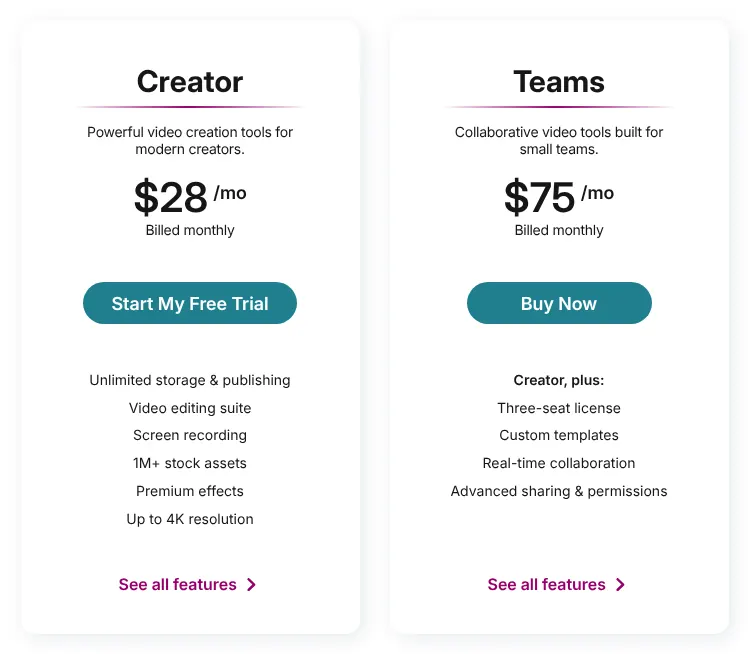
    Creator is $28 for each month, or $240 for a full year. There is no free plan on the web, only a 7-day trial whose exports carry the WeVideo watermark. Teams costs $75 a month for a licence with three seats, and adds real-time co-editing with comments on the timeline. Above three people, the Enterprise plan is priced on request. Payments to WeVideo are non-refundable.

    WeVideo plans for individuals and small businesses on monthly billing: Creator at 28 dollars a month and Teams at 75 dollars a month for a three-seat licence.
    Billed monthly, Creator is the single-user plan, and Teams covers three seats with real-time collaboration. Source: wevideo.com, captured on 14 Nov 2026.
  6. 6. Descript

    Descript is the pick when the video is mostly people talking, and a poor fit for a team that edits on phones.

    Score
    92/100
    Best for
    Interviews, podcasts and talking-head videos
    From
    $24/mo
    Free plan
    Yes · 720p export, 60 media minutes a month

    Descript edits video like a text document: deleting a word in the transcript, the written text of what is said, cuts it from the video. It runs in the browser and as a Mac and Windows app, but not on phones or tablets. Its templates are layout packs for scenes, such as intros and chapters, rather than ready-made ads.

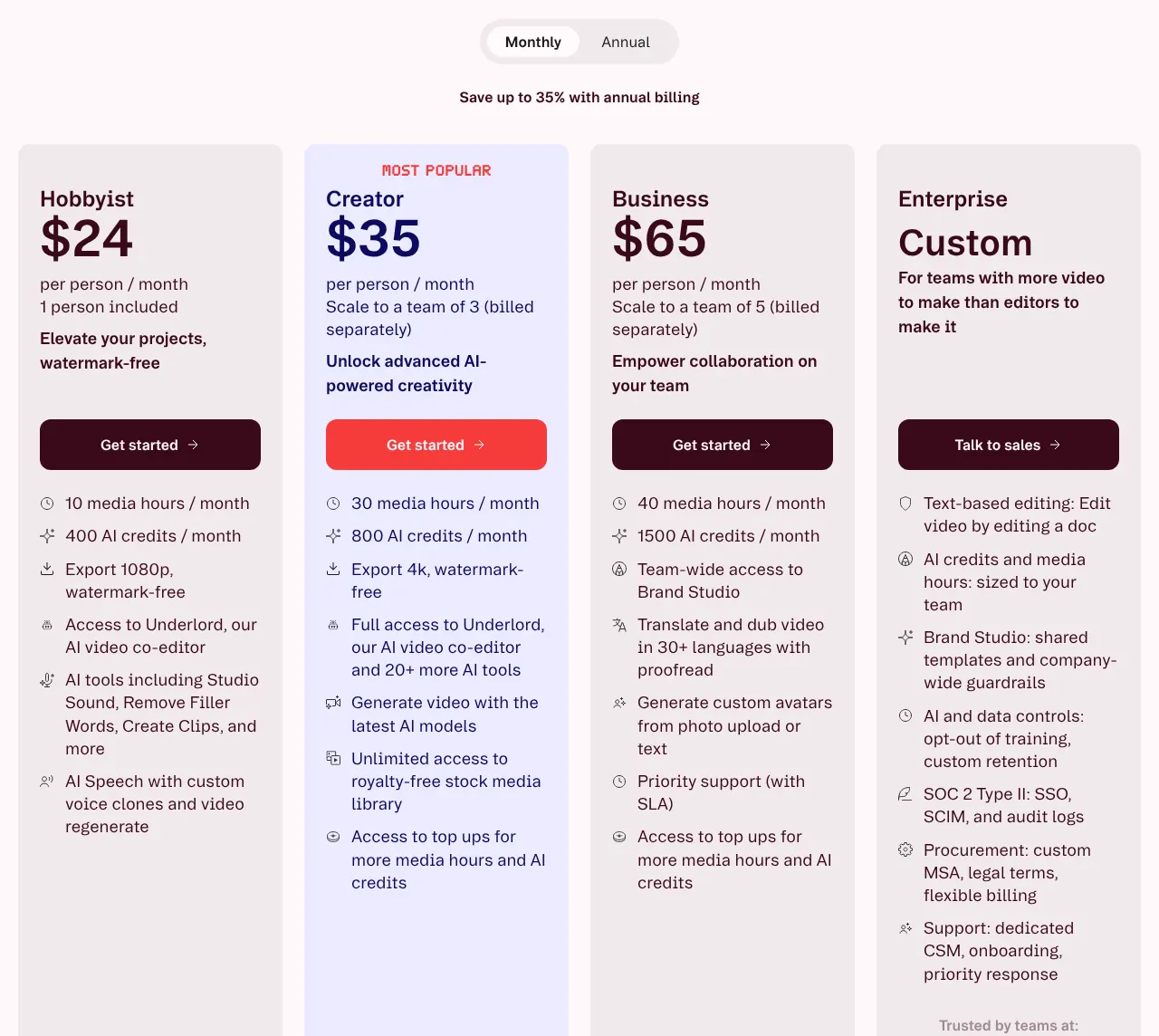
    Hobbyist, the first paid plan, charges $24 per person monthly, or $16 if paid yearly. It exports up to 1080p with no watermark. 4K starts with Creator at $35. The brand kit, called Brand Studio, needs Business at $65 per person. Creator holds up to 3 people and Business up to 5, so larger teams go to Enterprise, priced on request. AI tools spend AI credits, a monthly allowance that the plan renews: Hobbyist gets 400 a month.

    Descript plans with Monthly selected: Hobbyist at 24 dollars, Creator at 35 and Business at 65 dollars per person a month, with media hours, AI credits and export quality.
    With Monthly selected, Hobbyist is the first paid plan and exports 1080p; 4K starts on Creator. Source: descript.com, captured on 14 Nov 2026.
  7. 7. Microsoft Clipchamp

    Best free plan

    Clipchamp has the free plan with the fewest limits of the ten, and its paid plan comes only inside a Microsoft 365 subscription.

    Score
    91/100
    Best for
    Small businesses that want to start for free, or already pay for Microsoft 365
    From
    $9.99/mo
    Free plan
    Yes · 1080p, no watermark, unlimited exports

    Clipchamp is Microsoft's video editor, in the browser and as a Windows app. Its free plan exports up to 1080p with no watermark and no limit on the number of exports, and all its AI tools are free to every user. No other free plan among the ten documents all three: 1080p, no watermark and unlimited exports. It has no phone app: the iPhone app stopped being supported on 9 June 2026, and phone browsers are not supported.

    Premium is no longer sold alone. It comes with Microsoft 365 Personal at $9.99 a month, and adds 4K export, premium stock and the brand kit. When the page was read, Microsoft showed a first-month offer at $6.99, the large figure in the image; the regular price stays $9.99. For companies, Clipchamp Editor Standard costs $3 per user a month, paid yearly. The work version has no templates, and two people cannot edit the same video at the same time.

    Microsoft Clipchamp Free next to Microsoft 365 Personal on monthly billing, at 9.99 dollars struck through and 6.99 dollars for the first month.
    The struck-through $9.99 is the regular monthly price of Microsoft 365 Personal, which includes Clipchamp Premium; the larger figure is a first-month offer. Source: microsoft.com, captured on 14 Nov 2026.
  8. 8. Wondershare Filmora

    Filmora costs $49.99 a year for one person on Windows, but its AI tools and commercial use need dearer plans.

    Score
    91/100
    Best for
    Solo creators who edit on a computer and prefer one yearly payment
    From
    $49.99/yr
    Free plan
    Yes · every export watermarked

    Filmora is a Windows and Mac app with iPhone and Android apps, and no browser editor. It sells to individuals on yearly billing or as a one-time licence, with no monthly plan. Basic costs $49.99 a year on Windows and $69.99 on Mac, and it already exports in 4K without a watermark. No brand kit was found in its feature list.

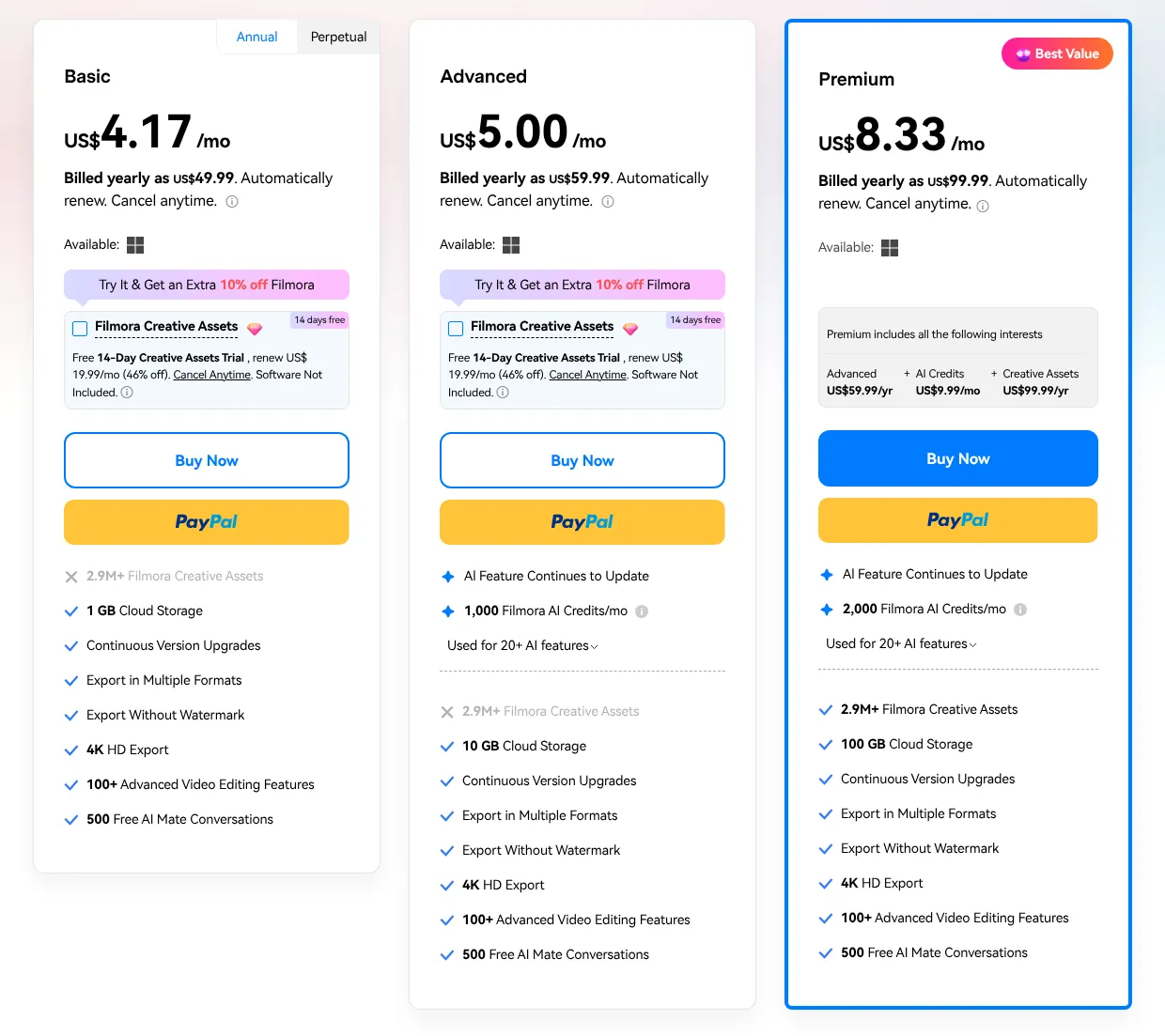
    Automatic captions, transcript editing and short clips spend AI credits. Credits start with Advanced, at $59.99 a year with 1,000 credits a month. For marketing and advertising, Wondershare asks for the Team & Business plan, at $155.88 per user a year for up to 5 users. On an individual plan, a commercial video must state in its description that it was made with Filmora. The free version adds a watermark to every export.

    Filmora individual plans on the Annual tab: Basic at 4.17 dollars a month billed yearly as 49.99, Advanced billed as 59.99 and Premium as 99.99.
    Only Annual and Perpetual tabs exist; Basic is billed yearly as US$49.99 and lists 4K export without watermark. Source: filmora.wondershare.com, captured on 14 Nov 2026.
  9. 9. Camtasia

    Camtasia is the tool for recorded demos and tutorials, and it asks for a full year's payment upfront.

    Score
    91/100
    Best for
    Product demos, tutorials and training videos recorded on screen
    From
    $179.88/yr
    Free plan
    Yes · full editor, every export watermarked

    Camtasia, by TechSmith, is built around screen recording: it records the screen up to 4K and the webcam too, then edits the result in a Windows or Mac app. Its browser version, Camtasia Online, is limited to simple edits at 1080p, and there is no phone app. Transcript editing goes through Camtasia Audiate, a separate app included in the plans.

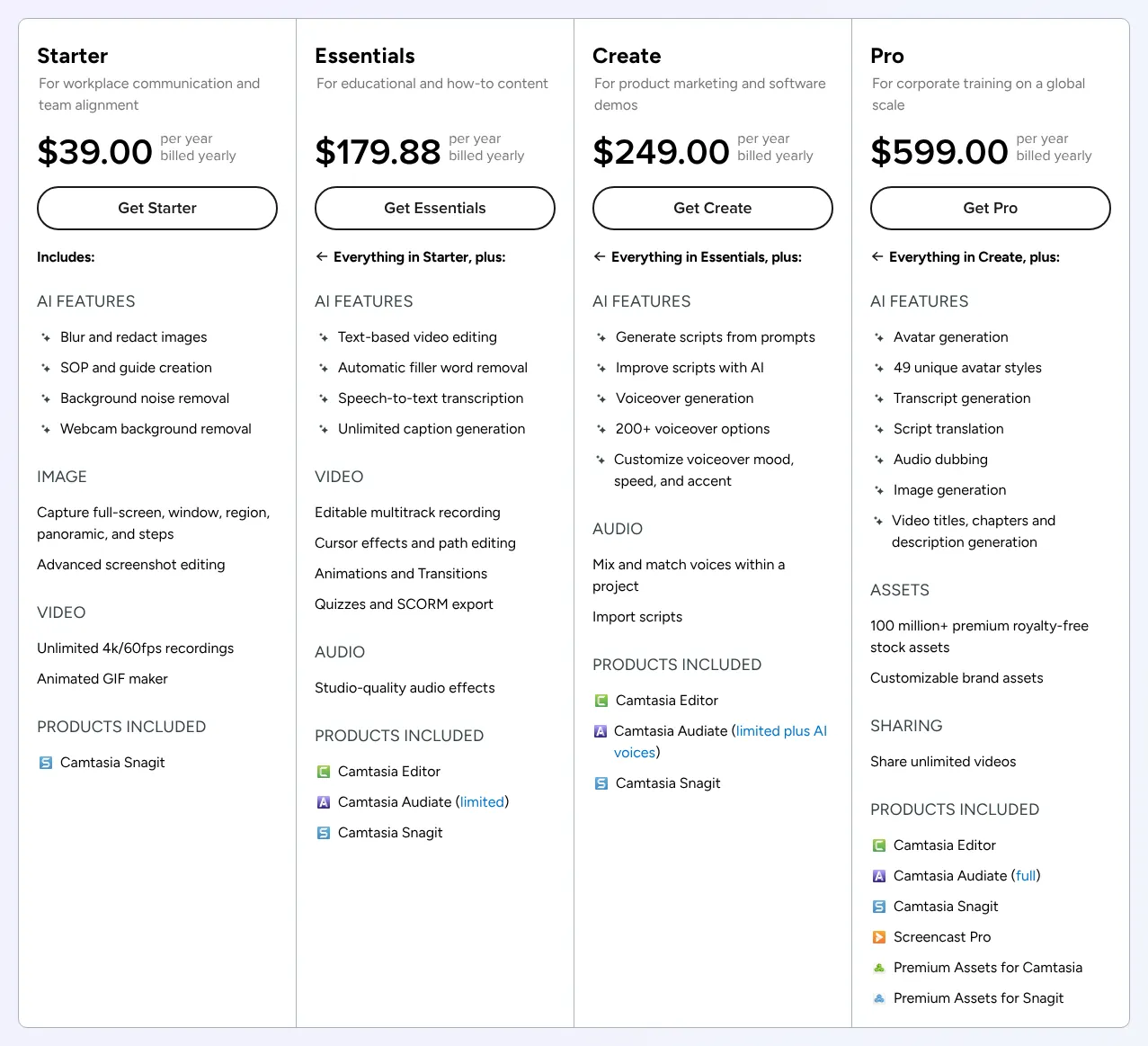
    Billing is yearly only. The first plan with the Camtasia editor is Essentials, at $179.88 a year; the $39 Starter plan contains only Camtasia Snagit. Every plan has a starter library of royalty-free videos and music, and the library of more than 100 million assets needs Pro, at $599 a year. Teams pay $198 per user a year, for up to 99 users, with licences that can move from one person to another. The free editor is complete, but every export carries a watermark.

    Camtasia individual plans billed yearly: Starter at 39 dollars, Essentials at 179.88, Create at 249 and Pro at 599 dollars a year, with the products each includes.
    Essentials, at $179.88 a year, is the first plan whose product list includes Camtasia Editor; Starter has Snagit only. Source: techsmith.com, captured on 14 Nov 2026.
  10. 10. invideo AI

    invideo AI fits a marketer who starts from a written prompt rather than from footage, and it keeps templates and brand kits in a separate product.

    Score
    89/100
    Best for
    Marketers who want AI to draft a video before they fine-tune it
    From
    $20/mo
    Free plan
    Yes · no watermark, weekly AI limit

    invideo AI pairs AI video generation with an editor that has a full multi-track timeline, where video, audio and text sit on separate layers. Templates and the brand kit are documented only in invideo Studio, a separate product of the same company. Its screen recorder is a separate tool, and exports are 1080p, with 4K only through a paid AI upscale. A companion app works on iPhone and Android.

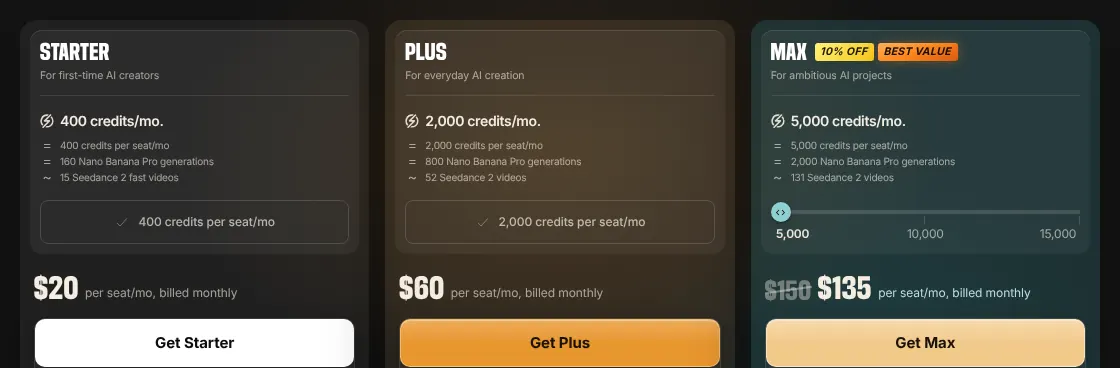
    A seat, meaning one paid user, costs $20 a month on Starter, or $10 a month with yearly billing. Edits on the timeline are free on every plan. Credits pay for generation, transcripts and paid stock, and unused credits do not roll over to the next month. The free plan exports without a watermark but stops at a weekly AI limit. Starter takes 1 to 5 seats. The Team plan costs $79 per seat a month and takes 5 to 30 seats.

    invideo AI plans on monthly billing: Starter at 20 dollars, Plus at 60 and Max at 150 dollars struck through to 135, per seat a month, with credits per seat.
    Billed monthly, Starter is the first paid plan at $20 per seat, with 400 credits a month. Source: invideo.io, captured on 14 Nov 2026.

Summary table

The table sets the ten editors side by side. Prices are the first paid plan, billed monthly, except Filmora and Camtasia, which bill yearly only. The score out of 100 counts the 19 features; a feature with a stated limit, sold separately or found only in another app of the vendor counts for half.

The 10 video editors side by side: score, price, free plan, browser and phone app
ToolScorePrice fromFree planWorks in a browserPhone app
01CapCut100$19.99/moBasic toolsYesiPhone, Android
02VEED100$25/mo720p, watermarkYesiPhone, Android
03Kapwing97$24/mo720p, watermarkYesNo (phone browser)
04Canva94$18/mo1080p, up to 30 minYesiPhone, Android
05WeVideo94$28/moTrial only (phone app free)YesiPhone, Android
06Descript92$24/mo720pYesNo
07Microsoft Clipchamp91$9.99/mo1080p, no watermarkYes (computer only)No
08Wondershare Filmora91$49.99/yrWatermarkNoiPhone, Android
09Camtasia91$179.88/yrWatermarkSimple edits, 1080pNo
10invideo AI89$20/moWeekly AI limitYesCompanion app

Prices in USD, read on 14 November 2026. Canva blocks automated reading, so its price was read on Jonathan Montoya's site and confirmed on BudgetPixel; every other price was read on the vendor's own pages.

What video editing software costs for your team

For a team of 5 billed monthly, the bill runs from $60 on CapCut to $395 on VEED. Each line uses the cheapest plan that fits the head count. Clipchamp's work plan is cheaper still, at $15 a month for 5 people, but it is paid a year at a time. Five tools publish no price for 20 people, and WeVideo publishes none above three. Taxes and extra AI credits are left out.

Cost of each editor for 1, 5 and 20 users
ToolPlan used1 user5 users20 users
01CapCutPro, then Teams$19.99/mo$60/moNo 20-seat option
02VEEDCreator, then Studio$25/mo$395/moOn request
03KapwingPro$24/mo$120/mo$480/mo
04CanvaPro, then Business$18/mo$125/mo$500/mo
05WeVideoCreator, then Enterprise$28/moOn requestOn request
06DescriptHobbyist, then Business$24/mo$325/moOn request
07Microsoft ClipchampMicrosoft 365 Personal, then Editor Standard$9.99/mo$15/mo, paid yearly$60/mo, paid yearly
08Wondershare FilmoraBasic, then Team & Business$49.99/yr$779.40/yrOn request
09CamtasiaEssentials, then Business$179.88/yr$990/yr$3,960/yr before discount
10invideo AIStarter, then Team$20/mo$100/mo$1,580/mo

Prices in USD, read on 14 November 2026; monthly billing unless the cell says yearly. CapCut sells Teams in fixed sizes (2, 5, 7, 10 or 30 seats) and states its prices are for reference only. Camtasia gives an unpublished discount from 10 users, and Filmora quotes above 5 users. Canva's prices were read on Jonathan Montoya's site.

How we rank

  1. The ten editors are ranked by a score out of 100. It measures how many of 19 features expected of video editing software for marketing each vendor documents. It does not measure video quality, speed or support.Editing 21% · 4 featuresAudio and captions 30% · 5 featuresMarketing content 30% · 6 featuresExport and teams 18% · 4 features
  2. The 19 features form a grid in four groups: editing, audio and captions, marketing content, and export and teams. The three that define the category weigh 3: a multi-track timeline, automatic captions and ready-made video templates. The others weigh 2 or 1. A tool scores 1 for a feature documented on its free plan or any paid plan. A feature with a stated limit, sold separately, or found only in another app of the vendor counts for half. It scores 0 when the feature is absent or could not be verified. The score is the weighted sum over the total weight, rounded.
  3. At equal scores, the lower first paid price ranks first, then the alphabet. Filmora and Camtasia sell yearly plans only, so their yearly price is used. CapCut ($19.99) comes before VEED ($25) at 100, Canva before WeVideo at 94, and Clipchamp before Filmora and Camtasia at 91. At 89, invideo AI ($20) comes before CyberLink PowerDirector 365 ($24.99) and Adobe Premiere.
  4. Fifteen tools were scored. Below the ten: CyberLink PowerDirector 365 (89), Adobe Premiere (89), Movavi Video Editor (80), Final Cut Pro (73) and DaVinci Resolve (71). Canva and Adobe block automated reading of their sites but lead the category, so their prices were read on two other sites each. Animoto refused automated reading and is not a category leader, so it was not scored.
  5. No entry on this page is sponsored. A sponsored entry is marked Sponsored and holds the position paid for; its score stays the computed one.

FAQ

Why are Adobe Premiere, DaVinci Resolve and Final Cut Pro not in the top 10?

They miss several features that marketing teams use. Adobe Premiere scores 89, the same as invideo AI, and ranks lower on price. It has no browser editor, and Adobe's AI assistant for turning long videos into short ones was a private beta on Premiere mobile in November 2026. Premiere costs $34.49 a month without commitment, a price read on Design Offset, or $22.99 a month on a yearly plan, read on Joseph Nilo's site. Final Cut Pro scores 73 and DaVinci Resolve 71: neither works in a browser, and neither documents a brand kit. If you mainly cut long videos on a computer, these three remain worth a look.

Which video editor is free with no watermark?

Clipchamp is the clearest case: its free plan exports up to 1080p with no watermark and no limit on exports. invideo AI also exports without a watermark on its free plan, but its AI tools stop at a weekly limit. Canva adds no watermark as long as you avoid Pro content. Kapwing, VEED, Filmora and Camtasia watermark every free export.

Can I buy a video editor once instead of paying a subscription?

Yes, from several vendors checked here. Filmora sells a perpetual licence for $79.99, but it does not include future major versions. DaVinci Resolve Studio is a one-time licence at $295, and Final Cut Pro for Mac costs $299.99 once on the Mac App Store. CyberLink sells PowerDirector 2027 once for $139.99. Some Final Cut Pro content now needs the Apple Creator Studio subscription, at $12.99 a month.

Can a whole marketing team share one subscription?

Usually not: most of these tools bill each person. Canva Pro and Filmora Basic are for one person only. Kapwing bills every member of a workspace, and VEED counts pending invitations as seats. WeVideo Teams is the exception, with three seats in one $75 monthly licence. Camtasia's business licences can move from one person to another, while its individual plans cannot.

Who runs CapCut for users in the United States?

CapCut's terms name TikTok USDS Joint Venture LLC as the service operator for users in the United States. Bytedance Pte. Ltd. is named as the global service provider. CapCut also states that plans and features can vary by region and platform, so check the pricing page from your own country.