top10alternative

Top 10 Knowledge Base Software (2026)

Ten knowledge base tools ranked by how many of 20 expected features they cover, from search and permissions to AI answers and export, with the price of each first paid plan.

The best knowledge base software for your situation

<p>Each line names a common situation and the tool that fits it, based on what each vendor publishes. The score on this page counts how many of 20 knowledge base features a tool covers. It measures coverage, not quality or ease of use.</p>

  • Five writers share one documentation site and want review dates on articlesArchbee · Growing costs $100 a month with 5 members.
  • You want every feature on this page and can wait for a quoteDocument360 · No public price. A 14-day free trial comes first.
  • Up to 30 colleagues write or read internal articles, and you want one flat billHelpjuice · $249 a month covers 30 users, readers included.
  • One or two writers publish for hundreds of readersKnowledgeOwl · Basic costs $100 a month with 1 author. Readers are free.
  • Your team of 10 or fewer wants an internal wiki for freeConfluence · Free covers 10 users. Standard costs $7.15 per user a month at 20 users.
  • Your support agents need tickets and a public help centre at a low priceZoho Desk · Standard costs US$20 per agent a month.
  • Your support team already answers customers in ZendeskZendesk · Suite Team costs $69 per agent a month on monthly billing.
  • You publish product or developer documentation as a websiteGitBook · Essential costs $79 per site plus $15 per user a month.
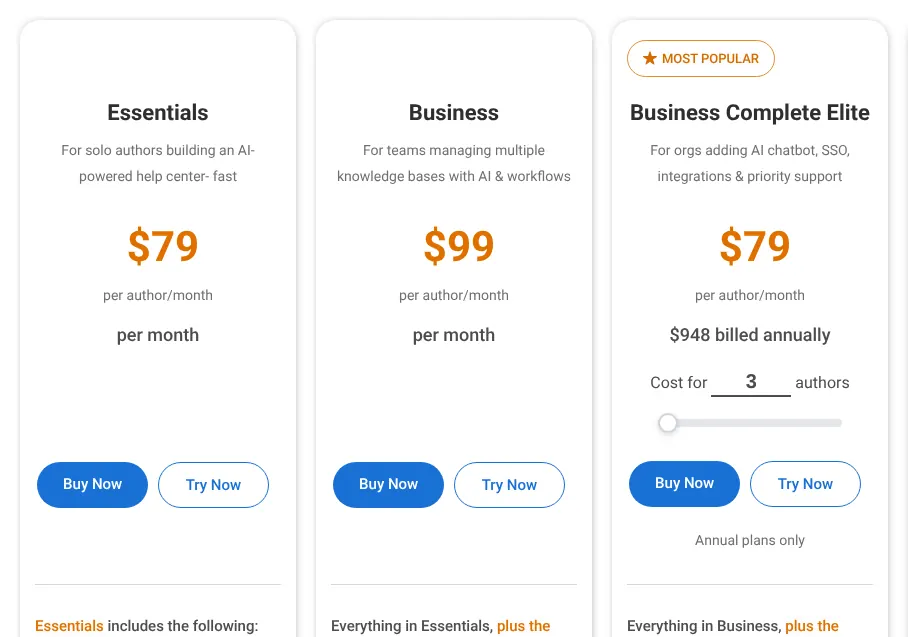
  • You write a customer help centre on your ownProProfs Knowledge Base · Essentials costs $79 per author a month, or $49 billed yearly.
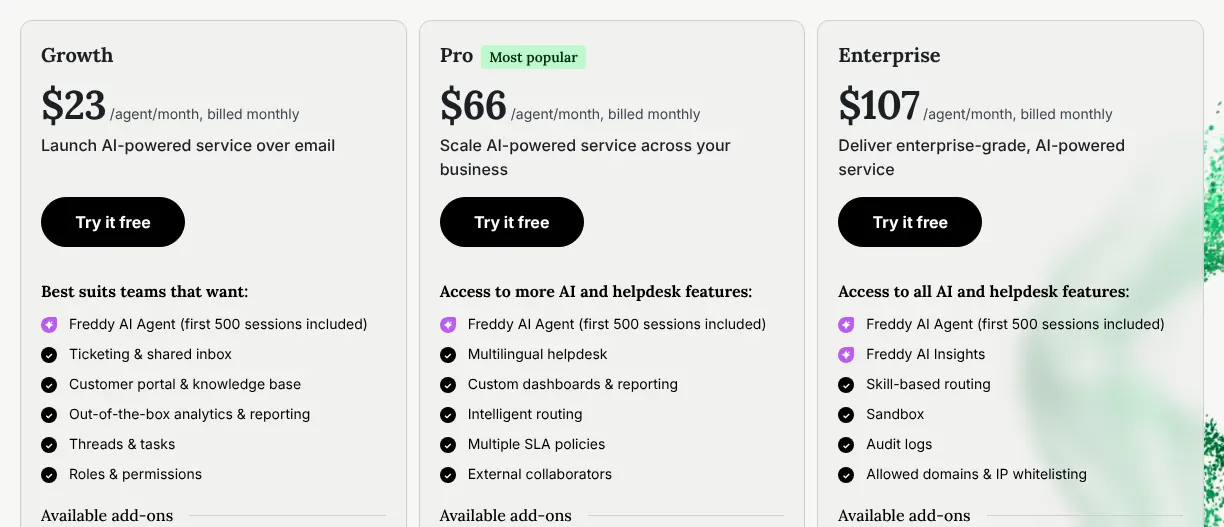
  • Your small support team wants the help centre on its first paid planFreshdesk · Growth costs $23 per agent a month.

How to choose knowledge base software

All ten have a rich-text editor, categories, full-text search and access permissions, so the score only builds the shortlist. Six checks narrow it to one or two tools. Each check rests on vendor pages read on 19 November 2026.

1. Decide who reads: customers, staff or both

Start with the audience, because some plans hide articles from one of them. Confluence Free has no public access, so it only works as a staff wiki. Zoho Desk Free keeps its articles for agents; the public help centre starts on Standard.

GitBook publishes public docs on every plan, but docs that only signed-in customers can read need its $299 plan. On Zendesk Suite Team, an article is shown to everyone or to signed-in users, with no finer groups. If you need both a public help centre and private staff pages, check that one plan holds both.

2. Count who pays: writers, agents or every reader

The ten tools bill different people, and that changes the bill more than the price on the card does. KnowledgeOwl, GitBook and Archbee bill only the people who write; readers are free. Zoho Desk, Zendesk and Freshdesk bill each support agent. Helpjuice counts everyone with a login, readers included.

Take 3 writers and 200 staff who read internal articles. On KnowledgeOwl Basic, that costs $150 a month. On Helpjuice, 203 users pass the 100-user plan, so the bill reaches $799 a month. Count readers who must log in before you compare prices.

3. Find the plan that holds the feature you need

A feature on this page can sit on a higher plan than the first one priced. Approval before publishing is the clearest case. Confluence puts it on Premium, at $14.10 per user. Freshdesk and Zendesk put it on Enterprise, and Archbee on Scaling, at $400 a month.

Articles in several languages follow the same pattern. Zoho Desk adds them on Professional, at US$35 per agent, and Freshdesk on Pro, at $66 per agent. Zendesk Suite Team publishes in 1 language only. Before you sign, list your three must-have features and find the plan that holds all three.

4. Price the AI answers apart from the plan

Most tools now answer readers' questions with AI drawn from the articles, and several bill it separately. Zendesk includes 5 automated resolutions (questions its AI closes without an agent) per agent a month, then charges $2.00 each. Freshdesk gives 500 sessions once, then charges $49 per 100. Archbee sells its AI as a $20 monthly add-on on Growing.

GitBook spends 20 credits per answer and includes 2,000 a month, about 100 answers. Helpjuice keeps its AI tools for the $449 plan. With one agent and 1,000 questions a month closed by its AI, Zendesk bills $1,990 on top of the plan. Estimate your volume first.

5. Plan how articles stay up to date

Outdated articles mislead readers, so a reminder to review them saves support time. Archbee asks a named writer to confirm each article at set intervals, from its first plan. KnowledgeOwl, Helpjuice, Document360 and Zoho Desk document review reminders or expiry dates.

Zendesk keeps article verification for Suite Enterprise. GitBook flags stale pages with an AI scan but sets no review dates. No such reminder appears in Freshdesk's plan comparison. If your product changes every month, give each article an owner and a review date, whichever tool you pick.

6. Check the way out before the way in

Export decides how hard it is to leave later. Archbee exports articles and whole spaces to Markdown, a plain-text format. GitBook exports to PDF from Essential. Freshdesk exports the whole account, for administrators only.

Zendesk has no export button: articles leave through the API or a partner service. Zoho Desk downloads articles as PDF one at a time. During the trial, export ten articles and open them elsewhere. If images or links break, you know the cost of leaving.

The 10 Knowledge base software

by overall score
  1. 1. Archbee

    Archbee suits a small documentation team that wants review dates on articles and either does without AI and a widget or pays for them.

    Score
    100/100
    Best for
    Up to five writers sharing one documentation site
    From
    $100/mo
    Free plan
    No · 14-day free trial

    Archbee, a product documentation platform, covers all 20 features on this page, some only on higher plans. AI answers, the help widget for an app and the public API are paid add-ons on its first two plans and included in Enterprise. AI costs $20 a month on Growing, and the widget and API cost $100 a month each.

    Growing costs $100 a month on monthly billing and includes 5 team members. Each extra member costs $6 a month, and readers are free. Twenty writers pay $190 a month. Article review, translations and search analytics start on Scaling, at $400 a month.

    Archbee asks writers to confirm articles at set intervals, a check called document verification, from Growing. Single articles and whole spaces export to Markdown, a plain-text format other tools can read. Archbee's pricing page refused the capture tool, so no image of it appears here.

  2. 2. Document360

    Document360 suits a team that wants every feature here and is ready to ask for a quote before knowing the price.

    Score
    100/100
    Best for
    Teams that want every feature on this page and accept a price set by quote
    From
    On quote
    Free plan
    No · 14-day free trial

    Document360 covers all 20 features on this page. It is built only for knowledge bases: a public help centre for customers, a private one for staff, or both. Its AI assistant, Ask Eddy, answers questions from the articles and runs on a monthly allowance of credits, one credit per question.

    Document360 publishes no plan names and no prices. Its pricing page states that each quote depends on team accounts, workspaces, languages, single sign-on and AI use. Single sign-on (SSO) allows staff to log in with their company account. The plan that holds each feature is therefore not public.

    A 14-day free trial comes first; after it, the price is set with sales. Most quotes include a standard migration of existing articles. The AI chatbot for a website is sold as an add-on (an extra paid on top of the plan).

    Document360 pricing page with its FAQ answer open, explaining that there is no flat pricing and that each customer receives a quote.
    The pricing page answers its own FAQ question on flat pricing: the price is quoted per configuration, so no plan or amount is shown. Source: document360.com, captured on 19 Nov 2026.
  3. 3. Helpjuice

    Helpjuice suits a team of up to 30 people who want every feature on this page for one fixed bill, with AI from the second plan.

    Score
    100/100
    Best for
    Up to 30 staff who write and read internal articles, for one flat price
    From
    $249/mo
    Free plan
    No · 14-day free trial

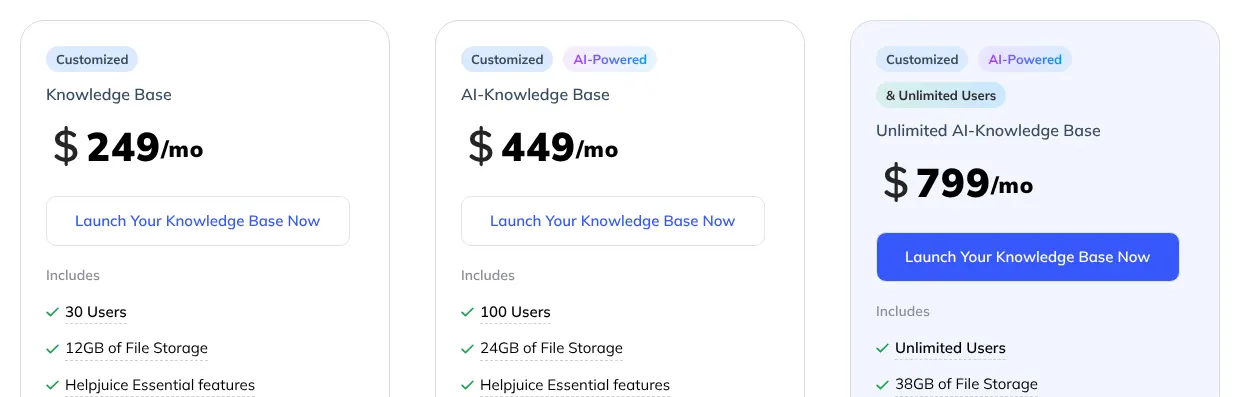
    Helpjuice also covers all 20 features. It charges a flat monthly price per plan, not a price per person. The Knowledge Base plan costs $249 a month and includes 30 users. Helpjuice counts everyone with a login as a user, including staff who only read internal articles.

    Thirty users suit a small company that keeps its procedures private. A company with 60 staff reading the same articles needs the next plan, AI-Knowledge Base, at $449 a month for 100 users.

    That second plan is also where the AI tools start: AI search, the AI writer, the chatbot and single sign-on. Articles are unlimited on every plan. Automatic translation is free for 30 translations, then billed by the character. The trial lasts 14 days, with no card required.

    Helpjuice plan cards: Knowledge Base at 249 dollars a month with 30 users, AI-Knowledge Base at 449 with 100 users, Unlimited at 799 with unlimited users.
    Each card shows one flat monthly price and the number of users it includes, from 30 on the first plan to unlimited on the third. Source: helpjuice.com, captured on 19 Nov 2026.
  4. 4. KnowledgeOwl

    KnowledgeOwl suits a small writing team serving a large audience, since readers cost nothing and each extra writer costs $25.

    Score
    99/100
    Best for
    One or two writers publishing for many readers
    From
    $100/mo
    Free plan
    No · 30-day free trial

    KnowledgeOwl covers 19 of the 20 features in full. The partial one is languages: there is no linked translation of one article, and the vendor advises one knowledge base per language, at $50 a month each.

    Basic costs $100 a month on monthly billing and includes 1 author and 1 knowledge base. Each extra author adds $25 a month. Readers are free and unlimited, even when they must log in. A team with 3 writers and 500 readers pays $150 a month.

    Basic holds up to 1,000 articles and keeps 45 days of reading statistics. A custom domain (the help centre at an address such as help.yourcompany.com), the help widget for an app and the API start on Pro, at $250 a month. An API is a connection that allows other software to read and write the articles. Only the 10 most recent versions of each article are kept.

    KnowledgeOwl plans on monthly billing: Basic, Pro and Business cards, each stating that it includes 1 knowledge base and 1 author, with more added as the team grows.
    With Monthly selected, the three cards show their monthly prices and the same note: each plan includes one knowledge base and one author. Source: knowledgeowl.com, captured on 19 Nov 2026.
  5. 5. Confluence

    Cheapest

    Confluence suits a team that wants an internal wiki for free up to 10 people, then the lowest per-user price here.

    Score
    97/100
    Best for
    Staff wikis for teams that start free and grow past 10 people
    From
    $7.15 per user/mo
    Free plan
    Yes · 10 users, 2 GB, no public access

    Confluence, Atlassian's team wiki, covers 18 features in full and 2 in part. Translation only comes as a machine-translated copy of a page, made by its AI assistant Rovo. The embeddable help widget belongs to Jira Service Management, a separate Atlassian product.

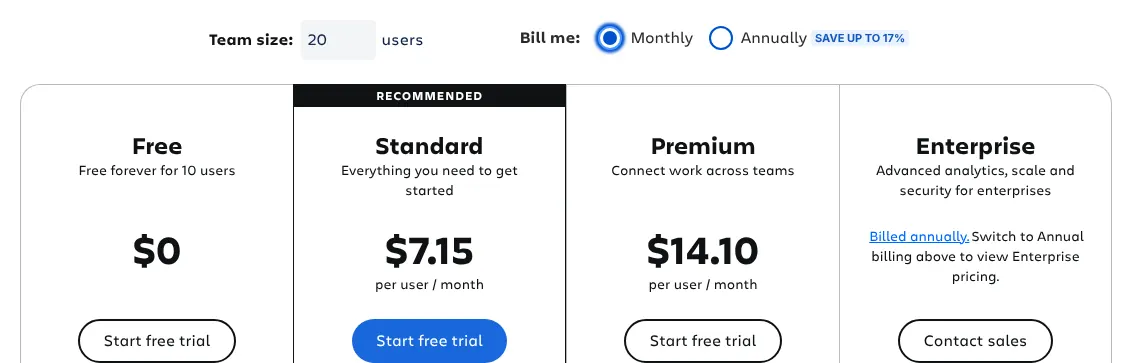
    The free plan covers up to 10 users with 2 GB of storage. It has no custom permissions and no public access, so it suits an internal wiki only. Standard costs $7.15 per user a month on monthly billing for a team of 20, the lowest first paid price of the ten.

    Several knowledge base tools sit on Premium, at $14.10 per user a month: page approvals, a custom domain and usage analytics. Single sign-on needs Enterprise or a paid security add-on called Atlassian Guard. A team of 20 on Standard pays $143 a month.

    Confluence plans with the team size set to 20 users and monthly billing selected: Free for 10 users, Standard, Premium and Enterprise with contact sales.
    With the team size set to 20 users and Monthly billing chosen, the Standard card shows the per-user price this page quotes. Source: atlassian.com, captured on 19 Nov 2026.
  6. 6. Zoho Desk

    Zoho Desk suits a support team that wants tickets and a public help centre together at US$20 per agent.

    Score
    97/100
    Best for
    Support teams that want ticketing and a public help centre at a low price per agent
    From
    US$20 per agent/mo
    Free plan
    Yes · 3 users, private articles for agents only

    Zoho Desk is a help desk: software where a support team answers customer emails and chats as tickets. Its knowledge base covers 19 features in full. The partial one is export: articles download as PDF one at a time, and bulk download is not available.

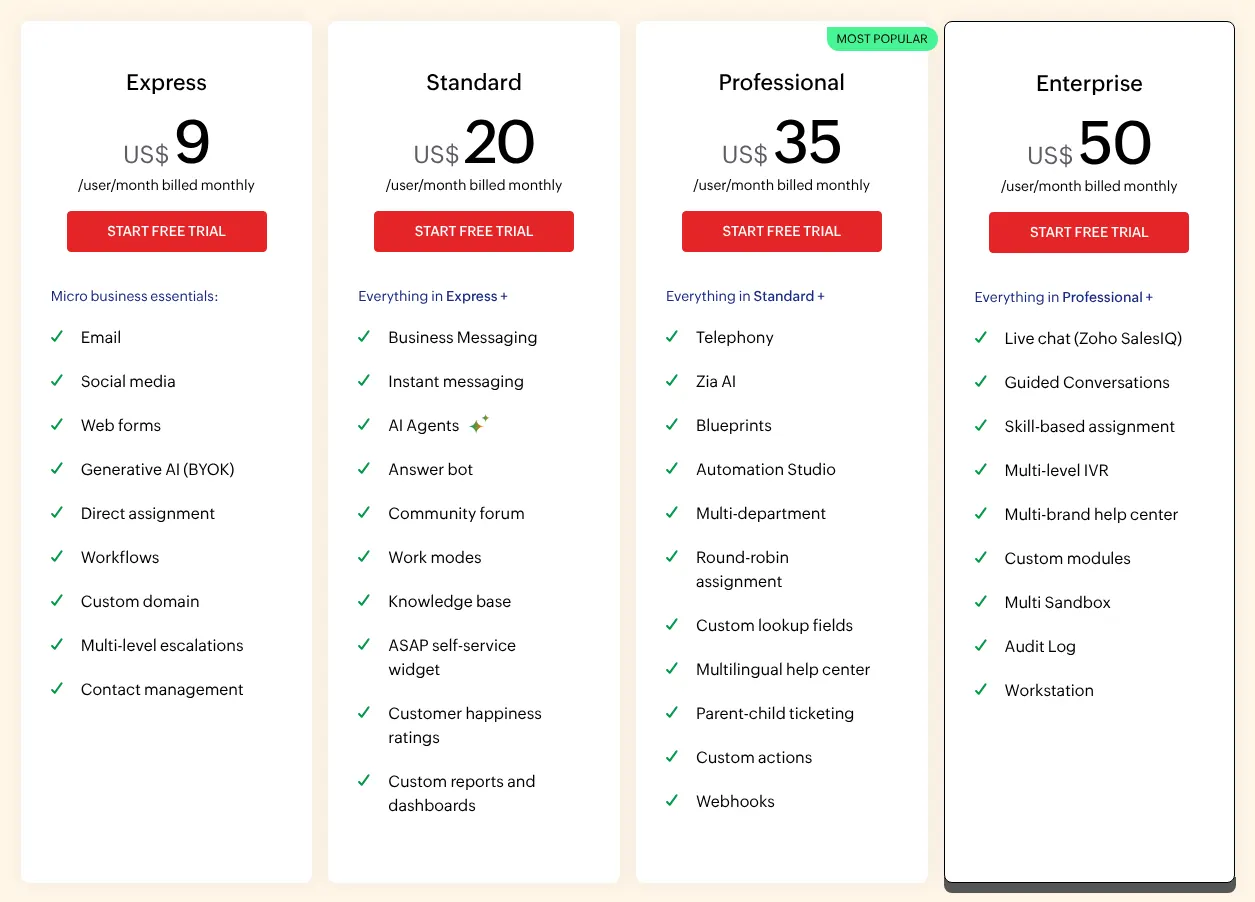
    The public help centre starts on Standard, at US$20 per agent a month on monthly billing. An agent is a support person who answers tickets, and each one is billed. The free plan covers 3 users with a private knowledge base for agents only, so customers cannot read it.

    Standard also includes an answer bot that replies to customers from the articles. Articles in several languages need Professional, at US$35 per agent a month. A 15-day trial works on any plan; afterwards the account falls back to the free plan.

    Zoho Desk plans on monthly billing, from Express to Professional, with prices per user per month billed monthly and the knowledge base listed on Standard.
    With monthly billing selected, Standard shows US$20 per user a month and lists the knowledge base among its features. Source: zoho.com, captured on 19 Nov 2026.
  7. 7. Zendesk

    Zendesk suits a team that already handles tickets there, as long as Suite Team's one language and missing history are acceptable.

    Score
    97/100
    Best for
    Support teams already answering customers in Zendesk
    From
    $69 per agent/mo
    Free plan
    No · 14-day free trial

    Zendesk is a help desk whose knowledge base covers 19 features in full. Export is the partial one: articles leave only through the API or a partner service, with no export button in the product.

    The cheapest plan with a help centre is Suite Team, at $69 per agent a month on monthly billing, or $55 billed yearly. Support Team, at $25, has no help centre at all. Suite Team also has limits: 1 language, no article history, and categories nested only 2 levels deep.

    On Suite Team, articles are shown either to everyone or to signed-in users only. Version history and 40-plus languages start on Suite Professional, at $149. Review before publishing and article verification need Suite Enterprise, which has no public price. Its AI agents answer customers from the articles; beyond 5 closed questions per agent a month, each costs $2.00.

  8. 8. GitBook

    GitBook suits a product team publishing public docs, with readers free and a bill that grows with each writer.

    Score
    97/100
    Best for
    Product and developer documentation published as a website
    From
    $79/mo + $15 per user
    Free plan
    Yes · 1 user

    GitBook is a documentation platform: it publishes product guides as a website. It covers 18 features in full and 2 in part. Templates exist only for a whole new site, not for single articles. Outdated pages are flagged by an AI scan, but no review dates or reminders were found.

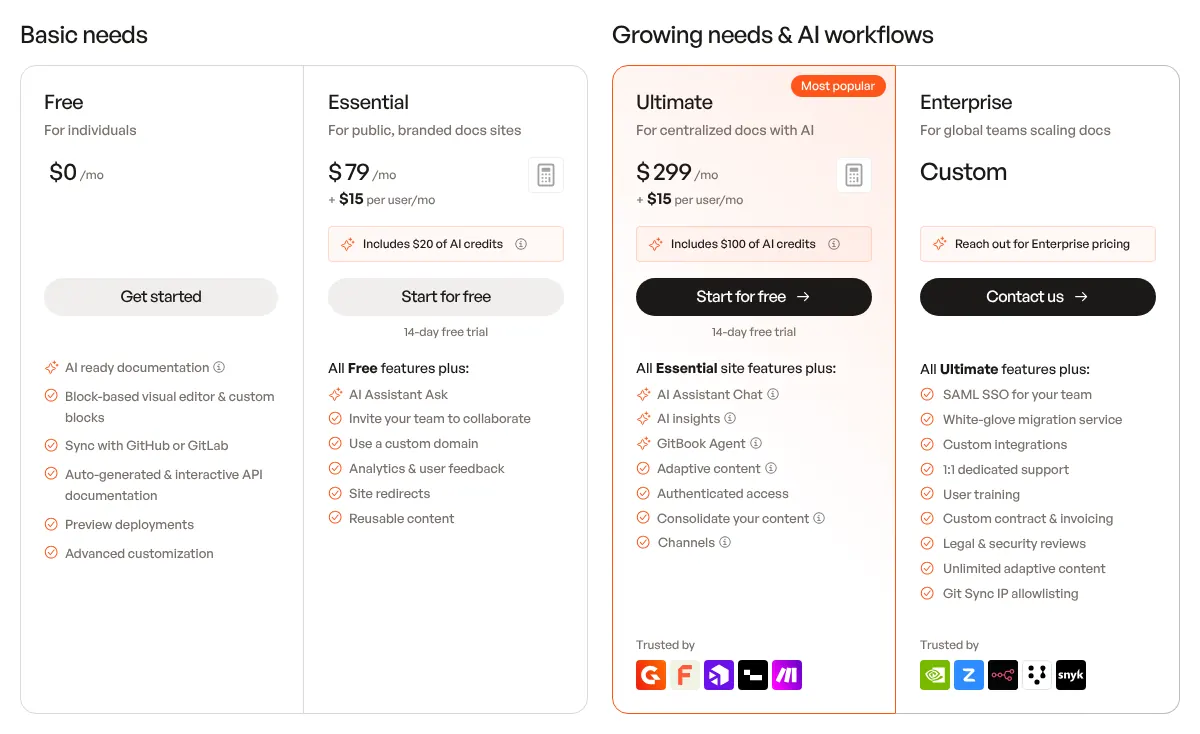
    The bill has two parts. Essential costs $79 a month per site, plus $15 per user a month on monthly billing, and the first user is billed too. One writer pays $94 a month; five pay $154. Readers and page views are free and unlimited.

    Essential adds a custom domain, search analytics and AI answers. Each AI answer uses 20 credits, and 2,000 are included each month, about 100 answers. Docs that only signed-in customers can read need the next plan, at $299 a month per site. SAML single sign-on (login through the company's own account system) is on Enterprise only.

    GitBook plans on monthly billing: Free, Essential for public branded docs sites, a second paid plan for centralized docs with AI, both adding a price per user, and Enterprise at a custom price.
    On monthly billing, each paid card shows a price per site plus a price per user, the two parts of the bill. Source: gitbook.com, captured on 19 Nov 2026.
  9. 9. ProProfs Knowledge Base

    ProProfs Knowledge Base suits one author starting a help centre, and costs much less on yearly billing.

    Score
    96/100
    Best for
    One author building a customer help centre
    From
    $79 per author/mo
    Free plan
    Yes · 1 author, 25 pages

    ProProfs Knowledge Base covers 18 features in full and 2 in part. The Essentials card mentions a site on the customer's own domain, but the custom domain itself is a $300 yearly add-on. Slack only receives change notifications, through a connection the customer sets up.

    Essentials costs $79 per author a month on monthly billing, or $49 billed yearly. The vendor presents it for solo authors, with 1 site and up to 300 pages. The free plan stops at 25 pages, enough to test a few articles.

    Some features sit on Business Complete Elite, which is sold yearly only, at $79 per author a month. That plan holds the approval step before publishing, the API and single sign-on. A team that needs approvals therefore commits for a year.

    ProProfs Knowledge Base plans on monthly billing: Essentials at 79 dollars and Business at 99 dollars per author per month, next to Business Complete Elite, annual plans only.
    On monthly billing, Essentials shows $79 and Business $99 per author a month; the third card, Elite, is sold on annual plans only. Source: proprofskb.com, captured on 19 Nov 2026.
  10. 10. Freshdesk

    Freshdesk suits a small support team that wants the knowledge base on its first paid plan and can do without article history.

    Score
    94/100
    Best for
    Small support teams that want tickets and a help centre from the first paid plan
    From
    $23 per agent/mo
    Free plan
    Free for 6 months · 2 agents

    Freshdesk, a help desk from Freshworks, covers 18 features in full. Its AI agent answers customers from the articles, but only 500 sessions are free, once per account; then 100 sessions cost $49. No reminder to review outdated articles appears in its plan comparison.

    Growth, the first paid plan, costs $23 per agent a month on monthly billing and includes the customer portal and knowledge base. Article versions and translations need Pro, at $66 per agent. The approval step before publishing is on Enterprise only.

    A Free Program gives two agents six months at no cost; it is not a permanent free plan. A 14-day trial runs on Enterprise, so a team should check which features stay on Growth before it ends.

    Freshdesk plans on monthly billing: Growth at 23 dollars, Pro at 66 dollars and Enterprise, priced per agent per month, with the customer portal and knowledge base listed on Growth.
    With Monthly selected, Growth shows $23 and Pro $66 per agent a month; the portal and knowledge base already sit on Growth. Source: freshworks.com, captured on 19 Nov 2026.

Summary table

The table puts the ten tools side by side. Each price is that of the first paid plan whose articles customers can read, billed monthly, at the regular price. Zoho Desk and Zendesk sell cheaper plans without a public help centre. The last column says who counts toward the bill.

The 10 knowledge base tools side by side: score, first paid plan, billing, free plan and who is billed
ToolScoreFirst paid planBilling of that priceFree planWho is billed
01Archbee100$100/mo (Growing, 5 members)MonthlyNo · 14-day trialTeam members; readers free
02Document360100On quoteNo price publishedNo · 14-day trialNot public
03Helpjuice100$249/mo flat (Knowledge Base, 30 users)MonthlyNo · 14-day trialEveryone with a login, readers included
04KnowledgeOwl99$100/mo (Basic, 1 author)MonthlyNo · 30-day trialAuthors; readers free
05Confluence97$7.15 per user/mo (Standard, 20 users)MonthlyYes · 10 users, internal onlyEvery user
06Zoho Desk97US$20 per agent/mo (Standard)MonthlyYes · 3 users, agents-only articlesAgents
07Zendesk97$69 per agent/mo (Suite Team)MonthlyNo · 14-day trialAgents
08GitBook97$79/mo per site + $15 per user (Essential)MonthlyYes · 1 userWriters; readers free
09ProProfs Knowledge Base96$79 per author/mo (Essentials)MonthlyYes · 1 author, 25 pagesAuthors
10Freshdesk94$23 per agent/mo (Growth)Monthly6 months free · 2 agentsAgents

What knowledge base software costs for 1, 5 or 20 people

For one person, Confluence costs nothing on its free plan, and Zoho Desk's paid plan costs US$20. For 20 people, the order changes. Confluence reaches $143 a month, while Zendesk reaches $1,380. Helpjuice stays at $249 up to 30 users. Archbee stays at $100 up to five members.

Monthly price for 1, 5 and 20 writers or agents, on monthly billing at the regular price
ToolPlan1 person, per month5 people, per month20 people, per month
01ArchbeeGrowing$100$100$190
02Document360Quote———
03HelpjuiceKnowledge Base$249$249$249
04KnowledgeOwlBasic + extra authors$100$200$575
05ConfluenceFree, then Standard$0$0$143
06Zoho DeskStandardUS$20US$100US$400
07ZendeskSuite Team$69$345$1,380
08GitBookEssential, 1 site$94$154$379
09ProProfs Knowledge BaseEssentials$79——
10FreshdeskGrowth$23$115$460

Monthly billing at the regular price. People means those who are billed: writers, agents or every user, as the summary table says. Document360 publishes no price. ProProfs presents Essentials for solo authors and does not state its price for several authors. AI answers billed by use are not included.

How we rank

  1. The ten tools are ranked by a category score out of 100. The score measures how many of 20 features expected of knowledge base software each vendor documents on its own site. It does not measure ease of use, speed, reliability or support.Writing and organising 31% · 5 featuresFinding answers 22% · 4 featuresPublishing and access 28% · 6 featuresIntegrations and data 19% · 5 features
  2. The 20 features form a grid in four groups: writing and organising, finding answers, publishing and access, integrations and data. Four define the category and weigh 3: a rich-text editor, categories, full-text search and access permissions. Eight weigh 2, among them AI answers, a public help centre and export. Eight weigh 1, such as templates and single sign-on.
  3. A feature counts 1 when the vendor documents it as built in, on any plan; the plan is named on this page when it matters. It counts 0.5 for a stated limit, a paid add-on, billing by use on top of the plan, or another product of the same vendor. For example, Zoho Desk's export counts 0.5 because articles download one at a time. A feature that is absent, or not found on the vendor's site, counts 0. The score is the weighted sum divided by the total weight, 36, rounded.
  4. At equal scores, the lower first paid price ranks first, then the alphabet. Archbee, Document360 and Helpjuice share 100. Archbee, at $100 a month, ranks before Helpjuice, at $249. Document360 publishes no price, so the alphabet places it between them. Confluence, Zoho Desk, Zendesk and GitBook share 97, at $7.15, US$20, $69 and $79. Freshdesk and HelpDocs share 94; HelpDocs, at $129 a month, is eleventh. Sixteen tools were scored: HelpDocs (94), Slab (93), Notion (92), Guru (89), Intercom (88) and Help Scout (85) fall below the ten.
  5. Zendesk's monthly prices appear only in a comparison panel that could not be captured as an image. Archbee's pricing page refused the capture tool. All prices, limits and features were read on vendor pages on 19 November 2026.
  6. No entry on this page is sponsored. A sponsored entry is marked Sponsored and holds the position paid for; its score stays the computed one.

FAQ

Is there free knowledge base software?

Four of the ten have a free plan, each with a hard limit. Confluence Free covers 10 users, for a staff wiki only. GitBook Free covers 1 user. ProProfs Free stops at 25 pages. Zoho Desk Free covers 3 users, with articles for agents only. Freshdesk gives 2 agents six months free. The other five offer a trial of 14 to 30 days.

Do I need a help desk to run a knowledge base?

No. Document360, Helpjuice, KnowledgeOwl, GitBook, ProProfs and Archbee are knowledge bases on their own. Zoho Desk, Zendesk and Freshdesk sell the knowledge base inside a help desk, billed per agent. On Zendesk, the $25 Support Team plan has no help centre at all. If you do not answer support tickets, a standalone tool avoids paying for ticketing you will not use.

Why are Notion, Slab and Guru not in the ten?

Notion scores 92. Full AI use, page verification and single sign-on need its Business plan, and a custom domain for a Notion site is a $10 monthly add-on. Slab scores 93: its review step keeps drafts but has no approval, and no translation feature was found. Guru scores 89 and publishes no price. Its current help pages describe sharing with teammates only, not a public site for customers.

Why are HelpDocs, Intercom and Help Scout not in the ten?

HelpDocs scores 94, like Freshdesk, but its first plan costs $129 a month, against $23 per agent for Freshdesk Growth. Intercom scores 88: its AI agent, Fin, costs $0.99 per outcome on top of each seat (a paid user place). Help Scout scores 85. Its free plan stops at 10 articles, and AI answers cost $0.75 per resolution.

How long does it take to move to another knowledge base?

It depends on how many articles you have and how they are stored. Document360 includes a standard migration in most quotes, so its team moves the articles. With the other tools, the move is yours to plan. Start with your 20 most-read articles, check images and links, then move the rest.