top10alternative

Top 10 AI Browsers (2026)

An AI browser is a web browser with an assistant that reads the open page; some add an agent that acts on websites. Ten of them are compared here on what they include and cost. They are ranked by how many of 17 common features each one documents.

The best AI browser for your situation

Each line matches a situation with the browser whose published facts fit it. The score out of 100 counts how many of 17 features expected of an AI browser a vendor documents. It measures what a browser offers, not how well its AI works.

  • You want an agent that carries out web tasks for youComet · The browser is free; the agent starts with Perplexity Pro at $20 a month.
  • You already use Google's apps and want to keep your browserGoogle Chrome · Gemini in Chrome is free; auto browse needs a paid Google AI plan.
  • You want free AI help and ad blocking without an accountBrave · Leo is free; Premium costs $14.99 a month for more models and requests.
  • You work on a Mac across many tabs and work appsDia · Better Answers costs $10 a month; the free plan has no AI.
  • You want unlimited AI chat and writing help for freeNorton Neo · AI is included with no credits, caps or account.
  • You pay for Microsoft 365Microsoft Edge · Copilot is free in Edge; the agent needs Microsoft 365 Premium in the U.S.
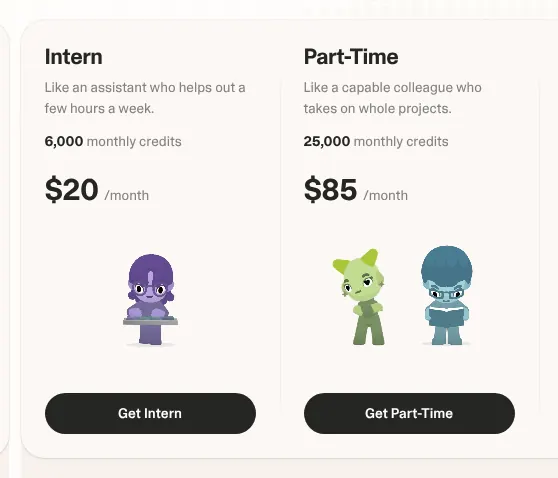
  • Your team wants to hand routine web work to an assistantStrawberry · Intern costs $20 a month for 6,000 credits; browsing uses none.
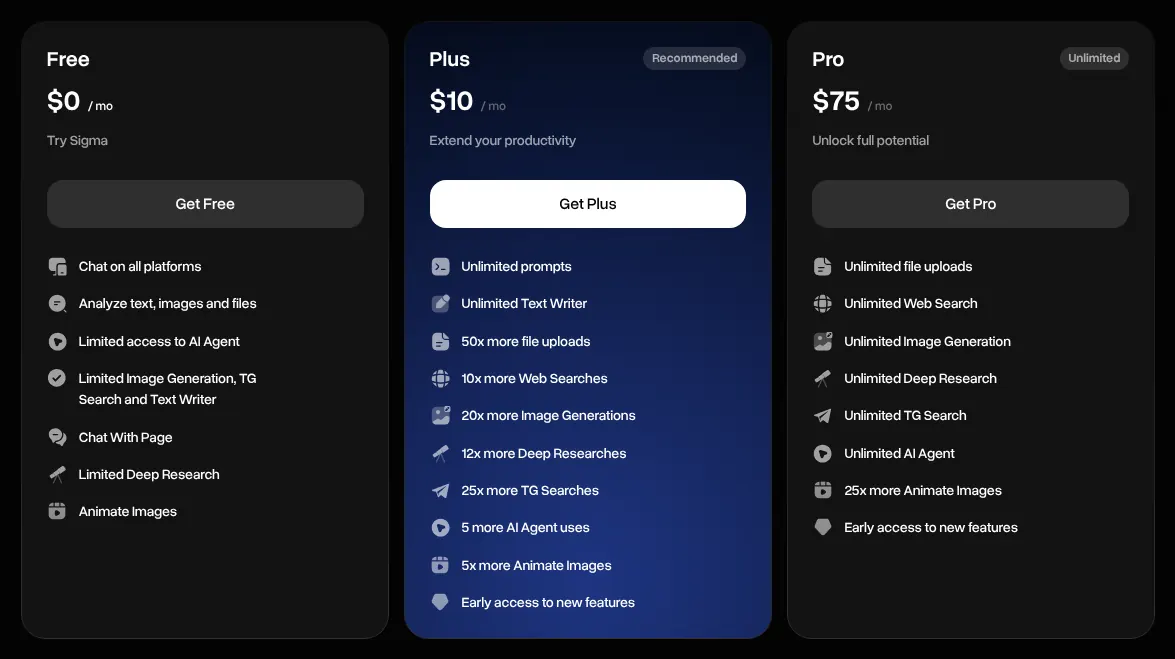
  • You want AI models that run on your own computerSigma · Local AI is free; Plus costs $10 a month.
  • You want free AI with no sign-up and a built-in VPNOpera · Opera AI is free; the browser includes a VPN and an ad blocker.

How to choose an AI browser

The score only shortlists: it counts features, and the right browser depends on what the AI should do, on which devices, and who pays. Five checks narrow the list to one or two. Each rests on facts read on 16 November 2026 on the vendors' own pages.

1. Decide whether you need an agent

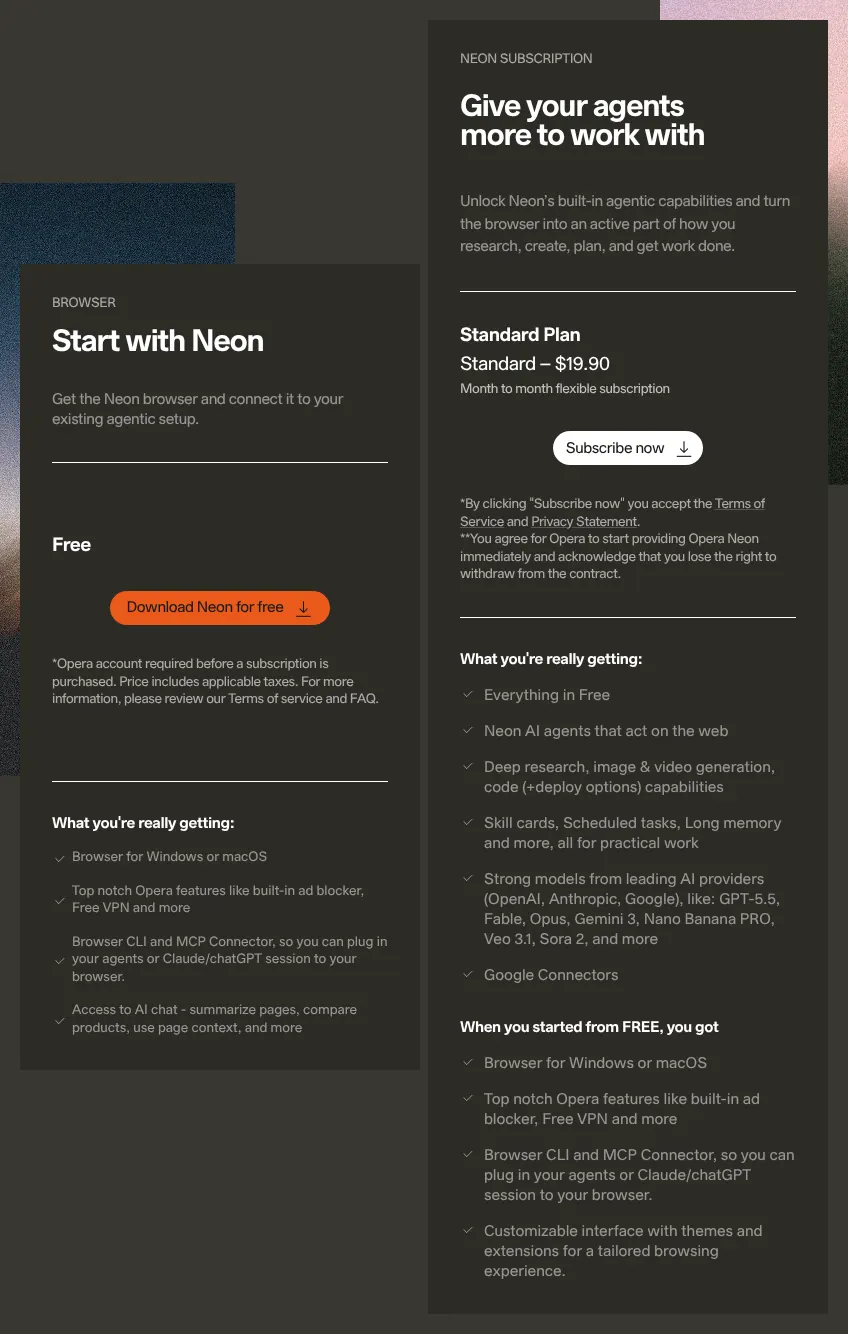
Decide first whether you want answers or an agent, the AI that clicks, types and fills forms on websites for you. Answers are free almost everywhere; an agent usually is not. On Comet, the agent starts with Perplexity Pro at $20 a month. On Microsoft Edge it needs Microsoft 365 Premium at $19.99, in the U.S. only. Opera Neon asks $19.90 for its own agents. Norton Neo and Opera document no agent at all. If you only want summaries and answers, a free version is enough.

2. Check what happens to your data

Read the training setting before you let the AI see your pages, because the defaults differ. Brave, Norton Neo, Opera, Opera Neon and Strawberry say chats are not used to train models. On Comet and on personal accounts in Microsoft Edge, training is on until you switch it off. Dia uses some content data to improve itself by default. If you browse health or bank sites, start with a browser that excludes training by default.

3. Check your computer and phone

Check that the browser runs on every device you use, because three run on computers only. Dia, Strawberry and Opera Neon offer macOS and Windows, with no phone app. Comet has no Linux version. Brave, Norton Neo, Microsoft Edge and Opera cover Windows, macOS, Linux, iOS and Android. If you switch between a laptop and a phone all day, start with one of these four.

4. Look at the usage limits

Look at how much AI each plan allows, because some count every request. Norton Neo states no caps on its free AI. Strawberry gives 500 credits a month for free and 6,000 on Intern at $20. Sigma limits the agent on its free plan, and removes the limit only on Pro at $75 a month. Opera may pause heavy users until the next day. If you plan to run the agent every day, price the plan with no agent limit.

5. Check your country

Check where you live before you pay, because several AI features are limited to the U.S. Chrome's auto browse needs a paid Google AI plan, in the U.S. and India. The writing helpers of Google Chrome and Microsoft Edge work in the U.S. only. The agent of Microsoft Edge is also U.S. only, at $19.99 a month. If you live elsewhere, read the vendor's help page for your country before you pay for an agent.
The 10 AI browsers

by overall score
  1. 1. Comet

    Comet fits someone who wants a browser that carries out tasks, and accepts $20 a month and a privacy setting to change.

    Score
    97/100
    Best for
    People who want an agent to carry out web tasks, and will pay for it
    From
    $20/mo
    Free plan
    Yes · basic AI, no agent

    Comet is the web browser made by Perplexity, the AI search company. It documents 16 of the 17 features on this page in full, more than any other browser here. Its assistant answers questions about the open page and can summarise several tabs at once. Its agent goes further: given a task, Comet navigates, searches and completes it on its own.

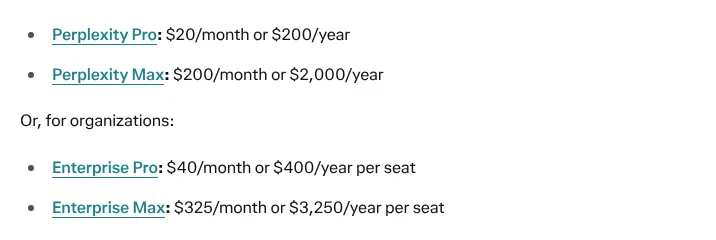
    The browser has been free to download since 2 October 2025, and basic AI features work without an account. The agent is not on the free plan. It starts with Perplexity Pro at $20 a month, or $200 a year. Max, at $200 a month, gives the highest agent allowance. For Free, Pro and Max users, AI data retention is on by default, so chats can be used to train models until the setting is switched off.

    Perplexity plan prices: Pro at 20 dollars a month or 200 a year, Max at 200 a month, Enterprise Pro at 40 dollars a month per seat.
    Perplexity Pro reads $20 a month or $200 a year; Comet's agent starts with this plan. Source: perplexity.ai, captured on 16 Nov 2026.
  2. 2. Google Chrome

    Cheapest

    Chrome fits someone who wants AI help without changing browser; the agent depends on a paid plan and on the country.

    Score
    87/100
    Best for
    People who already use Google's apps and want AI in the browser they know
    From
    $4.99/mo
    Free plan
    Yes · Gemini in Chrome

    Chrome now includes Gemini in Chrome, Google's assistant, at no charge. It uses the open tab and up to 10 shared tabs, and it can search Chrome history to find a page again. AI Mode, Google's AI search, opens from the right of the address bar. Google is releasing Gemini in Chrome gradually, so some users do not have it yet.

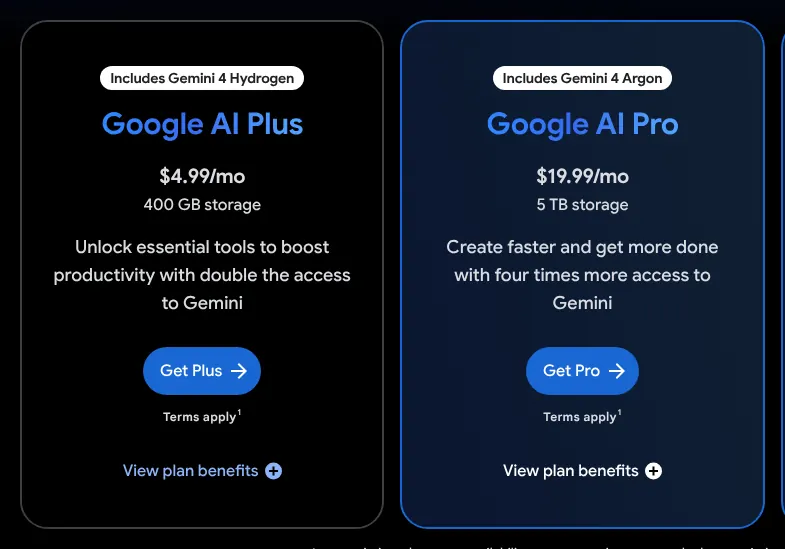
    Auto browse, Chrome's agent, needs a paid Google AI plan and works on desktop only. Google's Chrome page lists it for subscribers in the U.S.; its plans page adds India. Google's help page names Google AI Plus, at $4.99 a month, among the plans that include it. The plans page names only Pro, at $19.99, and Ultra. Ads disappear only on sites with poor ad experiences, so Chrome has no general ad blocker.

    Google AI plans billed monthly: Google AI Plus at 4.99 dollars a month with 400 GB of storage, Google AI Pro at 19.99 dollars a month with 5 TB.
    Google AI Plus reads $4.99 a month and Google AI Pro $19.99; the plans page lists Chrome auto browse under Pro. Source: one.google.com, captured on 16 Nov 2026.
  3. 3. Brave

    Brave fits someone who wants page summaries, tab questions and ad blocking for free, and can wait for its agent.

    Score
    87/100
    Best for
    People who want free AI help and built-in ad blocking without an account
    From
    $14.99/mo
    Free plan
    Yes · Leo free, no account

    Brave is a privacy-focused browser with its own assistant, Leo, free to use with no account. Leo summarises the page being read or the video being watched, and can work across several open tabs. Typing in the address bar and choosing Ask Leo starts a chat. Brave says Leo conversations are not kept for model training. Spoken questions to Leo are documented on iOS only, so on a computer or an Android phone the user types.

    Leo Premium costs $14.99 a month or $149.99 a year, with a 7-day free trial. It adds more models, more requests a day and early access to new features. Brave's agent, called AI browsing, exists only in Brave Nightly, a test version, on desktop. It needs no Premium and runs in a separate browser profile, away from the user's logins. No help page was found on Leo rewriting text inside a website's text box.

    Brave's Leo AI premium offer priced at 14.99 dollars a month or 149.99 dollars a year.
    Leo AI premium reads $14.99 a month or $149.99 a year; the free Leo needs neither. Source: brave.com, captured on 16 Nov 2026.
  4. 4. Dia

    Dia fits a Mac user who works in many tabs and accepts $10 a month for the AI, with an agent that stays on the open site.

    Score
    85/100
    Best for
    Mac users who want an assistant that works across their tabs and work apps
    From
    $10/mo
    Free plan
    Yes · without the AI

    Dia is made by The Browser Company, now part of Atlassian. A chat panel answers questions about the open site, and tabs can be mentioned with @ to compare them. On YouTube, the chat shows a summary of the video. Dia can also find sites again in the browsing history by date, title or address. Its separate memory feature is being phased out.

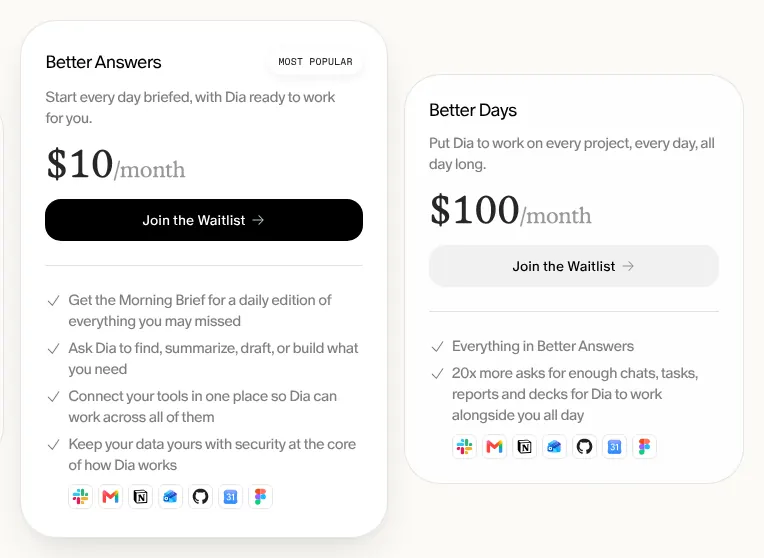
    The free plan is the browser without the AI. Better Answers costs $10 a month, and Better Days, with 20 times more requests, costs $100. Paid plans apply first to new Mac users; Windows users and existing users keep their access free for now. Dia's agent fills forms and drafts content, but it cannot move on to other websites by itself. Dia uses some content data to improve its own speed by default, and this can be turned off.

    Dia plans billed monthly: Better Answers at 10 dollars a month and Better Days at 100 dollars a month, with the features each includes.
    Better Answers reads $10 a month and Better Days $100; both cards list what the AI does on each plan. Source: diabrowser.com, captured on 16 Nov 2026.
  5. 5. Norton Neo

    Norton Neo fits someone who wants AI chat and writing help for free on every device, and does not need an agent.

    Score
    83/100
    Best for
    People who want unlimited AI chat and writing help at no cost
    From
    Free
    Free plan
    Yes · AI with no caps

    Norton Neo is a browser from Gen Digital, the company behind Norton. Its AI is free with no credits, no caps and no subscription, and it needs no account. Neo Chat opens beside the page, compares two or more tabs, and takes spoken questions. Neo Composer writes where the user is already typing, including in Google Docs and Word for the web.

    Neo reads a page only when asked, and keeps chat history on the device by default. Every AI provider it uses must agree in writing not to train models on chats. No help page describes an agent that clicks or fills forms. Video summaries and a choice of model are also absent from its help pages. Neo earns money from search partnerships and affiliate fees, and includes a free VPN, a service that hides the connection's location, with 5 GB a month.

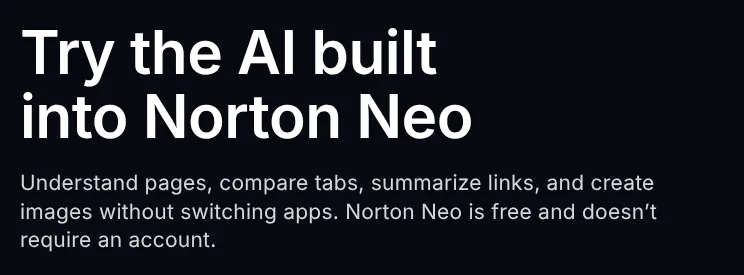
    Norton Neo page section titled Try the AI built into Norton Neo, stating that Norton Neo is free and does not require an account.
    The last sentence states that Norton Neo is free and needs no account; no paid plan was found. Source: neobrowser.ai, captured on 16 Nov 2026.
  6. 6. Microsoft Edge

    For someone already paying for Microsoft 365 in the United States, Edge adds an agent through the Premium plan.

    Score
    83/100
    Best for
    People who use Microsoft 365 and want Copilot in their browser
    From
    $9.99/mo
    Free plan
    Yes · with usage limits

    Edge comes with Copilot, Microsoft's assistant, free with a personal Microsoft account. Copilot summarises pages, videos and PDF files, and can work across many open tabs. A Copilot new tab answers a question or routes to the right site. With permission, it uses browsing history for better answers. Microsoft retired the separate Copilot Mode on 13 May 2026 and folded its features into Edge.

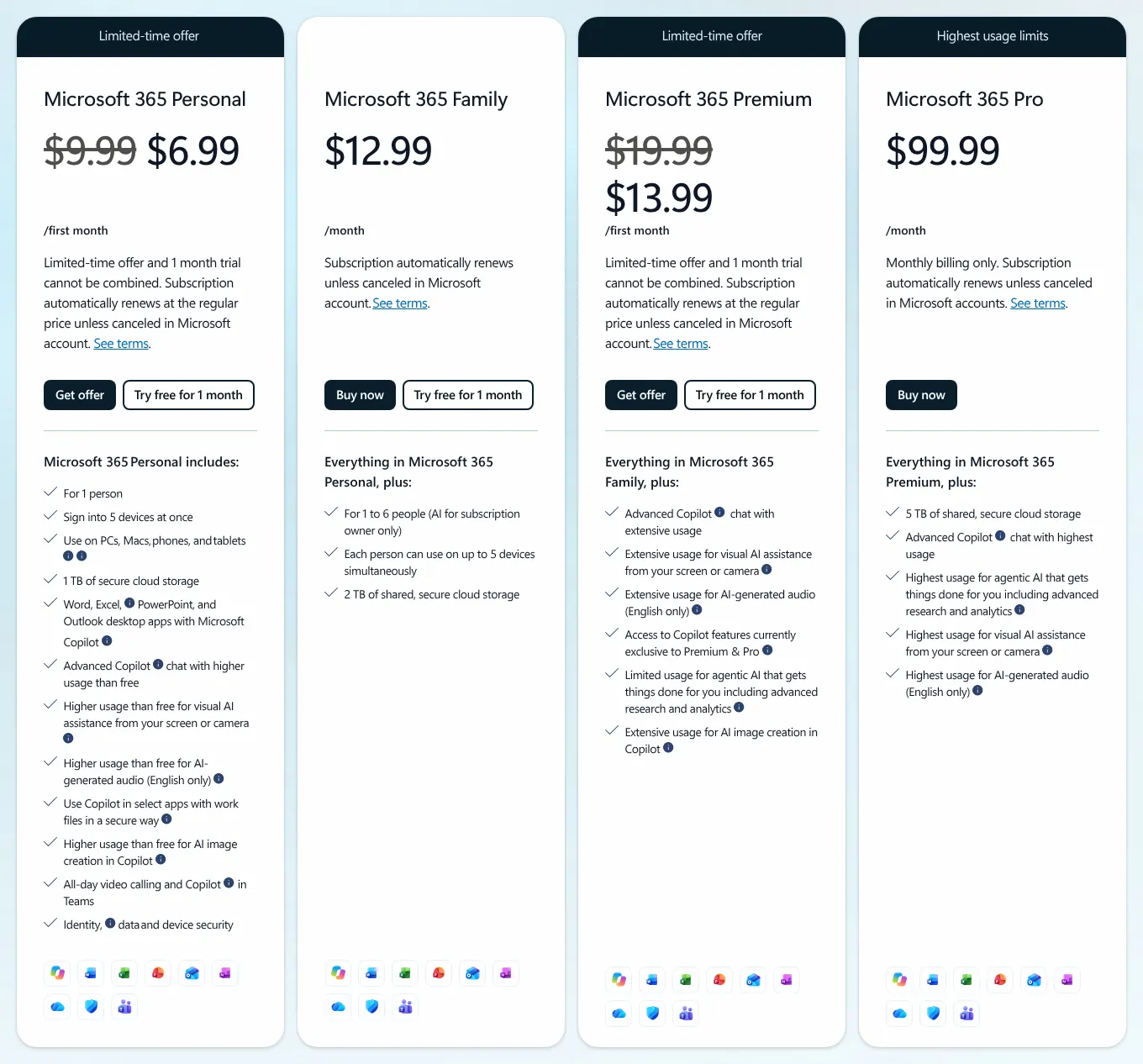
    Free use has limits; Microsoft 365 Personal raises them for $9.99 a month. Microsoft offered it at $6.99 for the first month on 16 November 2026. The agent, Browse with Copilot, needs Microsoft 365 Premium at $19.99 a month and works in the U.S. only. Microsoft calls it experimental, and it cannot use saved passwords or card details. Conversations from personal accounts can train Microsoft's models unless the user opts out.

    Microsoft 365 plans billed monthly: Personal at 9.99 dollars struck through for a first-month offer, Family, Premium at 19.99 dollars struck through, and Pro.
    Read the struck prices: Personal at $9.99 and Premium at $19.99 a month; the lower figures are first-month offers. Source: microsoft.com, captured on 16 Nov 2026.
  7. 7. Strawberry

    Strawberry fits a team that wants to hand repetitive web tasks to an assistant and can budget for credits.

    Score
    82/100
    Best for
    Teams that want AI helpers to run routine web work for them
    From
    $20/mo
    Free plan
    Yes · 500 credits a month

    Strawberry is a browser from Stockholm built around AI companions, assistants that do work in the browser. A companion plans a task, opens the sites, clicks through the steps and brings back the result. It asks before anything that sends or changes a record. Companions remember details, habits, people and projects for later chats. The New Tab page has a chat box for the companions, so a task can be typed where browsing starts. Strawberry reached version 1.0 on 26 October 2026.

    Plans are paid in credits, and browsing itself uses none. The free plan includes 500 credits a month. Intern costs $20 a month for 6,000 credits. Part-time costs $85 a month, and Full-time $250. Paid plans add the choice of AI model, and Strawberry states no training on user content. The browser runs on macOS and Windows only. Ads are blocked only by installing an ad-blocking extension.

    Strawberry plans billed monthly: Intern at 20 dollars a month with 6,000 monthly credits and Part-Time at 85 dollars a month with 25,000 credits.
    Intern reads $20 a month for 6,000 monthly credits, the first paid plan. Source: strawberrybrowser.com, captured on 16 Nov 2026.
  8. 8. Sigma

    Sigma fits someone who wants to test an agent on a computer and a phone for $10 a month, or to keep AI on the device.

    Score
    75/100
    Best for
    People who want an AI browser on computer and phone, with AI models that can run on their own computer
    From
    $10/mo
    Free plan
    Yes · limited agent

    Sigma is an AI browser from Sigmabrowser OÜ, a company based in Estonia. Chat with Page answers questions about a page and can compare several pages. Its agent navigates, fills forms and manages tasks on websites. In standard browsing, the agent needs the user's own key from an AI company, which links it to that company's models. Sigma also runs local AI: models downloaded to the computer, free and with no usage limit.

    The free plan gives limited agent use. Plus costs $10 a month, or $8 a month billed yearly, and adds 5 agent uses. Pro, at $75 a month, removes the agent limit. Prompts sent to a local model never leave the device and are not used for training. Nothing is said about chats sent to online models. Only AI chats are documented as syncing between devices.

    Sigma plans billed monthly: Free at 0 dollars, Plus at 10 dollars a month, Pro at 75 dollars a month, with the agent limits of each plan.
    With Monthly selected, Plus reads $10 a month; the lists show limited agent use on Free and unlimited use on Pro. Source: sigmabrowser.com, captured on 16 Nov 2026.
  9. 9. Opera

    Opera fits someone who wants free page summaries without an account; anyone who needs an agent should look at Opera Neon.

    Score
    70/100
    Best for
    People who want free AI with no sign-up, plus a built-in VPN and ad blocker
    From
    Free
    Free plan
    Yes · no account

    Opera One includes Opera AI, which replaced the Aria assistant. It is free and needs no log-in or sign-up. Opera AI answers questions about the page being viewed and about YouTube videos. Within a Tab Island, Opera's name for a group of tabs, it can answer about all the tabs. It also takes voice input and replies aloud. On Android, the search bar offers Ask AI beside ordinary web search; no Opera page describes the same on a computer.

    Opera says it does not use chats or browsed pages to train AI models, and does not send general browsing history to its AI. The browser includes a free VPN, which hides the connection's location, and an ad blocker. Opera AI's feature list includes no web actions, and connected chatbots cannot click or fill in forms. Opera's agent exists only in Opera Neon, a separate paid browser. Heavy use can pause the service until the next day. Users must be at least 18 years old.

    Opera help page question asking whether Opera AI is a free service, answered yes, it is free in the Opera browser.
    The answer states that Opera AI is a free service in the Opera browser; no paid plan exists for it. Source: help.opera.com, captured on 16 Nov 2026.
  10. 10. Opera Neon

    On a computer only and at $19.90 a month, Opera Neon suits someone who wants a browser built for agents.

    Score
    70/100
    Best for
    People who want Opera's agents and will pay a monthly subscription
    From
    $19.90/mo
    Free plan
    Yes · AI chat only

    Opera Neon is a separate browser from Opera, built for AI agents. Its start page acts as the AI interface. Neon Do opens pages, researches and fills in forms, with the user in control at each step. Neon can also remember personal preferences. Opera says it does not train models on user data, and logins, passwords and card details stay on the device.

    The free plan includes the browser and an AI chat that summarises pages. It also allows the user's own AI tools to control the browser through MCP, a standard way to connect outside AI tools. Standard costs $19.90 a month, month to month, taxes included. It unlocks Neon's own agents, deep research and image and video generation. Neon runs on macOS and Windows, and a mobile version is only planned. Importing bookmarks, syncing and Chrome extensions were not found on its pages.

    Opera Neon subscription page: a Free browser plan with a download button and the Standard plan at 19.90 dollars, month to month, with its features.
    Standard reads $19.90 on a month-to-month subscription; the Free column lists AI chat without Neon's own agents. Source: operaneon.com, captured on 16 Nov 2026.

Summary table

The table sets the ten AI browsers side by side. The entry price is the first paid plan that adds to the browser's AI, billed monthly. The agent column says which plan, if any, unlocks the AI that acts on websites.

The 10 AI browsers side by side: score, entry price, free version, agent and devices
BrowserScoreEntry priceFree versionAgentDevices
01Comet97$20/moYes · basic AI, no agentPerplexity Pro and MaxMac, Windows, iOS, Android
02Google Chrome87$4.99/moYes · Gemini in ChromePaid Google AI plans, U.S. and IndiaWindows, Mac, Chromebook Plus, iOS
03Brave87$14.99/moYes · Leo freeNightly test build onlyWindows, Mac, Linux, iOS, Android
04Dia85$10/moYes · without the AIStays on the open siteMac, Windows
05Norton Neo83FreeYes · AI with no capsNot documentedWindows, Mac, Linux, iOS, Android
06Microsoft Edge83$9.99/moYes · with usage limitsMicrosoft 365 Premium, U.S.Windows, Mac, Linux, iOS, Android
07Strawberry82$20/moYes · 500 credits a monthYes, paid in creditsMac, Windows
08Sigma75$10/moYes · limited agentLimited on Free and PlusMac, Windows, iOS, Android
09Opera70FreeYes · no accountNoneWindows, Mac, Linux, iOS, Android
10Opera Neon70$19.90/moYes · AI chat onlyStandard planMac, Windows

Prices in USD, billed monthly, read on 16 November 2026. Norton Neo and Opera sell no paid plan for their AI. Chrome's entry price is Google AI Plus; Edge's is Microsoft 365 Personal. Sigma's agent needs the user's own key from an AI company in standard browsing. Devices are those where the vendor documents the browser; for Chrome, those where Gemini in Chrome runs, as Chrome also runs on Linux and Android without it.

What an AI browser costs

Every browser here is free to download; the cost comes from the AI plan. Paid monthly for a year, the plans in the table cost from $120 on Dia and Sigma to $240 on Comet and Strawberry. Paying yearly saves $40 on Comet. It saves $39.89 on Google AI Pro and on Microsoft 365 Premium. Norton Neo and Opera cost nothing, and neither documents an agent.

Cost of the AI plan of each browser for one person, by month and by year
BrowserPlan usedAgent on this planPer month12 months, paid monthly12 months, paid yearly
01CometPerplexity ProYes, monthly limits$20/mo$240$200
02Google ChromeGoogle AI ProYes, U.S. and India$19.99/mo$239.88$199.99
03BraveLeo PremiumTest build only$14.99/mo$179.88$149.99
04DiaBetter AnswersStays on the open site$10/mo$120Not shown
05Norton NeoNone neededNot documentedFreeFreeFree
06Microsoft EdgeMicrosoft 365 PremiumYes, U.S. only$19.99/mo$239.88$199.99
07StrawberryInternYes, 6,000 credits a month$20/mo$2402 months free
08SigmaPlus5 more uses than Free$10/mo$120$96
09OperaNone neededNoneFreeFreeFree
10Opera NeonStandardYes$19.90/mo$238.80Monthly only

Prices in USD, read on 16 November 2026. Twelve months paid monthly is twelve times the monthly price. Chrome uses Google AI Pro, the plan its plans page lists with auto browse. Sigma's yearly figure is $8 a month for 12 months. Strawberry offers 2 months free on yearly billing without showing the amount. Dia's yearly price was not shown on its plans page.

How we rank

  1. The ten browsers are ranked by a score out of 100. It measures how many of 17 features expected of an AI browser each vendor documents on its own site. It does not measure how accurate the AI is or how reliable the agent is, which no vendor here proves independently.The assistant 33% · 6 featuresSearch, agent and memory 30% · 4 featuresPrivacy 10% · 2 featuresBrowser basics 27% · 5 features
  2. The 17 features fall into four groups: the assistant; search, agent and memory; privacy; and browser basics. Three define the category and weigh 3: chat about the open page, AI answers from the address bar or start page, and an agent that acts on websites. The others weigh 2 or 1, for a total weight of 30. A browser scores 1 for a feature its vendor documents on any plan. A feature with a stated limit counts for half: a U.S.-only agent, a test build, AI training that stays on until the user switches it off. It scores 0 when absent from the vendor's pages or not verified. The score is the weighted sum over 30, rounded.
  3. At equal scores the lower entry price ranks first. Google Chrome and Brave both score 87, so Chrome, from $4.99, comes before Brave at $14.99. Norton Neo and Microsoft Edge both score 83, so Norton Neo, which is free, comes before Edge at $9.99. Opera and Opera Neon both score 70, so Opera, which is free, comes before Opera Neon at $19.90.
  4. Fifteen browsers were considered and fourteen scored. Below the ten: Firefox (43) and Arc (40), which its maker shuts down on 22 December 2026. Fellou and Genspark were scored, but too few of their features could be checked on their sites to rank them. ChatGPT Atlas was left out: OpenAI's own news feed says Atlas has since been deprecated.
  5. No entry on this page is sponsored. A sponsored entry is marked Sponsored and holds the position paid for; its score stays the computed one.

FAQ

Is there a free AI browser?

Yes. Norton Neo includes its AI at no cost, with no credits or caps. Opera AI is free with no sign-up, and Brave's Leo is free without an account. Gemini in Chrome and Copilot in Edge are free, with paid plans for more. Comet is free to download, but its agent needs Perplexity Pro. Dia's free plan is the browser without the AI.

Is it safe to let an AI agent use my accounts?

The vendors themselves call their agents experimental, so keep them away from payments and sensitive accounts at first. Google says Chrome's agent is an experimental feature. Microsoft says the Edge agent may misinterpret instructions, and it cannot use saved passwords or card details. Brave runs its agent in a separate profile, without your logins. Strawberry asks before anything that sends or changes a record.

What happened to ChatGPT Atlas and Arc?

OpenAI's news feed says ChatGPT Atlas has since been deprecated, so it is not ranked here. Arc stopped accepting new accounts on 22 October 2026. It stops working on macOS and Windows on 22 December 2026. Arc's help centre says Dia is replacing Arc. If you still use Arc, plan your move before December.

Can I keep my bookmarks and passwords when I switch?

Most browsers here import them. Comet imports bookmarks, passwords, cookies (the small files that keep you signed in), history and extensions. Dia imports from Chrome, Safari, Edge and Arc, and Norton Neo from Chrome, Edge, Opera, Arc and Safari. Brave imports bookmarks from Chrome, but passwords need a separate export and import. No import guide was found for Opera Neon.

Why is Firefox not in the ten?

It scored 43, below the ten. Its chatbot sidebar connects to outside chatbots such as Claude, ChatGPT or Gemini instead of its own assistant. Smart Window, Mozilla's own assistant, is a beta in English for the U.S. and Canada, on desktop only. No agent appears in its feature list. If you want Firefox's privacy controls, you can block all its AI features with one switch.