top10alternative

Top 10 Total Uninstall Alternatives (2026)

The closest alternative to Total Uninstall is Revo Uninstaller. It does 14 of the 18 Total Uninstall features compared here in full, and two more in part. Its Pro edition (the paid version) costs $24.95 once, like Total Uninstall Essential. Wise Program Uninstaller comes second, then Bulk Crap Uninstaller, which is free.

Short answer · top 3 of 10

See all 10 ↓
  1. Revo UninstallerClosest match
    87%From $24.95 one-timeMigration Medium
    Visit
  2. 67%From $19.95 a year (3 PCs)Migration Medium
    Visit
  3. 63%From Free (open source)Migration Medium
    Visit

Ranked by similarity to Total Uninstall on 18 of its features. Prices in each vendor's own currency, for one PC unless stated.

Total Uninstall in three lines

What it is
A Windows uninstaller by Gavrila Martau. It analyses installed programs and removes what their own uninstaller leaves behind. It can also record a new installation as it happens.
Price
From $24.95 once for the Essential edition on one PC, with one year of updates. The program keeps working after that year. Installation monitoring needs Professional, at $49.95.
Used for
Removing programs completely, with a restore point and a full backup first. A restore point is a saved copy of system settings and files that Windows can roll back to. It also manages startup programs, and from the Professional edition it moves programs to a new PC.

Why teams look for a Total Uninstall alternative

Four points of Total Uninstall's own price list explain most searches for another uninstaller. Each one is written on martau.com, and tools on this page answer each of them.

No free edition after 30 days

Total Uninstall works for 30 days, then asks for a licence. Bulk Crap Uninstaller, Uninstalr and Puran Uninstaller are free with no time limit. Revo Uninstaller, Wise Program Uninstaller, IObit Uninstaller, Ashampoo UnInstaller, Soft Organizer and Glary Utilities also have free editions with fewer features.

Installation monitoring costs $49.95

Essential, at $24.95, does not monitor new installations. That feature starts with Professional, at $49.95. Soft Organizer tracks installations in its free version. Revo Uninstaller Pro and Uninstall Tool include monitoring at $24.95.

Updates stop after one year

Each licence includes one year of updates. The program keeps running afterwards, but new versions need a paid renewal. Uninstalr Pro includes updates for life. Ashampoo UnInstaller's subscription includes all upgrades for as long as it is paid.

The Family licence excludes work use

The three-PC Family licence covers one household only, not a business. Business licences are priced in euros, from €99.95 excluding VAT for four PCs. Bulk Crap Uninstaller and Uninstalr are free for business use as well.

How to choose a Total Uninstall alternative

Five checks bring the ten tools down to two or three. They come in the order that rules out the most tools first.

1. Decide if you need installation monitoring

Start here, because it splits the list in two. Revo Uninstaller, Uninstall Tool, IObit Uninstaller, Ashampoo UnInstaller and Soft Organizer record new installations. The other five only scan for leftovers after removal. If you install trial software every week, keep the first five.

2. Count your PCs

Licences cover different numbers of computers. Uninstall Tool charges $24.95 per PC, while Ashampoo's $12 subscription covers three devices. For three PCs, Uninstalr Pro at $39 covers five computers. Write down how many PCs you clean before comparing prices.

3. Choose between one payment and a yearly plan

Revo Uninstaller, Uninstall Tool, Soft Organizer and Uninstalr are paid once. Wise, IObit, Ashampoo and Glary bill every year. Over three years on one PC, IObit costs $59.97 at list price, against $24.95 once for Revo.

4. Check your Windows version

Ashampoo UnInstaller lists Windows 10 and 11 only, and the current Bulk Crap Uninstaller needs Windows 10. Revo Uninstaller states Windows Server support. If you clean servers, Revo is the closest match to Total Uninstall there.

5. Look at the safety net

Total Uninstall creates a restore point and a full backup before each removal. Wise restores files and registry entries after a forced removal. Revo, IObit and Uninstalr create a restore point. Uninstall Tool documents neither a restore point nor a backup.

Which Total Uninstall alternative for which situation

  • You want the closest match at the same one-time priceRevo Uninstaller · Pro, $24.95 once
  • You want to undo a forced removalWise Program Uninstaller · Restores files and registry entries
  • You remove dozens of programs at once, for freeBulk Crap Uninstaller · Open source, allowed at work
  • You track installations and want a one-time licenceUninstall Tool · Install Tracker, $24.95 per PC
  • You want monitoring and a free edition to try firstIObit Uninstaller · PRO from $19.99 a year
  • You compare system snapshotsAshampoo UnInstaller · $12 a year for three devices
  • You want installation tracking without payingSoft Organizer · Tracking in the free version
  • You want one free suite for removal and cleaningGlary Utilities · Free version, portable copy
  • You want to see every path before it is deletedUninstalr · Free edition has every feature
  • You clean an old PC or server with a free toolPuran Uninstaller · Lists Windows 2003 and 2008

The 10 alternatives

by similarity to Total Uninstall
What can you not lose?Tick the Total Uninstall functions you need. The tools where a ticked function was not found fade, with the reason.
Removing programs
Tracking installations
Safety and restore
System cleanup
Deployment and admin

The ranks do not change: they measure how much of Total Uninstall each tool replaces.

  1. Not found on Revo Uninstaller's site: Compares system snapshotsSearches the recorded changesOnly partly: Backs up removed programs for restoreTransfers programs to another PC

    1. Revo Uninstaller

    Closest match
    Similarity to Total Uninstall
    87%
    Starting price
    $24.95 one-time= same price · one-time
    Migration effort
    MediumNothing imports from Total Uninstall. Revo starts from the programs already installed and records new installations from the day it is set up.

    Same as Total Uninstall

    • Leftover scan after the program's own uninstaller, with the list shown before anything is deleted
    • Forced removal of programs whose uninstaller is missing, and several programs removed in one run
    • Real-time monitoring of new installations, with logs that can be exported
    • Startup, services and scheduled-task management, a portable version and Windows Server support

    What you lose

    • Moving a program to a new PC: Revo only moves its installation log, to uninstall the program there
    • Full program restore: Revo backs up registry entries and sends files to the Recycle Bin, and its FAQ advises reinstalling
    • Snapshot comparison (a before-and-after record of the whole system) as a tool of its own

    Switching from Total Uninstall to Revo Uninstaller

    Revo Uninstaller does 14 of the 18 Total Uninstall features compared here in full, and two more in part. That is 87% similar, the highest of the ten. Its Pro edition costs $24.95 once, the same as Total Uninstall Essential.

    The two programs share the same logic. Revo runs a program's own uninstaller first, then scans for the files and registry entries left behind. The registry is the store where Windows keeps program settings. Revo Pro also records every change a new installer makes, so the program can later be removed from that record.

    Revo is made by VS Revo Group, based in Ruse, Bulgaria. A free edition removes programs and scans for leftovers, without the installation monitor, forced removal or batch removal. Pro adds them, with one year of updates, and the licence stays usable after that year.

    Choose it if
    You want the same mix of monitored installs and leftover scans, at the price you paid for Total Uninstall Essential.
    Skip it if
    You rely on Total Uninstall to move programs to a new PC, which Revo does not do.
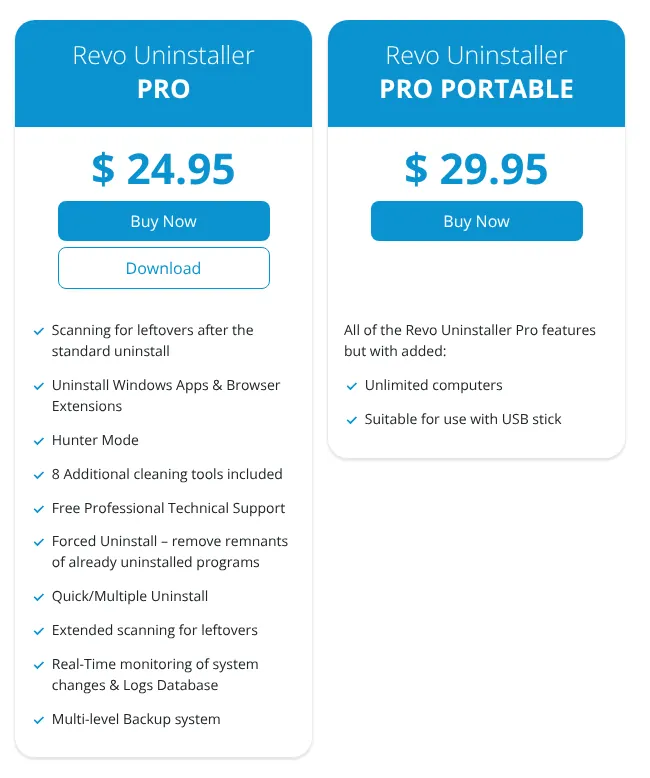
    Revo Uninstaller's purchase page: the Pro card at $24.95 listing its features, and the Pro Portable card at $29.95 for unlimited computers.
    Pro costs $24.95 once; the real-time installation monitor and the backup system appear in the Pro list. Source: revouninstaller.com, captured on 20 Nov 2026.

    Verdict: Revo Uninstaller keeps almost every Total Uninstall habit at the same one-time price, except moving programs to a new PC.


  2. Not found on Wise Program Uninstaller's site: Monitors new installationsCompares system snapshotsSearches the recorded changesExports the recorded changesTransfers programs to another PCCommand-line controlSupports Windows Server

    2. Wise Program Uninstaller

    Similarity to Total Uninstall
    67%
    Starting price
    $19.95 a year (3 PCs)−$5.00 in year one · yearly plan
    Migration effort
    MediumThere is no import. Programs that Total Uninstall monitored are removed by Wise with a leftover scan instead of a recorded log.

    Same as Total Uninstall

    • A deep scan for leftover files, folders and registry entries after each uninstall
    • Force Uninstall for broken programs, and Custom Uninstall for programs missing from the Windows list
    • Full restore of files and registry entries after a forced or custom uninstall
    • Startup programs, services and scheduled tasks managed in the PRO Software Health module

    What you lose

    • Installation monitoring: Wise records no installation, so every removal relies on a scan
    • Moving programs to a new PC
    • Windows Server: the vendor lists Windows 7 to Windows 11 only

    Switching from Total Uninstall to Wise Program Uninstaller

    Wise Program Uninstaller matches 11 of the 18 Total Uninstall features, for a 67% similarity. Its gap is clear: it has no installation monitor. It finds leftovers by scanning the system after the program's own uninstaller has run.

    Its safety net is close to Total Uninstall's. After a forced or custom uninstall, its manual says every removed file and registry entry can be restored. After a normal uninstall, only the deleted leftovers come back.

    The free edition already removes stubborn and hidden programs. PRO adds Software Health, a module that cleans leftover data and manages startup programs, services and scheduled tasks. It costs $19.95 a year for three PCs, billed annually. The page showed it at $14.95 on promotion on the day it was read.

    Choose it if
    You mostly remove programs that were never monitored, and you want an undo button after forced removals.
    Skip it if
    You install new software often and want an exact record of what each installer changed.
    Wise Program Uninstaller's PRO card: features including software health, the list price of $19.95 struck through next to a discounted price, and 1 Year / 3 PCs under the button.
    The struck-through $19.95 is the yearly list price for three PCs; the larger figure next to it is a promotion. Source: wisecleaner.com, captured on 20 Nov 2026.

    Verdict: Wise Program Uninstaller replaces Total Uninstall's scans and forced removals well, but not its installation monitor.

  3. Not found on Bulk Crap Uninstaller's site: Monitors new installationsCompares system snapshotsSearches the recorded changesExports the recorded changesTransfers programs to another PCSupports Windows ServerOnly partly: Backs up removed programs for restoreCleans junk files and registry entriesManages services and scheduled tasks

    3. Bulk Crap Uninstaller

    Open source
    Similarity to Total Uninstall
    63%
    Starting price
    Free (open source)−$24.95 · free
    Migration effort
    MediumNo import exists. Bulk Crap Uninstaller reads the programs installed on the PC and finds leftovers by scanning, without logs.

    Same as Total Uninstall

    • Batch removal of many programs in one run, with leftovers listed before deletion
    • Forced removal of programs whose uninstaller is missing or broken
    • A restore point offered before each uninstall run, and a portable build
    • Commands for unattended removal from saved lists, typed in a console

    What you lose

    • Installation monitoring and everything built on it: logs, search and export of recorded changes
    • Full program backup: only the registry entries of deleted leftovers are backed up
    • A general cleaner: it only removes empty or orphaned program folders

    Switching from Total Uninstall to Bulk Crap Uninstaller

    Bulk Crap Uninstaller is free and open source: its code is public, under the Apache 2.0 licence, and it may be used at home or at work. It reproduces nine of the 18 features in full and three in part, which puts it third at 63%.

    Its strength is volume. It selects many programs, runs their uninstallers one after another with automation, then lists the leftovers. That suits a PC with a long list of programs to remove.

    It does not watch installations. Every removal relies on its scan of files and registry entries. The current version needs Windows 10 or newer, and the project is kept by one developer, Klocman.

    Choose it if
    You remove many programs at once, or you need a free tool that is allowed at work.
    Skip it if
    You count on a recorded log of each installation to remove programs completely.

    Verdict: Bulk Crap Uninstaller is the free choice for removing many programs at once, at the cost of Total Uninstall's installation monitor.

  4. Not found on Uninstall Tool's site: Compares system snapshotsSearches the recorded changesCreates a restore point before uninstallBacks up removed programs for restoreCleans junk files and registry entriesTransfers programs to another PCSupports Windows ServerOnly partly: Uninstalls several programs at onceExports the recorded changesManages services and scheduled tasks

    4. Uninstall Tool

    Similarity to Total Uninstall
    60%
    Starting price
    $24.95 one-time (1 PC)= same price · one-time
    Migration effort
    MediumNo import from another uninstaller is documented. Install Tracker records new installations only from the day Uninstall Tool is set up.

    Same as Total Uninstall

    • Install Tracker, which records in real time what a new installer creates
    • Force Removal of stubborn programs, with leftovers listed before deletion
    • A startup manager, command-line options and a portable licence

    What you lose

    • Batch removal of desktop programs: only Microsoft Store apps run their uninstallers in one batch
    • A restore point or backup before removal: neither is mentioned on crystalidea.com
    • A junk cleaner and moving programs to a new PC

    Switching from Total Uninstall to Uninstall Tool

    Uninstall Tool shares 60% of Total Uninstall's features, level with IObit and Ashampoo. It comes first of the three because its price matches Total Uninstall's: $24.95, paid once, per PC.

    It is built around Install Tracker. The tracker follows an installer in real time, so there is no need to take snapshots before and after. Force Removal handles programs that their own uninstaller cannot remove.

    The safety net is thinner. Its site mentions no restore point and no backup of what it removes. There is no free edition, only a full 30-day trial. Minor updates are free, and a new major version costs existing customers half price.

    Choose it if
    Installation tracking is the feature you use most, and you prefer a one-time licence.
    Skip it if
    You want a backup or restore point before every removal.
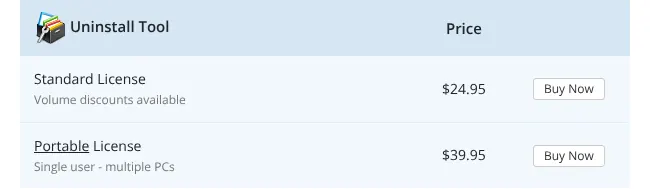
    Uninstall Tool price table: Standard License at $24.95 with volume discounts, and Portable License at $39.95 for a single user on multiple PCs.
    The Standard License at $24.95 covers one PC; the Portable License at $39.95 follows one user across several PCs. Source: crystalidea.com, captured on 20 Nov 2026.

    Verdict: Uninstall Tool matches Total Uninstall's price and its installation tracking, with fewer safety copies.

  5. Not found on IObit Uninstaller's site: Compares system snapshotsSearches the recorded changesExports the recorded changesManages startup programsManages services and scheduled tasksTransfers programs to another PCRuns as a portable versionCommand-line controlSupports Windows ServerOnly partly: Backs up removed programs for restore

    5. IObit Uninstaller

    Similarity to Total Uninstall
    60%
    Starting price
    $19.99 a year (1 PC)−$4.96 in year one · yearly plan
    Migration effort
    MediumThere is no import of another tool's logs. Install Monitor starts recording from the first installation after setup.

    Same as Total Uninstall

    • Install Monitor, which records installation changes for a complete removal later
    • Force Uninstall+ for programs with a missing uninstaller, and batch removal
    • A restore point option before each uninstall, and a junk file cleaner

    What you lose

    • A startup manager and services management, absent from its list of tools
    • Moving programs to a new PC: Software Relocator only moves them to another drive
    • A portable version and command-line control

    Switching from Total Uninstall to IObit Uninstaller

    At 60%, IObit Uninstaller covers eight of the 18 features in full. Its free edition already removes programs in batches and cleans leftovers automatically.

    PRO adds a list of more than 4,000 stubborn programs and deeper leftover scans. Its Free-versus-PRO table also places the real-time monitor in PRO, while the manual does not say so. PRO costs $19.99 a year for one PC at list price, the normal price before discounts.

    On the day of reading, a promotion showed $14.77 for the first year. Software Relocator moves an installed program to another drive of the same PC, not to another computer.

    Choose it if
    You want installation monitoring and a free edition to try first, and a yearly plan suits you.
    Skip it if
    You also manage startup programs and services from your uninstaller.
    IObit Uninstaller PRO price cards: 1 PC with $19.99 struck through under a discounted yearly price, and 3 PCs with $59.93 struck through under another discount.
    The struck-through amounts, $19.99 and $59.93 a year, are the list prices; the large figures are a time-limited promotion. Source: iobit.com, captured on 20 Nov 2026.

    Verdict: IObit Uninstaller keeps installation monitoring and forced removal on a yearly plan, without the startup manager.

  6. Not found on Ashampoo UnInstaller's site: Forces removal without an uninstallerSearches the recorded changesBacks up removed programs for restoreTransfers programs to another PCRuns as a portable versionCommand-line controlSupports Windows ServerOnly partly: Lists leftovers for review before deletion

    6. Ashampoo UnInstaller

    Similarity to Total Uninstall
    60%
    Starting price
    $12 a year (3 devices)−$12.95 in year one · yearly plan
    Migration effort
    MediumNothing imports from Total Uninstall. Forensic analysis builds removal logs for programs installed before Ashampoo was set up.

    Same as Total Uninstall

    • Monitoring and logging of every installation, then removal from the log
    • Snapshots that show every change made to the system between two points in time
    • Exportable logs, a junk cleaner and startup and services management

    What you lose

    • Removal of a program whose uninstaller is broken: not described on ashampoo.com
    • A backup of removed files and registry entries, not found on its pages
    • Windows Server and older Windows: it lists Windows 10 and Windows 11 only

    Switching from Total Uninstall to Ashampoo UnInstaller

    Ashampoo UnInstaller reaches 60% and does 10 of the 18 features in full. It is the only one of the ten with snapshots as a tool of their own. A snapshot is a record of the system at one moment, compared later with a second one.

    Like Total Uninstall, it logs each installation and removes the program from that log. Its forensic analysis also builds a removal log for programs installed before it was set up.

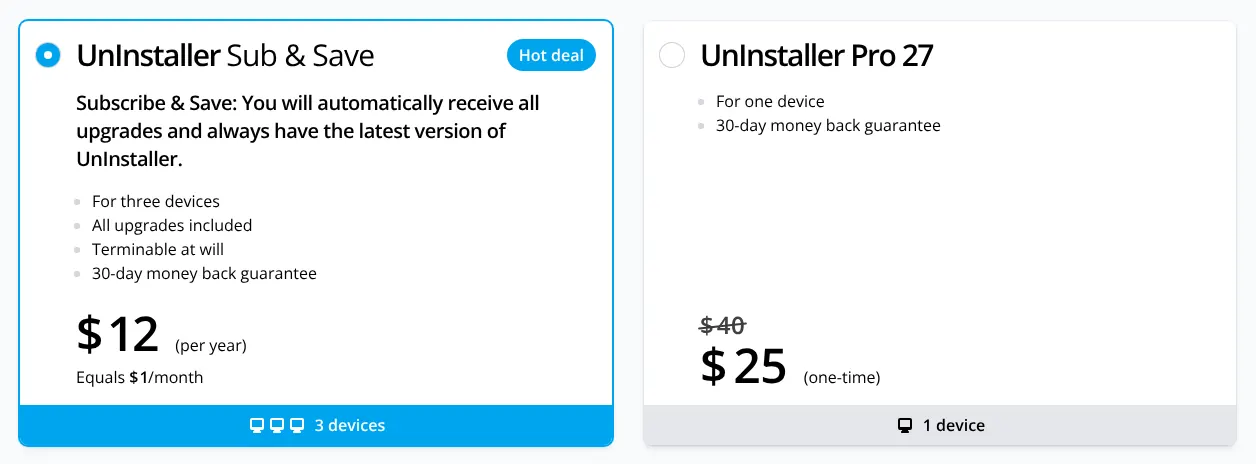
    The cheapest plan is a subscription at $12 a year for three devices, with all upgrades. A one-time Pro 27 licence lists at $40 for one device. Activation needs an internet connection, and the licence is checked online regularly.

    Choose it if
    You compare snapshots in Total Uninstall today, or you want monitoring on three PCs for little money.
    Skip it if
    Your PC stays offline, since activation and regular licence checks need the internet.
    Ashampoo license choice: UnInstaller Sub & Save at $12 per year for three devices with all upgrades, and UnInstaller Pro 27 for one device at $40 struck through, with a lower one-time promotional price.
    The subscription costs $12 a year for three devices; the one-time Pro 27 licence lists at $40 and showed a lower promotional price. Source: ashampoo.com, captured on 20 Nov 2026.

    Verdict: Ashampoo UnInstaller keeps Total Uninstall's logged installs and adds snapshots for $12 a year, but needs Windows 10 or 11 and an online licence.

  7. Not found on Soft Organizer's site: Searches the recorded changesExports the recorded changesCreates a restore point before uninstallManages startup programsManages services and scheduled tasksTransfers programs to another PCRuns as a portable versionCommand-line controlSupports Windows ServerOnly partly: Compares system snapshotsBacks up removed programs for restoreCleans junk files and registry entries

    7. Soft Organizer

    Similarity to Total Uninstall
    53%
    Starting price
    €15.75 one-time (2 PCs)
    Migration effort
    MediumNo import from another uninstaller. Tracked installation starts with the next program installed through Soft Organizer.

    Same as Total Uninstall

    • Tracked installation of programs in the free version, for a clean removal later
    • A search for leftovers, with automatic backups of what it removes
    • Removal of several programs at once, and an export of the program list

    What you lose

    • A restore point: version 3.50 replaced it with a backup of deleted leftovers
    • Services, scheduled tasks and a general junk cleaner, absent from its feature list
    • A portable version and command-line control

    Switching from Total Uninstall to Soft Organizer

    Six of the 18 features are fully there in Soft Organizer, and three in part: 53% in all. Its free version already tracks installations, which Total Uninstall reserves to its Professional edition.

    Its backups cover the leftovers it deletes, and they can be undone. Nothing on chemtable.com says the program itself can be backed up and reinstalled. Older versions created a restore point, but version 3.50 replaced it with these backups.

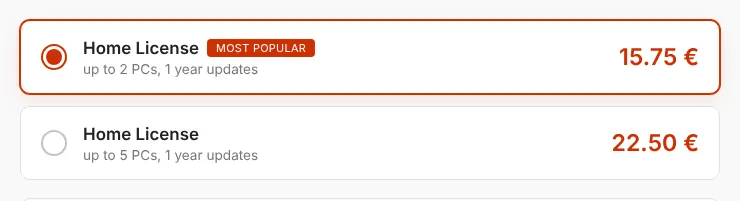
    The Pro version adds a search for leftovers of programs already removed, silent installs and program updates. A Home licence costs €15.75 once for up to two PCs, with one year of updates.

    Choose it if
    You want installation tracking at no cost, or at €15.75 for two PCs with the extras.
    Skip it if
    You manage services and scheduled tasks from your uninstaller, as Total Uninstall allows.
    Soft Organizer order page: Home License for up to 2 PCs with 1 year of updates at 15.75 euros, and Home License for up to 5 PCs at 22.50 euros.
    A Home licence costs 15.75 € for up to two PCs and 22.50 € for up to five, each with one year of updates. Source: chemtable.com, captured on 20 Nov 2026.

    Verdict: Soft Organizer gives installation tracking for free, but leaves out restore points and system tools.

  8. Not found on Glary Utilities's site: Lists leftovers for review before deletionMonitors new installationsCompares system snapshotsSearches the recorded changesExports the recorded changesCreates a restore point before uninstallTransfers programs to another PCCommand-line controlSupports Windows ServerOnly partly: Backs up removed programs for restore

    8. Glary Utilities

    Similarity to Total Uninstall
    50%
    Starting price
    $39.95 a year (3 PCs)+$15.00 in year one · yearly plan
    Migration effort
    MediumNo import exists. Its Uninstall Manager starts from the list of installed programs and checks for leftovers after each removal.

    Same as Total Uninstall

    • Complete removal with leftover checks, forced removal and batch removal
    • A junk cleaner, a startup manager and control of scheduled tasks and some services
    • A free portable version and an export of the program list

    What you lose

    • Installation monitoring, absent from its list of modules
    • Full backup of removed programs: only the uninstall information is saved
    • An automatic restore point before removal: the Restore Center creates one by hand

    Switching from Total Uninstall to Glary Utilities

    Glary Utilities is a suite of more than 20 maintenance tools, and its Uninstall Manager is one of them. Its score against Total Uninstall is 50%.

    The suite covers the cleaning side of Total Uninstall well: junk files, startup programs and scheduled tasks. It does not monitor installations, so every removal relies on its leftover checks.

    The standard version is free, with a free portable copy. Pro costs $39.95 a year for up to three PCs and adds automatic updates and deeper scans. Glarysoft offers a 90-day money-back guarantee.

    Choose it if
    You want one free suite for uninstalling, cleaning and startup control.
    Skip it if
    You want an exact record of what each installer changed.
    Glarysoft store banner: Glary Utilities Pro at $39.95, with the line 1 Year Subscription for Up to 3 PCs under the Buy Now button.
    Glary Utilities Pro costs $39.95 for a one-year subscription covering up to three PCs. Source: glarysoft.com, captured on 20 Nov 2026.

    Verdict: Glary Utilities covers Total Uninstall's cleaning and startup tools in a free suite, but records no installation.

  9. Not found on Uninstalr's site: Monitors new installationsCompares system snapshotsSearches the recorded changesExports the recorded changesBacks up removed programs for restoreCleans junk files and registry entriesManages startup programsManages services and scheduled tasksTransfers programs to another PCCommand-line controlSupports Windows Server

    9. Uninstalr

    Similarity to Total Uninstall
    47%
    Starting price
    $39 one-time (5 PCs)+$14.05 one-time · dearer
    Migration effort
    MediumNo import exists. Uninstalr reads the installed programs and shows every path it would remove before it starts.

    Same as Total Uninstall

    • Every path to be removed shown first, with the option to exclude any of them
    • Removal of programs whose own uninstaller is missing, corrupted or fails
    • A restore point before uninstalling, batch removal and a portable version

    What you lose

    • Removal from an installation record: its monitor is documented only to inspect changes
    • A backup of removed items: the site documents none
    • A startup manager, services control and a junk cleaner

    Switching from Total Uninstall to Uninstalr

    Uninstalr reaches 47%, with seven of the 18 features in full. It is a stand-alone version of the uninstaller inside jv16 PowerTools, from the same Estonian company.

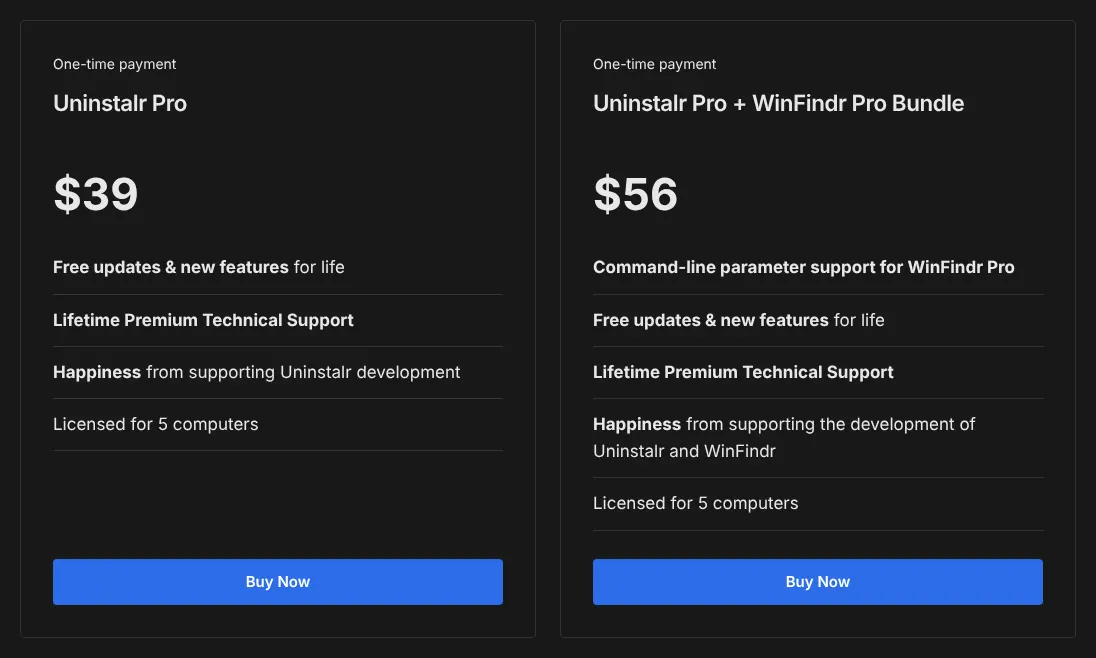
    The free edition has every feature of Pro and may be used at work. Pro adds technical support only. It costs $39 once for five computers, with updates for life.

    Its focus is the removal itself. It lists every file and registry path before deleting and creates a restore point first. Its installation monitor shows what new software created, but the site does not say it can uninstall from that record.

    Choose it if
    You want a free, simple uninstaller that shows exactly what it will delete.
    Skip it if
    You want logs of each installation, or startup and system cleaning tools.
    Uninstalr pricing: Uninstalr Pro at $39 as a one-time payment, licensed for 5 computers with free updates for life, next to a $56 bundle with WinFindr Pro.
    Uninstalr Pro costs $39 once and covers five computers; the free edition has the same features. Source: uninstalr.com, captured on 20 Nov 2026.

    Verdict: Uninstalr is a free, careful remover that shows every path first, but keeps no installation log and no backup.

  10. Not found on Puran Uninstaller's site: Lists leftovers for review before deletionMonitors new installationsCompares system snapshotsSearches the recorded changesExports the recorded changesCreates a restore point before uninstallBacks up removed programs for restoreCleans junk files and registry entriesManages startup programsManages services and scheduled tasksTransfers programs to another PCRuns as a portable versionCommand-line control

    10. Puran Uninstaller

    Similarity to Total Uninstall
    33%
    Starting price
    Free−$24.95 · free
    Migration effort
    MediumNothing carries over. The program lists installed software and removes leftovers with a scan after each uninstall.

    Same as Total Uninstall

    • Leftover removal after the program's own uninstaller
    • Forced removal of software that does not uninstall normally, and batch removal
    • A report of installed programs, and support for Windows 2003 and 2008

    What you lose

    • Installation monitoring, backups and restore points
    • Startup, services and cleaning tools inside the program
    • Recent updates: its own version history stops at version 3.0, from September 2013

    Switching from Total Uninstall to Puran Uninstaller

    With five of the 18 features, Puran Uninstaller ends tenth at 33%. Its site calls it simply Uninstaller, a free utility from Puran Software in India.

    It covers the basics: leftover removal, forced removal and batch removal. Its compatibility list includes Windows 2003 and 2008, which are server versions of Windows.

    Its own version history ends in 2013. It also ships inside the free Puran Utilities suite, updated in January 2026. Support is by email only.

    Choose it if
    You only need a free remover for stubborn programs on an old PC or server.
    Skip it if
    You want a tool that is still updated on its own, or any safety copy before removal.

    Verdict: Puran Uninstaller is a free basic remover, far from Total Uninstall's monitoring and backups.

Comparison table: the 10 alternatives vs Total Uninstall

The table sets the ten tools side by side on four points. Two decide the cost: the price to start and the free edition. Two decide how removals work: a record of each installation, and a restore point before uninstalling.

The 10 Total Uninstall alternatives compared with Total Uninstall
ToolMatchPrice to startFree editionRecords installationsRestore point before removal
REFTotal Uninstall100%$24.95 once (Essential, 1 PC)No, 30-day trialProfessional edition and aboveYes
01Revo Uninstaller87%$24.95 once (Pro, 1 PC)YesYes, in ProYes, in Pro
02Wise Program Uninstaller67%$19.95 a year (PRO, 3 PCs)YesNoYes, optional
03Bulk Crap Uninstaller63%FreeFree, open sourceNoYes, offered before each run
04Uninstall Tool60%$24.95 once (1 PC)No, 30-day trialYes (Install Tracker)Not found on the vendor's site
05IObit Uninstaller60%$19.99 a year (PRO, 1 PC)YesYes (Install Monitor)Yes, optional
06Ashampoo UnInstaller60%$12 a year (3 devices)Yes (UnInstaller FREE)Yes, in the full versionYes, optional
07Soft Organizer53%€15.75 once (up to 2 PCs)YesYes, in the free versionNo, replaced by backups
08Glary Utilities50%$39.95 a year (3 PCs)YesNoBy hand, in the Restore Center
09Uninstalr47%$39 once (5 PCs)Yes, every featureInspection onlyYes
10Puran Uninstaller33%FreeFree onlyNoNo

Prices read on each vendor's site on 2026-11-20, in the vendor's own currency, at list price before any promotion. Total Uninstall's dollar prices are those of its own online store for the United States. Records installations: the tool logs what an installer changes, so the program can be removed from that log.

What a Total Uninstall alternative really costs

The real cost depends on two things: the number of PCs, and whether the licence is paid once or every year. The table gives the first payment for one PC and for three PCs, then three years on one PC.

On one PC, Total Uninstall Essential, Revo Uninstaller Pro and Uninstall Tool all cost $24.95 once. A yearly plan looks cheaper at first. Over three years, Wise PRO comes to $59.85 and IObit PRO to $59.97 at list price.

For three PCs, the gap changes. Ashampoo's $12 subscription and Wise's $19.95 plan already cover three. Total Uninstall's Family licence costs $34.95, but only for one household.

Cost in the vendor's currency, at list price, for the cheapest licence that covers the PCs named
Tool1 PC, first payment3 PCs, first payment1 PC over three years
REFTotal Uninstall$24.95$34.95 (Family, home use only)$24.95, updates for the first year
01Revo Uninstaller$24.95$29.95 (Pro Portable, one user)$24.95, updates for the first year
02Wise Program Uninstaller$19.95$19.95$59.85
03Bulk Crap Uninstaller$0$0$0
04Uninstall Tool$24.95$39.95 (Portable, one user)$24.95, minor updates free
05IObit Uninstaller$19.99$59.93$59.97
06Ashampoo UnInstaller$12$12$36
07Soft Organizer€15.75 (up to 2 PCs)€22.50 (up to 5 PCs)€15.75, updates for the first year
08Glary Utilities$39.95$39.95$119.85
09Uninstalr$0 (free edition) or $39$0 or $39 (5 PCs)$0 or $39, updates for life
10Puran Uninstaller$0$0$0

List prices read on 2026-11-20, promotions excluded. Three years of a yearly plan count three payments at today's list price. Licences paid once keep working after their update period; new versions then cost extra, except where updates are for life.

How to migrate from Total Uninstall in five steps

A switch takes five steps, and the order matters. Total Uninstall's logs and backups work only inside Total Uninstall, so it leaves last.

  1. Remove monitored programs with Total Uninstall

    Open the Monitored programs list and uninstall what you no longer need. Total Uninstall removes them from its recorded log, which no other tool can read.

  2. Export the list of installed programs

    Export the installed and monitored programs list to a file, and keep it as a record of what was on the PC. With Professional, also export the changes each monitored program made.

  3. Copy the backups you want to keep

    Total Uninstall saves its backups as standard zip archives. Copy the ones you may need to another drive, since only Total Uninstall can restore them as programs.

  4. Install the new tool and start monitoring

    Install the alternative and, if it records installations, turn monitoring on before your next install. Programs installed before that day are removed with its leftover scan.

  5. Uninstall Total Uninstall last

    Create a restore point, then uninstall Total Uninstall with the new tool. Its leftover scan also shows you how the new tool works.

When it is better to stay on Total Uninstall

Staying on Total Uninstall is the better choice in four situations. The ranking on this page measures how closely each tool resembles Total Uninstall, not which one suits a given PC.

  • Programs are moved to new PCs. Total Uninstall backs up a program with its settings and restores it on another computer. None of the ten moves a program with its settings, and Revo moves only the log used to uninstall it.
  • A full undo matters. Total Uninstall backs up every removed file and registry entry and restores the whole program. Wise does the same only after forced or custom removals.
  • Servers are part of the job. Total Uninstall lists Windows Server 2016 to 2025. Revo also states Windows Server support, and Puran lists only versions 2003 and 2008.
  • A one-time licence is already paid. Total Uninstall keeps working after its update year. A switch to a yearly plan adds a cost every year.

A user in one of these cases gains more from upgrading Total Uninstall than from a move. Its last version, 7.6.2, came out in December 2025.

How we rank

  1. The order of this page is a similarity index: the share of Total Uninstall's features that each tool reproduces. It measures resemblance, not reliability, support or ease of use.Removing programs 33% · 4 featuresTracking installations 20% · 4 featuresSafety and restore 13% · 2 featuresSystem cleanup 13% · 3 featuresDeployment and admin 20% · 5 features
  2. The comparison uses a grid of 18 Total Uninstall features read on martau.com, worth 30 points in total, in five groups. The groups are removing programs, tracking installations, safety and restore, system cleanup, and deployment. Three features weigh 3: leftover removal, forced removal and installation monitoring. Six weigh 2 and nine weigh 1.
  3. A tool gets 1 for a feature documented on its own site, in any edition, free or paid. A partial feature counts half, such as a backup of the registry only, or services without scheduled tasks. A feature that is absent, or could not be found on the vendor's own site, counts 0.
  4. Sixteen candidates were checked, and the ten highest are listed. Smarty Uninstaller scored 45% and Advanced Uninstaller PRO 33%, but too many of their features could not be checked on their sites. GEEK Uninstaller (25%) and Absolute Uninstaller (23%) score lower. The sites of CCleaner and HiBit Uninstaller could not be read on the day.
  5. Ties go to the smaller gap between the tool's starting price and Total Uninstall's $24.95, then to alphabetical order. At 60%, Uninstall Tool ($24.95) comes before IObit Uninstaller ($19.99) and Ashampoo UnInstaller ($12). Price, migration effort and labels do not change the rank. All sources were read on 20 November 2026.
  6. No entry on this page is sponsored. A sponsored entry is marked Sponsored and holds the position paid for; its percentage stays the computed one.

FAQ

Is there a free alternative to Total Uninstall?

Yes. Bulk Crap Uninstaller, Uninstalr and Puran Uninstaller are free with no time limit, and the first two may be used at work. Soft Organizer's free version even tracks installations, which Total Uninstall reserves to Professional.

Does Total Uninstall stop working after the maintenance year?

No. The licence includes one year of updates, and the program keeps running after it without restriction. You only pay again if you want newer versions.

Which alternative records installations like Total Uninstall?

Revo Uninstaller Pro, Uninstall Tool, IObit Uninstaller, Ashampoo UnInstaller and Soft Organizer. Revo is the closest overall, at 87% similar. Soft Organizer does it in its free version.

Can I keep using Total Uninstall's logs in another tool?

Not that any of the ten vendors documents. Revo imports only logs exported from Revo itself. Remove your monitored programs with Total Uninstall before you uninstall it.

Which alternatives run on Windows Server?

Revo Uninstaller states support for Windows Server editions. Puran Uninstaller lists Windows 2003 and 2008. Total Uninstall itself supports Windows Server 2016 to 2025, so staying is often simpler on a server.