Why Teams Leave Docusign (2026)
Envelope limits are the reason cited most often for leaving Docusign: 9 of the 14 sources read for this page raise them. Cancelling an annual plan comes next, with 7, then customer support, with 6. Price and features kept for higher plans close the list. The sources are Docusign's own pages and eight threads from its customer forum. Two pages of reviews on Capterra and one Hacker News discussion complete them. All were read on November 20, 2026. None gives a share of departures per reason, so the ranking counts how many sources cite each one.
The reasons, ranked
- Cited in 9 of 14 sources
- Cited in 7 of 14 sources
- Cited in 6 of 14 sources
- Cited in 5 of 14 sources
- Cited in 4 of 14 sources
Ranked by the number of sources citing each reason, out of 14 read on November 20, 2026. No published source gives a percentage share, so none is shown.
1. Envelope limits, and charges when a team goes over
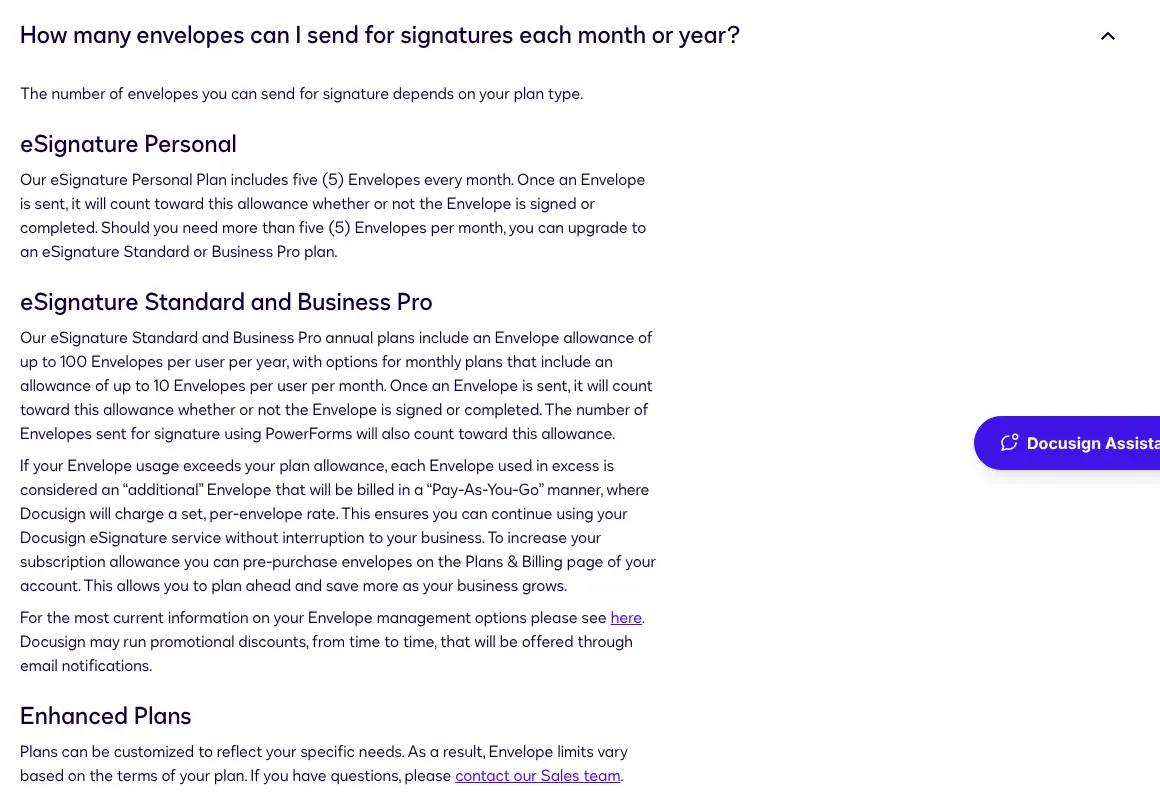
Envelope limits are the reason raised most often: 9 of the 14 sources mention them. An envelope is Docusign's unit of sending: one or more documents sent for signature, counted once whatever the number of signers. Every plan on the pricing page caps how many envelopes a user can send. An envelope counts as soon as it is sent, even if nobody signs it.
The caps depend on the plan. Personal includes 5 envelopes a month. Standard and Business Pro include up to 100 envelopes per user per year on annual billing. On monthly billing, they include up to 10 per user per month (Docusign pricing). Above the allowance, each extra envelope is billed at a set rate, and sending keeps working. The pricing page does not publish that rate. Docusign's Reasonable Use Policy also allows extra fees for envelopes used beyond the plan.
Customers describe the effect on the Docusign Community, the forum where Docusign customers post questions. In January 2026, a customer who had paid for a year of Personal in July 2025 was told that no envelopes were left. A Docusign employee answered that Personal keeps its limit of 5 a month, even on annual billing. In November 2024, a moderator confirmed that unused Personal envelopes do not carry over to the next month. In April 2025, a monthly Standard customer since 2020 wrote that they had been billed $200 in March for envelopes above a limit they had not known about.
Reviewers on Capterra, a software review site, say the same. One complained in November 2026 that an envelope counts as soon as it is sent, even when the recipient never opens it. Another wrote in October 2026 that small teams are penalized by "strict monthly envelope quotas, expensive overage fees". In July 2026, a business customer wrote on the forum that it was paying overage fees while its renewal had been stuck for over a month.
Signs this applies to you
- Docusign has told you that your envelopes are used up before the month or the year ends.
- Your invoice shows charges for envelopes beyond your plan.
- Many of the documents you send are never signed, and each one still uses an envelope.
Alternatives that answer it
SignWell
SignWell's paid plans have no document limit and no charge per document. Light costs $12 a month for one sender, the person who sends documents, billed monthly.

BoldSign
BoldSign Growth gives every user 50 envelopes a month, for $15 per user billed monthly. Its Business plan, at $25 per user a month, has unlimited envelopes with no overage.
2. Annual plans that are hard to leave before the year ends
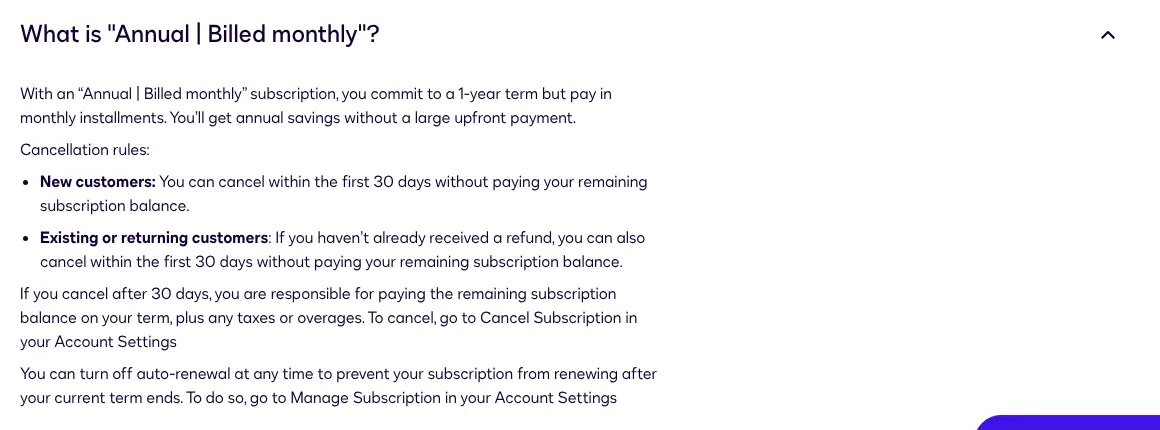
Cancelling is the second reason, raised by 7 of the 14 sources. Most complaints concern annual plans. Docusign sells two annual options: paid upfront, or "Annual | Billed monthly", a one-year commitment paid in monthly installments. With the second one, a customer who cancels after the first 30 days still owes the rest of the year, plus taxes and overages (Docusign pricing).
A worked case shows the cost. Standard on "Annual | Billed monthly" costs $30 per user a month, an annual commitment of $360. A single user who cancels after three months still owes nine installments, or $270. A refund within 30 days of purchase exists, but only once per customer. Monthly plans can be cancelled at any time, with no charge for the next month.
All plans renew by themselves. Docusign's terms promise a renewal notice at least 30 calendar days before a plan longer than a month ends (Docusign terms). To stop the renewal, the customer must cancel at least five business days before the end of the term. A Docusign employee explained on the forum that a cancellation made after the renewal date only takes effect at the end of the new billing cycle.
Forum threads show where it goes wrong. In March 2025, a customer who no longer needed Docusign found the plan already renewed, with the cancellation set for March 2026. In July 2025, a team charged for an extra user found the option to cancel greyed out. In July 2026, a customer who bought an annual Personal plan by mistake was told by the account screen that the plan was not eligible for a refund. Capterra reviewers also find renewal and cancellation "not as simple" as they would like.
Signs this applies to you
- You pay "Annual | Billed monthly", and your needs dropped after the first month.
- Your renewal date is close, and nobody on your team has turned off auto-renewal.
- You expected to stop paying on the day you cancel.
Alternatives that answer it

Zoho Sign
Zoho Sign presents itself as pay-as-you-go: its pricing page says you can upgrade, downgrade or cancel at any time.
SignWell
SignWell states "No long-term contracts" on its pricing page, with plans billed monthly or yearly.
3. Customer support that is hard to reach
Support comes third, raised by 6 of the 14 sources. The complaints are about reaching someone, more than about the answers. Docusign's pricing page lists 24/7 live technical support among the benefits of its Enhanced plans, which are sold through its sales team. The page does not list it for Personal, Standard or Business Pro. Plan changes, billing questions, downgrades and cancellations all go through Docusign Support.
Forum posts describe the gap. In March 2025, a customer trying to stop a renewal wrote that they could not find a support contact or phone number. In July 2026, another customer wrote that the support chat was not working. A business customer waited more than a month for two renewal coordinators to process its renewal. In each thread, a moderator moved the case to a private message or a support case, so the outcome is not public.
Capterra reviews are mixed on this point. One reviewer in March 2026 found support "somewhat unavailable" at the moment it was needed. Another, in June 2026, wrote of getting "the run around" after many requests. A third, in November 2026, called support helpful, while noting that complex issues can take longer than expected.
Signs this applies to you
- Your last billing question needed a support case and several days to get an answer.
- You cannot find a phone number or a chat that works for your plan.
- Your renewal or downgrade is stuck, and messages to your Docusign contact go unanswered.
Alternatives that answer it
BoldSign
BoldSign offers chat, email and ticket support on every plan. It also imports your Docusign templates for free.

DocuSeal
DocuSeal's Pro plan, at $20 per user a month billed monthly, includes an account manager. The free Basic plan has email support.
4. The price per user, and the jump between plans
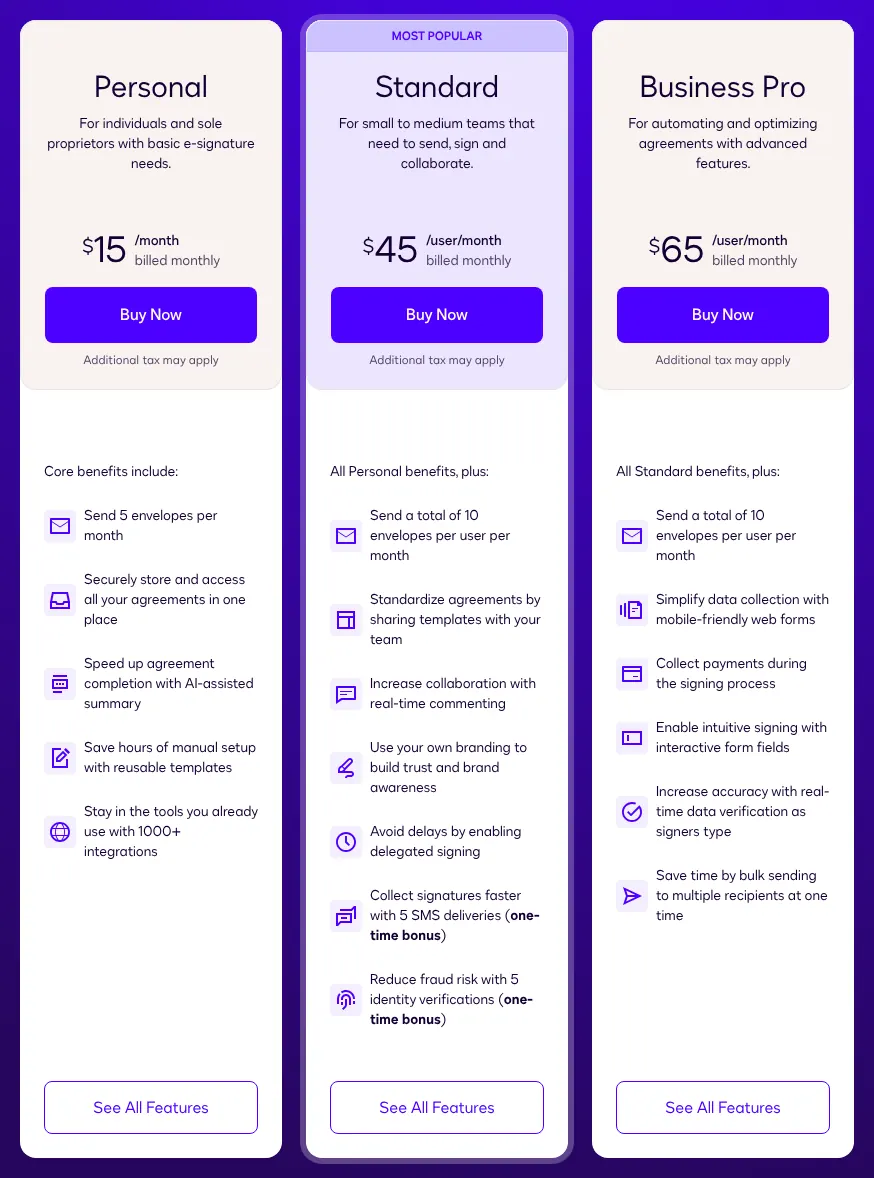
Price is the fourth reason, cited by 5 of the 14 sources. Billed monthly, Standard costs $45 per user a month, and Business Pro $65 (Docusign pricing). Personal costs $15 a month for one user. Annual billing lowers the price: Standard falls to $30 per user a month over a one-year commitment, or $25 when paid upfront.
The cost grows with each user. A team of three on monthly Standard pays $135 a month. Bulk send, which sends one document to a list of people at once, is only on Business Pro, so a team that needs it pays $65 per user. Capterra reviewers write that the plans "scale up quickly" with more features or volume. Several find the cost high for solo workers and small teams.
Returning customers raise a separate point. In June 2026, a forum post claimed that Docusign shows higher prices to customers who come back to renew. Docusign's pricing page states that plans, pricing and packaging may be valid for new customers only. On Hacker News, a discussion site, a user wrote in 2023 that they had to pay $45 per user a month to send a single document.
Signs this applies to you
- You send a few documents a month, and you pay for several users.
- You moved up to Business Pro for a single feature.
- Your renewal quote is higher than the price on Docusign's public pricing page.
Alternatives that answer it
BoldSign
BoldSign Growth costs $15 per user a month, billed monthly, which is −$30 a user compared with Docusign Standard. It includes 50 envelopes per user a month.
DocuSeal
DocuSeal Pro costs $20 per user a month, billed monthly, which is −$25 a user compared with Docusign Standard. It allows unlimited signature requests.
5. Features kept for higher plans
Features reserved for higher plans close the list, with 4 of the 14 sources. Bulk send, which sends one document to a list of people so each gets their own copy, starts on Business Pro (Docusign pricing). So do web forms (forms that people fill in and sign from a link) and payment collection during signing. Single sign-on (one company login for every employee) is only on Enhanced plans, priced on request.
Custom branding, with a company's logo and colours, starts on Standard. A Capterra reviewer wrote in July 2026 that custom branding and bulk sending are kept for more expensive plans. On Hacker News in 2023, a user named batch envelopes, another name for bulk send, as a feature Docusign "charges a lot of money for".
The result is a price step for one feature. A team that only needs bulk send moves from $45 to $65 per user a month on monthly billing. For a team of three, the step costs $60 more a month.
Signs this applies to you
- You pay for Business Pro mainly to send one document to many people.
- You collect form answers or payments in another tool because your plan lacks them.
- Your IT team asks for single sign-on, and Docusign answers with an Enhanced quote.
Alternatives that answer it
DocuSeal
DocuSeal's Pro plan includes bulk send from a spreadsheet, at $20 per user a month billed monthly.
BoldSign
BoldSign sells bulk send as an add-on (an option paid on top of the plan) on its Business and Premium plans, at $0.25 per envelope, after an extra verification.
Before you leave: can it be fixed inside Docusign?
Some reasons have a fix inside Docusign, others do not. Envelope limits and price can be managed by choosing the right plan and billing. Cancelling can be planned with dates. Support and the features kept for higher plans depend on the plan bought.
Envelope limits
Partly. On Standard and Business Pro, envelopes can be bought in advance from the Plans & Billing page of the account, which avoids overage at an unknown rate. A Docusign moderator explained that Personal cannot be topped up this way. A sender who needs more than 5 envelopes a month has to move to Standard.
Cancelling
Yes, with dates. Auto-renewal can be turned off at any time in the account settings, and the plan then stops at the end of its term. A refund is possible within 30 days of purchase, once per customer. After that, a monthly plan stops at the end of the paid month, and an annual plan is owed until the end of its year.
Support
Partly. Plan changes, billing and cancellations go through Docusign Support. On the forum, moderators ask customers to open a support case or send a private message for billing questions. The pricing page lists 24/7 live technical support only with the Enhanced plans.
Price
Partly. Annual billing paid upfront brings Standard from $45 to $25 per user a month. The catch is the commitment: once the first 30 days have passed, the year is owed. Personal, at $15 a month, can be enough for one sender who needs 5 envelopes a month or fewer.
Features kept for higher plans
No fix inside a lower plan. Bulk send, web forms and payment collection need Business Pro. Single sign-on needs an Enhanced plan, on quote.
What a move off Docusign involves
A move takes five steps, and the dates come first, because an annual plan keeps billing until its end. The steps follow the documentation of Docusign, BoldSign, Zoho Sign, DocuSeal and SignWell. How long a full move takes is not documented, and is not estimated here.
Find your renewal date and your billing type
Open your plan in your account settings, and note its end date and its billing type. On a monthly plan, you can cancel at any time and stop paying the next month. On "Annual | Billed monthly", the rest of the year stays due after the first 30 days. Docusign must send you a renewal notice at least 30 days before a plan longer than a month ends.
Turn off auto-renewal early
Turn off auto-renewal in Manage Subscription, in your account settings. The terms ask you to cancel at least five business days before the end of the term. Do it well before that deadline: once the renewal date has passed, a cancellation only applies at the end of the new cycle.
Download your signed documents
Docusign allows you to download envelopes, documents and data for use in other systems. It can also export the data of your documents to a CSV file (a spreadsheet file that most tools can open). Do it while your plan is still active. Docusign also keeps a free account for people who mainly sign and store agreements, and free accounts do not expire.
Move your templates
Templates are your reusable documents, with their signature fields already placed. Zoho Sign imports Docusign template exports on its Professional plan and above. DocuSeal and BoldSign both import Docusign templates directly. SignWell has no direct import: you upload the PDF or Word file and place the fields again.
Move the signed archive, if you need it in the new tool
BoldSign can migrate your signed documents from Docusign if your account has production API access. An API is the connection through which one piece of software exchanges data with another. BoldSign says this usually takes 2 to 3 business days. Otherwise, keep the files you downloaded in your own storage.
FAQ
What is the main reason people leave Docusign?
Envelope limits: 9 of the 14 sources read for this page raise them, from the cap on each plan to the charges above it. Cancelling an annual plan comes next, with 7, then support, with 6. None of the sources gives a share of departures, so the ranking counts sources.
What happens when you go over your Docusign envelope limit?
On Standard and Business Pro, each extra envelope is billed at a set per-envelope rate, and you can keep sending. The pricing page does not publish that rate. On Personal, the limit is 5 envelopes a month, and a Docusign moderator said extra envelopes cannot be added to it.
Can you cancel a Docusign annual plan and get a refund?
Within 30 days of purchase, yes, but only once per customer. After 30 days, an "Annual | Billed monthly" plan still owes the rest of the year, plus taxes and overages. To stop the renewal, turn off auto-renewal in your account settings, at least five business days before the term ends.
Does Docusign have a free plan for sending documents?
Not on the pricing page: its plans start at Personal, $15 a month billed monthly, with 5 envelopes a month. Docusign also has a free account, designed mainly for people who sign and store agreements. It does not expire, but Docusign says it has many restrictions and is limited to one user. Your signers never need an account to sign what you send them.
Do unused Docusign envelopes roll over to the next month?
Not on Personal: a Docusign moderator confirmed that its 5 envelopes reset each month. On annual Standard and Business Pro, the allowance is counted per year, up to 100 envelopes per user.
When is it better to stay on Docusign?
Stay when your volume fits your plan and your annual term still has months to run, because cancelling will not stop the payments. If you are on "Annual | Billed monthly" Standard with nine months left, you still owe $270 per user. Plan the move for your renewal date instead.