top10alternative

Top 10 HubSpot Alternatives (2026)

The closest alternative to HubSpot is EngageBay, which does all 18 HubSpot functions compared here, from $14.99 per user a month. Vtiger, Odoo CRM and Bitrix24 follow at 97%. They start at $15 per user, $38.90 per user and $69 for five users. This page ranks ten CRM suites by how much of HubSpot each one replaces, with prices read on each vendor's site.

Short answer · top 3 of 10

See all 10 ↓
  1. EngageBayClosest match
    100%From $14.99/user/moMigration Low
    Visit
  2. 97%From $15/user/moMigration Medium
    Visit
  3. Odoo CRMEuropean
    97%From $38.90/user/moMigration Medium
    Visit

Ranked by similarity to HubSpot on 18 HubSpot functions. Prices in USD, billed monthly, regular price without new-customer offers.

HubSpot in three lines

What it is
HubSpot is a CRM (customer relationship management software: the shared record of every contact, company and deal) with marketing, sales, service and content tools around it. It is based in Cambridge, Massachusetts.
Price
Free tools for up to 2 users. Starter, which bundles all five hubs, costs $20 per seat (one paid login) a month billed monthly. New customers see $10 on the pricing page, an offer for a limited time.
Used for
Keeping contacts and deals in one place, sending marketing email, capturing leads with forms and chat, and answering support tickets.

Why teams look for a HubSpot alternative

Four limits written on HubSpot's own pages explain most searches for an alternative. Each one has tools on this page that answer it.

The price is per seat, and the low price is for new customers

HubSpot Starter costs $20 per seat a month (a seat is one paid login). The $10 shown in large type is a discount for new customers only. A team of five pays $100 a month at the regular price. Bitrix24 charges $69 for five users, and Freshsales $55.

The free tools stop at 1,000 records

HubSpot's free CRM holds up to 1,000 contact and company records. Beyond that, a paid subscription is needed. Nutshell includes unlimited contacts on every plan, and Zoho CRM Standard holds 100,000 records.

Marketing contacts are counted apart

Starter includes 1,000 marketing contacts, the people a team can send marketing email to. Brevo prices its plans by email volume instead, from $9 a month for 5,000 emails.

Branding stays on the free tools

Free HubSpot email, landing pages (single web pages built to collect sign-ups), live chat and meeting links carry HubSpot branding. EngageBay and Vtiger include landing pages, forms and campaigns from their first paid plan, at about $15 per user, below HubSpot Starter's $20. EngageBay's Basic plan still lists its 3,000 emails as Branded Emails, so the point is worth checking there too.

How to choose a HubSpot alternative

Five checks bring the ten tools down to one or two. They come in the order that removes the most tools first.

1. List the hubs you really use

Start with what you use today: sales only, or marketing and support too. If you only use deals and email, Zoho CRM, Freshsales and Nutshell cost $20 or less per user. If you also send newsletters and answer tickets, look at EngageBay, Vtiger and Odoo CRM, which keep all three in one account.

2. Count the people who need a login

Most tools here charge per user, like HubSpot. Bitrix24 charges one price for a group of users: $69 a month covers 5 users. Its next plan covers 50. Keap includes 2 users for $320 and charges $39 for each extra one. For a team of five, the order of prices changes.

3. Check what the entry plan leaves out

Low prices often hide one missing piece. EngageBay Basic stops at 500 contacts, Nutshell Foundation at 100 open leads. Salesforce Starter has no booking links without a $50 add-on. Read the plan list of your choice for the two or three functions you use daily.

4. Decide how your history moves

Zoho CRM, EngageBay, Freshsales and Bitrix24 document a HubSpot import or sync. Nutshell documents a CSV route (spreadsheet files exported from HubSpot) and can do the import for you. With Salesforce, Odoo and Vtiger, plan a CSV import of contacts, companies and deals.

5. Check where the data is kept

If your customers are in Europe, check the hosting region. Brevo keeps its servers in the EU. Odoo offers a choice of region, Europe included. Bitrix24 hosts EU accounts in Frankfurt.

Which HubSpot alternative for which situation

  • You use HubSpot's marketing, sales and service tools togetherEngageBay · All 18 functions, $14.99 per user a month
  • You want one suite for up to 15 people at a lower priceVtiger · $15 per user, campaigns and cases included
  • You also need invoicing or stock, with data in EuropeOdoo CRM · Every app for $38.90 per user
  • Your team has five people or moreBitrix24 · $69 a month covers 5 users
  • You expect to grow into a large sales organizationSalesforce · Starter Suite at $25 per user
  • You want chat and forms included at HubSpot's priceNutshell · $19 per user, unlimited contacts
  • Email campaigns matter more than the sales pipelineBrevo · $9 a month for one user
  • You want automation built for you by expertsKeap · $320 a month for 2 users
  • You want the same price and a free, guided moveZoho CRM · $20 per user, HubSpot import built in
  • Your team calls and emails prospects all dayFreshsales · $11 per user, phone and chat included

The 10 alternatives

by similarity to HubSpot
What can you not lose?Tick the HubSpot functions you need. The tools where a ticked function was not found fade, with the reason.
CRM records
Sales email and meetings
Marketing and lead capture
Conversations and service
Reporting and platform

The ranks do not change: they measure how much of HubSpot each tool replaces.

  1. 1. EngageBay

    Closest match
    Similarity to HubSpot
    100%
    Starting price
    $14.99/user/mo−$5.01/mo · cheaper
    Migration effort
    LowEngageBay has a built-in HubSpot sync that pulls records with a HubSpot private app key, and its pricing page offers a free migration service from any platform.

    Same as HubSpot

    • Contacts, companies, deals on a board, tasks and custom fields (fields a team adds itself)
    • Marketing email, landing pages and web forms in the same account
    • Website live chat, a chatbot and a help desk with tickets
    • Meeting booking, a mobile app, an API (a door other software uses to read and write the data) and an integrations directory

    What you lose

    • Two-way inbox sync (every email in Gmail or Outlook copied both ways): only on Pro, at $119.99 per user a month
    • Room on the entry plan: Basic holds 500 contacts, where HubSpot Starter includes 1,000 marketing contacts
    • Custom reports: struck out on Basic and Growth, included on Pro

    Switching from HubSpot to EngageBay

    EngageBay is built on the same idea as HubSpot: marketing, sales and support tools in one account. It does all 18 HubSpot functions compared on this page, so it reaches 100%. Its All-in-One Basic plan is priced at $14.99 per user a month, $5.01 under HubSpot Starter.

    The limits sit in the volumes. Basic holds 500 contacts and 10 landing pages. Growth, at $64.99, raises the contact count to 5,000. The full two-way link with Gmail or Outlook needs Pro, at $119.99 per user. On the Monthly tab, EngageBay's Basic card prints "paid yearly" under the price, while the Yearly tab shows $13.79. So the $14.99 may be a yearly commitment, not a month-to-month price.

    The move is the easiest on this page. EngageBay documents a HubSpot sync: a private key (a code that gives EngageBay access to the HubSpot account) created in HubSpot is pasted into EngageBay, then the fields are mapped. Its pricing page also promises a free migration service from any platform.

    Choose it if
    You use HubSpot's marketing, sales and service tools together and want them all for less, with fewer than 500 contacts or a budget for Growth.
    Skip it if
    Your team lives in Gmail or Outlook and needs every email logged both ways without paying for Pro.
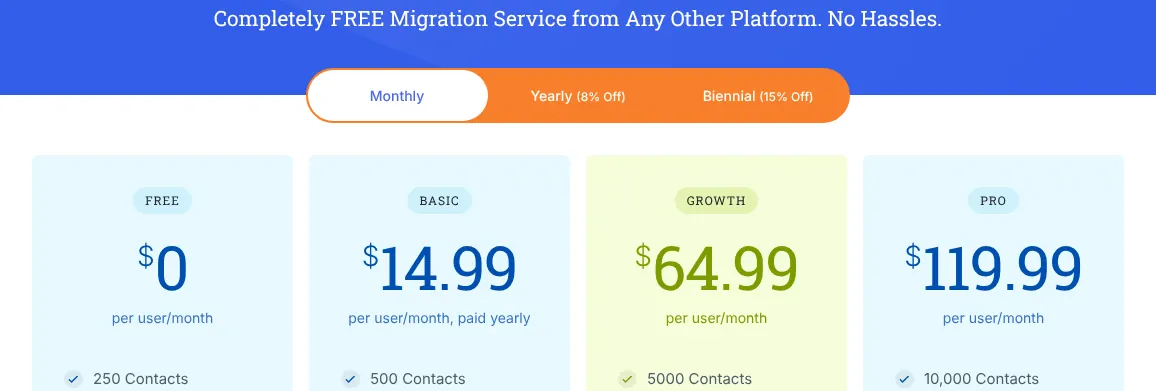
    EngageBay's All-in-One plans on the Monthly tab: Free at 0, Basic at 14.99 per user per month with the line paid yearly, Growth at 64.99 and Pro at 119.99.
    The Monthly tab is selected, yet the Basic card reads paid yearly under 14.99; the Yearly and Biennial tabs show lower prices. Source: engagebay.com, captured on 18 Nov 2026.

    Verdict: EngageBay copies HubSpot's all-in-one layout for $5.01 less per user, within 500 contacts on Basic or on the Growth plan.

  2. Only partly: Website live chat

    2. Vtiger

    Similarity to HubSpot
    97%
    Starting price
    $15/user/mo−$5/mo · cheaper
    Migration effort
    MediumVtiger offers free migration services from another CRM and imports CSV files (spreadsheet exports), but HubSpot is not among the migrations it lists.

    Same as HubSpot

    • Contacts, organizations, a sales pipeline, tasks and custom fields
    • Marketing campaigns, a landing page (a single page built to collect sign-ups) and web forms on One Growth
    • Support cases (tickets), dashboards, a mobile app and personal booking pages
    • A chatbot in the One AI edition (Vtiger's name for a plan)

    What you lose

    • Live chat as a clear part of the plan: the edition comparison lists it as a paid extra, while the pricing page puts Live Chat in One Professional
    • Email volume: One Growth sends 5,000 marketing emails a month
    • Size: One Growth stops at 15 users and 100,000 records

    Switching from HubSpot to Vtiger

    Vtiger covers 97% of HubSpot. It is a suite of sales, marketing and help desk apps with one login, like HubSpot's hubs. At $15 per user, One Growth undercuts HubSpot Starter by $5 and already includes campaigns, cases and inbox sync.

    Live chat is the one gap, and Vtiger's pages disagree about it. The pricing page lists Live Chat under One Professional, at $42. The edition comparison marks it as a paid extra on every edition. The point is worth asking Vtiger in writing.

    One Growth is built for small teams: 15 users at most and 100,000 records. Vtiger offers free migration services from another CRM. HubSpot is not on its list of frequent migrations, so plan a CSV import of contacts, companies and deals.

    Choose it if
    You want sales, marketing and support in one subscription for a team of up to 15, and you can live with a CSV import.
    Skip it if
    Website chat is central to how you sell or support customers.
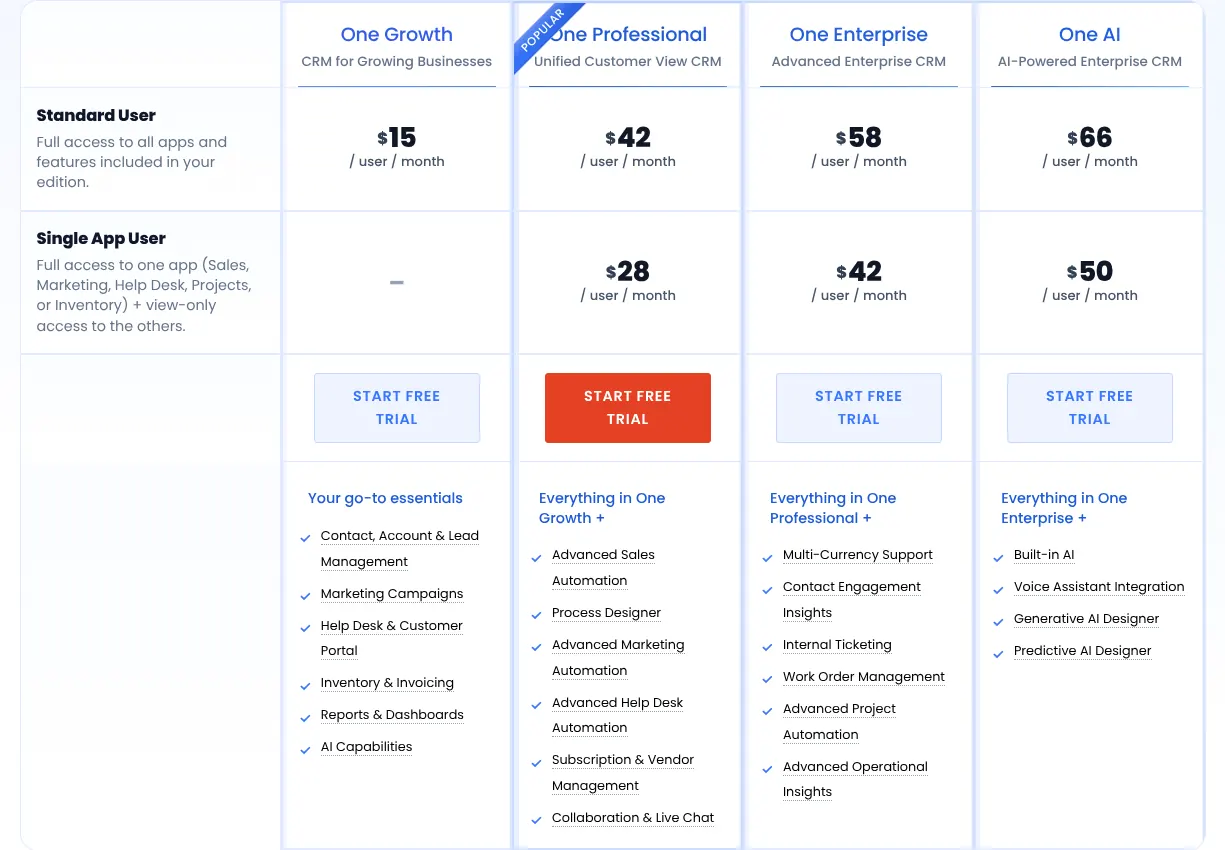
    Vtiger's paid editions: One Growth at 15, One Professional at 42, One Enterprise at 58 and One AI at 66 dollars per user per month.
    The Standard User row gives each edition's monthly price; Live Chat appears in the One Professional list. Source: vtiger.com, captured on 18 Nov 2026.

    Verdict: Vtiger reproduces nearly all of HubSpot for $15 a user, with a doubt on live chat and a ceiling of 15 users on its entry edition.

  3. Only partly: Email open and click tracking

    3. Odoo CRM

    European
    Similarity to HubSpot
    97%
    Starting price
    $38.90/user/mo+$18.90/mo · pricier
    Migration effort
    MediumOdoo imports CSV and Excel files, with a documented section on importing from another application; no HubSpot importer was found.

    Same as HubSpot

    • Contacts, companies, a pipeline board, activities and custom fields
    • Email marketing, a website builder, forms and appointment booking, all apps of the Standard plan
    • Live chat with a chatbot, and a helpdesk with tickets
    • Dashboards and a mobile app

    What you lose

    • Open and click tracking of one-to-one sales emails: Odoo documents open and click rates for Email Marketing campaigns only
    • The API and the third-party app store on Standard: both need the Custom plan, at $76.20 per user
    • A low price for one person: $38.90 a month against HubSpot's $20

    Switching from HubSpot to Odoo CRM

    Odoo is a Belgian suite of business apps, and its CRM is one of them. The Standard plan includes every app, so marketing email, the website, live chat and the helpdesk come with it. That reaches 97% of HubSpot. Open and click rates are reported for email campaigns, not for one-to-one sales emails.

    Its regular monthly price for Standard is $38.90 per user. The pricing page shows $31.10 next to it, a discount for the first 12 months, on the users of the first order. A connection to other software through the API needs Custom, at $76.20 per user.

    Odoo is headquartered in Belgium, and each customer chooses the region where the data is hosted, Europe included. It has no HubSpot importer. Records move as CSV or Excel files through Odoo's import tool.

    Choose it if
    You also need invoicing, stock or projects, and want them in the same system as your CRM.
    Skip it if
    Your sales team relies on knowing when a prospect opens a one-to-one email.

    Verdict: Odoo replaces HubSpot and much of the back office with European hosting, at nearly twice HubSpot's price per user.

  4. Only partly: Chatbot builderSupport ticketing

    4. Bitrix24

    Similarity to HubSpot
    97%
    Starting price
    $69/mo for 5 users+$49/mo · pricier for one user
    Migration effort
    MediumBitrix24 publishes its own HubSpot Migrator app; the objects it moves are not documented on the pages read, and CSV import works on every plan.

    Same as HubSpot

    • Contacts, companies, deal pipelines, tasks and custom fields
    • Website live chat on every plan, the free one included
    • Web forms, landing pages and marketing email (bulk email from Standard)
    • Dashboards, a mobile app and a marketplace of 850+ apps

    What you lose

    • Built-in tickets: support requests run through chat channels and CRM records, with help desk modules sold as Market apps
    • A built-in chatbot builder: bots are installed from the Bitrix24 Market
    • The API on the regular plans: REST API access (the door other software uses to exchange data) comes only with the Vibe+ version of each plan, from $89 a month for five users

    Switching from HubSpot to Bitrix24

    Bitrix24 does 97% of what HubSpot does, with a different price model. It charges per organization, not per person. Basic costs $69 a month for 5 users, so a team of five pays less than the $100 HubSpot Starter costs.

    For one person, the sum goes the other way: $69 against $20. Standard, at $144 a month, takes 50 users and adds bulk marketing email and the dashboard editor. Meeting booking links come with Professional, at $289. Bitrix24's site contradicts itself on the free plan: its card says 1 to 2 users, its FAQ says unlimited users.

    Bitrix24 also covers staff work: its Standard plan lists unlimited projects and boards. A HubSpot user finds the CRM inside a larger tool, which takes time to learn. Bitrix24 publishes its own HubSpot Migrator app to move the data.

    Choose it if
    Five or more people need the CRM and you also want staff projects and tasks in the same place.
    Skip it if
    You work alone or in pairs, where a flat $69 a month costs more than HubSpot's $20 per seat.
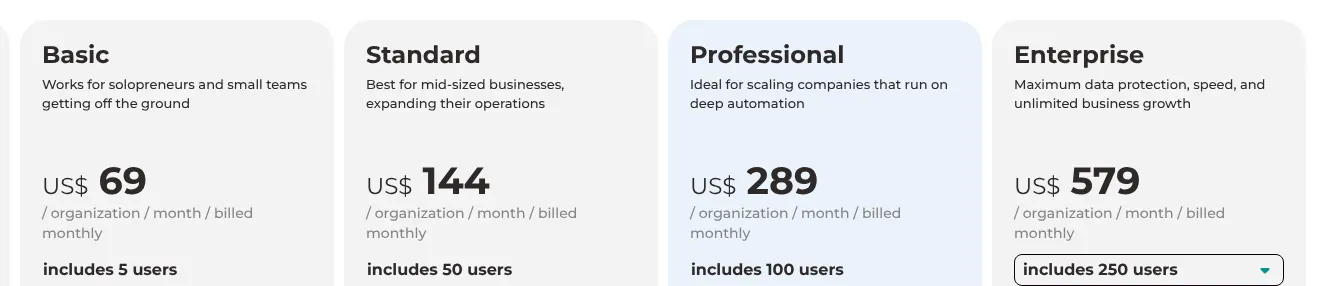
    Bitrix24's plans billed monthly: Basic at US$ 69 per organization for 5 users, Standard at 144 for 50, Professional at 289 for 100 and Enterprise at 579.
    Each card shows one price per organization billed monthly and the users it includes: US$ 69 covers 5 users on Basic. Source: bitrix24.com, captured on 18 Nov 2026.

    Verdict: Bitrix24 matches 97% of HubSpot and gets cheaper as the team grows, since one flat price covers five or fifty users.

  5. Only partly: Meeting booking linksChatbot builder

    5. Salesforce

    Similarity to HubSpot
    96%
    Starting price
    $25/user/mo+$5/mo · pricier
    Migration effort
    MediumSalesforce's Data Import Wizard loads CSV files of up to 50,000 records at a time; no HubSpot importer was found on salesforce.com.

    Same as HubSpot

    • Accounts (companies), contacts, a drag-and-drop opportunity board and tasks
    • Marketing email, landing pages and lead capture forms in Starter Suite
    • Support cases (tickets), dashboards and a mobile app
    • Gmail and Outlook email sync (emails copied into the CRM record)

    What you lose

    • Meeting booking links: part of Sales Engagement, an add-on at $50 per user a month
    • A website chatbot: only in Service Cloud Advanced, a separate product billed yearly
    • Live chat and the AgentExchange app store: Pro Suite, at $100 per user a month billed annually

    Switching from HubSpot to Salesforce

    Salesforce reaches 96% of HubSpot. Its Starter Suite puts sales, service and marketing email in one plan, much like HubSpot Starter. The price is $25 per user, billed monthly or annually: $5 above HubSpot.

    The entry plan has tight edges. Starter sends 2,000 marketing emails a month, and each extra 1,000 costs $10. API access is an add-on (an option billed on top of the plan) at $25 per user. Live chat and the AgentExchange store need Pro Suite, at $100 per user and only on a yearly contract.

    Salesforce has no HubSpot importer on its site. The Data Import Wizard reads CSV files of contacts, accounts and opportunities, up to 50,000 records at a time. Free Suite, for up to two users, is a way to test the layout first.

    Choose it if
    You plan to move up to Pro Suite or other Salesforce products later and want to start on that platform now.
    Skip it if
    You rely on HubSpot's meeting links and website chat and do not want to pay for add-ons or a yearly contract.

    Verdict: Salesforce keeps 96% of HubSpot for $5 more per user, but chat, booking links and the API cost extra on its entry plan.

  6. Only partly: Marketing email campaignsSupport ticketing

    6. Nutshell

    Similarity to HubSpot
    94%
    Starting price
    $19/user/mo−$1/mo · cheaper
    Migration effort
    LowNutshell's help centre documents an import of HubSpot contacts, companies and deals exported as CSV files, and its support team can run the import.

    Same as HubSpot

    • Unlimited contacts, a drag-and-drop lead board, reminders and custom fields
    • Web chat, an AI chatbot, a form builder and landing pages on every plan
    • Gmail and Outlook sync, dashboards and iOS and Android apps
    • An integrations directory and a public API

    What you lose

    • Marketing email at volume: every plan includes 150 sends a month, then campaigns are paid by contact count
    • Tickets: support cases live in Zendesk or Freshdesk and sync into Nutshell
    • Email tracking and the meeting scheduler on the entry plan: both start with Pro, at $49

    Switching from HubSpot to Nutshell

    Nutshell does 94% of what HubSpot does, for $1 less per user. Foundation is $19. It already includes web chat, an AI chatbot, forms and landing pages, which HubSpot spreads across its hubs.

    The catch is in the details of Foundation. It holds 100 open leads and one pipeline. Email open tracking and the booking link for meetings arrive with Pro, at $49. Marketing email becomes a separate subscription above 150 sends a month.

    The move is well documented. A help article explains how to export contacts, companies and deals from HubSpot and import them. Nutshell's support team, or its partner Import2, can run the import.

    Choose it if
    You mainly sell, with a small marketing list, and want chat and forms included at about HubSpot's price.
    Skip it if
    Newsletters to thousands of contacts are a core part of your HubSpot use.
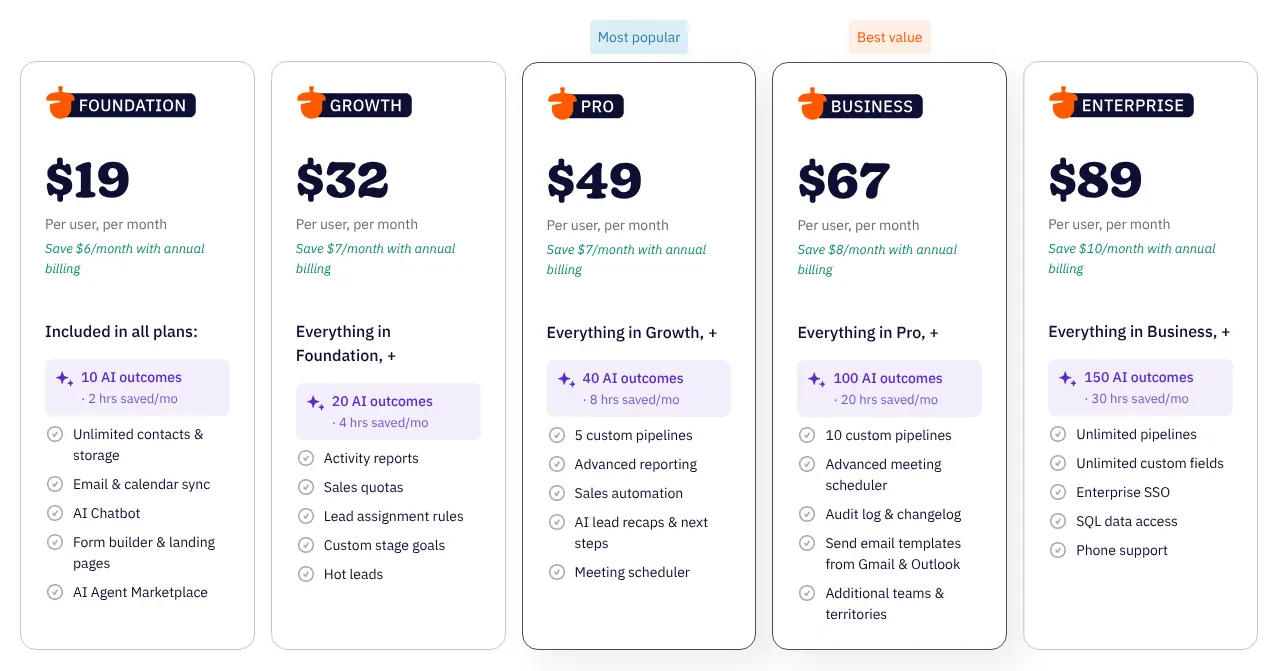
    Nutshell's five plans: Foundation at $19, Growth at $32, Pro at 49, Business at 67 and Enterprise at 89 per user per month.
    Each card reads Per user, per month, with the saving for annual billing printed underneath: these are the monthly prices. Source: nutshell.com, captured on 18 Nov 2026.

    Verdict: Nutshell matches 94% of HubSpot at a similar price and includes chat and forms, but heavy email marketing costs extra.

    Visit nutshell.comPartner link · may earn us a commission
  7. Only partly: Email open and click trackingReusable sales email templatesiOS and Android app

    7. Brevo

    Cheapest
    Similarity to HubSpot
    93%
    Starting price
    $9/mo−$11/mo · cheaper
    Migration effort
    MediumBrevo imports contacts in bulk; its two-way HubSpot integration is set up by its Enterprise team, and its help centre could not be read.

    Same as HubSpot

    • Contacts, companies and deals on a drag-and-drop pipeline
    • Marketing email, forms, live chat and a meeting booking page
    • Gmail inbox connection, dashboards and an app marketplace
    • Support tickets with the Sales Advanced package

    What you lose

    • Open and click tracking of one-to-one sales emails: documented for campaigns only
    • Sales email templates and a CRM mobile app: not stated on the pages read
    • Seats: Starter takes one sales user; a team needs Standard, at $18, plus $31 a month per sales user for Sales Essentials

    Switching from HubSpot to Brevo

    Brevo is an email marketing platform that sells its sales CRM as separate packages. It covers 93% of HubSpot and has the lowest entry price of the ten. Starter costs $9 a month for one user. Its free sales package, Sales Free, adds one pipeline and up to 50 open deals.

    Teams pay more. Starter admits a single sales user, so a team needs Standard, at $18, which takes up to five. Each sales user then needs a Sales Essentials seat, at $31 a month. Tickets need Sales Advanced, sold with the Professional plan at $499 a month. Landing pages also start on Standard. Brevo is based in Paris and keeps its servers in the EU.

    Moving is partly manual. Brevo imports contacts in bulk. Its HubSpot integration (a connection between the two tools) brings in contacts, companies and deals, and Brevo's Enterprise team sets it up.

    Choose it if
    Email campaigns are your main use of HubSpot and one or two people handle sales.
    Skip it if
    You run a sales team of more than five people, or you need tickets without a $499 plan.
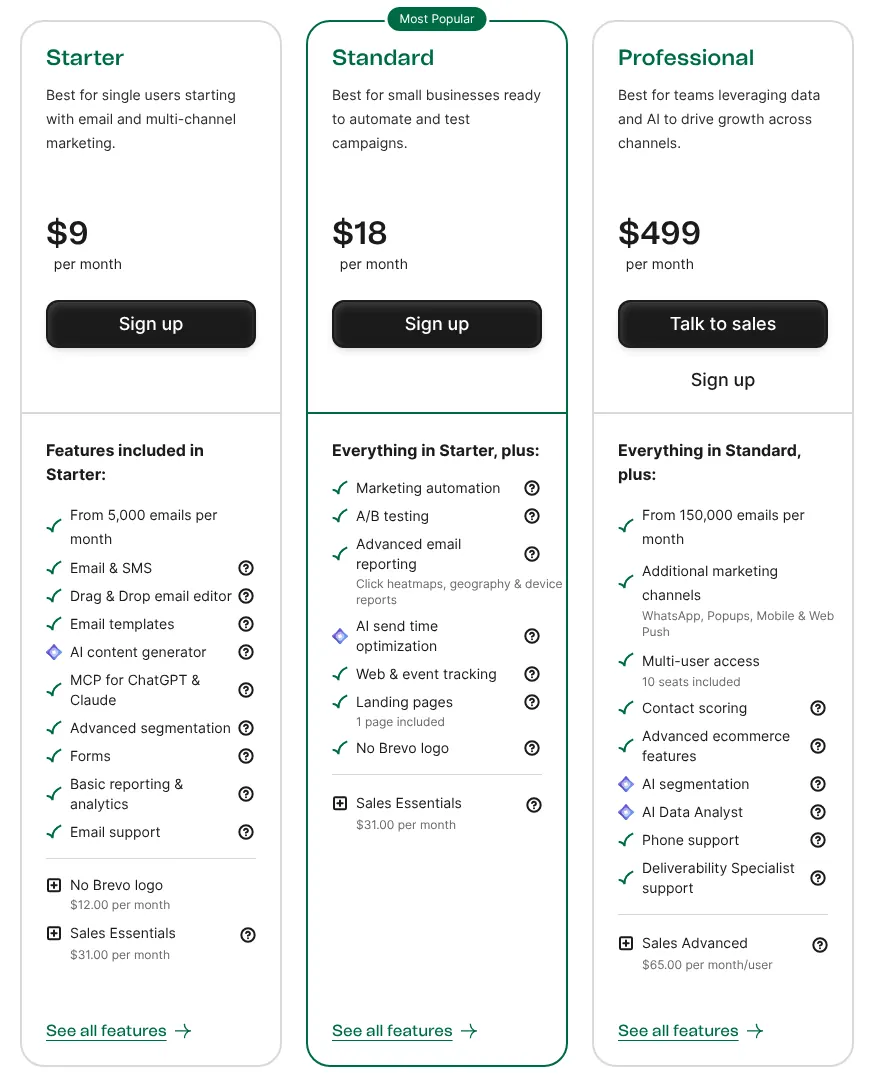
    Brevo's marketing plans: Starter at $9, Standard at 18 and Professional at 499 per month, with the Sales Essentials add-on at 31.00 per month.
    Starter at $9 per month is the entry plan; the Sales Essentials line under it is the paid sales package, billed per sales user. Source: brevo.com, captured on 18 Nov 2026.

    Verdict: Brevo is the cheapest way for one person to keep HubSpot's email and basic CRM, while a sales team pays per seat on top of Standard.

    Visit brevo.comPartner link · may earn us a commission
  8. Not found on Keap's site: Support ticketingOnly partly: Website live chatChatbot builder

    8. Keap

    Similarity to HubSpot
    93%
    Starting price
    $320/mo for 2 users+$300/mo · pricier
    Migration effort
    LowData import and migration services are part of the implementation package that Keap requires with every subscription.

    Same as HubSpot

    • Contacts, companies, a sales pipeline, tasks and custom fields
    • Marketing email, landing pages, forms and appointment booking
    • Inbox sync, email open tracking and email templates
    • Reports, a public API and a mobile app

    What you lose

    • Support tickets: none in Keap's full feature list
    • Website live chat and a chatbot: only through third-party apps
    • A low starting price: $320 a month for 2 users and 1,500 contacts, plus a required implementation package

    Switching from HubSpot to Keap

    Keap presents itself as automation software and sells a single plan with every feature. It reaches 93% of HubSpot. That plan starts at $320 a month, billed monthly, for 2 users and 1,500 contacts.

    Each extra user costs $39 a month. Keap also requires an implementation package with every new account. The package includes strategy calls, data import and migration services. The free trial lasts 14 days and sends 25 emails at most.

    Keap has no tickets, and chat or a chatbot come from third-party apps. Its mobile app is offered in five countries only: the U.S., Australia, Canada, the U.K. and New Zealand. A team based elsewhere cannot count on it.

    Choose it if
    You use HubSpot mostly for automated follow-ups and appointments, and want experts to build them for you.
    Skip it if
    You want a low monthly price or handle support requests in your CRM.
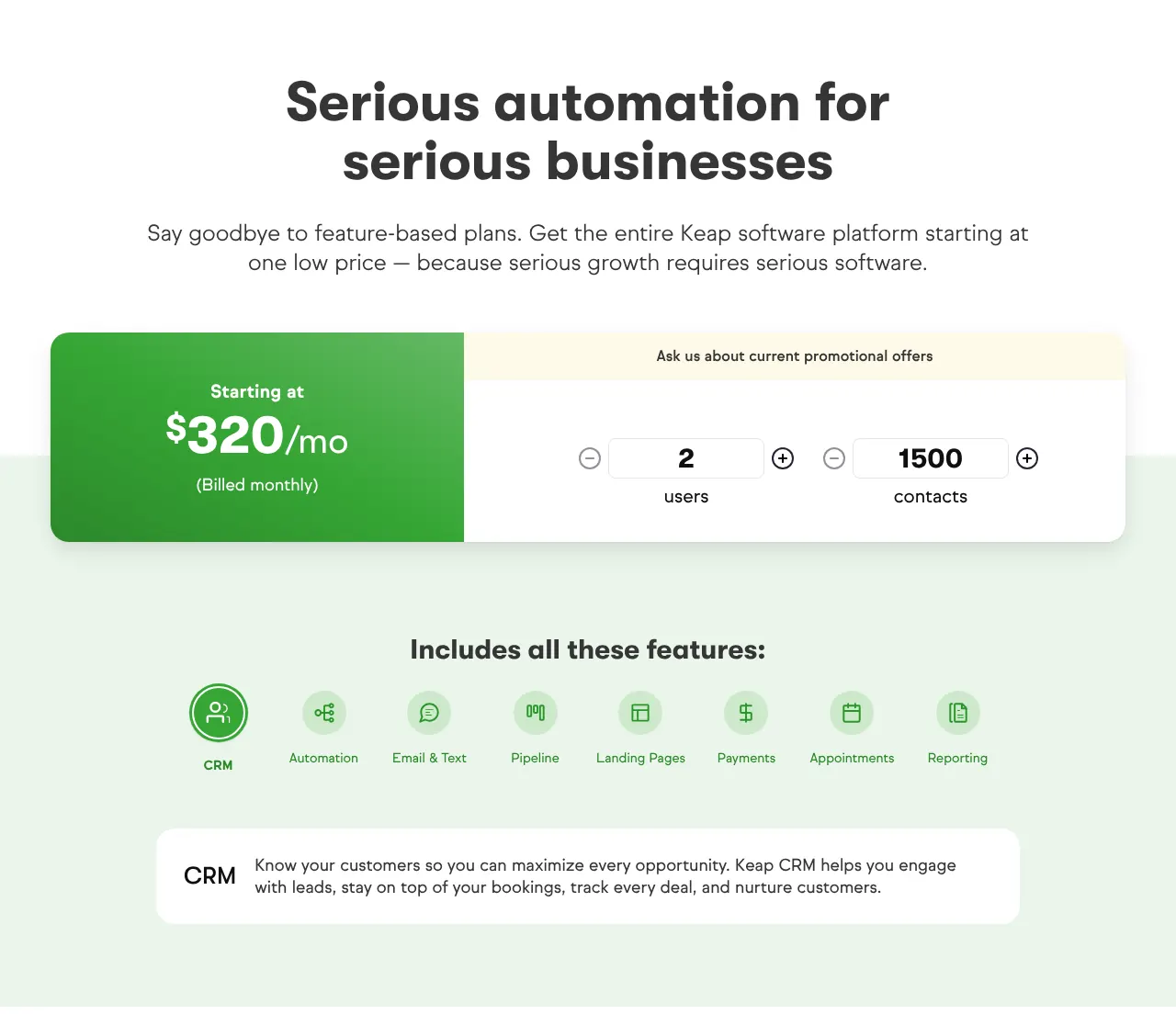
    Keap's pricing block: Starting at $320/mo (Billed monthly) for 2 users and 1500 contacts, above the list of features included in the single plan.
    One plan, one price: $320/mo billed monthly for the 2 users and 1,500 contacts set in the calculator. Source: keap.com, captured on 18 Nov 2026.

    Verdict: Keap keeps 93% of HubSpot in one plan built around automation, at $320 a month before any extra user.

    Visit keap.comPartner link · may earn us a commission
  9. Only partly: Marketing email campaignsLanding page builderWebsite live chatChatbot builder

    9. Zoho CRM

    Similarity to HubSpot
    90%
    Starting price
    $20/user/mo±$0/mo · same price
    Migration effort
    LowZoho CRM has a built-in HubSpot migration that connects to HubSpot's API, and Zoho offers to run the move for free.

    Same as HubSpot

    • Contacts, accounts, deals on a board, tasks and custom fields
    • Gmail and Outlook sync, email templates and meeting booking
    • Web forms (website forms that create contacts), support cases, dashboards and mobile apps
    • A public API and the Zoho Marketplace

    What you lose

    • Newsletters and landing pages: sold as Zoho Campaigns and Zoho LandingPage, two separate products
    • Website chat and chatbots: they come from Zoho SalesIQ, another separate product
    • Mass email (one message sent to a whole list): Standard sends 250 a day for the whole organization

    Switching from HubSpot to Zoho CRM

    Zoho CRM Standard and HubSpot Starter carry the same price: $20 per user each month. It covers 90% of HubSpot. The gaps are the marketing pieces: newsletters, landing pages and chat each need another Zoho product, connected to the CRM.

    The CRM itself is complete. Standard includes Gmail and Outlook integration, web forms, mass emails and multiple pipelines. It caps mass email at 250 a day for the organization. The free edition takes 3 users and 5,000 records.

    Zoho documents the move in two places. Zoho CRM has a HubSpot import in its settings that connects to HubSpot directly. Zoho's HubSpot comparison page offers to run the migration completely free.

    Choose it if
    You use HubSpot mainly as a sales CRM and want the same price with a guided, free move.
    Skip it if
    You want marketing email, landing pages and chat under one bill and one login.
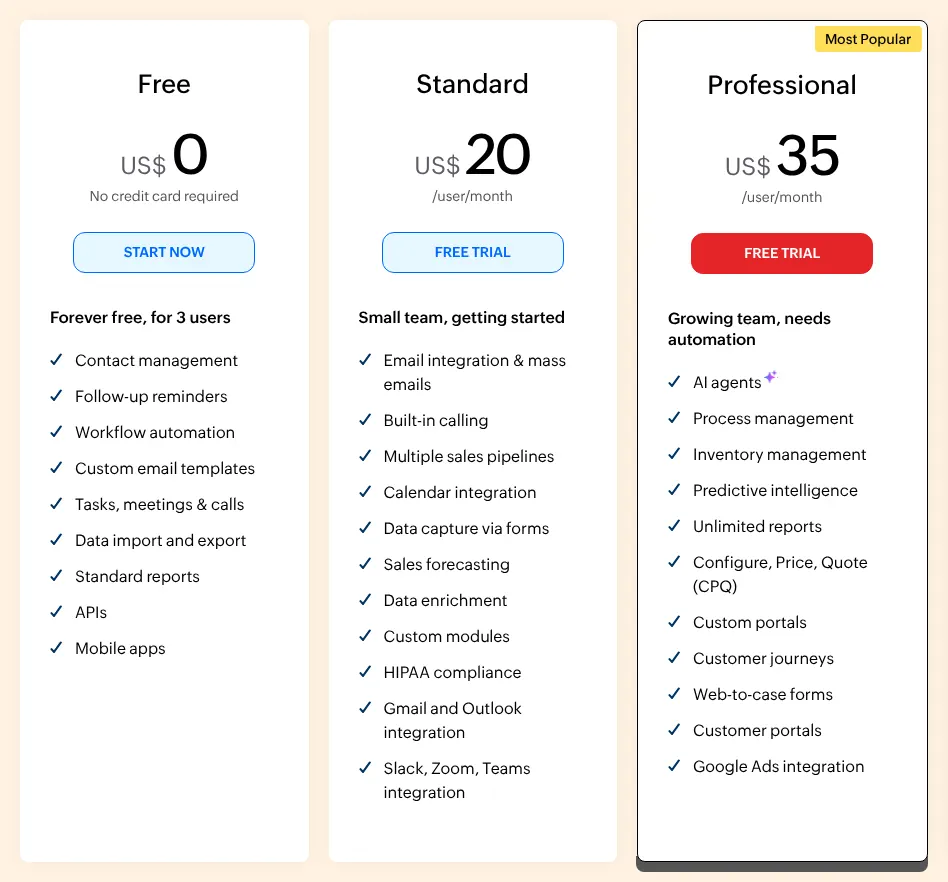
    Zoho CRM editions: Free for 3 users, Standard at US$20 per user per month and Professional at 35, with the features of each.
    Standard reads US$20 per user per month, the same as HubSpot Starter's regular price; the annual view shows lower figures. Source: zoho.com, captured on 18 Nov 2026.

    Verdict: Zoho CRM matches HubSpot's price and 90% of its functions, with marketing and chat sold as separate Zoho products.

  10. Only partly: Meeting booking linksMarketing email campaignsLanding page builderSupport ticketing

    10. Freshsales

    Similarity to HubSpot
    90%
    Starting price
    $11/user/mo−$9/mo · cheaper
    Migration effort
    LowFreshsales has a HubSpot migration in its admin settings that brings contacts, accounts and deals across.

    Same as HubSpot

    • Contacts, accounts, a Kanban deal board (stages shown as columns), tasks and custom fields
    • Built-in chat, email and phone on the Growth plan
    • Email templates and tracking, web forms and reports
    • Mobile apps, a public API and an app marketplace

    What you lose

    • Newsletters and landing pages: they belong to Freshmarketer, sold separately; Growth sends 250 bulk sales emails per user a day
    • Tickets: handled in Freshdesk, a separate Freshworks product
    • A booking link to share: visitors book only inside the chat widget, on Pro

    Switching from HubSpot to Freshsales

    Freshsales is the sales CRM of Freshworks, the maker of Freshdesk. It does 90% of what HubSpot does. Growth is $11 a head, $9 under HubSpot Starter. Growth already includes chat, email and phone in one place.

    Marketing and support sit in sister products. Landing pages and newsletters belong to Freshmarketer, and tickets to Freshdesk. Growth has one pipeline; several pipelines need Pro, at $47. Meetings can be booked only through the chat widget, on Pro.

    Freshsales has a HubSpot migration screen under its data and import settings. It brings contacts, accounts and deals. A free plan for up to 3 users is a way to test before paying.

    Choose it if
    Your team mostly calls and emails prospects and wants a cheaper sales CRM with phone and chat built in.
    Skip it if
    You need marketing campaigns, landing pages and tickets without adding other Freshworks products.
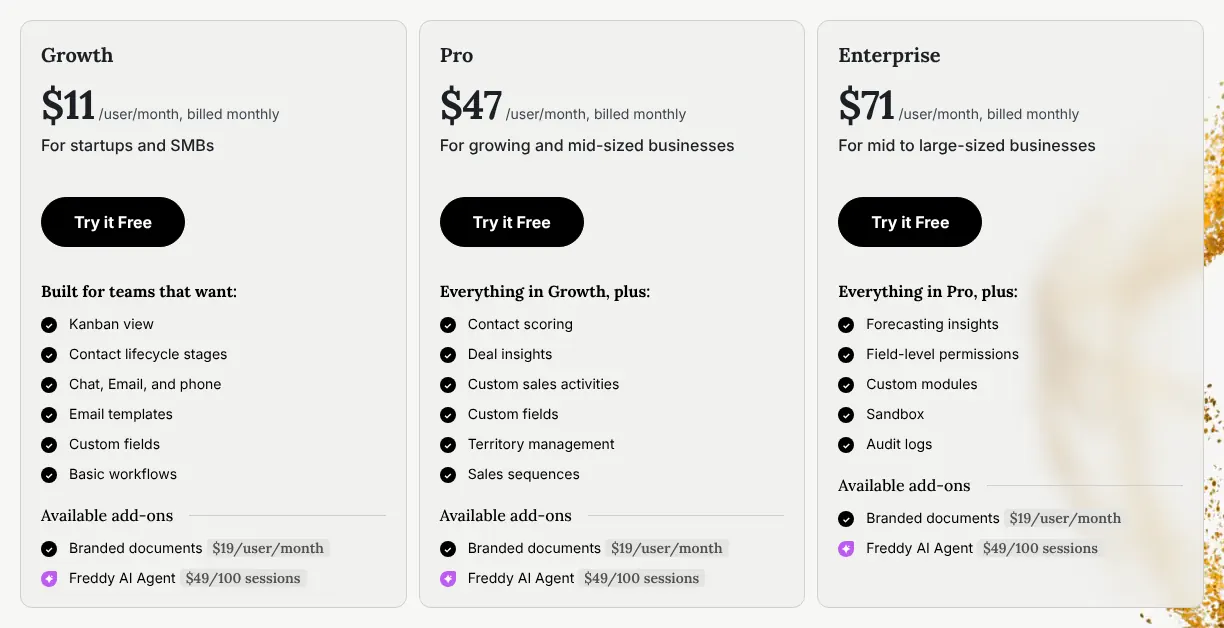
    Freshsales plans billed monthly: Growth at $11, Pro at 47 and Enterprise at 71 per user per month, with Kanban view, chat, email and phone listed on Growth.
    Growth costs $11 per user per month, billed monthly; the Freddy AI Agent and Branded documents are add-ons priced on top. Source: freshworks.com, captured on 18 Nov 2026.

    Verdict: Freshsales keeps 90% of HubSpot for $9 less per user, as long as marketing and support stay in other tools.

Comparison table: the 10 alternatives vs HubSpot

The table sets the ten tools side by side on four points that decide most moves: price, how users are counted, a free plan and the import from HubSpot. The entry price is the cheapest paid plan, billed monthly, at its regular price.

The 10 HubSpot alternatives compared with HubSpot
ToolMatchEntry priceHow users are billedFree planImport from HubSpot
REFHubSpot100%$20/seat/mo (Starter)Per seatYes, up to 2 usersn/a
01EngageBay100%$14.99/user/mo (Basic)Per userYes, 15 users, 250 contactsHubSpot sync, free migration
02Vtiger97%$15/user/mo (One Growth)Per user, 15 at mostYes, 10 users, 3,000 recordsFree migration service, CSV
03Odoo CRM97%$38.90/user/mo (Standard)Per userYes, one appCSV or Excel files
04Bitrix2497%$69/mo (Basic)Per organization, 5 usersYesHubSpot Migrator app
05Salesforce96%$25/user/mo (Starter Suite)Per userYes, up to 2 usersCSV, Data Import Wizard
06Nutshell94%$19/user/mo (Foundation)Per userNo, 14-day trialHelp article, CSV
07Brevo93%$9/mo (Starter)1 user on Starter, up to 5 on Standard at $31 per sales seatYes, no sales toolsBulk contact import
08Keap93%$320/mo (single plan)2 users, then $39 eachNo, 14-day trialDone in the implementation package
09Zoho CRM90%$20/user/mo (Standard)Per userYes, 3 usersBuilt-in HubSpot migration
10Freshsales90%$11/user/mo (Growth)Per userYes, up to 3 usersHubSpot migration screen

Prices read on each vendor's site on 2026-11-18, regular price without introductory offers. Free plan: a plan with no time limit. Import from HubSpot: what each vendor documents for bringing HubSpot data in. Bitrix24's free plan is described as 1 to 2 users on its card and unlimited users in its FAQ.

What a HubSpot alternative really costs

For one person, five of the ten tools cost less than HubSpot Starter's $20 a month, and Zoho CRM costs the same. Bitrix24, Odoo, Keap and Salesforce cost more. The order changes with the team, because two tools do not charge per person.

The table applies one rule to every price list read on 2026-11-18. For each team size, it takes the cheapest paid plan billed monthly that gives each person a login. Extra users are added at the price each vendor publishes.

At five people, HubSpot Starter costs $100 a month. Freshsales costs $55 and Bitrix24 $69. Keap reaches $437 and Odoo $194.50.

Monthly cost for 1, 3 and 5 users, in USD
Tool1 user3 users5 users
REFHubSpot$20$60$100
01EngageBay$14.99$44.97$74.95
02Vtiger$15$45$75
03Odoo CRM$38.90$116.70$194.50
04Bitrix24$69$69$69
05Salesforce$25$75$125
06Nutshell$19$57$95
07Brevo$9$111$173
08Keap$320$359$437
09Zoho CRM$20$60$100
10Freshsales$11$33$55

HubSpot: Starter at $20 per seat, regular price. Bitrix24: Basic, one price for up to 5 users. Brevo: Starter for one user with Sales Free. Starter admits a single sales user, so for 3 and 5 users the table takes Standard at $18 plus one Sales Essentials seat per person at $31. Keap: the single plan with 2 users, plus $39 per extra user, before the required implementation package. Odoo: Standard at $38.90 per user.

How to migrate from HubSpot in five steps

The move takes five steps. What moves is contacts, companies, deals and their notes. Email templates, forms and workflows (HubSpot's automated sequences of actions) are rebuilt by hand.

  1. List what you use in HubSpot

    Write down your pipelines, custom properties, forms, email templates and workflows. This list becomes the checklist for the new tool.

  2. Export your records

    In HubSpot, open the All records view of contacts, companies and deals, then export. Choose all properties rather than those in the view. HubSpot emails a download link that expires after 30 days, so save the files at once.

  3. Export activities separately

    Notes, calls and emails logged on records do not come with a standard export. HubSpot's help centre explains how to export them on their own. Without this step, the history of each deal stays behind.

  4. Import, or use the vendor's HubSpot tool

    Use the vendor's HubSpot importer where one exists: Zoho CRM, EngageBay, Freshsales and Bitrix24 document one. Otherwise, import the CSV files (one per object) and map each HubSpot property to a field.

  5. Rebuild forms, templates and automation

    Recreate your web forms and replace the HubSpot form code on your website. Then rebuild email templates and workflows, and test each one on a sample contact.

When it is better to stay on HubSpot

Staying on HubSpot is the better choice in three situations. The ranking on this page measures how closely a tool resembles HubSpot, not which one suits a given team.

  • The team is new to HubSpot and on the offer. New customers pay $10 a seat on Starter instead of $20. Only Brevo, at $9 for one user, costs less for a single person among the ten.
  • The team needs a large app marketplace and every hub in one login. HubSpot lists more than 2,000 apps in its marketplace. Zoho CRM and Freshsales add marketing or chat only through separate products of their makers.
  • Two people and 1,000 records are enough. HubSpot's free tools have no time limit and no credit card. For a team that fits in those limits, an alternative saves nothing.

HubSpot keeps exports open on every plan. That makes a later move possible at any time.

How we rank

  1. The order of this page is a similarity index: the share of HubSpot's functions that each tool reproduces. It measures resemblance, not quality, reliability or support.CRM records 29% · 4 featuresSales email and meetings 23% · 4 featuresMarketing and lead capture 17% · 3 featuresConversations and service 11% · 3 featuresReporting and platform 20% · 4 features
  2. The comparison uses a grid of 18 HubSpot functions read on hubspot.com, worth 35 points in total, in five groups: CRM records, sales email and meetings, marketing and lead capture, conversations and service, and reporting and platform. Four functions weigh 3: contact and company records, the visual deal pipeline, the inbox connection and marketing email. Nine weigh 2 and five weigh 1. A tool gets 1 for a function documented on any of its plans. A partial function counts half: a documented limit, a paid add-on, a separate product of the same vendor, or an outside service the vendor documents. It gets 0 when the function is absent or could not be found on the vendor's own site. The same grid is used on this site's page of free HubSpot alternatives.
  3. Fourteen candidates were scored, and the ten highest that could be priced are listed. Pipedrive scores 91%, which would place it ninth. Its pricing page refused both tools this site uses to read vendor pages, so its monthly price could not be read and it is not listed. ActiveCampaign (83%), monday CRM (80%) and Capsule (80%) score lower. Agile CRM and Insightly were not scored: their pricing pages refused to be read. Zendesk Sell was left out because Zendesk is retiring it.
  4. Vtiger, Odoo and Bitrix24 tie at 97%, Brevo and Keap at 93%, Zoho CRM and Freshsales at 90%. Ties go to the smaller gap between entry prices and the $20 of HubSpot Starter, then to alphabetical order. Price, migration effort and labels do not change the rank. Salesforce's and Odoo's pricing pages refused the browser, so their prices were read in the text their servers send, without a capture. All sources were read on 18 November 2026.
  5. No entry on this page is sponsored. A sponsored entry is marked Sponsored and holds the position paid for; its percentage stays the computed one.

FAQ

Is there a free alternative to HubSpot?

Yes, several, with limits. EngageBay's free plan takes 15 users and 250 contacts. Vtiger One Pilot takes 10 users and 3,000 records. Zoho CRM and Freshsales are free for 3 users. A full comparison of free plans is on this site's page of free HubSpot alternatives.

Which alternative costs least for a team of five?

Freshsales Growth, at $55 a month for five users, then Bitrix24 Basic at $69 for up to five. EngageBay Basic costs $74.95. Check the limits: Freshsales sells landing pages in a separate product, and Bitrix24 sends no bulk marketing email on Basic.

Can I keep my HubSpot data if I leave?

Yes. Every HubSpot plan can export records to CSV or Excel files, with all properties and associations. Activities such as notes and calls are exported separately. Export before you cancel, and keep the files.

Which alternative has its own HubSpot importer?

Zoho CRM has a HubSpot migration in its settings, and Zoho offers to run the move for free. EngageBay has a HubSpot sync, Freshsales a HubSpot migration screen and Bitrix24 a HubSpot Migrator app. Nutshell documents the CSV route and can import for you.

Which alternative keeps data in Europe?

Brevo, based in Paris, keeps its servers in the EU. Odoo, based in Belgium, offers a choice of hosting region. Bitrix24 hosts accounts of its EU domains in Frankfurt, and Zoho CRM and Vtiger offer European data centres.