top10alternative

Top 10 Invoicing Software for Small Business (2026)

Ten invoicing tools compared on what a small business needs to bill and get paid, and on what each one costs, ranked by how many of 21 features it covers.

The best invoicing software for your small business

Each line matches a common situation with the tool whose published facts fit it. The score on this page counts how many of 21 invoicing features each tool covers. It measures coverage, not quality.

  • You want invoices and full accounting in one toolZoho Books · Standard costs $20 a month billed monthly, with 3 users and 5,000 invoices a year.
  • You bill a handful of clients and want reminders and late fees to run on their ownFreshBooks · Lite costs $23 a month at the regular price and bills up to 5 clients.
  • You work alone and want unlimited clients for a low priceInvoice Ninja · Ninja Pro costs $14 a month billed monthly. The free plan covers 5 clients.
  • You freelance and also need proposals, projects and hoursMoxie · Starter costs $12 a month billed monthly, for one person.
  • Your accountant and several colleagues all need accessXero · Every plan has unlimited users. Early costs $27 a month at the regular price but sends only 20 invoices a month.
  • Your accountant asks you to use QuickBooksQuickBooks Online · Simple Start costs $38 a month at the regular price, for 1 user and 2 accountants.
  • You run an agency that bills projects and hoursBonsai · Essentials, the first plan with invoices, costs $25 per user a month.
  • You want free bookkeeping too, and will pay only for extrasWave · Starter is free; Pro costs $19 a month per business.
  • You want to invoice without paying, with one or two peopleZoho Invoice · It is free, with 2 users and 500 invoices a year.
  • You send a few invoices and want the lowest paid planBilldu · Lite costs $7.99 a month for 1 user and 10 clients.

How to choose invoicing software for a small business

The score only shortlists: all ten tools send a branded invoice that a client can pay online. Six checks narrow the list to one or two. Each rests on facts read on vendor pages on 15 November 2026.

1. Count your clients and invoices before you look at prices

Start with your volume, because the cheapest plans cap it. FreshBooks Lite bills 5 clients and Billdu Lite 10. Xero Early sends 20 invoices a month. QuickBooks Free sends 2 invoices a month unless QuickBooks Payments is turned on. Zoho Invoice stops at 500 invoices a year.

Take a business with 30 regular clients, each invoiced once a month. It outgrows FreshBooks Lite, Billdu Lite and Xero Early in the first month. Invoice Ninja Pro has no client cap, and Wave Starter creates unlimited invoices. Check the cap of the plan you can afford, not of the plan on the home page.

2. Decide whether you also need the accounts

Some of these tools only bill; others also keep the books. Bookkeeping here means a full set of accounts: every sale and expense recorded twice, so the balance sheet and the profit and loss add up. An accountant works from those reports at tax time.

Zoho Books, Xero, QuickBooks Online and Wave keep full accounts. FreshBooks does from Plus. Invoice Ninja, Moxie, Bonsai and Billdu stop at simpler reports, and Zoho Invoice leaves the accounts to Zoho Books. If your accountant already uses a tool, ask which one before you choose. Moving a year of invoices later costs more than choosing now.

3. Compare what each card payment costs

The subscription is not the whole cost: each online payment pays a fee to the payment service. Five of the ten charge 2.9% + 30¢ per standard card payment: Zoho Books, Zoho Invoice, FreshBooks, Xero and Bonsai. Invoice Ninja and Moxie leave the fee to the payment service connected, such as Stripe. Wave charges 2.9% + $0.60 on Starter. QuickBooks charges 2.99%, and Billdu 3.4% + 30¢ on its lowest plan. These are US fees: other countries have their own rates. ACH payments (the US system for paying straight from a bank account) cost less, often 1%.

Take a $1,000 invoice. Paid by card at 2.9% + $0.30, it costs $29.30 in fees. Paid by ACH at 1%, it costs $10. If your clients pay large invoices, offer bank payment and check that your plan includes it.

4. Count the people who will use it

Prices change the most once a second person joins. Xero includes unlimited users on every plan, and Zoho Books Standard includes 3. FreshBooks charges $11 a month for each team member, except on Select, which includes 2. Bonsai charges every plan per user. QuickBooks needs Essentials for 3 users.

For a team of three on monthly billing, Zoho Books costs $20 a month and Xero $27. FreshBooks Lite with two team members costs $45. QuickBooks Essentials costs $85, and Bonsai Essentials $75. If your accountant only needs to read the books, check for a free accountant login first: QuickBooks Simple Start includes access for 2 accountants.

5. Look past the price of the first months

Three of the ten lead their pricing page with an offer for new customers. FreshBooks shows 80% off for 4 months. Xero shows 80% off for 3 months. QuickBooks shows 50% off for 3 months. The regular price applies afterwards, and it is the one this page uses.

During its offer, FreshBooks Lite costs a fifth of its regular $23. Yearly billing also lowers the price but asks for twelve months up front: Zoho Books Standard falls from $20 to $15 a month. Pay monthly while you test a tool, then switch to yearly once you are sure.

6. Check that recurring invoices and reminders are on your plan

A recurring invoice is sent again automatically on a schedule, such as every month for a retainer. A reminder is an automatic email when an invoice is overdue. Together they remove most of the chasing. Most of the ten include both, but not always on the cheapest plan.

Billdu puts recurring invoices on Premium only, at $27.99 a month. Invoice Ninja keeps reminders for Ninja Pro. Wave sends reminders on Pro, or on Starter once online payments are set up. If you bill the same clients every month, compare the plan that has both features, not the entry plan.

The 10 Invoicing software for small business

by overall score
  1. 1. Zoho Books

    Zoho Books suits a business that wants invoices and full accounting in one place, provided it checks which plan holds the features it needs.

    Score
    100/100
    Best for
    A business that wants invoices and its accounts in the same tool
    From
    $20/mo
    Free plan
    Yes · revenue under $50K a year

    Zoho Books covers all 21 features on this page, like FreshBooks, and its lower price ranks it first. It is accounting software that starts with the invoice. The same account keeps the books, records expenses and imports transactions from the bank. A business that wants one tool for billing and for its accountant can stop here.

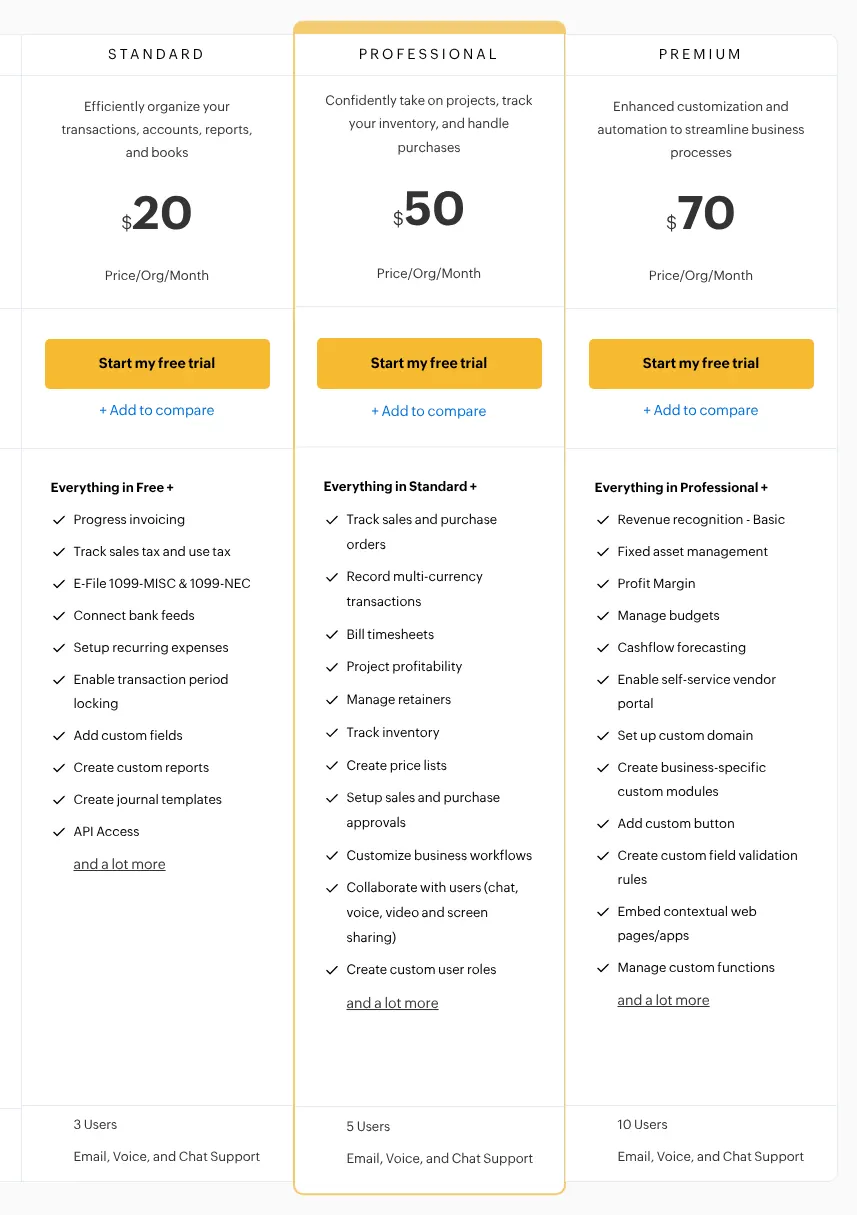
    Standard costs $20 a month when paid month by month, or $15 a month billed yearly. It includes 3 users and up to 5,000 invoices a year. Each extra user costs $3 a month. Some features sit on higher plans. Invoices in another currency and billing of timesheets start on Professional, at $50 a month. Automatic late fees start on Premium, at $70.

    The free plan is real but narrow. It stays free only while the business earns less than $50K in a financial year. It covers 1 user plus an accountant, and 1,000 invoices a year. A US card payment through Zoho Payments, Zoho's own payment service, costs 2.90% + 30¢. Other payment services, such as Stripe or PayPal, can be connected instead.

    Zoho Books plans on monthly billing: Standard, Professional and Premium with their price per organization per month, their feature lists and 3, 5 and 10 users.
    Standard, the first paid plan, shows $20 per organization per month on monthly billing, with 3 users at the foot of the card. Source: zoho.com, captured on 15 Nov 2026.
  2. 2. FreshBooks

    FreshBooks automates billing well for a business with a few clients, but its monthly bill grows quickly past 5 clients and with each colleague.

    Score
    100/100
    Best for
    A service business that bills a handful of clients and wants billing to run on its own
    From
    $23/mo
    Free plan
    No · 30-day trial

    FreshBooks is built for service businesses that bill clients, and it scores 100, level with Zoho Books. Its higher price ranks it second. Recurring invoices, automatic reminders and late fees are included on every plan, Lite included. Clients can pay by card or by bank transfer straight from the invoice.

    The pricing page leads with an offer: 80% off for the first 4 months. The regular price of Lite is $23 a month, billed monthly, and that is the price used on this page. Yearly billing takes 10% off. There is no free plan, only a 30-day trial.

    Lite has two limits that a growing business meets quickly. It bills up to 5 clients, and archived clients count toward that limit. Each team member costs an extra $11 a month on Lite, Plus and Premium. Select, which has custom pricing, includes 2 team members. Double-entry accounting reports (the balance sheet and other reports an accountant works from) start on Plus, at $43 a month. A standard US card payment costs 2.9% + $0.30. An American Express or business card costs 3.5% + $0.30. A bank transfer costs 1%, for US customers only.

  3. 3. Invoice Ninja

    Invoice Ninja gives a one-person business nearly everything the larger tools do for $14 a month, but a team has to pay for Enterprise.

    Score
    99/100
    Best for
    A freelancer or small business that wants full invoicing at a low monthly price
    From
    $14/mo
    Free plan
    Yes · 5 clients

    Invoice Ninja makes invoicing software for freelancers and small businesses, and its makers have built business tools since 2014. It scores 99, just behind Zoho Books and FreshBooks. It does 20 of the 21 things on this page in full. The gap is the accounting side: it produces a profit and loss report, but not a full set of accounts.

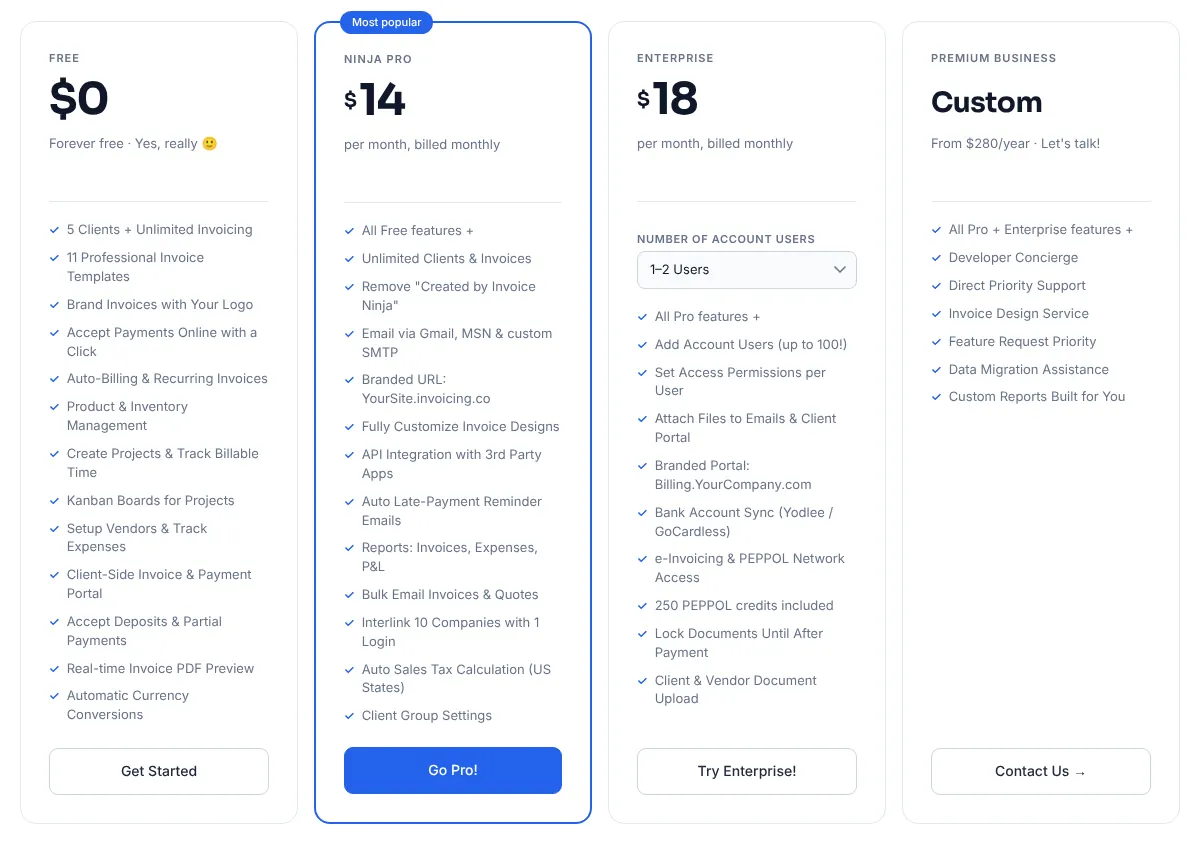
    Ninja Pro costs $14 a month, billed monthly, or $140 a year. It covers one user with unlimited clients and invoices. Automatic payment reminders and reports start on this plan. Several users with their own permissions need Enterprise, from $18 a month for 1–2 users. The bank account sync is also an Enterprise feature.

    The free plan works for a very small client list. It allows 5 clients and unlimited invoices, with a line saying Created by Invoice Ninja on each one. Invoice Ninja publishes no payment fee of its own: the fee is that of the payment service the business connects. Its code is published under the Elastic License v2. A business may install it on its own server and use it at no cost.

    Invoice Ninja plans billed monthly: Free for 5 clients, Ninja Pro, Enterprise with a selector for the number of users, and Premium Business on request, each with its features.
    The Ninja Pro card lists unlimited clients and invoices and automatic late-payment reminder emails, which the free plan does not have. Source: invoiceninja.com, captured on 15 Nov 2026.
  4. 4. Moxie

    Moxie suits a freelancer who wants billing, projects and hours together at a low price, and suits a team of employees less well.

    Score
    97/100
    Best for
    A freelancer who wants proposals, projects, hours and invoices in one place
    From
    $12/mo
    Free plan
    No · 14-day trial

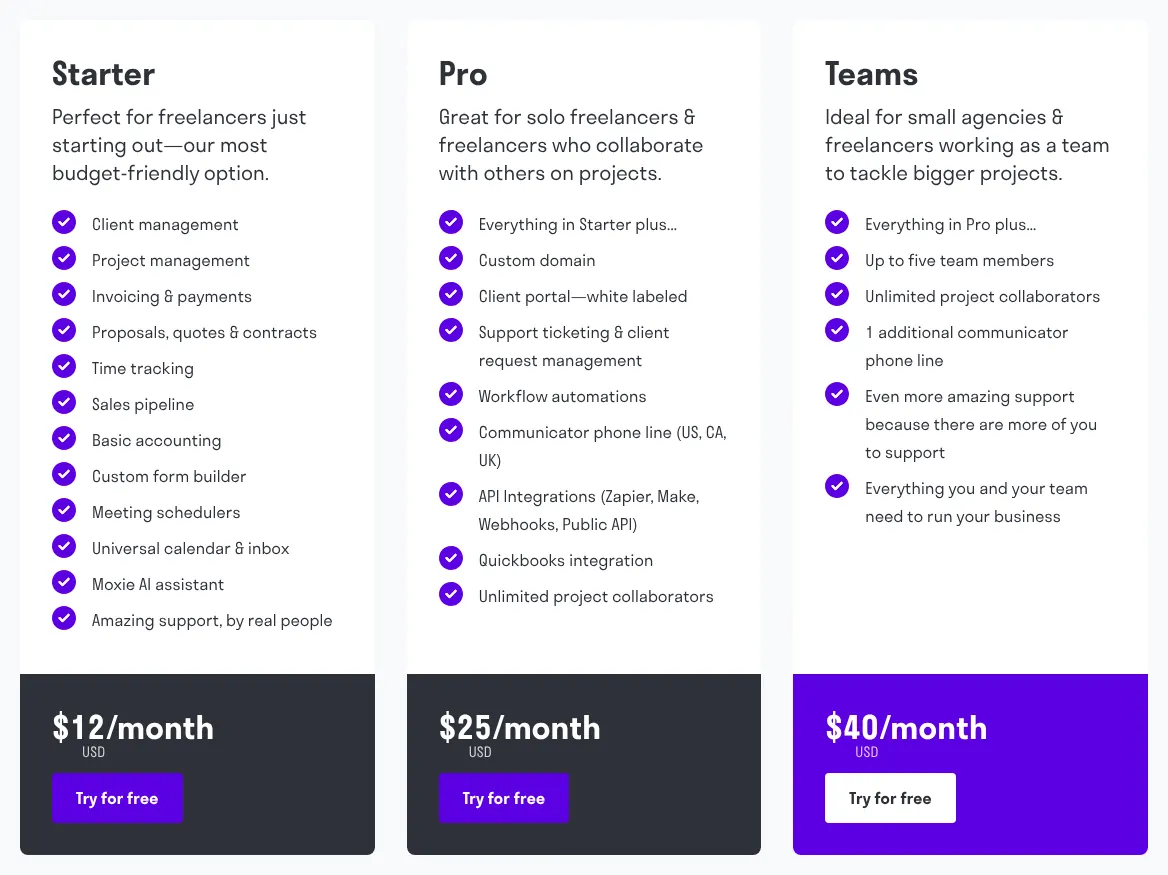
    Moxie is made for freelancers. Clients, projects, proposals, hours and invoices share one workspace. It scores 97. Starter is $12 a month with monthly payments, or $10 a month paid yearly. Only Billdu has a lower paid price among the ten.

    The billing side is complete. Moxie sends recurring invoices and reminders, adds a late fee when an invoice is overdue, and takes deposits. Clients pay by card or by bank transfer through Stripe. Bank transfers work for invoices in US dollars paid from US bank accounts. Logged hours become invoice lines in one step. Two things fall short. A refund is recorded on the invoice, with no credit note (a separate document that cancels all or part of an invoice). The accounting is limited to a report of money in and money out.

    Starter is for one person. Team members need Teams, at $40 a month for up to five people. Connections to other apps through Zapier (a service that links apps without code) need Pro, at $25 a month. Moxie does not publish card fees: Stripe sets them.

    Moxie plans with their monthly prices: Starter at $12/month, then Pro, then Teams at $40/month, each followed by its list of features.
    Starter shows $12/month and lists invoicing, time tracking and basic accounting; team members appear only on the Teams card, at $40/month. Source: withmoxie.com, captured on 15 Nov 2026.
  5. 5. Xero

    Xero fits a business whose accountant works in it or whose staff all need access, as long as it sends few invoices or pays for Growing.

    Score
    97/100
    Best for
    A business whose accountant or staff all need access to the accounts
    From
    $27/mo
    Free plan
    No · one-month trial

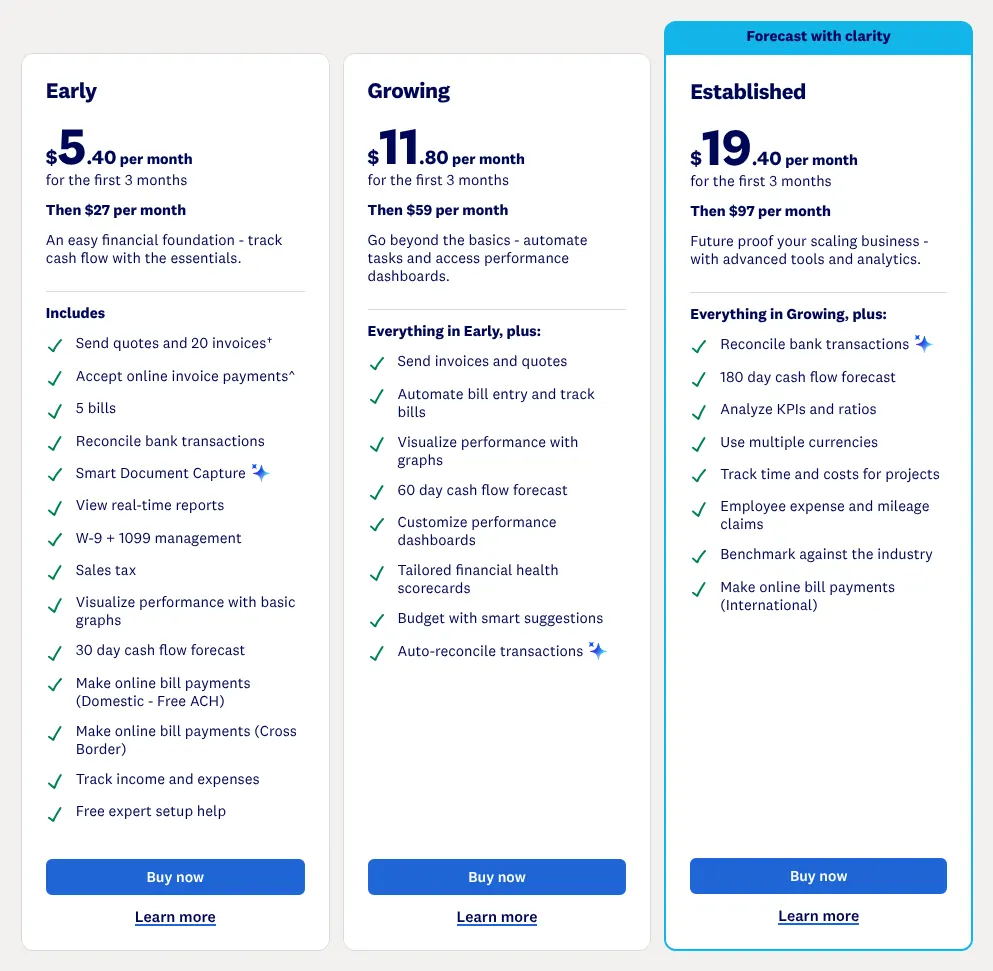
    Xero is accounting software for small businesses, and invoicing is one part of it. It scores 97. It is the only tool of the ten with unlimited users on every plan, so an accountant and staff add nothing to the bill. Its pricing page leads with an offer for new customers: 80% off for the first 3 months. The regular price of Early is $27 a month, billed monthly.

    Early has a hard limit: 20 invoices and 5 bills a month. A business that sends more moves up to Growing, at $59 a month. Invoices in other currencies and time tracking for projects start on Established, at $97. Xero has no built-in late fee. Its own blog points to Paidnice, an outside app sold in its app store.

    A card payment costs 2.9% + 30¢. An ACH payment costs 1%, capped at $9. There is no client login: each invoice and each statement opens from its own link. There is no free plan, only a one-month trial.

    Xero plans Early, Growing and Established: a reduced price for the first 3 months in large type, then $27 per month for Early and $97 per month for Established, with their features.
    The large figure is the offer for the first 3 months; the line below it gives the regular price, Then $27 per month for Early. Source: xero.com, captured on 15 Nov 2026.
  6. 6. QuickBooks Online

    QuickBooks Online fits a business whose accountant already uses it, at a higher monthly price than most of the ten.

    Score
    97/100
    Best for
    A business whose accountant asks for QuickBooks
    From
    $38/mo
    Free plan
    Yes · 2 invoices a month

    QuickBooks Online is Intuit's accounting software for small businesses, with invoicing and payments built in. It scores 97, level with Moxie and Xero. Its price is the highest of the three, so it ranks sixth.

    Simple Start costs $38 a month at its regular price. The pricing page shows 50% off for the first 3 months next to it. Simple Start covers 1 user, plus access for 2 accountants. Invoices in other currencies and staff time added to invoices start on Essentials. Essentials costs $85 a month and covers 3 users. Intuit also sells Lite, a one-person plan at $20 a month, on its separate page for solo workers.

    QuickBooks Free exists, with a catch. It sends 2 invoices a month, unless the business turns on QuickBooks Payments, Intuit's payment service. A card payment through it costs 2.99%. An ACH bank payment costs 1%. No page read describes a portal where clients log in to see all their invoices.

  7. 7. Bonsai

    Bonsai suits an agency that bills time and projects, but its per-user price makes it costly for a team that only needs invoices.

    Score
    96/100
    Best for
    An agency or consultancy that bills projects and hours
    From
    $25/user/mo
    Free plan
    No · 7-day trial

    Bonsai runs client work for agencies, consultancies and freelancers: proposals, contracts, projects, hours and billing. It scores 96. Its prices are per user, and its cheapest plan does not invoice. Basic, at $15 per user a month, covers hours and projects only. Invoices and payments start on Essentials, at $25 per user a month on monthly billing.

    Per-user pricing changes the bill quickly. A team of three on Essentials pays $75 every month. Connections to QuickBooks, Xero and Zapier need Premium, at $39 per user a month. Keeping a client's card on file to charge any invoice needs Elite, which requires at least 3 users.

    A card payment through Bonsai Payments costs 2.9% + $0.30. Its payments page puts an ACH payment at as low as 1%. No Bonsai page read mentions credit notes, and its accounting stops at profit and loss reports. There is no free plan for invoicing, only a 7-day trial.

    Bonsai price per user for each plan: Basic, Essentials at $25 / month, Premium and Elite, each with a lower price if paid annually.
    Essentials, the first plan with invoices, shows $25 / month per user on monthly billing, with the yearly price on the line below. Source: hellobonsai.com, captured on 15 Nov 2026.
  8. 8. Wave

    Wave suits a business that wants free invoices and bookkeeping and accepts the card fee, but not one that bills by the hour.

    Score
    93/100
    Best for
    A business that wants free invoices and bookkeeping and pays only for extras
    From
    $19/mo
    Free plan
    Yes · Starter, unlimited invoices

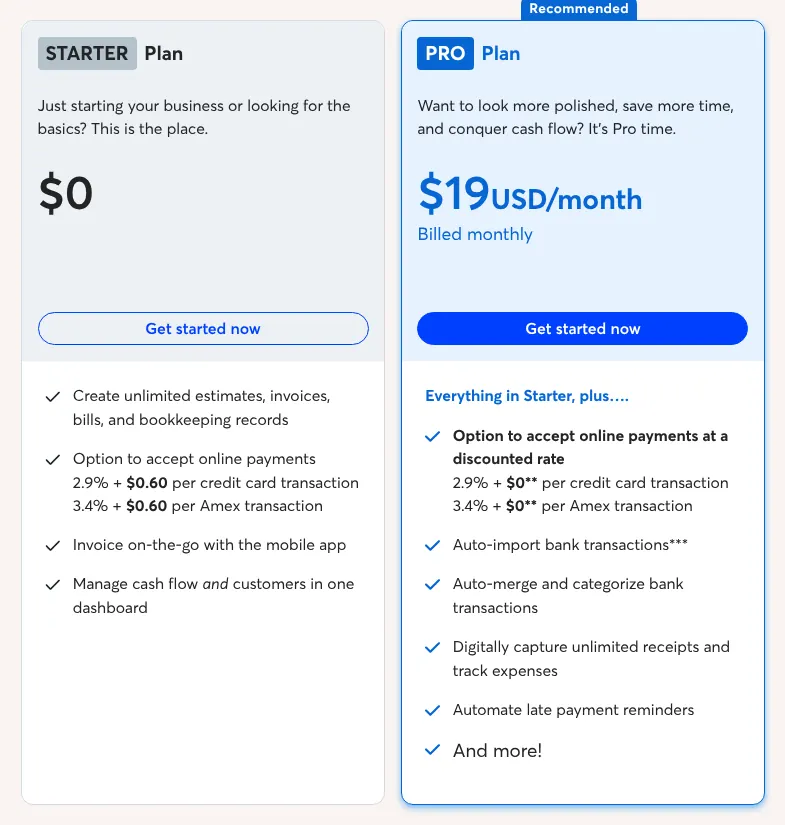
    Wave gives away invoicing and bookkeeping on its Starter plan and charges for the extras. It scores 93, one point ahead of Zoho Invoice. Starter creates unlimited estimates and invoices and keeps the books at no cost. The business pays when a client pays by card: 2.9% + $0.60 per payment.

    Pro is billed at $19 per month, or $190 a year, per business. It adds automatic import of bank transactions, invited users with roles, and connections to other apps. Payment reminders work on Pro, or on Starter once online payments are set up. On Pro, the card fee drops to 2.9% + $0 for the first 10 payments of each month.

    Some features are partial or missing. Wave adds no automatic late fee. It has no time tracking of its own: hours arrive through partner apps on Pro. Clients get no login of their own, but on Pro, or once online payments are on, Wave can send a statement link that lists all their unpaid invoices. An ACH payment costs 1%, with a $1 minimum.

    Wave Starter plan at zero with its card fees, next to the Pro plan at $19 USD per month billed monthly, with bank import and automatic reminders listed.
    With Monthly selected, Pro shows $19 USD a month, billed monthly; its list adds bank import and automatic late payment reminders. Source: waveapps.com, captured on 15 Nov 2026.
  9. 9. Zoho Invoice

    Zoho Invoice is the free choice for one or two people who send up to 500 invoices a year and keep their accounts elsewhere.

    Score
    92/100
    Best for
    A business of one or two people that wants to invoice without paying
    From
    Free
    Free plan
    Yes · the whole product

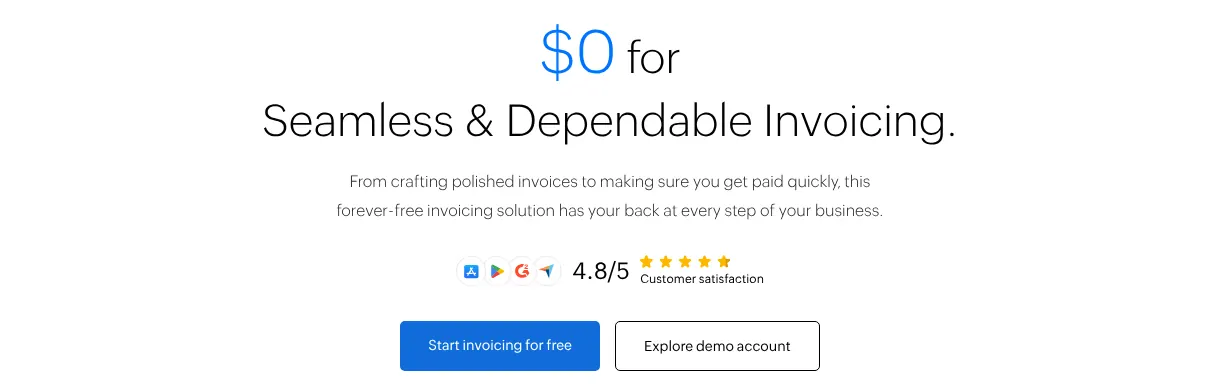
    Zoho Invoice is free and has no paid plan at all. It scores 92, one point behind Wave, and costs nothing. It is Zoho's invoicing-only product, separate from Zoho Books. Recurring invoices, reminders, estimates, card and bank payments, a client portal and time tracking are all included.

    Invoices go out only in the business's own base currency. A business that bills foreign clients in their currency needs another Zoho product, such as Zoho Billing. The other limits are on the size of the account. It allows 2 users, 500 invoices a year and 3 projects. The words Powered by Zoho Invoice stay on documents. When an account stays inactive for over 180 days, its data is deleted within the next 20 days.

    Zoho Invoice has no bank connection and no bookkeeping of its own: those come with Zoho Books, which the account can move up to. No page read mentions automatic late fees. Through Zoho Payments, a US card payment costs 2.90% + 30¢. An ACH payment costs 0.8%, capped at $5, and is available on request.

    Zoho Invoice pricing page header: $0 for invoicing, described as a forever-free solution, with a button to start invoicing for free.
    The pricing page header shows $0 for invoicing, described as forever free. Source: zoho.com, captured on 15 Nov 2026.
  10. 10. Billdu

    Cheapest

    Billdu is the cheapest way to send a few invoices a month, but recurring billing needs its top plan.

    Score
    89/100
    Best for
    A business that sends a few invoices to a few clients
    From
    $7.99/mo
    Free plan
    No · 7-day trial

    Billdu has the lowest paid price of the ten. Lite costs $7.99 per month with monthly billing, or $4.99 a month paid yearly. It is an invoicing app for the web, iPhone and Android. It scores 89, level with Hiveage; the lower price keeps Billdu in the ten.

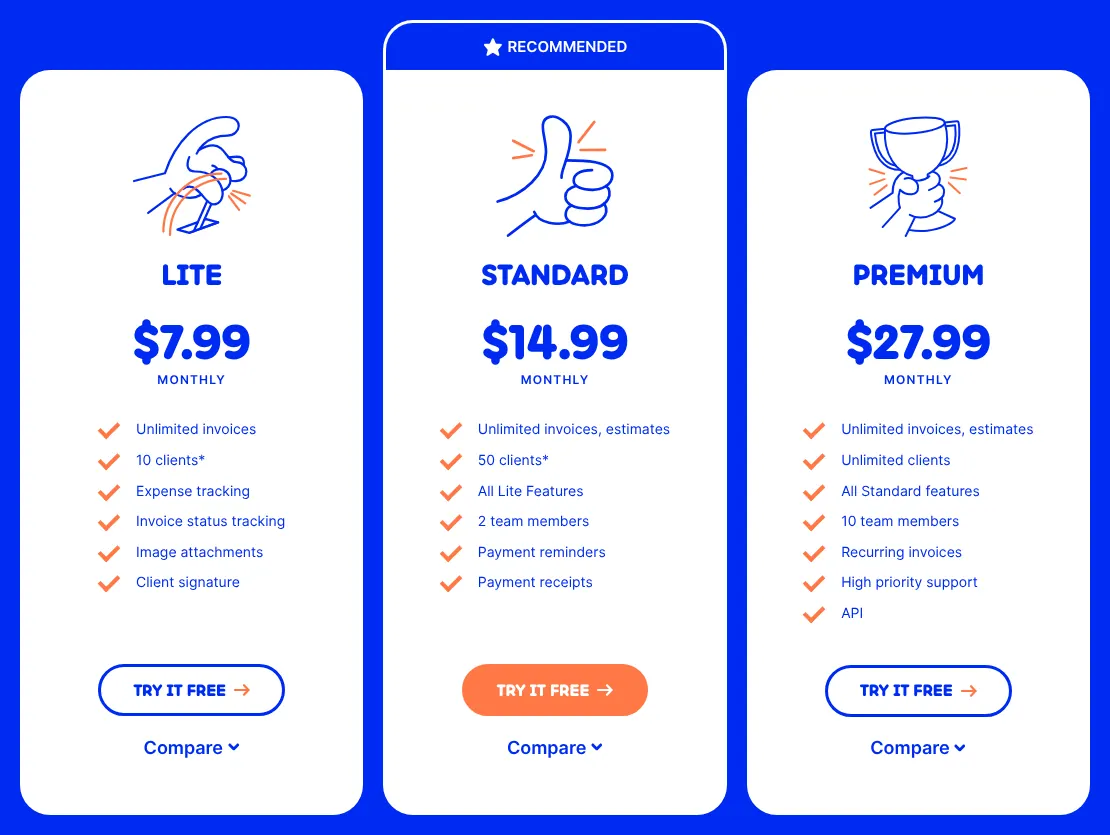
    Lite is narrow. It covers 1 user and 10 clients, with unlimited invoices and expense tracking. It has no estimates, no reminders and no recurring invoices. After the 7-day trial, an account without a subscription stays in a limited state; one help article lists it as Free, with 3 invoices a year. Standard, at $14.99, adds estimates, reminders, 50 clients and 2 team members. Recurring invoices and unlimited clients need Premium, at $27.99 a month.

    Billdu's own pages disagree on reminders. The pricing page puts them in Standard, while one of its help articles says Premium only. Card payments go through Stripe, and the fee falls as the plan rises. On the lowest plan, a US card payment costs 3.4% + 30¢. On Premium, it costs 2.9% + 30¢. Billdu has no time tracking, no bank connection and no late fees, and each business needs its own subscription.

    Billdu plans on monthly billing: Lite at $7.99, Standard and Premium, with the number of clients, team members and features listed under each.
    With Pay monthly selected, Lite shows $7.99 a month; payment reminders appear on Standard and recurring invoices only on Premium. Source: billdu.com, captured on 15 Nov 2026.

Summary table

The table sets the ten tools side by side. Prices are those of the first paid plan that sends invoices, billed monthly, at the regular price; Zoho Invoice has no paid plan. The last column names the limit of that plan that a small business meets first.

The 10 invoicing tools side by side: score, entry price, billing, free plan and the first limit of the entry plan
ToolScoreEntry priceBilling of that priceFree planFirst limit of the entry plan
01Zoho Books100$20/moMonthlyYes · revenue under $50K3 users, 5,000 invoices a year
02FreshBooks100$23/moMonthly, after a 4-month offerNo · 30-day trial5 billable clients
03Invoice Ninja99$14/moMonthlyYes · 5 clients1 user
04Moxie97$12/moMonthlyNo · 14-day trial1 user
05Xero97$27/moMonthly, after a 3-month offerNo · one-month trial20 invoices a month
06QuickBooks Online97$38/moMonthly, after a 3-month offerYes · 2 invoices a month1 user
07Bonsai96$25/user/moMonthlyNo · 7-day trialPrice per user
08Wave93$19/moMonthlyYes · StarterOne business per subscription
09Zoho Invoice92FreeNo paid planYes · whole product2 users, 500 invoices a year
10Billdu89$7.99/moMonthlyNo · 7-day trial10 clients, no recurring invoices

Prices in USD, read on vendor pages on 15 November 2026, before taxes and payment fees. Bonsai: Basic ($15 per user) does not send invoices, so Essentials is shown. QuickBooks: Lite, a one-person plan at $20, is sold on a separate page. Zoho Books: the free plan applies while yearly revenue stays under $50K.

What invoicing software costs for your team

For one person, the ten range from free on Zoho Invoice to $38 a month on QuickBooks Online, billed monthly at regular prices. Three people change the order. Xero and Zoho Books stay at $27 and $20, because users are included. Bonsai triples to $75, and QuickBooks moves to Essentials at $85. Taxes and payment fees are left out.

Monthly price for one person and for three people, on monthly billing at the regular price
ToolPlan for 1 person1 person, per monthPlan for 3 people3 people, per month
01Zoho BooksStandard$20Standard (3 users included)$20
02FreshBooksLite$23Lite + 2 team members$45
03Invoice NinjaNinja Pro$14Enterprise, 3–5 usersNot read
04MoxieStarter$12Teams (up to 5)$40
05XeroEarly$27Early (unlimited users)$27
06QuickBooks OnlineSimple Start$38Essentials$85
07BonsaiEssentials$25Essentials × 3 users$75
08WavePro$19ProNot published
09Zoho InvoiceFree$0Not possible (2 users at most)—
10BillduLite$7.99Premium (Standard has 2)$27.99

Invoice Ninja: Enterprise starts at $18 for 1–2 users; the price for 3–5 users appears only in a selector on the plan card and was not read. Wave: users are invited on Pro, priced per business; no price per user is published, and Starter is free for one person. Xero Early sends 20 invoices a month at most. FreshBooks Lite bills 5 clients.

How we rank

  1. The ten tools are ranked by a category score out of 100. The score measures how many of 21 features expected of invoicing software for a small business each vendor documents on its own site. It does not measure ease of use, reliability or support.Creating invoices 36% · 6 featuresGetting paid 31% · 6 featuresClients and work 11% · 3 featuresBookkeeping and reports 11% · 3 featuresTeam and tools 11% · 3 features
  2. The 21 features form a grid in five groups: creating invoices, getting paid, clients and work, bookkeeping and reports, team and tools. Four define the category and weigh 3: branded invoice templates, recurring invoices, card payments from the invoice and automatic payment reminders. Seven weigh 2 and ten weigh 1. A tool receives 1 for a feature documented as built in, on any plan. It receives 0.5 when the feature is partial. That covers a stated limit, a paid add-on, another product of the same vendor, or an outside app the vendor documents. A feature that is absent, or that could not be found on the vendor's site, counts 0. The score is the weighted sum divided by the total weight, 36, rounded to the nearest integer.
  3. At equal scores, the lower entry price ranks first. Zoho Books and FreshBooks share 100. Moxie, Xero and QuickBooks Online share 97. Billdu and Hiveage share 89: Billdu ($7.99) takes tenth place and Hiveage ($19) is eleventh. The entry price is the first paid plan that sends invoices, billed monthly, at the regular price; for Bonsai that is Essentials. Zoho Invoice has no paid plan and counts as free. Nineteen tools were considered and fifteen scored. HoneyBook (88), Harvest (86), invoicely (79) and Stripe Invoicing (76) score below the ten. Square Invoices, Invoice Simple, Sage Accounting and PayPal Invoicing were not scored, because their pages refused the browser used by this site on 15 November 2026.
  4. The FreshBooks pricing page failed to load in that browser, and the QuickBooks pricing page answered it with a server error, so neither could be captured as an image. Their prices were read in the page text. All prices, limits and features were read on vendor pages on 15 November 2026.
  5. No entry on this page is sponsored. A sponsored entry is marked Sponsored and holds the position paid for; its score stays the computed one.

FAQ

Can a small business send invoices for free?

Yes, and five of the ten offer a way to. Zoho Invoice is entirely free, with 2 users and 500 invoices a year. Wave Starter creates unlimited invoices and charges only on card payments. Invoice Ninja is free for 5 clients. Zoho Books is free while revenue stays under $50K a year. QuickBooks Free sends 2 invoices a month unless QuickBooks Payments is on. Pick the free plan whose limit you will not reach this year.

Why is Hiveage not in the ten?

Hiveage scores 89, the same as Billdu, and the tie goes to the lower entry price: $7.99 on Billdu against $19 on Hiveage. No Hiveage help page describes credit notes, automatic late fees or a bank connection. Its own card payment service is closed to new users, so you would connect Stripe, PayPal or another payment service instead.

Is Stripe Invoicing an option for a small business?

Yes, if you already take payments with Stripe, but it scores 76 and stays out of the ten. It has no monthly subscription: Invoicing Starter takes 0.4% of each paid invoice. Recurring invoices need Stripe Billing, a separate product. It has no expense tracking and no bookkeeping. Choose it only if your invoices are simple and your accounts live elsewhere.

Can I move my invoices to another tool later?

Yes, though not in one click, so keep an export of your client list. Most of the ten import clients from a CSV file (a simple spreadsheet file that most tools can read). Zoho Books exports a complete backup as CSV files. Billdu exports invoices and clients as PDF, XLS or CSV. Moxie exports the whole workspace as an Excel workbook.

Is Invoice Ninja open source?

Not in the usual sense. Its code is published under the Elastic License v2, which Invoice Ninja calls source-code available. You may install it on your own server and use it for your own business at no cost. Its own site says the installed version has no client limits, no invoice caps and no paid features.