top10alternative

Top 10 MCP Servers (2026)

Ten MCP servers compared on how they connect, which AI apps they support and what they let an assistant do, ranked by how many of 16 expected features each one documents.

The best MCP server for your situation

<p>An MCP server is a small connector that gives an AI assistant, such as Claude, ChatGPT or Cursor, a way to read and act in another service. MCP stands for Model Context Protocol, a shared standard for these connectors. Each line below matches a common need with the server whose published facts fit it. The score counts how many of 16 features expected of an MCP server each one documents: it measures coverage, not quality.</p>

  • You want your assistant to read code and handle issues on GitHubGitHub MCP Server · The server is free on every GitHub plan, Free included.
  • You need data from many websites without writing a scraper, a program that copies content from web pagesApify MCP Server · The free plan gives $5 of usage a month.
  • Your app runs on Supabase and you want help with its databaseSupabase MCP Server · Keep the read-only option on until you trust the assistant.
  • You want web search in your assistant without a subscriptionExa MCP · Search costs $4 per 1,000 requests after $10 of free credits a month.
  • You need whole pages or sites turned into clean textFirecrawl MCP Server · The free plan gives 1,000 credits a month.
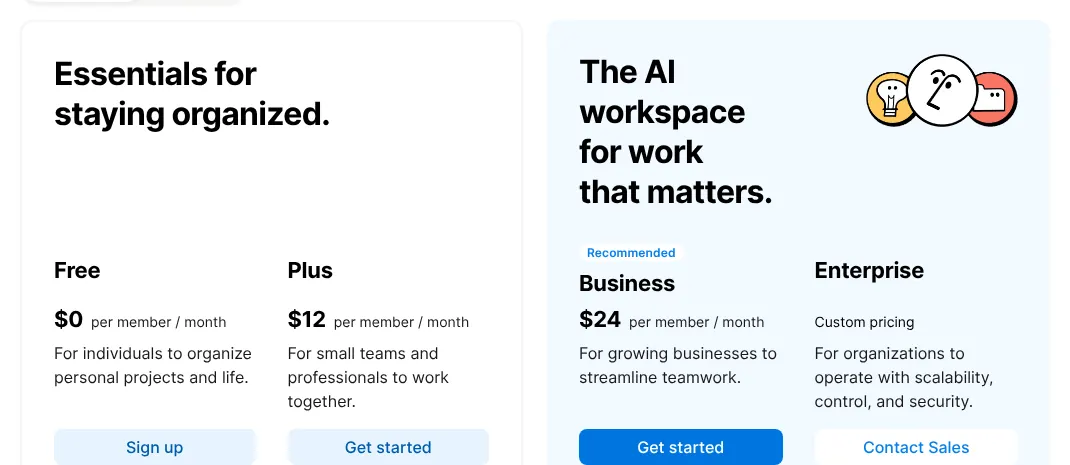
  • Your team's notes and wikis live in NotionNotion MCP · It works on the Free plan; Plus costs $12 per seat a month.
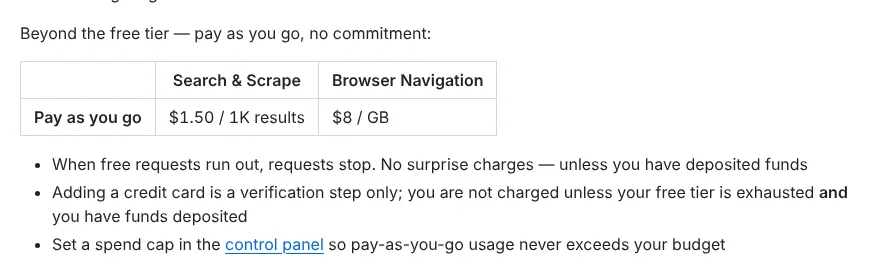
  • You scrape sites that block ordinary tools and want to pay per resultBright Data MCP · 5,000 requests a month are free.
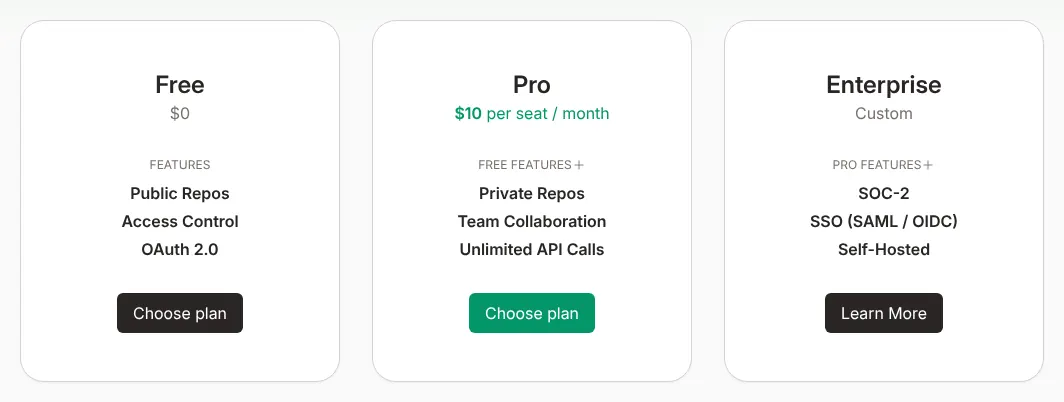
  • Your coding assistant keeps suggesting outdated code for a libraryContext7 · A free account includes 1,000 calls a month.
  • Your company plans work in Jira and writes in ConfluenceAtlassian Rovo MCP Server · Admins can block edits and see every tool use in the audit log.
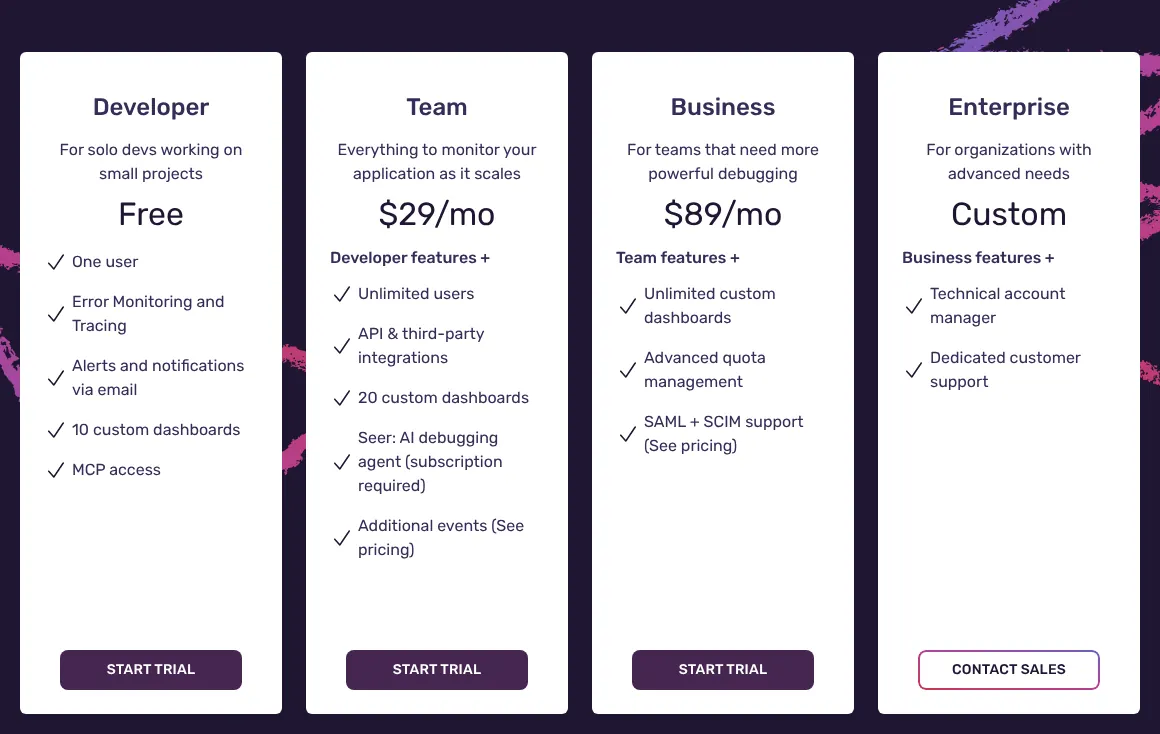
  • Your app reports its errors to Sentry and you want help to investigate themSentry MCP · The free Developer plan includes MCP access for one user.

How to choose an MCP server

Most people do not pick one MCP server: they add the servers of the services they already use. All ten here run at a hosted address, offer browser sign-in and give set-up steps for Claude, Cursor and VS Code. Six checks decide which ones to add, and how safely. Each rests on facts read on the vendors' own pages on 15 November 2026.

1. Start from the service your work lives in

An MCP server reaches one service, so the right choice depends on where your files, tickets or data already sit. A developer on GitHub adds the GitHub server. A team on Jira and Confluence adds Atlassian's. Web servers, such as Exa, Firecrawl and Bright Data, work on public web pages rather than inside an account.

The server rarely costs anything on its own. GitHub, Notion, Atlassian and Apify state that connecting is free or included in every plan. What you pay is the service behind it. A team of five on Jira Standard pays $42.40 a month for Jira, and nothing extra for the server.

2. Check that your AI app is on the vendor's list

Each vendor publishes set-up steps for the AI apps it supports. All ten cover Claude, Cursor and VS Code. Nine give steps for ChatGPT or for Codex, OpenAI's coding assistant; Bright Data covers only OpenAI's developer tools.

Follow the vendor's own steps rather than a generic guide. Several vendors, GitHub and Atlassian among them, offer one-click buttons that fill in the settings for you. If your app is missing from a vendor's list, test the server on a free plan before you rely on it.

3. Prefer a hosted server with browser sign-in

A hosted server runs at an address the vendor maintains, so there is nothing to install or update. All ten offer one, though Sentry's is still marked Beta. Browser sign-in, known as OAuth, opens a window where you log in and approve access, so you never copy a secret key into a settings file.

A key or token (a long password made for programs) still has a use. With it, a script or an automated job can connect without anyone at the keyboard. Notion keeps that option for its Business and Enterprise plans. If you want the server on your own machine, seven of the ten run there in full. Two more do it only in part: Supabase with fewer tools, and Notion with its unmaintained older server.

4. Decide what the assistant may change

Some servers only read; others can create, edit and delete. Exa and Bright Data change nothing in your accounts: they search and read the web. GitHub, Supabase, Notion, Atlassian and Sentry can change code, databases, pages, tickets or issues.

A server that can write needs a limit. GitHub has a read-only flag, Supabase can run every query as a read-only user, and Atlassian's admins can block edits. GitHub warns about prompt injection: hidden instructions in a file or web page that try to steer the assistant. Supabase warns of security risks in its docs. Start in read-only mode, then allow changes once you have watched the assistant work.

5. Count what each call costs

The price that matters is what each request uses up in the service. Exa charges per search, Bright Data per result, Firecrawl per page in credits and Context7 per call above the plan's allowance.

A worked example shows the gap. An assistant that runs 1,000 searches a month on Exa costs $4 at list price, which Exa's $10 of free monthly credits cover. On Context7 Pro, a developer who makes 3,000 calls a month goes 1,000 calls over the 2,000 a seat includes. That adds $5 to the $10 seat, so $15 a month. Check the usage page of each service after the first week.

6. Keep the list of tools short

Every tool a server exposes takes space in the assistant's working memory. GitHub notes that enabling only the needed toolsets helps the assistant choose the right tool. Seven of the ten let you pick tools or groups of tools.

Switch on only what the task needs, and add tools when a new task calls for them. On GitHub, toolsets do this by group. With Apify, Exa, Bright Data or Sentry, a parameter in the server address does the same job.

The 10 MCP servers

by overall score
  1. 1. GitHub MCP Server

    GitHub's server covers all 16 features at no cost for the server itself, and adds a read-only switch.

    Score
    100/100
    Best for
    Developers who want an AI assistant to read code, open issues and review pull requests on GitHub
    From
    $4/user/mo
    Free plan
    Yes · the server works on GitHub Free

    The GitHub MCP Server does all 16 things on the list, for a score of 100. It gives an assistant tools to read repositories (the folders that hold a project's code) and code, manage issues and pull requests (proposed changes to code), and analyse code. GitHub runs it at a public address, so nothing has to be installed. It can also run on the user's own computer from an official Docker image (a sealed package that runs the same way on any machine).

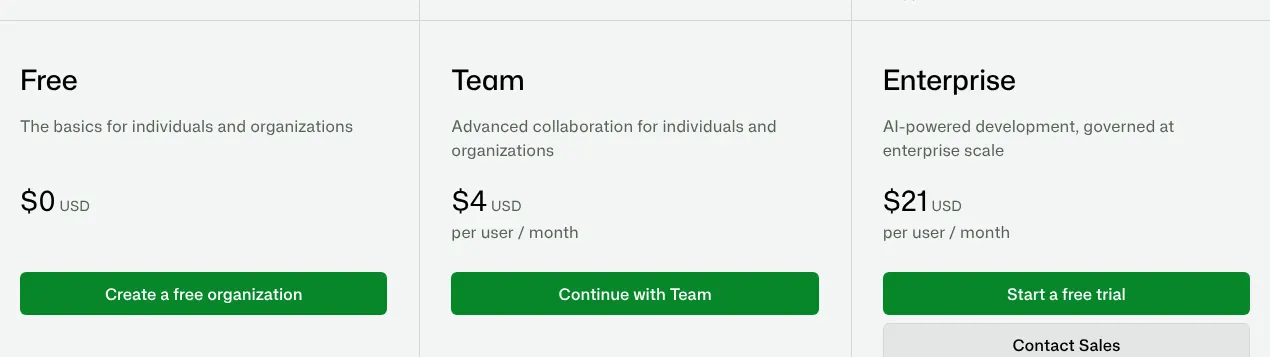
    The server itself costs nothing and is open to every GitHub plan, Free included. A tool tied to a paid feature, such as the Copilot coding agent, needs the same paid licence. The first paid plan, Team, costs $4 per user a month.

    Two settings matter for safety. A read-only flag removes every tool that could change a repository. Toolsets let a team switch whole groups of tools on or off, which also keeps the assistant's choices short. Companies on GitHub Enterprise Server, the version a company installs on its own machines, cannot use the hosted address.

    GitHub plan cards in US dollars: Free at zero, Team per user per month and Enterprise per user per month, each with its sign-up button.
    Team is the first paid plan; the MCP server itself is open to the Free plan as well. Source: github.com, captured on 15 Nov 2026.
  2. 2. Apify MCP Server

    Apify suits data collection from many websites, but every run draws on a usage budget that has to be watched.

    Score
    92/100
    Best for
    Teams that want an assistant to run ready-made web scrapers and collect data from many sites
    From
    $19/mo
    Free plan
    Yes · $5 of usage a month

    Apify's server gives an assistant access to Apify Store, a library of Actors (ready-made programs that scrape a site or automate a task). The assistant can search the store, run an Actor and read its results. It scores 92: it lacks only a Docker image of its own and a read-only setting.

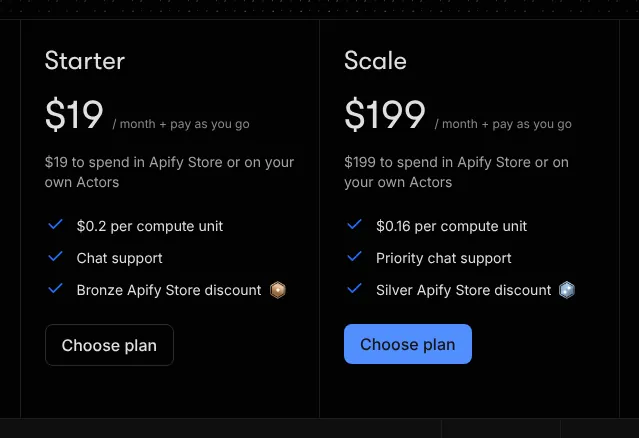
    Connecting costs nothing. Each Actor run is billed to the Apify account at that Actor's own price, which a tool shows before the run. The free plan gives $5 of usage a month. Starter costs $19 a month, billed monthly, and that sum is spent in the store or on the customer's own Actors.

    The hosted address opens a browser window on first use, to sign in and approve access. A parameter in the address chooses which tools the assistant sees. Apify leaves out Actors that ask for full permissions, for safety, and allows up to 20 requests a second per user.

    Apify plan cards: Starter at $19 a month and Scale at $199 a month, each billed on top for usage and showing the sum to spend in Apify Store.
    Starter at $19 a month is the first paid plan; its price is also the usage budget for Actor runs. Source: apify.com, captured on 15 Nov 2026.
  3. 3. Supabase MCP Server

    Supabase gives an assistant real power over a database, with a read-only mode that should stay on until the team trusts it.

    Score
    90/100
    Best for
    Developers building an app on Supabase who want the assistant to query and change the database
    From
    $25/mo
    Free plan
    Yes · 2 active projects

    Supabase hosts the database (where an app stores its records) behind many web apps. Through its server, an assistant can query a project, create new projects and deploy Edge Functions, small pieces of server code. It scores 90.

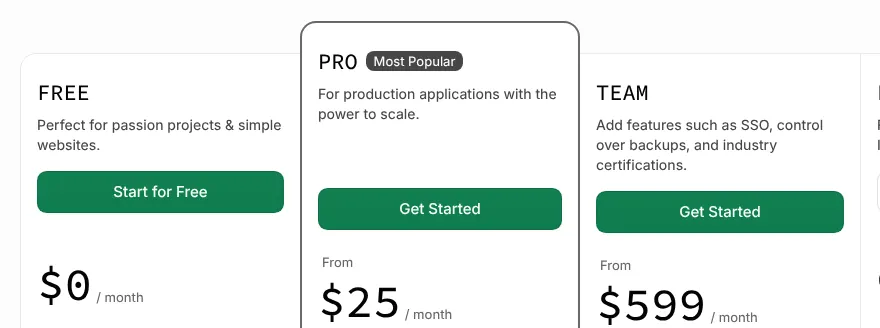
    The free plan allows 2 active projects and a 500 MB database. A free project pauses after a week without activity. Pro costs $25 a month, billed monthly. The branching tools, marked experimental, need a paid plan. Before creating a project or a branch that costs money, the server asks for confirmation.

    Supabase warns in its own docs that connecting an assistant to a database carries security risks. Three settings reduce them: every query can run as a read-only user, the server can be limited to one project, and tool groups can be switched off. The local version comes with the Supabase command line tool (a program run from a terminal window) and offers fewer tools.

    Supabase plan cards: Free, Pro from $25 a month marked Most Popular, and Team from a higher monthly price.
    Pro, from $25 a month, is the first paid plan; the page has no switch between monthly and yearly billing. Source: supabase.com, captured on 15 Nov 2026.
  4. 4. Exa MCP

    Exa is the low-cost way to give an assistant web search, and it cannot change anything in an account.

    Score
    87/100
    Best for
    Anyone who wants an assistant to search the web and read pages, with no subscription
    From
    $4 per 1,000 searches
    Free plan
    Yes · $10 of credits a month

    Exa is a web search service built for AI tools. Its server gives an assistant web search, the text of a web page and longer research tasks. It scores 87, level with Firecrawl. At equal scores the page lists the lower entry price first: $4 per 1,000 searches for Exa, $19 a month for Firecrawl.

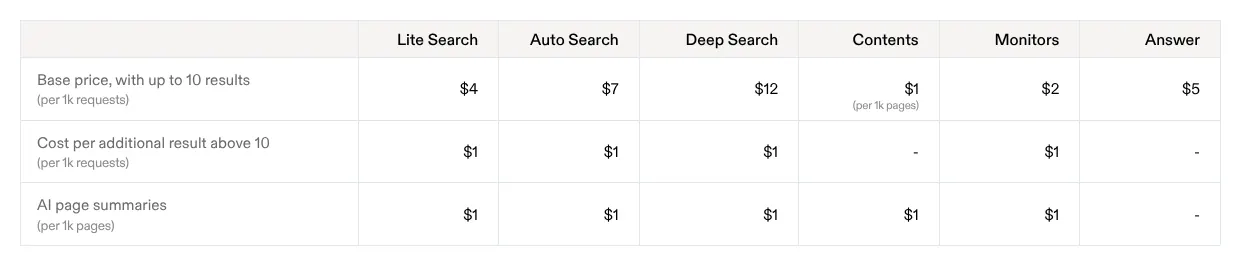
    There is no monthly plan. Search is billed per request: a Lite Search with up to 10 results costs $4 per 1,000 searches. The free plan gives $10 of credits every month, without a card. Search and page fetching can even be tried without an account, at a free rate limit.

    The server only looks things up: none of its four tools changes data in an account. A parameter in the address chooses which tools appear. Exa's code also marks its tools as read-only, but its docs do not describe that.

    Exa price table per 1,000 requests for up to 10 results: Lite Search, Auto Search, Deep Search, Contents, Monitors and Answer, with costs for extra results.
    The Lite Search column is the cheapest search; the first row gives the price per 1,000 requests. Source: exa.ai, captured on 15 Nov 2026.
  5. 5. Firecrawl MCP Server

    Firecrawl goes beyond search, with scraping, crawling and page monitors, but every action spends credits.

    Score
    87/100
    Best for
    Developers who need web pages turned into clean text, or whole sites crawled (read page after page), for an assistant
    From
    $19/mo
    Free plan
    Yes · 1,000 credits a month

    Firecrawl turns web pages into clean text that an assistant can read. Its server can search the web, scrape a page and interact with live pages. It can also set up monitors that watch a page for changes. It also scores 87.

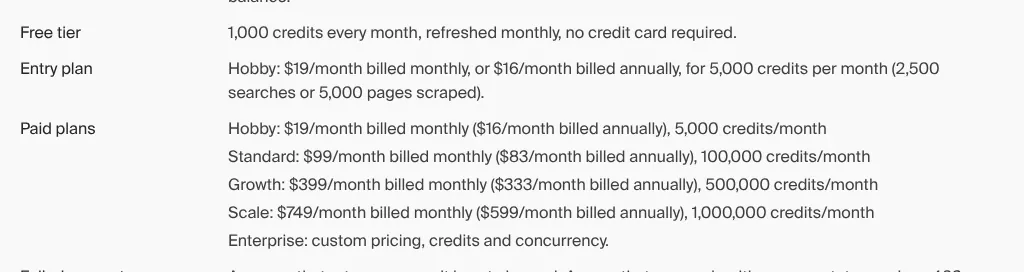
    Firecrawl counts usage in credits: one page scraped costs 1 credit, and a search costs 2 credits per 10 results. The free plan gives 1,000 credits a month. Hobby costs $19 a month billed monthly, for 5,000 credits. The plan cards open on yearly prices, so the monthly figure sits lower on the page.

    The server has 33 tools with the full set switched on. Only some optional tools can be turned off, and no read-only setting was found. Without an account, the hosted server offers 3 tools within daily limits.

    Firecrawl pricing summary: free tier of 1,000 credits a month, then Hobby, Standard, Growth and Scale with monthly and yearly prices and credits.
    Hobby reads $19/month billed monthly; the figure in brackets is the lower yearly price. Source: firecrawl.dev, captured on 15 Nov 2026.
  6. 6. Bright Data MCP

    Bright Data's 5,000 free requests a month cover a lot of testing, and requests stop rather than bill once they run out.

    Score
    85/100
    Best for
    Projects that need data from sites that block ordinary scrapers, with pay-per-result pricing
    From
    $1.50 per 1,000 results
    Free plan
    Yes · 5,000 requests a month

    Bright Data's server offers web search, page scraping, structured data from more than 100 sites and browser automation. It has 30 tools and scores 85.

    Every new account gets 5,000 free requests a month. Beyond them, search and scraping cost $1.50 per 1,000 results, and the remote browser $8 per GB of data. When the free requests run out, requests stop, unless funds have been added.

    Bright Data's MCP pricing page did not show its amounts in the browser used for this page. The price comes from Bright Data's own GitHub page. Parameters in the address limit the server to chosen tools or groups. No read-only setting was found.

    Bright Data price table beyond the free requests: usage-based search and scraping at $1.50 per 1,000 results, and a per-GB price for browser navigation.
    Search and scraping cost $1.50 / 1K results once the free requests are used up. Source: github.com, captured on 15 Nov 2026.
  7. 7. Notion MCP

    Notion's server reads and edits a whole workspace on any plan, but blocking tools takes the Enterprise plan.

    Score
    83/100
    Best for
    Teams whose notes, wikis and task lists live in Notion
    From
    $12/seat/mo
    Free plan
    Yes · the server works on Free

    With Notion MCP, an assistant can search a workspace, create and edit pages and manage databases. It works on every Notion plan, Free included, through a hosted address. It scores 83.

    Plus, the first paid plan, costs $12 per seat (one paid member) a month, billed monthly. Signing in with a token instead of a browser needs the Business or Enterprise plan. Blocking individual tools is an Enterprise control. Each tool call counts toward Notion's normal request limits, which are higher on Business and Enterprise.

    The tools act with the user's full Notion permissions: they reach everything that person can open. Notion's older server, which could run locally and in read-only mode, is no longer maintained. Guests cannot connect, only workspace members.

    Notion plan cards: Free, Plus at $12 per member per month, Business at a higher price per member, and Enterprise at custom pricing.
    Plus shows $12 per member a month, its price on monthly billing; the page itself opens on lower yearly prices. Source: notion.com, captured on 15 Nov 2026.
  8. 8. Context7

    Context7 does one job, current documentation for coding assistants, and costs little to try.

    Score
    82/100
    Best for
    Developers who want a coding assistant to read current documentation instead of guessing from memory
    From
    $10/seat/mo
    Free plan
    Yes · 1,000 calls a month

    Context7 feeds a coding assistant with up-to-date documentation and code examples for a chosen library and version. It has two tools: one finds the library, the other fetches the right part of its docs. It scores 82.

    A free account includes 1,000 API calls a month (one call is one request to Context7). After that limit, free users are blocked, with 20 bonus calls a day. Pro costs $10 per seat a month and includes 2,000 calls per seat. Extra calls cost $5 per 1,000.

    Only the question the assistant writes is sent, not the code or the conversation. The server code is open source (published for anyone to read, use and change) under the MIT licence, but the search and parsing engines behind it are private. Account changes go through a separate admin server.

    Context7 plan cards: Free, Pro at $10 per seat per month with private repositories and team collaboration, and Enterprise at custom pricing.
    Pro reads $10 per seat / month; the card's unlimited calls mean extra calls are billed, not blocked. Source: context7.com, captured on 15 Nov 2026.
  9. 9. Atlassian Rovo MCP Server

    Atlassian's server fits companies already on Jira and Confluence, with admin controls and an audit log of every tool use.

    Score
    80/100
    Best for
    Companies that run projects in Jira and keep documents in Confluence
    From
    $8.48/user/mo
    Free plan
    Yes · Jira Free, up to 10 users

    Atlassian's server connects an assistant to Jira, Confluence, Jira Service Management, Bitbucket, Compass and Loom. It can search, summarise, and create or update work items and pages. It scores 80.

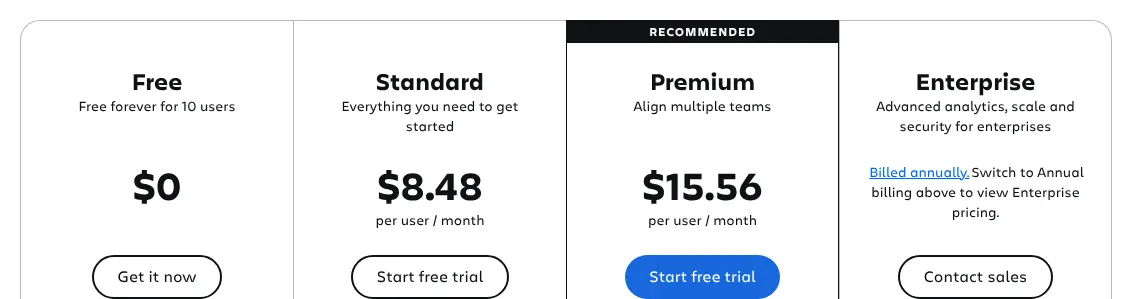
    Installing and connecting it is free. Most calls that pull richer context across products cost 1 to 10 Rovo credits each (Atlassian's usage units), while simple lookups and updates in a single product are free. Jira Standard, the first paid plan, costs $8.48 per user a month, billed monthly. Jira Free covers up to 10 users.

    Control sits with the organisation's admins. They can stop the server from creating or editing content, and every tool use lands in the audit log. Delete tools for Jira are off by default. The server runs only in Atlassian's cloud, and its public repository holds set-up files, not the server's code.

    Jira plan cards billed monthly: Free for up to 10 users, Standard at $8.48 and Premium per user per month, and Enterprise billed annually.
    Standard, at $8.48 per user a month, is Jira's first paid plan; Free covers 10 users. Source: atlassian.com, captured on 15 Nov 2026.
  10. 10. Sentry MCP

    Sentry's server fits teams whose apps already report errors to Sentry, provided a hosted service still in beta and no read-only setting are acceptable.

    Score
    78/100
    Best for
    Developers whose apps report errors to Sentry and who want an assistant to investigate them
    From
    $29/mo
    Free plan
    Yes · Developer, one user

    Sentry collects the errors of an app: each time a bug is caught, a report reaches Sentry. Through its server, an assistant can search those errors, traces (the path of one request through an app) and logs in plain language. It can also act, for example update an issue, create a project or set an alert rule. It scores 78.

    Connecting costs nothing extra: the free Developer plan lists MCP access, for one user. Team costs $29 a month billed monthly and has no limit on users. A team of five therefore pays the same $29. The pricing page opens on yearly billing, where Team shows $26 a month.

    The hosted server is still marked Beta. It can also run locally through Sentry's command line tool, where its AI search tools need a key from an AI provider such as OpenAI or Anthropic. A parameter in the server address narrows it to one project or to chosen groups of tools. No read-only setting was found. The code is public under a licence that bars rival commercial services, and each version becomes open source two years after release.

    Sentry plan cards: Developer free for one user with MCP access, Team at $29 a month with unlimited users, then Business and Enterprise.
    With the switch on Monthly, Team shows $29 a month for unlimited users; the free Developer card lists MCP access. Source: sentry.io, captured on 15 Nov 2026.

Summary table

The table sets the ten servers side by side. The entry price is that of the service behind the server: its cheapest paid plan billed monthly, or its usage price when there is no plan.

The 10 MCP servers side by side: score, entry price, billing, free allowance and local install
MCP serverScoreEntry priceBilling of that priceFree allowanceRuns locally
01GitHub MCP Server100$4/user/moMonthly (GitHub Team)Server free on every planYes, official Docker image
02Apify MCP Server92$19/moMonthly, plus usage$5 of usage a monthYes
03Supabase MCP Server90$25/moMonthly2 active projectsPartly, fewer tools
04Exa MCP87$4 per 1,000 searchesPer request$10 of credits a monthYes
05Firecrawl MCP Server87$19/moMonthly1,000 credits a monthYes, official Docker image
07Notion MCP83$12/seat/moMonthly (Notion Plus)Server free on every planOnly the old, unmaintained server
06Bright Data MCP85$1.50 per 1,000 resultsPer result5,000 requests a monthYes
08Context782$10/seat/moMonthly1,000 calls a monthYes
09Atlassian Rovo MCP Server80$8.48/user/moMonthly (Jira Standard)Server free; Jira Free up to 10 usersNo, cloud only
10Sentry MCP78$29/moMonthly (Team)Developer plan, one userYes, with Sentry's command line tool

Prices in US dollars, before taxes, read on vendor pages on 15 November 2026. Bright Data: price read on Bright Data's GitHub page, because its pricing page showed no amounts in the browser used. Sentry: its pricing page opens on yearly billing ($26 a month), and the monthly $29 shows after the switch to Monthly. GitHub, Notion and Atlassian: the price is that of the product the server connects to.

What an MCP server costs for your team

For a team of five, the bill depends on how the service charges. GitHub Team costs $20 a month for five users, Jira Standard $42.40 and Notion Plus $60. Sentry Team costs $29 whatever the number of users. Apify, Supabase and Firecrawl show one price per plan, not per person. Exa and Bright Data charge only for what the assistant uses.

Paid plan behind each server, how it is charged and the monthly cost for five people
MCP serverPaid plan usedCharged perPrice, billed monthly5 people per month
01GitHub MCP ServerGitHub TeamUser$4$20
02Apify MCP ServerStarterPlan, plus usage$19Not priced per person
03Supabase MCP ServerProOrganization$25Not priced per person
04Exa MCPUsage-based1,000 searches$4Usage only
05Firecrawl MCP ServerHobbyPlan, 5,000 credits$19Not priced per person
07Notion MCPPlusSeat$12$60
06Bright Data MCPUsage-based1,000 results$1.50Usage only
08Context7ProSeat$10$50
09Atlassian Rovo MCP ServerJira StandardUser$8.48$42.40
10Sentry MCPTeamPlan, unlimited users$29$29

Monthly billing, before taxes. For plans not priced per person, the number of people who may share one plan was not checked. Extra usage is billed on top: Context7 charges $5 per 1,000 calls above 2,000 per seat, and some Atlassian calls use Rovo credits.

How we rank

  1. The ten servers are ranked by a category score out of 100. The score measures how many of 16 features expected of an MCP server each vendor documents on its own site. It does not measure speed, reliability, the quality of answers or support.Connection 30% · 5 featuresAI apps 20% · 4 featuresTools 30% · 4 featuresControl and safety 20% · 3 features
  2. The 16 features form a grid in four groups: connection, AI apps, tools, and control and safety. The three that define the category weigh 3: a hosted server, a published list of tools, and tools that read live data. Eight weigh 2 and five weigh 1. A server receives 1 for a feature the vendor documents, on any plan. A feature counts 0.5 when it is in beta or preview, limited to some plans, offered only by an older or separate product, or visible only in the source code. A feature that is absent, or that could not be found, counts 0. MCP resources are documents or data a server hands to the assistant to read, and MCP prompts are ready-made instructions a server supplies. The score is the weighted sum divided by the total weight, 30, rounded to the nearest integer.
  3. Exa and Firecrawl both score 87. At equal scores the lower entry price comes first: $4 per 1,000 searches for Exa, $19 a month for Firecrawl. Sixteen servers were scored. The six left out are Tavily (75), Zapier (73), Linear (68), Stripe (68), Browserbase (57) and Brave Search (55). All prices and features were read on vendor pages and vendor GitHub repositories on 15 November 2026. Sentry's pricing page shows its monthly price only after the switch to Monthly; the same $29 a month is also printed on Sentry's own blog.
  4. No entry on this page is sponsored. A sponsored entry is marked Sponsored and holds the position paid for; its score stays the computed one.

FAQ

Do MCP servers cost money?

Usually not on their own. GitHub and Notion include their servers in every plan, Free included, and Atlassian and Apify state that connecting is free. You pay for the service behind the server, by plan or by use. Check how each call is counted before you let an assistant run for hours.

Is it safe to give an AI assistant access to my accounts?

It carries real risk, and vendors say so. Notion's tools act with your full permissions, and Supabase warns about security risks in its own docs. Start with read-only access where it exists, limit the server to one project or a few tools, and never connect production data before a test.

Why are Tavily, Zapier and Linear not in the ten?

Tavily (a web search service for AI tools) scores 75, three points below Sentry. No setting to choose its tools was found, and its tools only read the web, while Sentry's can also update issues or set alert rules. Zapier (a service that links apps so they work together) and Linear document fewer of the 16 features. Zapier has no local version, no published server code and no read-only setting that was found. Linear publishes no full list of its tools and no local version. If your work lives in one of them, its server can still be the right one to add.

Can I run an MCP server on my own computer?

Seven of the ten can run locally, usually with one command or a Docker image. Supabase's local version has fewer tools, Notion's local server is no longer maintained, and Atlassian runs only in its own cloud. A local server keeps the connection on your machine, but you have to install updates yourself.

Do these servers work with ChatGPT?

Nine of the ten give set-up steps for ChatGPT or for Codex, OpenAI's coding assistant. Bright Data's guide covers only OpenAI's tools for developers. Look for the ChatGPT or Codex entry on the vendor's set-up page before you connect.