top10alternative

Top 10 Photo Editing Software (2026)

Ten photo editing programs compared on what they do and what they cost, ranked by how many of 21 common photo editing capabilities each one covers.

The best photo editing software for your situation

<p>Each line matches a situation with the tool whose published facts fit it. The score on this page counts how many of 21 common photo editing capabilities a tool covers. It measures coverage, not quality.</p>

  • You retouch, combine and repair photos, and clients send you PSD files, the Photoshop formatAdobe Photoshop · Photoshop covers 20 of the 21 capabilities in full. Take it through the Photography plan, at $19.99 a month on an annual plan, which also includes Lightroom.
  • You shoot a lot and need to sort, rate and edit whole shoots on computer and phoneAdobe Lightroom · Lightroom keeps albums, keywords and ratings in sync across devices. Its plan costs $11.99 a month on an annual plan.
  • You want AI to replace skies and remove objects, and you prefer to pay onceLuminar · Luminar is sold as a one-time licence. Its generative tools last 365 days, then need a yearly subscription.
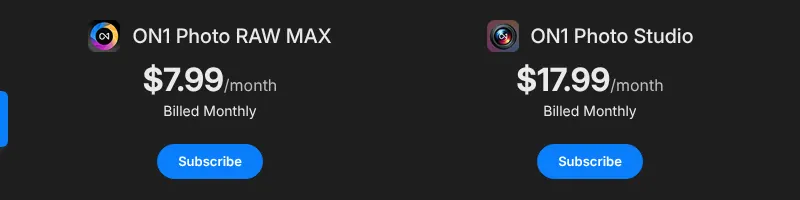
  • You want a catalogue, RAW editing and layers in one app, on a monthly planON1 Photo RAW · Photo RAW MAX costs $7.99 a month billed monthly, and the desktop trial runs 30 days without a card.
  • You want many AI tools in one subscription, monthly or yearlyPhotoDirector 365 · PhotoDirector 365 costs $19.99 a month and includes 1,200 AI credits a year. It does not open PSD files.
  • You work on Windows and refuse subscriptionsPaintShop Pro · PaintShop Pro is paid once, with a list price of $79.99. It does not run on Mac.
  • You want a full layer editor and pay nothingAffinity · Affinity is free on Mac, Windows and iPad. Only its AI tools need a paid Canva plan.
  • You edit now and then, on any computer, in a browserPhotopea · Photopea opens PSD and RAW files in the browser for free, with ads on screen.
  • You shoot tethered in a studio, with the camera linked to the computerCapture One Pro · Capture One supports over 550 cameras and tethered shooting. Pro costs $28 a month, or $18 a month on an annual plan.
  • You use Linux, or want free software you can keep foreverdarktable · darktable is free and open source (its code is public and free to reuse). It is a RAW editor and catalogue, not a layer editor.

How to choose photo editing software

The score only shortlists: it counts capabilities, and the right tool depends on the work done with the photos. Six checks narrow the list to one or two tools. Each one rests on facts read on 15 November 2026, on vendor pages or, for Adobe's prices, on two other sites.

1. Decide whether you organise photos or change them

Photo editing software splits into two kinds, and you should pick the kind before the tool. A RAW editor with a catalogue sorts a whole shoot and adjusts light and colour, like Lightroom, Capture One Pro or darktable. A pixel editor changes the picture itself in layers, like Photoshop, Affinity, Photopea or PaintShop Pro.

If you shoot hundreds of photos a week, the catalogue matters more than layers. If you edit a few images in depth, layers matter more. ON1 Photo RAW, Luminar and PhotoDirector 365 do some of both.

2. Check that your camera's RAW files open

RAW files hold everything the camera sensor recorded, which leaves more room to fix light and colour than a JPEG. Each camera model writes its own RAW format, so support varies. Capture One lists over 550 supported cameras and PaintShop Pro over 800 camera models. Photopea opens the formats of the main brands, such as CR3 and NEF, in a browser.

Look for your exact camera model on the vendor's supported list before you pay, then open a few of your own files during the trial.

3. Count what the AI tools really cost

The same AI tool can be free, paid in credits or locked behind another subscription. Credits are units that each generative edit spends. In Photoshop, an AI enlargement of an image up to 25 megapixels costs 10 credits. In Lightroom, Generative Remove spends no credits. PhotoDirector 365 includes 1,200 credits a year.

Two cases need care. Luminar's generative tools last 365 days on a one-time licence, then need a subscription. Affinity is free, but its AI tools need a paid Canva plan. If you never use generative AI, darktable runs its AI masks and enlargement on your own computer, at no cost.

4. Compare subscriptions with one-time licences over three years

A subscription costs less at the start and more over time. A one-time licence, also called a perpetual licence, is paid once and kept, but usually covers one version. ON1's one-time licence, for example, covers Photo RAW 2027 only, with no future major upgrades.

Over three years, Photoshop alone costs $827.64 on its annual plan paid monthly. PaintShop Pro costs $79.99 once over the same period. The table further down sets every tool side by side at one and three years.

5. Check where the tool runs

Some tools here are limited to certain systems. PaintShop Pro runs on Windows only. darktable's Mac builds need an Apple Silicon Mac, one with Apple's own chip rather than an Intel one. Affinity runs on Mac, Windows and iPad, with no phone app. Capture One's mobile app is for iPhone and iPad, with no Android version.

If you edit on a phone as well as a computer, Lightroom and Luminar sync between the two. If you move between computers you do not own, Photopea needs nothing but a browser.

6. Read the price after the promotion

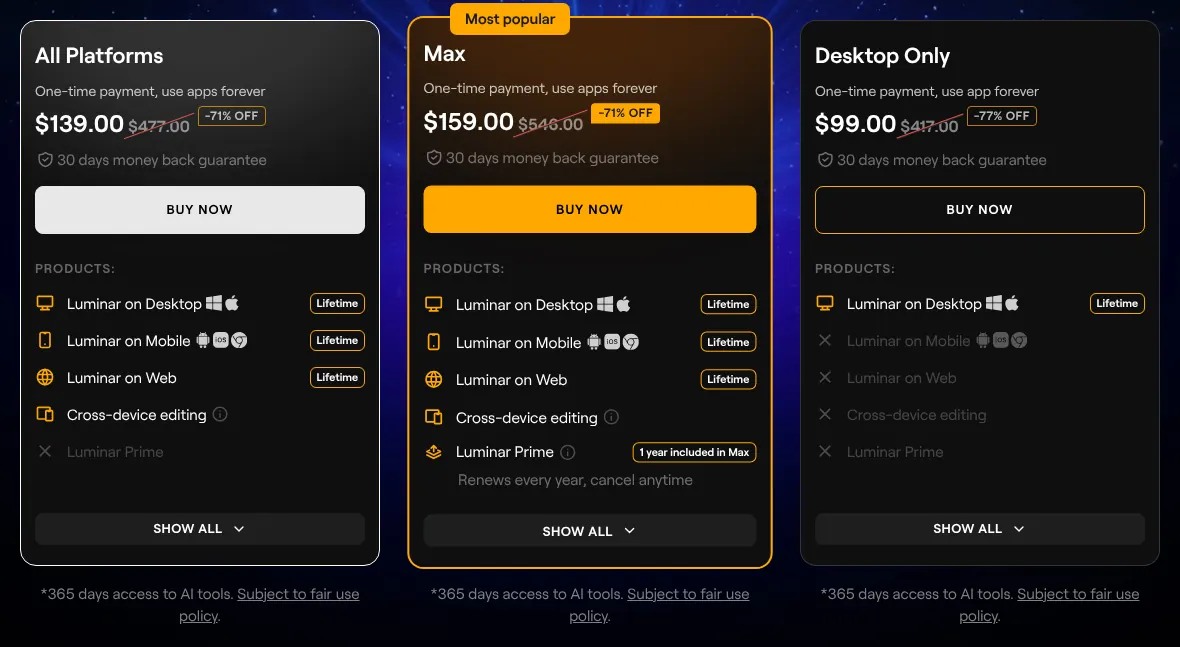
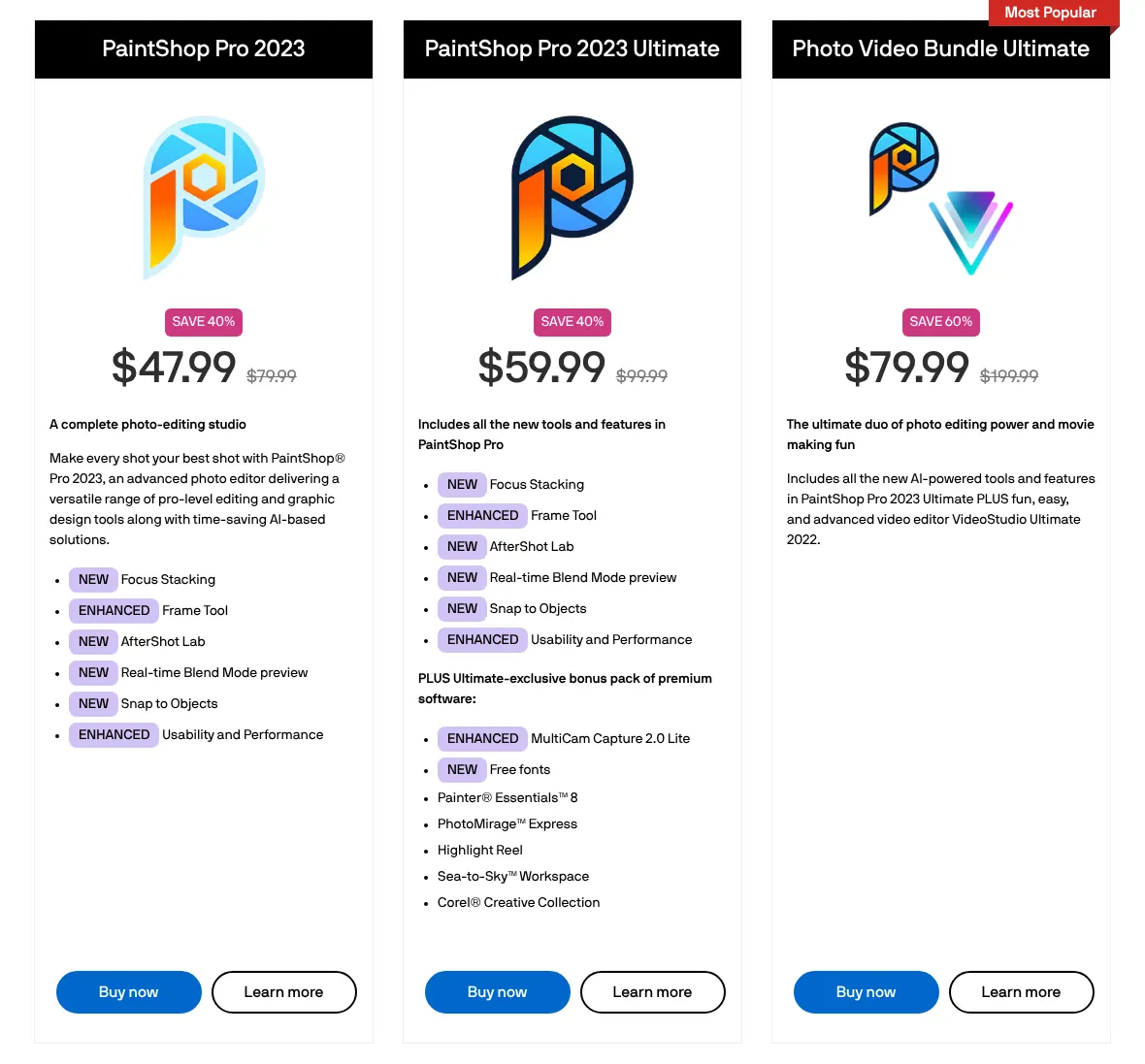
Several vendors showed promotions on 15 November 2026, and this page uses the list price, the standard price before offers. Luminar's Desktop Only licence showed $99 against a list price of $417. PaintShop Pro showed $47.99 against $79.99.

An offer on a one-time licence is a real saving if you buy during it. On a subscription, check what the second year costs before you pay.

The 10 Photo editing software

by overall score
  1. 1. Adobe Photoshop

    Photoshop covers almost everything on this page, and its Photography plan is the cheaper way to get it, with Lightroom included.

    Score
    97/100
    Best for
    Photographers and retouchers who combine, repair and finish images in layers
    From
    $22.99/mo, annual plan
    Free plan
    No · 7-day trial; free phone app

    Adobe Photoshop covers 20 of the 21 capabilities in full, the highest count on this page. It is a pixel editor: it changes the picture itself, in layers, stacked sheets that each hold one part of the image. It also opens RAW files, the unprocessed data a camera records, through Camera Raw, which comes with it. Its AI tools remove objects, replace skies and fill part of a photo from a typed prompt.

    Adobe's plan pages refused the browser used by this site, so the prices come from other sites. Photoshop alone costs $22.99 a month, as read on Dupple and confirmed on Joseph Nilo's blog. That price is a one-year commitment paid in twelve instalments. The Photography plan costs less, $19.99 a month on the same terms, according to Dupple. Adobe's own page says that plan adds Lightroom, Lightroom Classic and 1TB of cloud storage.

    The one gap is the photo library. Photoshop has no catalogue of its own (a list that keeps every photo with its ratings and keywords). That job goes to Adobe Bridge, a separate free app. The AI tools spend generative credits: an AI enlargement of an image up to 25 megapixels costs 10 credits. Photoshop runs on Windows, Mac, in a browser and on phones, and the desktop app has a 7-day trial.

  2. 2. Luminar

    Luminar suits someone who wants AI sky and object tools in an app paid once, but its generative tools need a subscription after the first year.

    Score
    96/100
    Best for
    Enthusiasts who want AI tools for skies, objects and portraits in an app they pay for once
    From
    $417 one-time, list price
    Free plan
    Yes · web editor, exports up to 1280 px

    Luminar, called Luminar Neo on older Skylum pages, is a photo editor built around AI tools. It scores 96, with 18 capabilities in full and 3 in part. Its Sky AI tool replaces a sky, and its Erase tool removes an object brushed over. It also keeps a library with star ratings, edits RAW files, works in layers and merges HDR shots, several exposures blended so that both shadows and highlights keep detail.

    Luminar is sold as a licence paid once, with no monthly plan on its pricing page. The Desktop Only licence lists at $417, the struck-through price on Skylum's page. On 15 November 2026 a Black Friday offer showed it at $99. The All Platforms licence adds the phone app and the web editor. The free option is Luminar on Web, which exports at 1280 pixels at most.

    The generative tools, which paint new content into a photo, come with a limit. A one-time licence includes them for 365 days. After that, they need Luminar Prime, a yearly subscription for licence owners. Luminar opens PSD files, but the Skylum pages read do not say that their layers survive. Text can only be added as a watermark at export.

    Luminar plan cards, all one-time payments: All Platforms at 139 dollars, Max at 159 dollars, and Desktop Only at 99 dollars with 417 dollars struck through, minus 77 percent.
    The large figures are a Black Friday offer; the struck-through $417.00 next to Desktop Only is the list price used on this page. Source: skylum.com, captured on 15 Nov 2026.
  3. 3. ON1 Photo RAW

    ON1 Photo RAW costs $7.99 a month without a yearly commitment, and suits a photographer who wants catalogue and layers in one place.

    Score
    93/100
    Best for
    Photographers who want a catalogue, RAW editing and layers in one app, monthly or paid once
    From
    $7.99/mo
    Free plan
    No · 30-day trial, free phone app

    ON1 Photo RAW puts a catalogue, a RAW editor and a layer editor in one desktop app for Windows and Mac. It scores 93, level with PhotoDirector, with 18 capabilities in full. Its Sky Swap AI replaces skies, and Resize AI enlarges images for large prints. Its catalogue keeps keywords, ratings and colour labels.

    ON1's cheapest monthly plan is the Photo RAW MAX subscription, at $7.99 a month billed monthly. Billed yearly, the list price is $89.99. ON1 also sells Photo RAW 2027 as a one-time licence at $99.99, which covers that version only, with no future major upgrades. The desktop app has a 30-day trial with no card, and the phone app for iOS and Android is free.

    Two capabilities are missing. No tool fills an area from a typed prompt, and there is no browser version. ON1 lists PSD among its formats, but its readable pages do not say that the layers of an opened PSD are kept. Some AI tools, such as the cloud-based Generative Erase, are reserved for Photo RAW MAX, whether bought by subscription or once.

    ON1 subscriptions with Monthly selected: ON1 Photo RAW MAX at 7.99 dollars a month billed monthly, ON1 Photo Studio at 17.99 dollars a month billed monthly.
    With Monthly selected, Photo RAW MAX reads $7.99/month billed monthly; Photo Studio, at $17.99/month, is the next plan up. Source: on1.com, captured on 15 Nov 2026.
  4. 4. PhotoDirector 365

    PhotoDirector 365 gives nearly every photo tool on this page for $19.99 a month, provided no one sends PSD files.

    Score
    93/100
    Best for
    Windows and Mac users who want many AI tools in one subscription, paid monthly or yearly
    From
    $19.99/mo
    Free plan
    Yes · Essential, limited tools

    PhotoDirector 365 is CyberLink's photo editor for Windows and Mac. It covers 18 of the 21 capabilities in full and 1 in part. Its AI tools replace skies, remove objects and fill a selected area from a text prompt. It also has layers, a photo library with star ratings and RAW editing.

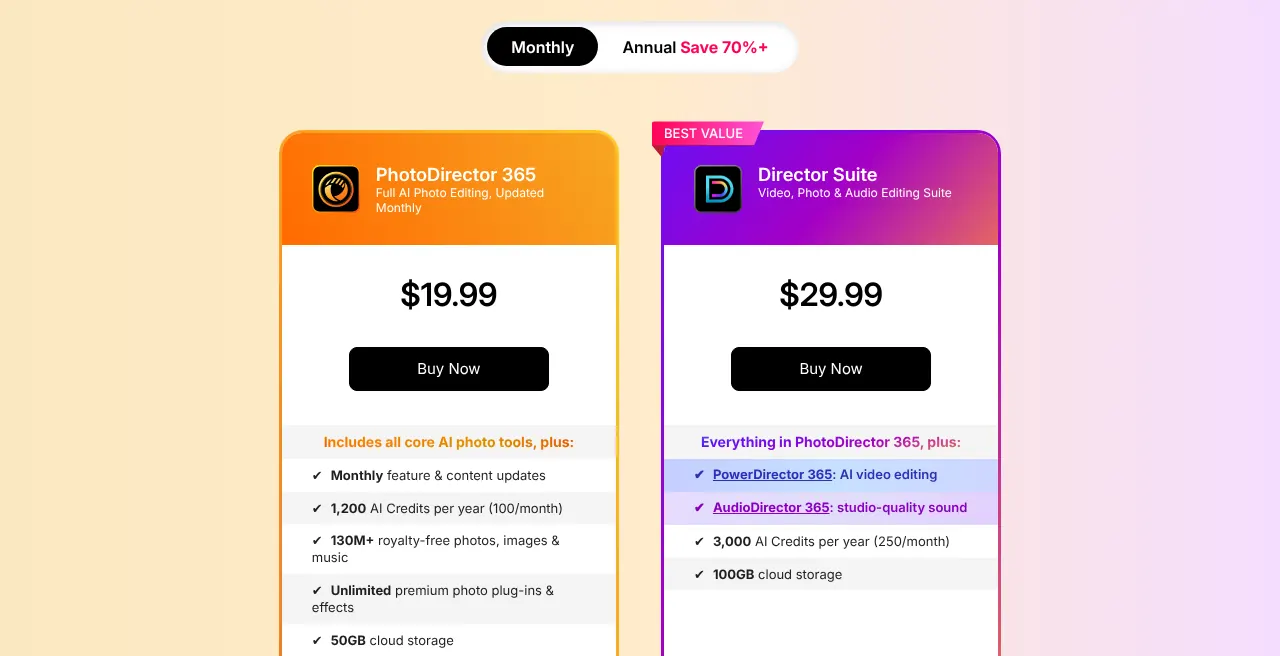
    The subscription costs $19.99 a month, billed monthly. Billed yearly, it lists at $79.99. On 15 November 2026 the yearly plan showed a promotion at $69.99. Both include 1,200 AI credits a year, the units that each generative edit spends. CyberLink also sells PhotoDirector 2027 as a one-time licence at $119.99. That licence gets 300 credits once and no monthly updates.

    Two capabilities are missing: PSD files are not in its import list, and there is no browser version. One subscription covers Windows or Mac, not both. CyberLink's current pages show only an Android phone app. The free Essential version has no time limit but restricts the advanced AI tools and some export options.

    PhotoDirector pricing with Monthly selected: PhotoDirector 365 at 19.99 dollars, and the Director Suite card, which adds PowerDirector and AudioDirector.
    With Monthly selected, the PhotoDirector 365 card shows its monthly price, $19.99; Director Suite, on the right, is the larger bundle with video and audio editing. Source: cyberlink.com, captured on 15 Nov 2026.
  5. 5. Adobe Lightroom

    Lightroom suits a photographer with thousands of photos to sort and edit, and the Photography plan adds Photoshop for $8 more a month.

    Score
    88/100
    Best for
    Photographers who sort, rate and edit whole shoots, on computer, phone and web
    From
    $11.99/mo, annual plan
    Free plan
    Yes · phone app, most editing tools

    Adobe Lightroom is a photo library and RAW editor rather than a pixel editor. It covers 16 capabilities in full and 3 in part. It organises photos in albums with keywords, flags and ratings, and syncs them between computer, phone and browser. It selects the subject of a photo in one click and removes objects with Generative Remove, which spends no credits.

    Adobe's plan pages refused the browser used by this site. Adobe's own help page states the Lightroom plan at US$11.99 a month, annual billed monthly, and Life after Photoshop gives the same figure. The plan includes Lightroom Classic, a separate desktop version, and 1TB of cloud storage. Paid for a year at once, it costs US$119.88. The free version is the phone app, with most editing tools.

    Lightroom has no layers, so combining photos or adding graphics needs another app. Text only goes on as a watermark at export. Typed-prompt editing is an early-access feature of the desktop app, paid in credits. The free phone app leaves out the healing brush, masking and RAW editing, which need the subscription.

  6. 6. PaintShop Pro

    PaintShop Pro suits a Windows user who wants layers, RAW editing and a licence paid once, but Mac users and AI-heavy work need another tool.

    Score
    80/100
    Best for
    Windows users who want a layer-based photo editor without a subscription
    From
    $79.99 one-time
    Free plan
    No · 30-day trial

    PaintShop Pro is Corel's photo editor for Windows, sold without a subscription. It scores 80: 12 capabilities in full and 6 in part. It edits RAW files from over 800 camera models, works in layers and enlarges images with an AI option. Its organiser rates photos so that favourites are easy to find.

    PaintShop Pro 2023 lists at $79.99, paid once. On 15 November 2026 the page showed it at $47.99, a Black Friday offer. The version on sale is still the 2023 one, kept current by updates. There is a 30-day trial and a 30-day money-back guarantee.

    The partial points come from its platform and from AI tools kept in other apps. Its AI background removal works on people only. Prompt-based editing sits in Vision FX, a separate app sold on its own. It merges HDR shots but has no panorama stitching, and it runs on Windows only, with no Mac, browser or phone version.

    PaintShop Pro 2023 at 47.99 dollars with 79.99 struck through, PaintShop Pro 2023 Ultimate at 59.99 with 99.99 struck through, and a photo and video bundle.
    The struck-through $79.99 under PaintShop Pro 2023 is the list price used on this page; the larger figure is a 40% offer, which the vendor's home page calls Black Friday. Source: paintshoppro.com, captured on 15 Nov 2026.
  7. 7. Affinity

    Affinity gives a complete layer editor for nothing, as long as the AI tools are not needed.

    Score
    79/100
    Best for
    Anyone who wants a full layer-based photo editor on Mac, Windows or iPad without paying
    From
    Free
    Free plan
    Yes · every tool, no restrictions

    Affinity by Canva is a free app for Mac, Windows and iPad that holds photo, vector and layout tools. Individuals can use every tool with no restrictions or payment, according to Affinity. It scores 79, with 13 capabilities in full. It opens RAW files, imports PSD files with their layers intact, and merges HDR shots and panoramas.

    The AI tools are the catch. Background removal, generative fill, AI object removal and Super Resolve need a paid Canva premium plan. Affinity does not publish that price on its own site, and generative edits count toward a monthly limit. Downloading the app needs a free Canva account.

    Four capabilities are missing. Affinity has no photo library to rate and tag a collection, and no sky replacement was found on its site. There is no browser version and no phone app, only the iPad one.

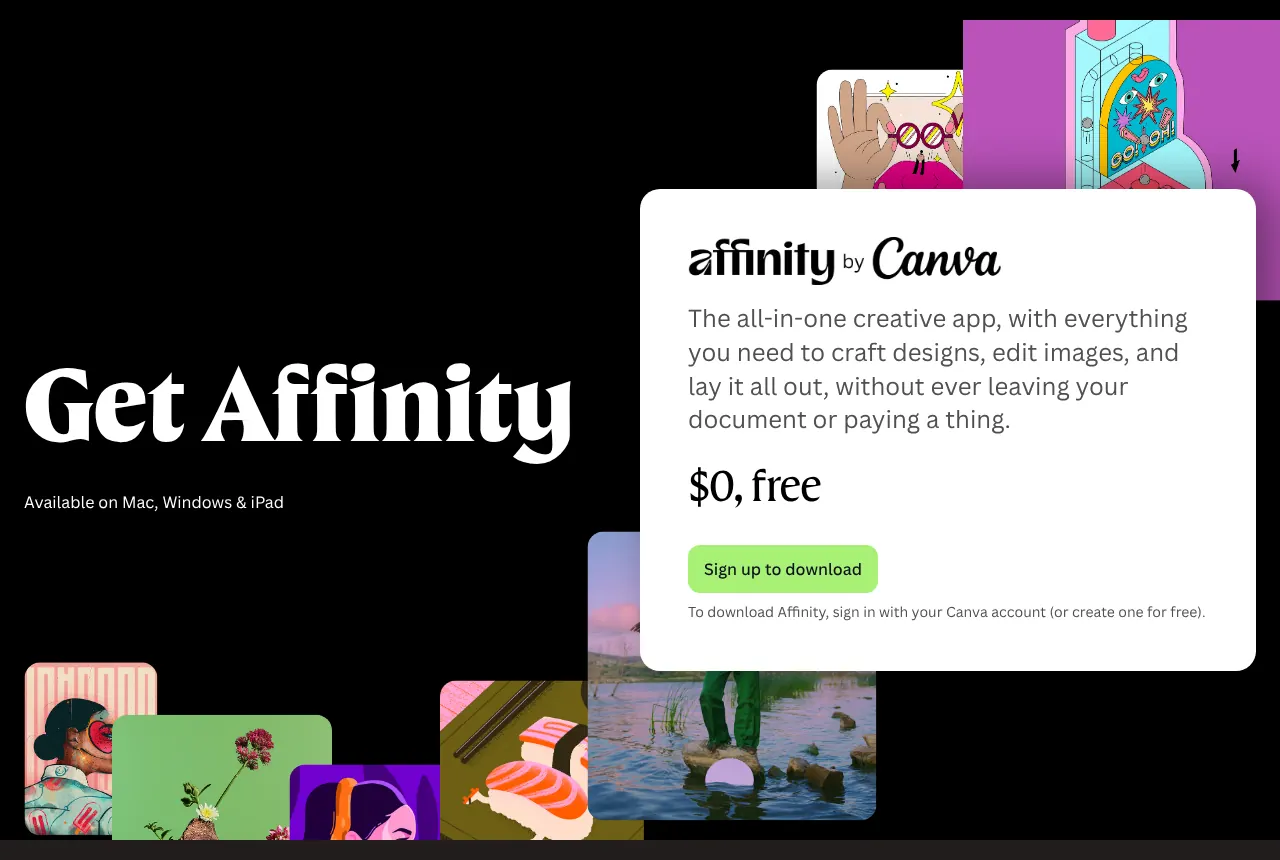
    Affinity download page: available on Mac, Windows and iPad, the price shown as 0 dollars, free, with a sign-up button and a note that a Canva account is needed.
    The download page states $0, free, and asks for a Canva account before the download. Source: affinity.studio, captured on 15 Nov 2026.
  8. 8. Photopea

    Photopea opens PSD files on any computer for free, at the cost of ads and no photo library.

    Score
    78/100
    Best for
    Occasional editors who need Photoshop-style layers and PSD files in any browser
    From
    Free, with ads
    Free plan
    Yes · all features, with ads

    Photopea is a photo editor with layers that runs in a web browser. It opens and saves PSD files, the Photoshop format, and calls it its main format. It also opens RAW files from the main camera brands and removes a background in one click. It scores 78, with 13 capabilities in full.

    The whole editor is free, with ads that may cover between 5% and 15% of the screen. Premium removes the ads and is a one-time payment for a period, not a subscription. Its current Premium prices are shown only inside the editor, in its Account window, so none is given here. With Premium, the AI tools can be used hundreds of times a month.

    Photopea has no desktop or phone app: installing it only adds a shortcut that still runs in the browser. No AI upscaling or sky replacement was found on its site. Its file manager has no ratings or keywords, and it stitches panoramas but documents no HDR merge.

  9. 9. Capture One Pro

    Capture One Pro suits a studio photographer who shoots tethered, not someone who wants AI to change the content of a photo.

    Score
    78/100
    Best for
    Professional photographers who shoot tethered in a studio and process large shoots
    From
    $28/mo
    Free plan
    No · 7-day trial

    Capture One Pro is a RAW editor and catalogue for Windows and Mac, built for professional shoots. It supports over 550 cameras and tethered shooting, where the camera sends each photo straight to the computer. It masks subjects and backgrounds in one click and keeps a catalogue of metadata, keywords and ratings. It scores 78, level with Photopea.

    Pro costs $28 a month when paid monthly. Paid annually, it comes to $18 a month, which saves $120 over a year. A perpetual licence, paid once and kept, costs $349. The iPhone and iPad app starts with the All in One plan, at $24.67 a month billed annually. There is a 7-day trial and no free plan.

    Capture One leaves out generative AI. No AI object removal, prompt fill, AI upscaling or sky replacement is listed in its plans. Its layers hold adjustments and repairs, not other photos, and PSD files open flattened into one image. There is no browser version and no Android app.

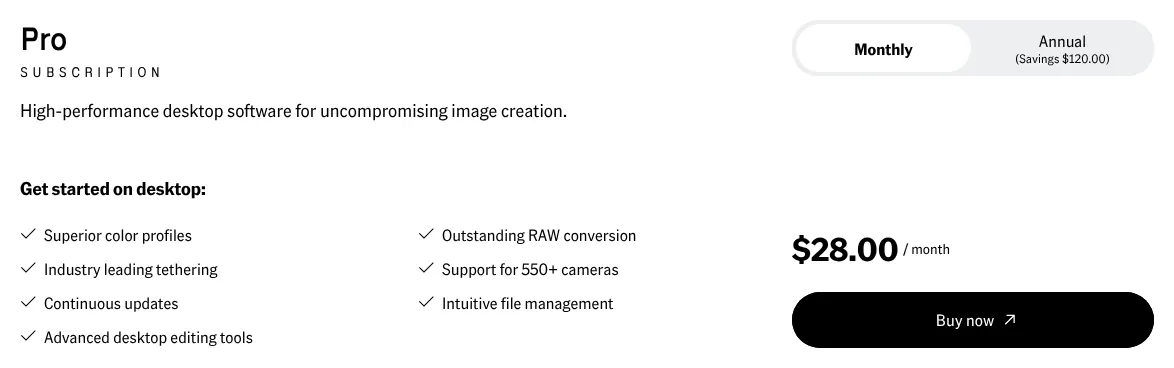
    Capture One Pro subscription card with Monthly selected and a price of 28 dollars a month, the Annual option marked savings of 120 dollars, next to the list of desktop features.
    With Monthly selected, Pro reads $28.00 a month; the Annual option beside it shows Savings $120.00 over a year. Source: captureone.com, captured on 15 Nov 2026.
  10. 10. darktable

    Open source

    darktable is a free RAW editor and catalogue for anyone ready to learn a different way of working, and the only one of the ten with a Linux version.

    Score
    76/100
    Best for
    Photographers on Linux, Windows or Mac who want a free RAW editor and catalogue
    From
    Free
    Free plan
    Yes · free software, all features

    darktable is a free RAW editor and photo catalogue for Linux, Windows and Mac. It is open source: its code is public and released under the GNU GPL licence, so anyone may use it for free. It scores 76, with 12 capabilities in full. Its edits never change the original file, and it filters a collection by tags, star ratings and colour labels.

    Version 5.6 added AI tools that run on the computer itself, with nothing sent online. One click on a subject builds a mask around it, a selection that limits an edit to that area. Another tool enlarges images 2 or 4 times. These AI tools are off by default and missing from the Flatpak version for Linux, one of the ways to install it there.

    darktable does not generate content: its AI page rules out sky replacement and inserted objects. It has no layer panel, does not open PSD files, and adds text only as a watermark. The Mac builds run only on Apple Silicon, Apple's own chips, not on Intel Macs. Its site warns that the learning curve can be steep, since little knowledge carries over from other programs.

Summary table

The table sets the ten tools side by side. Prices are those of the first paid plan, billed monthly where the vendor shows it; Adobe's are annual plans paid monthly. A capability that comes only on a paid add-on, a separate app or with a stated limit counts for half in the score.

The 10 photo editing tools side by side: score, entry price, billing, free option and platforms
ToolScoreEntry priceBilling of that priceFree optionPlatforms
01Adobe Photoshop97$22.99/moAnnual plan, paid monthlyNo · 7-day trial; free phone appWindows, Mac, browser, iOS, Android
02Luminar96$417One-time licenceYes · web editorWindows, Mac, browser, iOS, Android
03ON1 Photo RAW93$7.99/moMonthlyNo · 30-day trialWindows, Mac, iOS, Android
04PhotoDirector 36593$19.99/moMonthlyYes · EssentialWindows or Mac, Android
05Adobe Lightroom88$11.99/moAnnual plan, paid monthlyYes · phone appWindows, Mac, browser, iOS, Android
06PaintShop Pro80$79.99One-time licenceNo · 30-day trialWindows
07Affinity79FreeNo chargeYes · every toolWindows, Mac, iPad
08Photopea78FreePremium shown in the editor onlyYes · with adsBrowser
09Capture One Pro78$28/moMonthlyNo · 7-day trialWindows, Mac, iPhone, iPad
10darktable76FreeNo chargeYes · free softwareLinux, Windows, Mac

Prices in USD, read on 15 November 2026, at list price: the Black Friday offers shown that day are left out. Photoshop's price was read on Dupple and confirmed on Joseph Nilo's blog, Lightroom's on Adobe's help page and on Life after Photoshop, because Adobe's plan pages could not be read.

What photo editing software costs over one and three years

Over three years, the bill runs from nothing for Affinity, Photopea and darktable to $1,008 for Capture One Pro paid monthly. Photoshop alone comes to $827.64. Each line takes the plan whose price the summary table shows and counts it over 12 and 36 months. A one-time licence counts once. The Photography plan, at $19.99 a month on an annual plan, brings Photoshop to $719.64 over three years, with Lightroom included. Taxes, extra AI credits and paid upgrades to a new version are left out.

Cost of each tool on its entry plan for 1 and 3 years, in USD at list price
ToolPlan used1 year3 years
01Adobe PhotoshopPhotoshop, annual plan paid monthly$275.88$827.64
02LuminarDesktop Only, one-time$417$417
03ON1 Photo RAWPhoto RAW MAX, monthly$95.88$287.64
04PhotoDirector 365PhotoDirector 365, monthly$239.88$719.64
05Adobe LightroomLightroom, annual plan paid monthly$143.88$431.64
06PaintShop ProPaintShop Pro 2023, one-time$79.99$79.99
07AffinityFree app$0$0
08PhotopeaFree, with ads$0$0
09Capture One ProPro, monthly$336$1,008
10darktableFree software$0$0

Luminar: the generative tools stop after 365 days without Luminar Prime, not counted here. PhotoDirector 365: billed yearly, it lists at $79.99 a year. ON1: billed yearly, Photo RAW MAX lists at $89.99 a year, and a one-time licence for Photo RAW 2027 costs $99.99. Capture One: billed yearly, Pro costs $216 a year, and a perpetual licence costs $349. Affinity: AI tools need a paid Canva plan, not counted.

How we rank

  1. The ten tools are ranked by a category score out of 100. The score measures how many of 21 capabilities expected of photo editing software each vendor documents on its own site. It does not measure image quality, speed, ease of use or support.Editing tools 47% · 7 featuresAI tools 18% · 5 featuresWorkflow 18% · 4 featuresFiles and platforms 16% · 5 features
  2. The 21 capabilities form a grid in four groups: editing tools, AI tools, workflow, and files and platforms. The four that define the category weigh 3: RAW editing, curves and colour adjustments, masks for local adjustments, and spot healing. The others weigh 2 or 1. A tool receives 1 for a capability documented as native on any plan. A capability counts for half, 0.5, when it comes with a limit the vendor states, needs a paid add-on or sits in a separate app. It receives 0 when the capability is absent from the vendor's feature lists or help pages, or could not be verified. The score is the weighted sum divided by the total weight, rounded to the nearest integer.
  3. At equal scores the lower entry price (the price of the first paid plan, billed monthly) ranks first. ON1 Photo RAW and PhotoDirector 365 share 93: ON1 costs $7.99 a month and PhotoDirector $19.99, so ON1 comes third. Photopea and Capture One Pro share 78, and Photopea is free, so it comes eighth. darktable and Picsart share 76, and darktable, being free, takes tenth place.
  4. Sixteen tools were considered and fifteen scored. Adobe's plan pages refused the browser used by this site on 15 November 2026. Photoshop and Lightroom lead the category, so their prices were read on other sites, named in the entries, each one confirmed by a second site. Their features come from Adobe's own help pages. Picsart (76), Pixelmator Pro (75), Pixlr (75), Fotor (70) and GIMP (62) score below the ten. DxO PhotoLab was not scored: its pricing page refused every reading. The other prices and features were read on vendor pages on 15 November 2026.
  5. No entry on this page is sponsored. A sponsored entry is marked Sponsored and holds the position paid for; its score stays the computed one.

FAQ

Why do the Photoshop and Lightroom prices come from other sites?

Adobe's plan pages refused the browser used by this site on 15 November 2026. Photoshop's $22.99 comes from Dupple and Joseph Nilo's blog. Lightroom's $11.99 is stated on Adobe's own help page and on Life after Photoshop. Both are annual plans paid monthly. Check the price on Adobe's page before you pay.

Which photo editing software is completely free?

Three of the ten cost nothing. Affinity is free with every tool, darktable is free software, and Photopea is free with ads. Lightroom's phone app is free too, with most editing tools. GIMP is free and open source (its code is public and free to reuse), but it scores 62 here. It opens RAW files only through another app, and its site documents no photo library or HDR merge.

Should you choose Photoshop or Lightroom for photos?

Choose by the work. Lightroom sorts and adjusts many photos quickly; Photoshop changes the content of one image in layers. You do not have to choose: the Photography plan includes both for $19.99 a month on an annual plan, according to Dupple. That is less than Photoshop alone, which costs $22.99.

Which tools open Photoshop PSD files with their layers?

Besides Photoshop, Affinity imports PSD files with their layers intact, and Photopea opens and saves PSD as its main format. Capture One opens them flattened into one image. Lightroom opens a layered PSD only if it was saved with maximum compatibility. PhotoDirector 365 and darktable do not open PSD files.

Which photo editors run on Linux?

Of the ten, darktable is the only one with a Linux version. Photopea runs in any browser, including on Linux. If you need layers on Linux, GIMP runs there too, but it scores lower here.

Can you keep using the software if you stop paying?

With a one-time licence, yes. PaintShop Pro, Luminar and the one-time versions of ON1, PhotoDirector and Capture One stay usable, although Luminar's generative tools stop after 365 days. When a PhotoDirector 365 subscription ends, the app falls back to the free Essential version. Capture One gives a perpetual licence at no extra cost after five years of subscription.