top10alternative

Top 10 Project Management Software (2026)

Ten project management tools compared on what they do and what they cost, ranked by how many of 18 common project management functions each one covers.

The best project management software for your situation

Each line matches a situation with the tool whose published facts fit it. The score on this page counts how many of 18 common project management functions a tool offers. It measures coverage, not quality.

  • You are a small team on a tight budget and want Gantt chartsZoho Projects · Premium costs US$5 per user a month billed monthly, the lowest monthly price read on this page. It includes Gantt charts, dependencies and timesheets. Five people pay US$25 a month.
  • You want the whole team on a free plan firstJira · Jira Free takes up to 10 users with board, timeline and calendar views and forms. Its 150 automation steps a month are shared by the whole account, so heavy automation needs Standard.
  • You run projects for clients and log the hours you spendTeamwork.com · Time tracking is in Teamwork.com from the Free plan, and clients can be invited as third-party users. Basics costs $13.99 per user a month billed monthly, with 3 users at least.
  • You want most functions on one monthly planClickUp · Core costs $12 per user a month billed monthly and includes Gantt charts, time tracking and custom fields. When you upgrade, every member of the workspace is billed.
  • You work alone or with one other personAsana · Asana Personal is free for 2 users, with list, board and calendar views. Timelines, dependencies and automations start on Starter, at $13.49 per user a month.
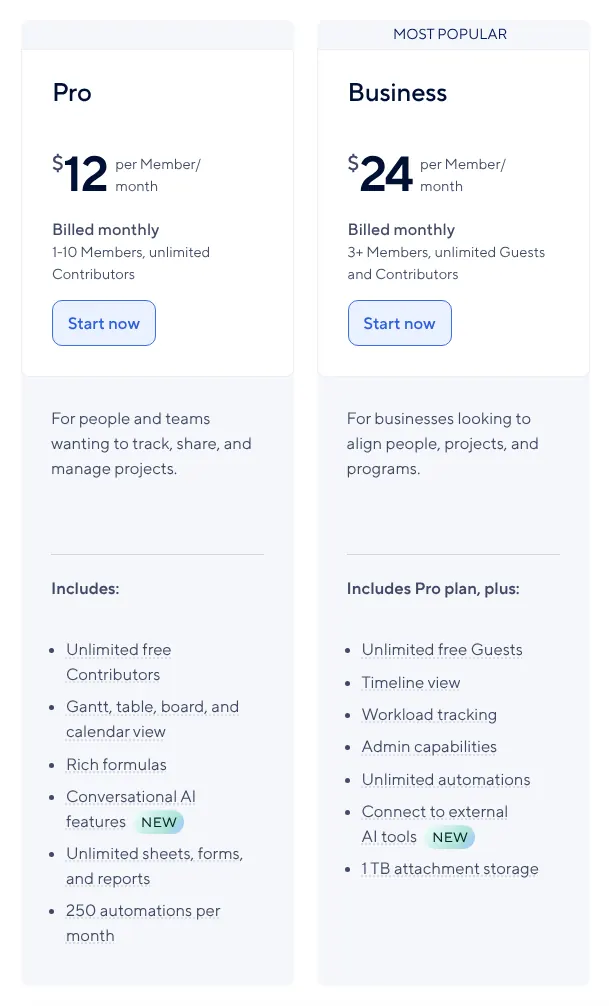
  • You plan in a spreadsheet today and want a Gantt chartSmartsheet · Pro shows the same rows as a sheet, a Gantt chart, a board or a calendar, for $12 per member a month billed monthly. It stops at 10 members.
  • You need request forms, time tracking and workload charts togetherWrike · Wrike Business has all three, at $25 per user a month on an annual subscription. Team, at $10, already gives a view across several projects.
  • You want to design your own trackerAirtable · Airtable is a database on which you shape your own fields and views. Team costs $24 per seat a month billed monthly, the highest entry price of the ten.

How to choose project management software

The score narrows the list, the plans decide it. Nine of the ten tools score 97 or more, so the useful checks are about plans, seats and limits. Each check below rests on vendor pages read on 15 November 2026.

1. Use the score to shortlist, not to decide

A score of 100 means the vendor offers all 18 functions on at least one of its plans. It says nothing about ease of use, speed or support. Five tools reach 100. Among them, the one with the lower entry price (the price of the cheapest paid plan) comes first, so rank 1 does no more than rank 5. Four more score 97, and Hive closes the list at 94.

A tool at 97 can suit you better than one at 100. Zoho Projects loses its three points on guests, which it sells as client users at US$5 each a month. If you never invite clients, those points cost you nothing. Your team of 5 then pays US$25 a month instead of $60 on ClickUp Core.

2. Check which plan holds the view you need

The function you want may sit one or two plans above the entry price. On monday.com, Basic at $12 a seat has no timeline, calendar view, automations or guests: they start on Standard at $14. On Asana, the free Personal plan has no timeline, and Starter adds it. Jira Free and Zoho Projects Free already show tasks on a timeline or a Gantt chart.

Read the plan card, not the feature page, before you pay. A team of 5 that needs a timeline on monday.com pays $70 a month on Standard, not $60 on Basic.

3. Count your seats before you compare prices

Start with your head count, because every price on this page is per user, and each vendor has its own seat rule. monday.com and Teamwork.com bill 3 seats at least. Wrike sells seats in groups of five up to 30, and its Team plan serves 2 to 15 users. Smartsheet Pro stops at 10 members, and Hive Starter at 10 workspace members.

Steps in seat counts change the bill. Asana adds seats in blocks of 5 once a team passes 5 users. A team of 7 on Starter pays for 10 seats, so $134.90 a month on monthly billing.

4. Compare monthly and yearly billing

Most of these tools show a lower price when you pay a year ahead. Asana Starter costs $13.49 a user on monthly billing and $10.99 on yearly billing. ClickUp Core goes from $12 to $9. Teamwork.com Basics goes from $13.99 to $9.99. For Wrike and Hive this page gives yearly prices. Wrike publishes no monthly price for Team, and Hive's monthly price could not be quoted from its page.

The gap adds up over a year. Ten users on ClickUp Core pay $120 a month on monthly billing or $90 on yearly billing. That is $360 less over twelve months, in exchange for paying the year upfront.

5. Check the automation allowance

Automations are rules that act on their own, such as moving a task when its status changes. Most plans cap how many run each month. Wrike Team allows 50 automation actions per seat, and Jira Standard 400 steps per user. Smartsheet Pro allows 250 automations a month, and ClickUp Core 1,000 actions. Airtable Team gives 25,000 runs a month.

Count the rules your team will really run. A team of 5 on Wrike Team shares 250 actions a month. A single rule that fires on every finished task can use that up.

6. Plan how your data will move

Most tools on this list take in a spreadsheet, and some import straight from a rival. ClickUp imports from Asana, monday.com, Jira, Trello, Basecamp, Wrike and Notion. Teamwork.com imports projects in one step from Wrike, Asana, Basecamp, ClickUp, Trello and monday.com. Zoho Projects reads Microsoft Project, Jira and Basecamp files.

Check the size limits before the move. Wrike imports up to 5,000 tasks from one Excel file. A project with 8,000 tasks therefore goes in through two files.

The 10 Project management software

by overall score
  1. 1. Wrike

    Wrike offers all 18 functions at $10 a user, but on a yearly contract, and time tracking waits for Business.

    Score
    100/100
    Best for
    Teams of 2 to 15 that want a view across projects and can pay a year ahead
    From
    $10/user/mo
    Free plan
    Yes · 200 active tasks

    Every one of the 18 functions is documented by Wrike, and its Team plan already includes a view across several projects. Team also brings Gantt charts, calendars, dashboards and custom fields (boxes a team adds to every task, such as a budget or a priority). The Free plan has no user limit. It stops at 200 active tasks, subtasks included.

    Team costs $10 per user a month, billed annually, for teams of 2 to 15 users. The pricing page shows no monthly price. Seats are sold in groups of five up to 30. Request forms, time tracking and workload charts (how much work each person carries) start on Business, at $25 per user a month. Business and the plans above it are sold only as annual subscriptions. Team allows 50 automation actions per seat each month. Tasks and projects come in from Excel files, up to 5,000 tasks per import.

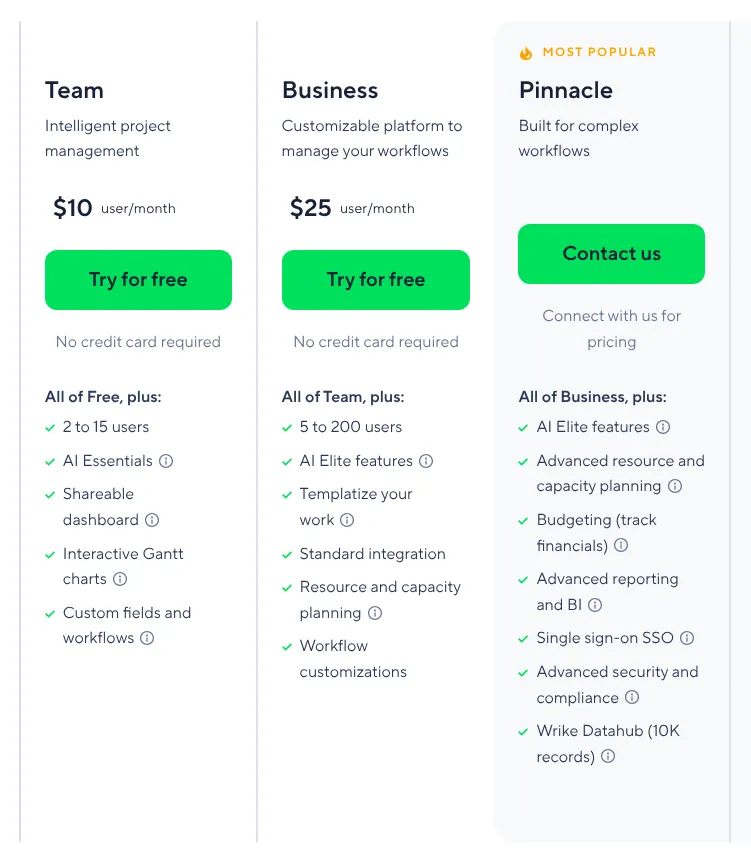
    Wrike plan cards: Team at $10 per user a month for 2 to 15 users, Business at 25 dollars for 5 to 200 users, and Pinnacle with a button to reach sales.
    The Team card shows $10 per user a month for 2 to 15 users; the pricing page states that this amount is billed annually. Source: wrike.com, captured on 15 Nov 2026.
  2. 2. ClickUp

    ClickUp puts Gantt charts, time tracking and custom fields in a $12 monthly plan, provided everyone in the workspace is paid for.

    Score
    100/100
    Best for
    Teams that want Gantt charts, time tracking and custom fields on one monthly plan
    From
    $12/user/mo
    Free plan
    Yes · unlimited members, 60 MB

    ClickUp reaches 100 too, and its Free Forever plan already has boards, calendars, dependencies, forms and automations. Free takes unlimited members but only 60 MB of storage, so shared files soon call for a paid plan. ClickUp imports from Asana, monday.com, Jira, Trello, Basecamp, Wrike and Notion. It also reads CSV files (the plain text format that spreadsheets export).

    Core costs $12 per user a month on monthly billing, or $9 on yearly billing. It adds Gantt charts, time tracking and custom fields, with 1,000 automation actions a month. An upgrade moves the whole workspace: every member is billed, including people who never use the paid features. Workload views and advanced dashboards start on Business, at $25 per user a month billed monthly.

    ClickUp plan cards with Monthly selected: Free Forever at 0 dollars, Core at $12 and Business at 25 dollars per user a month billed monthly, Enterprise at a custom price.
    With Monthly selected, the Core card reads $12 per user a month, billed monthly. Source: clickup.com, captured on 15 Nov 2026.
  3. 3. monday.com

    monday.com reaches all 18 functions, but a team that needs a timeline or automations should budget for Standard at $14 a seat, 3 seats at least.

    Score
    100/100
    Best for
    Teams of three or more that want visual boards and can start on Standard
    From
    $12/seat/mo
    Free plan
    Yes · 2 seats, 3 boards

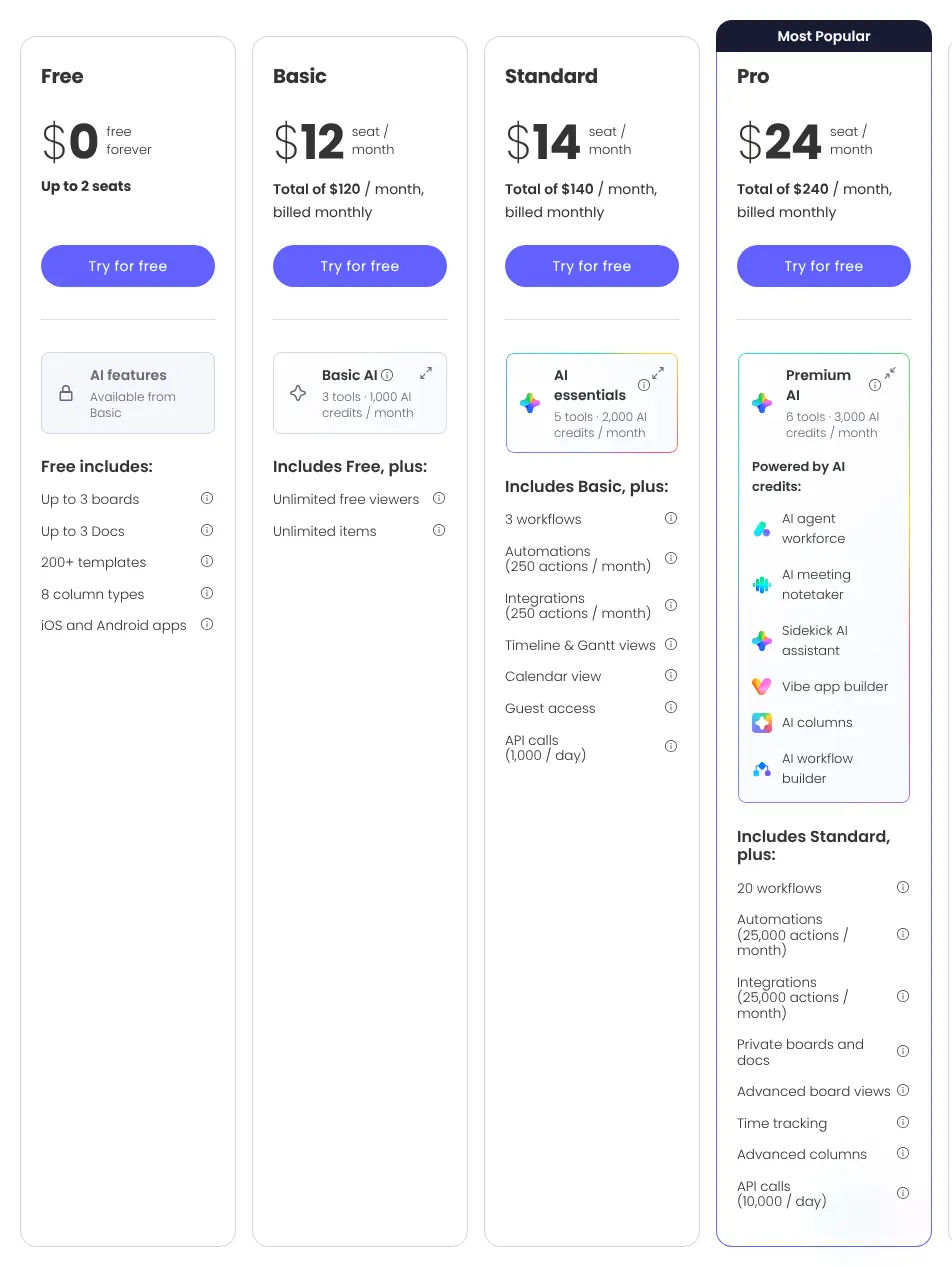
    monday.com offers the 18 functions across its plans, but its entry plan holds few of them. A seat is one paid user account. Basic, at $12 per seat a month on monthly billing, adds unlimited items and free viewers to the Free plan. Timeline and Gantt views, the calendar view, automations and guest access start on Standard, at $14 per seat.

    Every paid plan starts at 3 seats, so a person working alone pays $36 a month on Basic. Time tracking and dependencies come with Pro, at $24 per seat a month on monthly billing. Workload and portfolio management are Enterprise features. A portfolio shows the health of many projects in one place. The Free plan takes 2 seats and 3 boards. Old spreadsheets come in through an import from Excel.

    monday.com plan cards with Monthly selected for 10 seats: Free at 0 dollars for up to 2 seats, Basic at 12, Standard at 14 and Pro at 24 dollars per seat a month.
    For 10 seats on monthly billing, Basic totals $120 a month; timeline views, the calendar and guest access are listed under Standard. Source: monday.com, captured on 15 Nov 2026.
  4. 4. Asana

    Asana puts timelines, forms, rules and free guests in Starter at $13.49 a user, and keeps time tracking and workload views for Advanced.

    Score
    100/100
    Best for
    Teams that want rules, forms, dashboards and free guests on the first paid plan
    From
    $13.49/user/mo
    Free plan
    Yes · 2 users

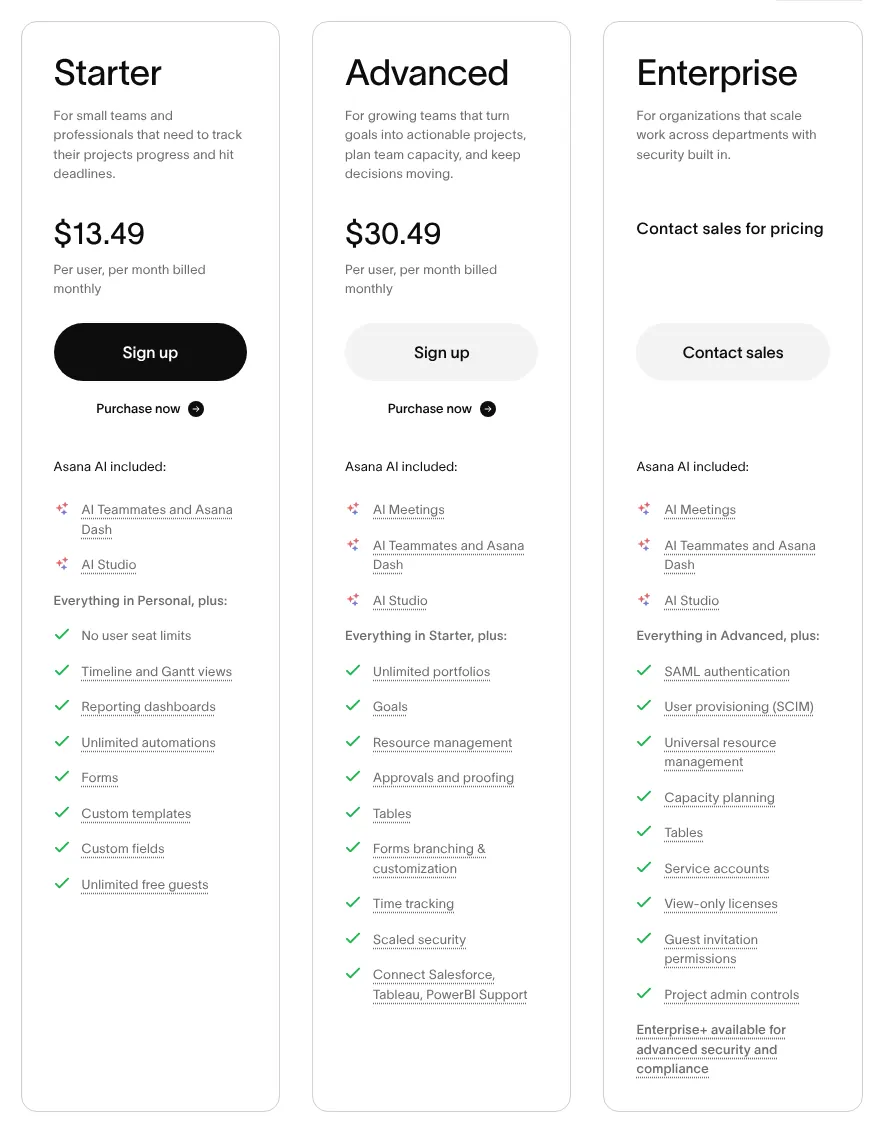
    Asana also scores 100, and its first paid plan already holds most of them. Starter adds timeline and Gantt views, dependencies, milestones, forms and dashboards. It also adds rules, the Asana name for automations, and custom fields. Guests are free on Starter, so clients and contractors can join without adding seats.

    Starter costs $13.49 per user a month on monthly billing, or $10.99 on yearly billing. Up to 5 users, seats are added one at a time. Beyond that they come in blocks of 5 up to 30 users. A team of 7 therefore pays for 10 seats. Time tracking, portfolios and workload views start on Advanced, at $30.49 per user a month billed monthly. The free Personal plan serves 2 users, with list, board and calendar views. Projects come in from a CSV file, each file becoming one project.

    Asana plan cards with Monthly selected: Starter at $13.49 and Advanced at 30.49 dollars per user a month billed monthly, Enterprise with contact sales, and each plan's feature list.
    With Monthly selected, Starter shows $13.49 per user a month; time tracking and resource management appear only on the Advanced card. Source: asana.com, captured on 15 Nov 2026.
  5. 5. Teamwork.com

    Teamwork.com covers all 18 functions and logs time from its free plan, but the 3-user minimum puts the smallest monthly bill at $41.97.

    Score
    100/100
    Best for
    Teams that run projects for clients and log the hours they spend
    From
    $13.99/user/mo
    Free plan
    Yes · 5 users, 5 projects

    Teamwork.com covers the full list of 18 functions, and time tracking is there from the Free plan. People outside the company can be invited into projects as third-party users. Work can be planned on a Gantt chart (tasks drawn as bars along a calendar) with dependencies, where one task waits for another to finish. The vendor imports projects in one step from Asana, Wrike, Basecamp, ClickUp, Trello and monday.com.

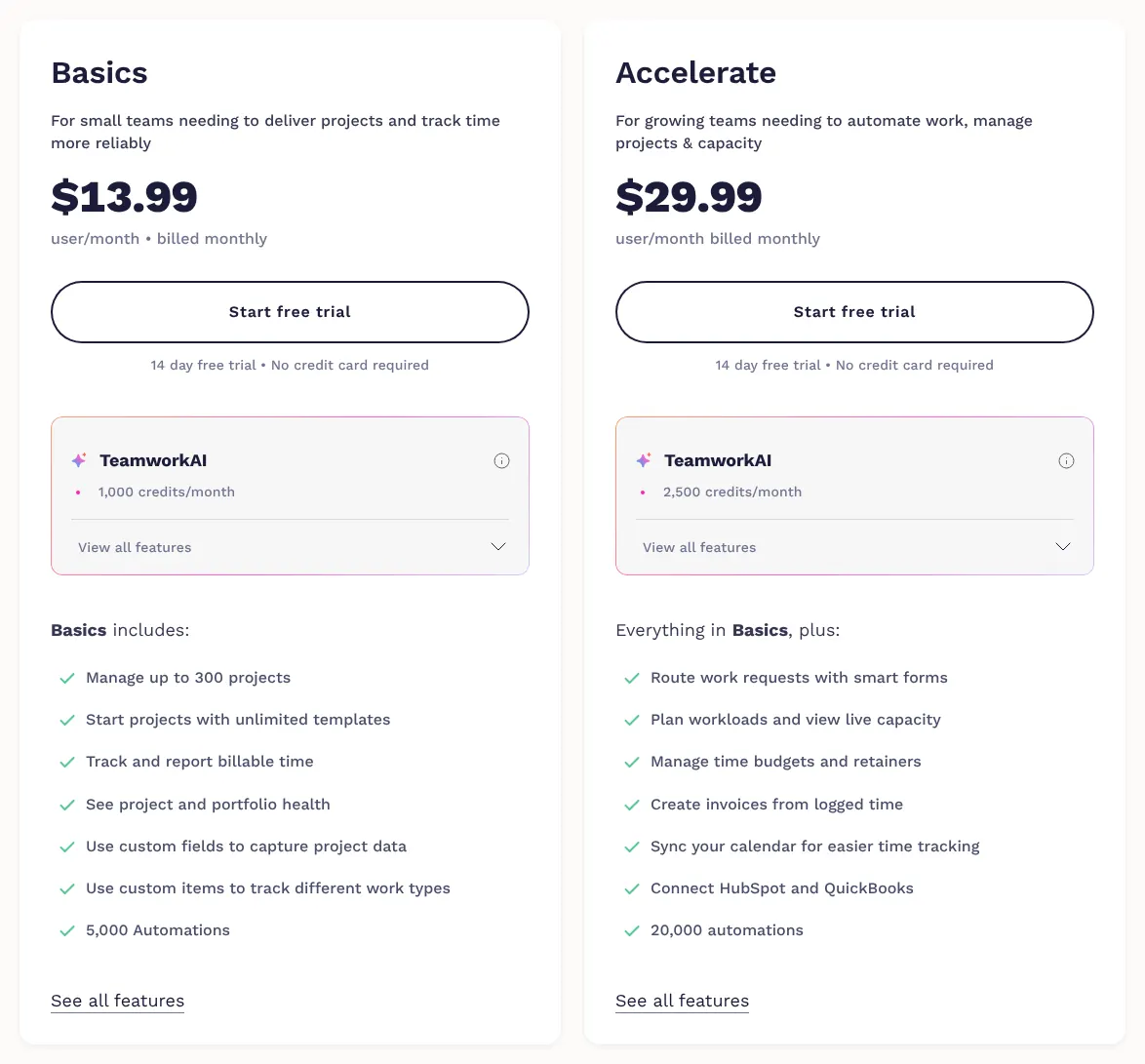
    Basics costs $13.99 a month for each user on monthly billing, or $9.99 billed yearly. It needs 3 users at least, so the smallest monthly bill is $41.97. Basics holds 300 projects and 5,000 automations. Workload planning, timesheets and time budgets start on Accelerate, the next plan up. The Free plan stops at 5 users and 5 projects.

    Teamwork.com Basics and Accelerate plan cards on the monthly view: Basics at 13.99 dollars and Accelerate at 29.99 dollars per user a month, both billed monthly.
    On the Monthly view, the Basics card shows 13.99 dollars per user a month, billed monthly. Source: teamwork.com, captured on 15 Nov 2026.
  6. 6. Zoho Projects

    Zoho Projects gives Gantt charts and timesheets for US$5 a user each month, but each client costs the same again as an add-on user.

    Score
    97/100
    Best for
    Small teams that want Gantt charts and timesheets at a low price per user
    From
    US$5/user/mo
    Free plan
    Yes · 5 users, 3 projects

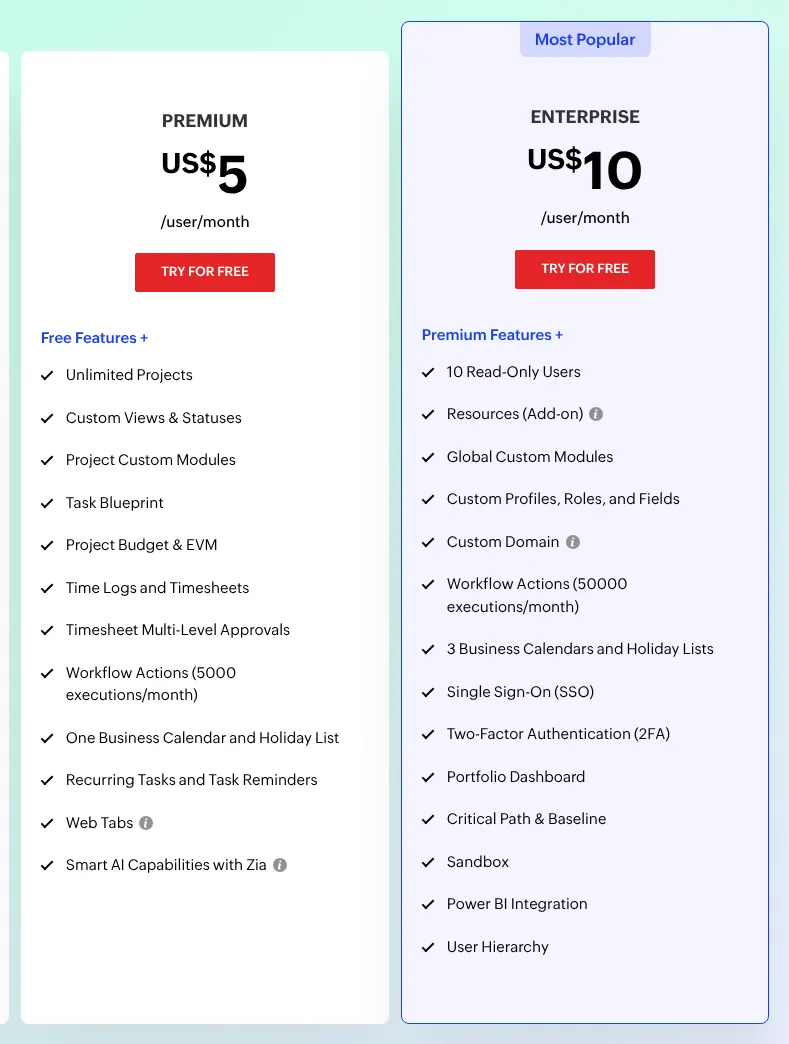
    Zoho Projects has the lowest price billed monthly on this page: US$5 per user on Premium. Its Free plan already has Gantt charts, dependencies, milestones and automations, for up to 5 users and 3 projects. Premium adds unlimited projects, timesheets, request forms and 20 project templates.

    The score of 97 comes from guests. People outside the company join as client users, a paid add-on (an extra bought on top of the plan) at US$5 each a month. On Premium, dependencies stay inside one project, and the workload report covers one project at a time. Custom fields on tasks and the portfolio dashboard start on Enterprise, at US$10 per user a month. Data comes in from Excel and CSV files, Microsoft Project, Jira and Basecamp.

    Zoho Projects plan cards with Monthly selected: Premium at US$5 and Enterprise at US$10 per user a month, each with its list of features.
    With Monthly selected, Premium costs US$5 per user a month; the portfolio dashboard is listed on the Enterprise card at US$10. Source: zoho.com, captured on 15 Nov 2026.
  7. 7. Jira

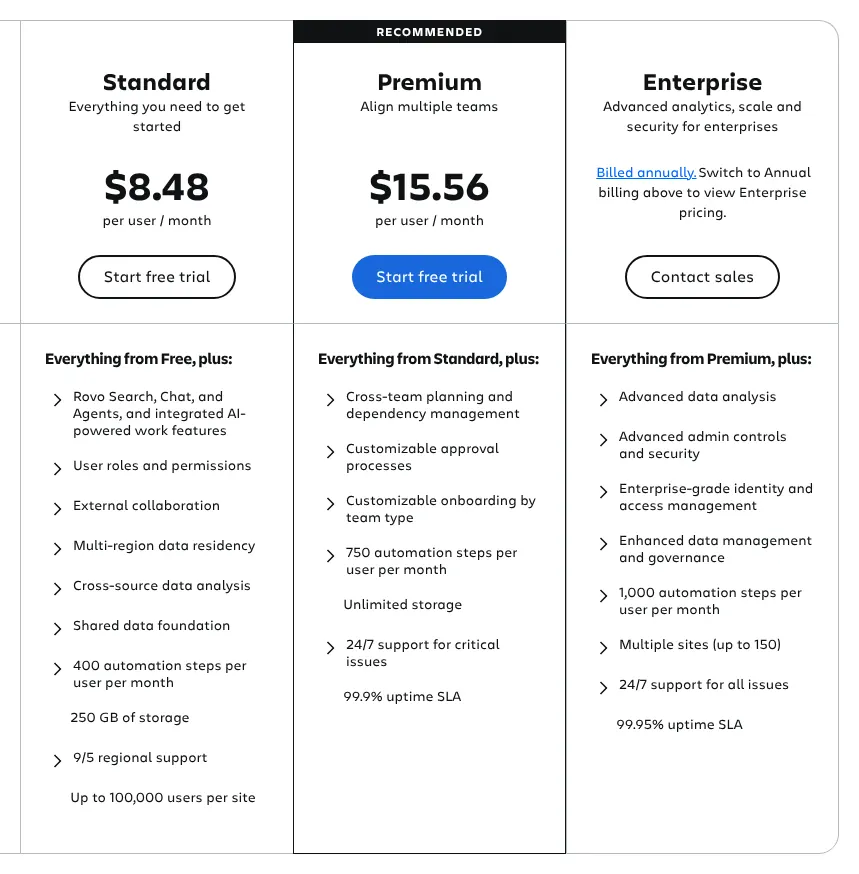
    Jira Free serves a team of 10 with timelines and forms; above that, the $8.48 shown is the per-user price at 300 users.

    Score
    97/100
    Best for
    Teams of up to 10 that want a free plan with timeline, calendar and forms
    From
    $8.48/user/mo
    Free plan
    Yes · 10 users

    Jira Free takes up to 10 users and already has board, timeline and calendar views, forms and custom fields. Automations are included too, with 150 steps a month for the whole account. Jira scores 97 because it has no milestone item, a marker for a key date in a project. Atlassian's public tracker still lists milestones as a suggestion under consideration.

    Standard is listed at $8.48 a user each month, billed monthly. That figure is computed for 300 users, the default team size of the calculator on the page. Atlassian calls its monthly pricing progressive: the price per user falls as seats are added, so a small team pays more per user than the figure shown. Standard adds free guests and 400 automation steps per user each month. Capacity planning and dependencies across projects start on Premium. A trial of Standard or Premium lasts 7 days.

    Jira plan cards: Standard at $8.48 and Premium at 15.56 dollars per user a month, Enterprise marked billed annually, with each plan's main features.
    Standard shows $8.48 per user a month; on Atlassian's page this figure is calculated for the default team size of 300 users. Source: atlassian.com, captured on 15 Nov 2026.
  8. 8. Smartsheet

    Smartsheet suits a team that thinks in spreadsheets, as long as it stays at 10 members or moves to Business at $24.

    Score
    97/100
    Best for
    Teams of up to 10 that plan in rows and columns and want a Gantt chart
    From
    $12/member/mo
    Free plan
    No · 30-day trial

    Smartsheet starts from a sheet, rows and columns as in a spreadsheet, and shows the same plan as a Gantt chart, a board or a calendar. All four views come with Pro, along with forms, reports and 250 automations a month. Contributors are unlimited and free on Pro.

    Pro costs $12 per member a month on monthly billing, or $9 on yearly billing, and stops at 10 members. Guests, workload tracking, the timeline view and the API start on Business, at $24 per member a month. The API is the access through which other software reads and writes Smartsheet data. Business needs 3 members at least. Time tracking is not built into the plans: it comes with Resource Management, a paid add-on. New sign-ups have had no free plan since August 2024, only a 30-day trial of Business.

    Smartsheet plan cards with Monthly pricing selected: Pro at 12 dollars per member a month for 1 to 10 members, Business at 24 dollars for 3 members or more, both billed monthly.
    Both cards read Billed monthly; guests, the timeline view and workload tracking are listed under Business. Source: smartsheet.com, captured on 15 Nov 2026.
  9. 9. Airtable

    Airtable gives a team its own tracker to shape, at $24 a seat each month, the highest entry price of the ten.

    Score
    97/100
    Best for
    Teams that want to build their own tracker on a database
    From
    $24/seat/mo
    Free plan
    Yes · 5 editors, 1,000 records a base

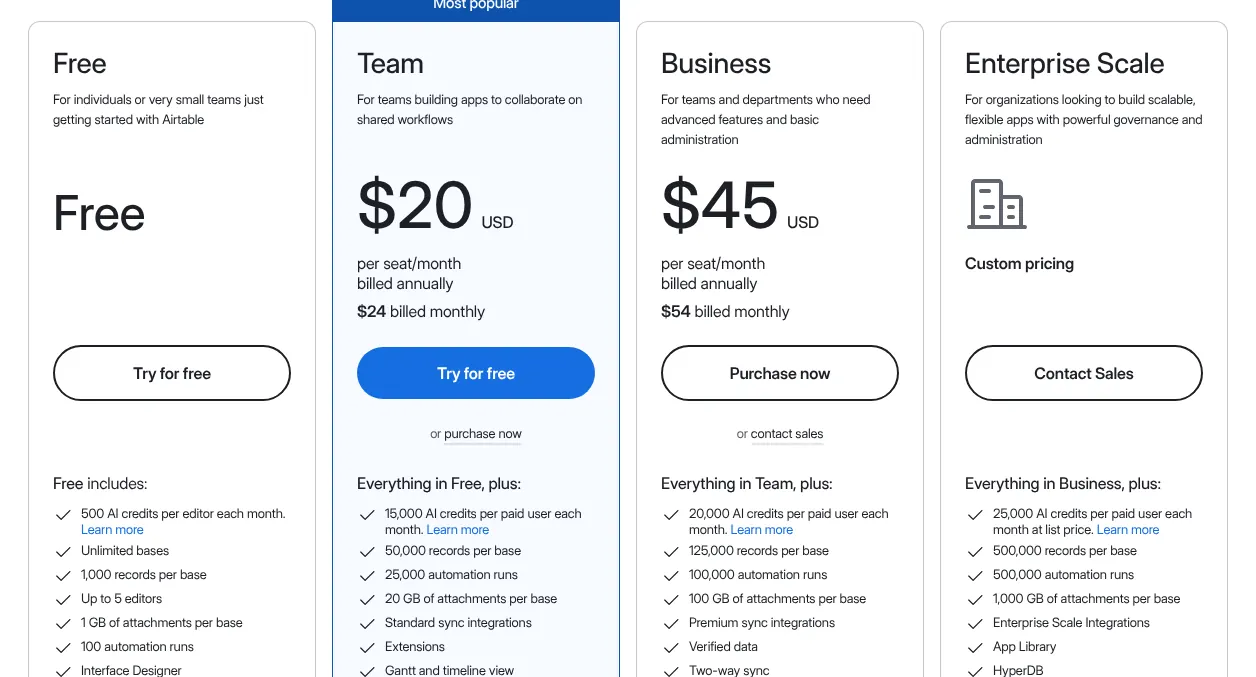
    Airtable is a database, a set of tables with rows and fields, on which a team builds its own project tracker. Subtasks and dependencies are records linked to other records. Board, calendar and form views are on the Free plan, and the Gantt and timeline views come with Team.

    Team costs $24 per seat a month on monthly billing, or $20 billed annually, the highest entry price of the ten. Each base, one Airtable database, holds up to 50,000 records on Team, with 25,000 automation runs a month. On Team every editor and commenter is a paid seat, while read-only users are free. People from outside the company need Portals, a paid add-on. The Free plan takes 5 editors and 1,000 records per base.

    Airtable plan cards: Team at 20 dollars per seat a month billed annually and $24 billed monthly, Business at 45 dollars annually and 54 dollars monthly, beside Free and Enterprise Scale.
    The large figure on the Team card is the annual price; the monthly price, $24 billed monthly, sits underneath it. Source: airtable.com, captured on 15 Nov 2026.
  10. 10. Hive

    Hive Starter fits a team of up to 10 that wants Gantt charts at $5 a user on yearly billing, but workload planning costs extra.

    Score
    94/100
    Best for
    Teams of up to 10 that want Gantt charts and pay yearly
    From
    $5/user/mo
    Free plan
    Yes · 10 members, 200 MB

    Hive scores 94, the lowest of the ten, because two functions depend on paid extras. Workload planning comes with Team resourcing, an add-on at $5 per user a month. Outside guests need the External users add-on, at $5 per user a month, which gives each license 5 external users. Forms, time tracking, automations, dashboards and mobile apps are part of the product.

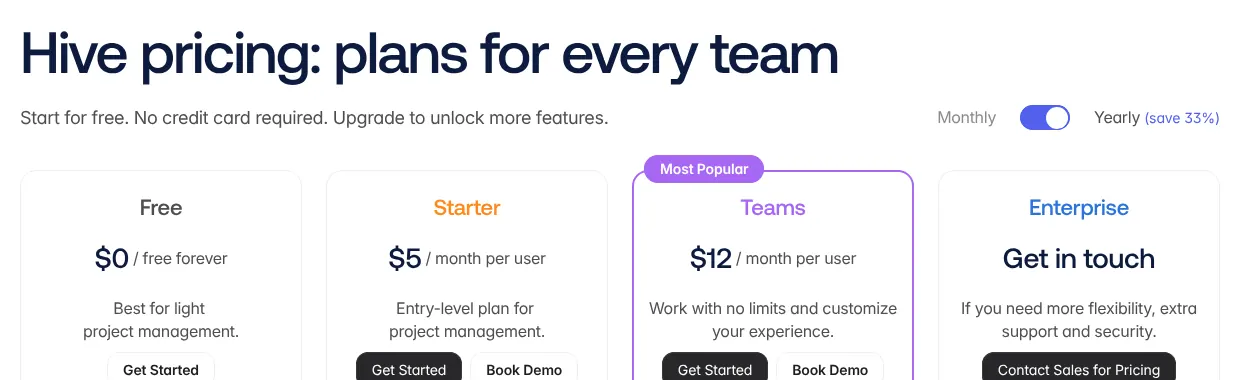
    Starter shows $5 a month per user on the pricing page, which opens with its Yearly switch on. The page says yearly billing saves 33%. Its monthly amount is not in the page text until a switch is clicked, so this page uses the yearly price. Starter stops at 10 workspace members and 10 projects, and includes the Gantt view and a calendar. Forms, time tracking, portfolios and custom fields start on Teams, at $12 per user a month billed yearly. The free plan takes 10 members and 200 MB of storage.

    Hive pricing page with the Yearly switch on: Free at 0 dollars, Starter at $5 and Teams at 12 dollars per month per user, and Enterprise with a contact sales button.
    The switch sits on Yearly (save 33%), so the $5 shown for Starter is the rate per user on yearly billing. Source: hive.com, captured on 15 Nov 2026.

Summary table

The table sets the ten tools side by side. Prices are those of the first paid plan. In the score, a function that comes only as a paid add-on, through another company's tool, or with a stated limit counts for half.

The 10 project management tools side by side: score, entry price, billing, free plan and seat rule
ToolScoreEntry priceBilling of that priceFree planSeat rule
01Wrike100$10/user/moAnnualYes · 200 active tasksTeam: 2 to 15 users
02ClickUp100$12/user/moMonthlyYes · unlimited members, 60 MBWhole workspace billed
03monday.com100$12/seat/moMonthlyYes · 2 seats, 3 boards3 seats at least
04Asana100$13.49/user/moMonthlyYes · 2 usersBlocks of 5 seats from 6 users
05Teamwork.com100$13.99/user/moMonthlyYes · 5 users, 5 projects3 users at least
06Zoho Projects97US$5/user/moMonthlyYes · 5 users, 3 projectsPer user, client users extra
07Jira97$8.48/user/moMonthly, shown for 300 usersYes · 10 usersPrice per user falls as seats rise
08Smartsheet97$12/member/moMonthlyNo · 30-day trialPro: 1 to 10 members
09Airtable97$24/seat/moMonthlyYes · 5 editorsEditors and commenters billed
10Hive94$5/user/moYearlyYes · 10 membersStarter: up to 10 members

Prices in US dollars, before taxes, read on vendor pages on 15 November 2026. Hive also sells monthly billing, but its monthly amount could not be quoted from its page, so its yearly price is shown. Wrike publishes only the annual price of Team. Jira's figure is the price per user the page computes for 300 users.

What project management software costs for your team

For 5 users, the entry plan costs from US$25 to $120 a month, before free plans. Each line multiplies the entry price by the number of users and applies the vendor's seat rule. When a plan stops below 20 users, the next plan is used and named. Jira's price per user depends on team size, so its free plan is shown where it fits. Add-ons and taxes are left out, so the real bill can be higher.

Monthly cost of the entry plan of each tool at 1, 5 and 20 users
ToolEntry planBilling1 user5 users20 users
01WrikeTeam, then BusinessAnnualNot sold for 1 user$50$500 · Business
02ClickUpCoreMonthly$12$60$240
03monday.comBasicMonthly$36 · 3 seats billed$60$240
04AsanaStarterMonthlyFree · Personal plan$67.45$269.80
05Teamwork.comBasicsMonthly$41.97 · 3 users billed$69.95$279.80
06Zoho ProjectsPremiumMonthlyUS$5US$25US$100
07JiraFree, then StandardMonthly$0 · Free plan$0 · Free planDepends on team size
08SmartsheetPro, then BusinessMonthly$12$60$480 · Business
09AirtableTeamMonthly$24$120$480
10HiveStarter, then TeamsYearly$5$25$240 · Teams

Before taxes. Wrike's Team plan starts at 2 users and stops at 15, so 20 users need Business at $25 a user. Smartsheet Pro stops at 10 members, and Hive Starter at 10 members. Asana's free Personal plan covers 1 or 2 users. monday.com sells seats by team size, and the sizes on offer could not be read as text.

How we rank

  1. The ten tools are ranked by a category score out of 100. The score measures how many of 18 functions expected of project management software each vendor documents on its own site. It does not measure quality, ease of use, speed or support.Tasks and views 44% · 6 featuresPlanning 15% · 4 featuresTeam 15% · 3 featuresAutomation and reporting 21% · 3 featuresAccess 6% · 2 features
  2. The 18 functions form a grid in five groups: tasks and views, planning, team, automation and reporting, and access. The four that define the category weigh 3: tasks with assignees and due dates, a kanban board (tasks shown as cards moved between columns), a Gantt chart or timeline, and rule-based automations. Eight weigh 2 and six weigh 1, for a total weight of 34. A tool receives 1 for a function documented as native on any plan. It receives 0.5 when the function is a paid add-on, comes only through another company's tool, or has a stated limit such as a beta app. It receives 0 when the function is absent or could not be found. The score is the weighted sum divided by 34, rounded to the nearest integer.
  3. Ties go to the lower entry price shown on the page, then to alphabetical order. Wrike, ClickUp, monday.com, Asana and Teamwork.com all score 100. Wrike comes first at $10, an annual price, because it publishes no monthly one. ClickUp and monday.com both show $12, so the alphabet orders them. Zoho Projects, Jira, Smartsheet and Airtable share 97. The prices of Wrike and Hive used here are yearly prices, as explained under the summary table.
  4. Fifteen tools were scored. The five left out are OpenProject (93), Trello (88), Notion (88), Microsoft Planner (87) and Basecamp (72). All prices and functions were read on vendor pages on 15 November 2026.
  5. No entry on this page is sponsored. A sponsored entry is marked Sponsored and holds the position paid for; its score stays the computed one.

FAQ

Why are Trello and Notion not in the ten?

Both score 88, six points below Hive. In Trello, dependencies, milestones, workload views, time tracking and forms come only from Power-Ups, add-ons made by other companies. Notion has no milestone item or workload view on the pages read, and its time tracking runs through Everhour, a separate tool. If your projects are simple boards, Trello Standard at $6 a user each month can still be enough.

Can I run a whole team on a free plan?

Yes, within limits. Jira Free takes 10 users, and ClickUp Free Forever takes unlimited members with 60 MB of storage. Wrike Free has no user limit but stops at 200 active tasks. Zoho Projects Free and Teamwork.com Free both stop at 5 users. Pick the plan whose limit you will hit last.

Which tools let me invite clients without paying for them?

Asana gives unlimited free guests from Starter, and Jira gives free guests from Standard. Smartsheet adds free guests on Business. On Zoho Projects, a client user is an add-on at US$5 a month, and Airtable sells Portals for outside users. If clients will work in your projects every week, count them before you choose.

Do these tools track time without another app?

Nine of the ten have a built-in timer or time log, on different plans. Teamwork.com has it on Free, ClickUp on Core and Zoho Projects on Premium. Asana and Hive keep it for their second paid plan. Smartsheet sells time tracking with Resource Management, an add-on. If you bill clients by the hour, check that the plan you buy includes timesheets.

Is there an open-source option?

OpenProject publishes a free Community edition (a version of the product) that you install on your own server. Its code is open source (published, so anyone may read and change it). It scores 93, one point below Hive, because its request forms and automations are limited and its mobile app is in beta. Choose it if you want to host your data yourself and have someone to maintain the server.