top10alternative

Top 10 Discord Alternatives (2026)

The closest alternative to Discord is Fluxer, which does most of what Discord does, voice channels and roles included, for free. This page ranks ten chat tools by how much of Discord each one replaces, with prices read on vendor pages on 14 November 2026.

Short answer · top 3 of 10

See all 10 ↓
  1. FluxerClosest match
    81%From $4.99/moMigration Medium
    Visit
  2. 81%From $7.00/mo, billed yearlyMigration High
    Visit
  3. 80%From FreeMigration High
    Visit

Ranked by similarity to Discord on 18 Discord features. Prices in USD, per person or per member as each card states.

Discord in three lines

What it is
Group chat for friends, players and communities: servers with text and voice channels, video calls and game streaming.
Price
Free to use. In the US, Nitro Basic costs $2.99/mo and Nitro $9.99/mo, billed monthly. Both are personal subscriptions: they add bigger uploads and profile extras for one person, not for a server.
Used for
Playing games and hanging out with friends, and running communities of any size.

Why teams look for a Discord alternative

Three changes and two limits explain most searches for an alternative. All of them are documented on discord.com.

Age checks for age-restricted content

Since late September 2026, Discord places each account in an age group, estimated from signals such as account age. An account it cannot place stays unconfirmed. Some content and settings meant for adults stay closed until the person confirms being an adult, for example with a credit card. In the UK, Australia and Brazil, the law may require facial age estimation or an ID check. Discord says more than 90% of users will not be asked. A community that wants to set its own rules looks at tools it can run on its own server, such as Fluxer, Stoat and Element.

One company hosts every server

Discord's pages offer apps to download, not a server a community can run itself. On 25 March 2026, voice and video were badly degraded for over three hours. Self-hosting (running the software on a server the community controls) is free with Fluxer, Stoat, Element, Rocket.Chat and Zulip.

Bigger files cost a subscription

Free Discord accounts send files of up to 20 MB. Nitro Basic raises that to 50 MB, and Nitro to 1 GB. Telegram sends files of up to 2 GB each for free, and Root allows attachments of up to 100 MB.

A gaming app used for work

Discord presents itself as group chat for games and friends. Teams that use it for work often want separate workspaces, admin controls and per-user billing. Microsoft Teams, Slack and Zulip are built for that, and charge per member.

Privacy of messages

Discord encrypts voice and video calls end to end, and has required it in calls since 1 March 2026. Its pages read for this comparison say nothing about end-to-end encryption of text messages. Element encrypts messages, voice and video end to end by default.

How to choose a Discord alternative

Five checks bring the ten tools down to one or two. They come in the order that removes the most tools first.

1. Decide whether drop-in voice channels are a must

On Discord, people join a voice channel without calling anyone. Only three tools here keep that: Fluxer, Root and Stoat. In the seven others, someone starts a call, a huddle or a video chat, and the others join it. If your server is quiet in text and busy in voice, start with those three.

2. Count your members before you compare prices

Discord costs nothing for a server of any size, and Nitro is a personal extra. Microsoft Teams, Slack and Zulip bill each member, every month. For a server of 50 people, Slack Pro comes to $437.50 a month. Fluxer, Telegram, Root and Stoat stay free at that size. The cost table works it out for 10, 50 and 250 members.

3. Check what moves from Discord

No tool here imports Discord messages or members. Fluxer and Root copy a server template, which holds your channels, roles and permissions. With every other tool, you rebuild the server by hand. Plan for your members to join again through a new invite link.

4. Decide who should hold the data

Five tools document running them on your own server: Fluxer, Stoat, Element, Rocket.Chat and Zulip. That keeps the data in your hands, but someone must keep the server running and updated. If you prefer a hosted service in Europe, Stoat says its data sits mainly with EU cloud providers.

5. List the bots and moderation your server relies on

Discord bots do not move: each tool has its own way for programs to post and react. Root, Telegram and Rocket.Chat filter words or spam by themselves, and Circle does it on its Scale plan. Fluxer and Stoat leave most filtering to bots. Write down each bot you use and check that its job can be done in the new tool.

Which Discord alternative for which situation

  • You want the closest copy of a Discord server, voice channels and roles includedFluxer · Imports a Discord server template
  • Your Discord server is really a work teamMicrosoft Teams · $7.00 per user a month, billed yearly
  • Your community is large and shares big filesTelegram · Groups of up to 200,000 members, files up to 2 GB
  • You run a gaming community with voice, moderation and raid sign-upsRoot
  • Your server is a creator's paid community with courses or eventsCircle · $89 a month for unlimited members, billed yearly
  • You want a free Discord-style server from a European companyStoat
  • Your group writes more than it talks and can pay per memberSlack
  • You want to run your own server for up to 50 peopleRocket.Chat
  • Encrypted messages matter more to you than voice channelsElement
  • Your community writes long discussions and wants them ordered by topicZulip

The 10 alternatives

by similarity to Discord
What can you not lose?Tick the Discord functions you need. The tools where a ticked function was not found fade, with the reason.
Text chat
Voice and video
Community management
Apps and integrations

The ranks do not change: they measure how much of Discord each tool replaces.

  1. Not found on Fluxer's site: Stage rooms for an audienceEnd-to-end encrypted callsScheduled community eventsGames and apps inside callsOnly partly: Automatic moderationDesktop, web and mobile apps

    1. Fluxer

    Closest match
    Similarity to Discord
    81%
    Starting price
    $4.99/mo+$2.00/mo · pricier
    Migration effort
    MediumFluxer copies a Discord server's channels, roles and permissions from a server template. Messages and members do not move: members join again by invite.

    Same as Discord

    • Communities with text channels, threads and forum channels (both in early beta)
    • Voice channels members join and leave freely, with video and screen sharing
    • Roles with exactly the permissions each member needs, plus bots, webhooks and a public directory called Explore
    • 500 custom emoji and 500 stickers per community, free

    What you lose

    • Stage channels, scheduled events and Activities (games inside a call): none is offered today
    • End-to-end encrypted calls: Fluxer says nothing on it is end-to-end encrypted yet
    • An iPhone app: it is due on the App Store in late November or early December 2026, and iPhones use the website until then

    Switching from Discord to Fluxer

    Fluxer is the tool on this page built most directly around the way Discord works. It matches 81% of Discord's features, the highest share on this page, tied with Microsoft Teams. Communities hold text and voice channels, members hop into voice without a call, and roles set what each person can do. Threads and forum channels exist but are still marked early beta.

    The account, the community, messages, calls and screen sharing are free. Plutonium, the optional subscription, costs $4.99 a month or $49.99 a year. Like Discord Nitro, it raises one person's limits and does not upgrade a community. Free accounts send files up to 25 MB and stream at up to 720p and 30 frames a second.

    Fluxer is run by Fluxer Platform AB, a Swedish company founded in Stockholm in 2025. The software is open source (its code is public, and anyone can run it) under the AGPL (a licence that keeps the code, and any changes to it, public), version 3.0. Self-hosting it is free. Most of the hosted service's data is stored in New Jersey, in the United States, today. Fluxer says it is moving to its own hardware in Sweden, without a date.

    Choose it if
    Your Discord server lives in its voice channels and roles, and you want the closest copy, free for every member.
    Skip it if
    Your members are mostly on iPhone, or your server runs stage events, scheduled events or end-to-end encrypted calls.
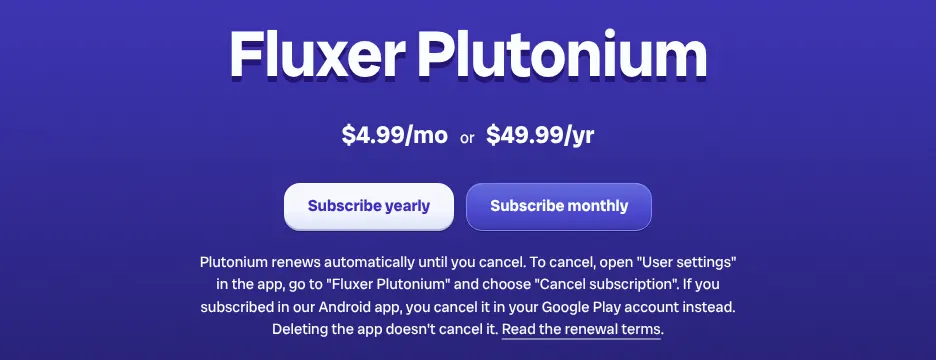
    Fluxer's Plutonium page: a heading reading Fluxer Plutonium, the price 4.99 dollars a month or 49.99 dollars a year, and two buttons to subscribe yearly or monthly.
    Fluxer's Plutonium page lists the optional subscription at $4.99 a month, with a yearly option beside it. Source: fluxer.com, captured on 14 Nov 2026.

    Verdict: Fluxer is the nearest copy of Discord on this page: free for every member, with voice channels and Discord roles, but no stage, events or iPhone app yet.

  2. Only partly: Forum channelsDrop-in voice channelsEnd-to-end encrypted callsRoles and channel permissionsAutomatic moderationPublic server directoryGames and apps inside calls

    2. Microsoft Teams

    Similarity to Discord
    81%
    Starting price
    $7.00/mo, billed yearly+$4.01/mo · pricier
    Migration effort
    HighMicrosoft documents no Discord importer. Teams, channels, roles and bots are set up again, and every member needs a paid licence.

    Same as Discord

    • Teams that hold channels, with threaded conversations, private chats and group chats
    • Video meetings and screen sharing, up to 300 participants on business plans
    • Town halls for a large audience, up to 10,000 attendees
    • Custom emoji, bots and incoming webhooks (a web address through which another service posts into a channel)

    What you lose

    • Drop-in voice rooms: someone starts a meeting with Meet now, and members join it
    • Custom roles: Teams has fixed roles such as team owner and member
    • A public directory of communities, and automatic moderation outside an extra Microsoft Purview licence

    Switching from Discord to Microsoft Teams

    Microsoft Teams matches as much of Discord as Fluxer, 81%, but it is a work product sold per user, per month. A team holds channels, and a channel post can open a thread. Video meetings, screen sharing, bots and webhooks are all built in.

    Two Discord habits do not carry over. A Teams channel has no voice room that stays open: someone starts a meeting with Meet now, and the others join it. Roles are fixed (owner, member, guest, channel moderator), so the fine-grained role lists of a Discord server cannot be rebuilt.

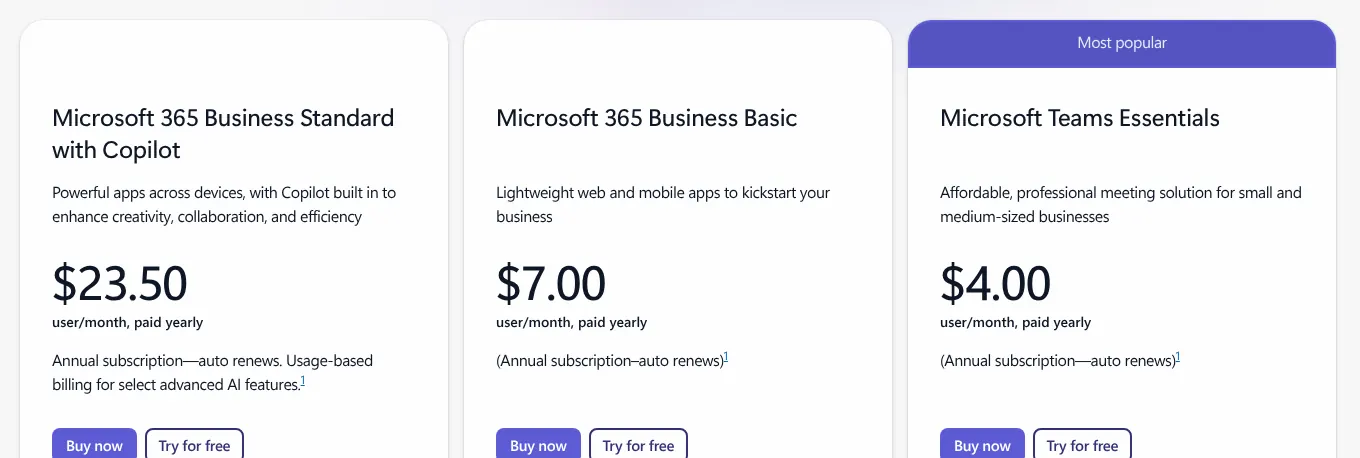
    Microsoft 365 Business Basic, the plan used for the price on this card, costs $7.00 per user per month, billed yearly. Its card lists chat, calls and meetings in Microsoft Teams, for up to 300 users. Teams Essentials costs $4.00, but Microsoft sells it as a meeting solution. Free Teams for personal use stops offering Communities from December 2026.

    Choose it if
    Your Discord server is really a work team, and your organisation already uses Microsoft accounts.
    Skip it if
    Your server is a public community: every member would need a paid seat (one user account on a paid plan), and nobody can drop into a voice room.
    Microsoft's plan cards: Business Standard with Copilot at 23.50 dollars, Business Basic at 7.00 dollars and Teams Essentials at 4.00 dollars, per user per month, paid yearly.
    Microsoft's plan cards show every price per user per month, paid yearly: Business Basic is $7.00 and Teams Essentials $4.00. Source: microsoft.com, captured on 14 Nov 2026.

    Verdict: Microsoft Teams reproduces most of Discord's structure for a work team, at $7.00 per member per month and without drop-in voice rooms.

  3. Only partly: Threads inside channelsDrop-in voice channelsEnd-to-end encrypted callsRoles and channel permissionsPublic server directoryScheduled community eventsIncoming webhooksGames and apps inside calls

    3. Telegram

    Similarity to Discord
    80%
    Starting price
    Free−$2.99/mo · cheaper
    Migration effort
    HighTelegram imports chat history from WhatsApp, Line and KakaoTalk, and names no Discord importer. Groups and topics are rebuilt by hand.

    Same as Discord

    • Groups split into topics, each with its own history, which work like Discord forum channels
    • Video chats with screen sharing, and group calls of up to 200 people
    • Scheduled video chats where listeners raise a hand to speak, like a Discord stage
    • Bots, custom emoji, an anti-spam filter and apps for every platform, including the web

    What you lose

    • Permanent voice channels: an admin starts a video chat, and members join while it runs
    • Custom roles: admins get rights one by one, and other members share the group's default rights
    • A browsable directory of communities: public groups are found by link or by search

    Switching from Discord to Telegram

    Telegram is a messaging app first, and a community tool second. Its groups hold up to 200,000 members and can be split into topics, each with its own history, much like a Discord forum. Files of up to 2 GB each travel on the free app, against 20 MB on free Discord.

    Voice works differently. An admin starts a video chat in a group, and members join while it runs. Admins can schedule a video chat and let listeners raise a hand to speak. Calls between people are end-to-end encrypted (only the people in the call can hear and see it), but group video chats are not described that way.

    Private messaging is free, and Telegram says it will stay free. Telegram Premium adds extras, but its price is shown only inside the app, so it is not listed here. The client apps are open source, the development team is based in Dubai, and cloud chats are stored in several data centres around the world.

    Choose it if
    Your community is large, talks more in text than in voice, and shares big files.
    Skip it if
    Your members expect to hop into voice channels at any time, or you need roles beyond admins.

    Verdict: Telegram carries a large Discord community at no cost and with bigger files, but voice happens in video chats an admin opens, not in standing channels.

  4. Not found on Root's site: Forum channelsStage rooms for an audienceEnd-to-end encrypted callsIncoming webhooksOnly partly: Threads inside channelsGames and apps inside callsDesktop, web and mobile apps

    4. Root

    Similarity to Discord
    80%
    Starting price
    $9.99/mo+$7.00/mo · pricier
    Migration effort
    MediumRoot imports a Discord server template: roles, channels and categories. Members, messages, files, emoji, bots and webhooks stay behind.

    Same as Discord

    • Communities with text and voice channels grouped together, and per-channel permissions
    • Voice channels members join and leave freely, with video and screen sharing
    • Automatic moderation with word filters and spam detection, through Root's own Moderation app
    • A public directory of communities, custom emoji and bots

    What you lose

    • Threads and forum channels: a reply quotes a message, and the three channel types are text, voice and app
    • Stage channels for an audience
    • A version in the web browser: Root runs as an app on Windows, macOS, Linux, iOS and Android

    Switching from Discord to Root

    Root is a community app published by Root Communications, Inc., of Los Angeles, and it follows Discord's model closely. Members join voice channels without a call, and each channel and channel group has its own permissions. A voice channel holds up to 200 members, and a community up to 50,000.

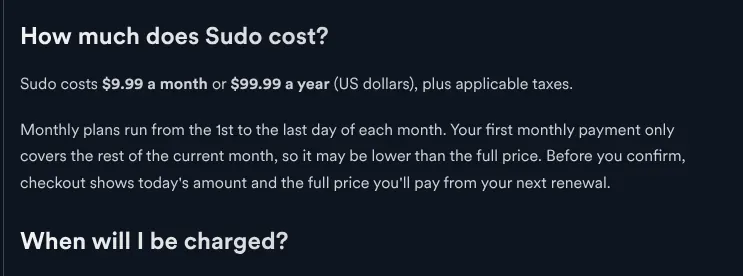
    Root is free, and two purchases are optional. Sudo, the personal subscription, costs $9.99 a month or $99.99 a year, and plays the part of Discord Nitro. Cores cost $2.99 a month each and pay for community features, like Discord Server Boosts. A community needs four cores to be listed in the public directory.

    Root covers moderation and events with its own free apps installed into a community. The Moderation app filters slurs, profanity, custom words and spam. The Raid Planner app organises gaming events such as raids. Root says the information it collects is stored on servers in the United States.

    Choose it if
    Your server is a gaming community that relies on voice channels, moderation and event sign-ups.
    Skip it if
    Some members can only use a web browser, or your server depends on threads and forum channels.
    Root's help centre answer to the question How much does Sudo cost: 9.99 dollars a month or 99.99 dollars a year, in US dollars, plus applicable taxes.
    Root publishes no pricing page: its help centre states the Sudo price, $9.99 a month. Source: support.rootapp.com, captured on 14 Nov 2026.

    Verdict: Root rebuilds a Discord gaming server with its voice channels, permissions and moderation for free, but without threads, forums or a browser version.

  5. Not found on Circle's site: End-to-end encrypted callsGames and apps inside callsOnly partly: Custom emoji and reactionsDrop-in voice channelsRoles and channel permissionsBots and developer APIIncoming webhooks

    5. Circle

    Similarity to Discord
    77%
    Starting price
    $89/mo, billed yearly+$86.01/mo · pricier
    Migration effort
    MediumCircle has no self-serve Discord importer. Its migration team moves content, members and settings, and Business includes standard migration services.

    Same as Discord

    • Chat spaces that work like Discord channels, with forum-style discussion spaces
    • Live rooms and live streams with screen sharing, where hosts bring participants on stage
    • Unlimited members, a public marketplace called Circle Discover, and apps for iOS, Android and desktop

    What you lose

    • Drop-in voice rooms: live rooms are sessions a host starts, for 15 people on Professional
    • Bots: the API (the access other programs use) starts on Business, without bot accounts
    • A free plan: Circle offers a 14-day trial

    Switching from Discord to Circle

    Circle is a platform for paid communities and courses, not a gaming chat app. It replaces Discord when the server is a creator's or a brand's community. Chat spaces work like channels, discussion spaces like forums, and events and live streams are built in.

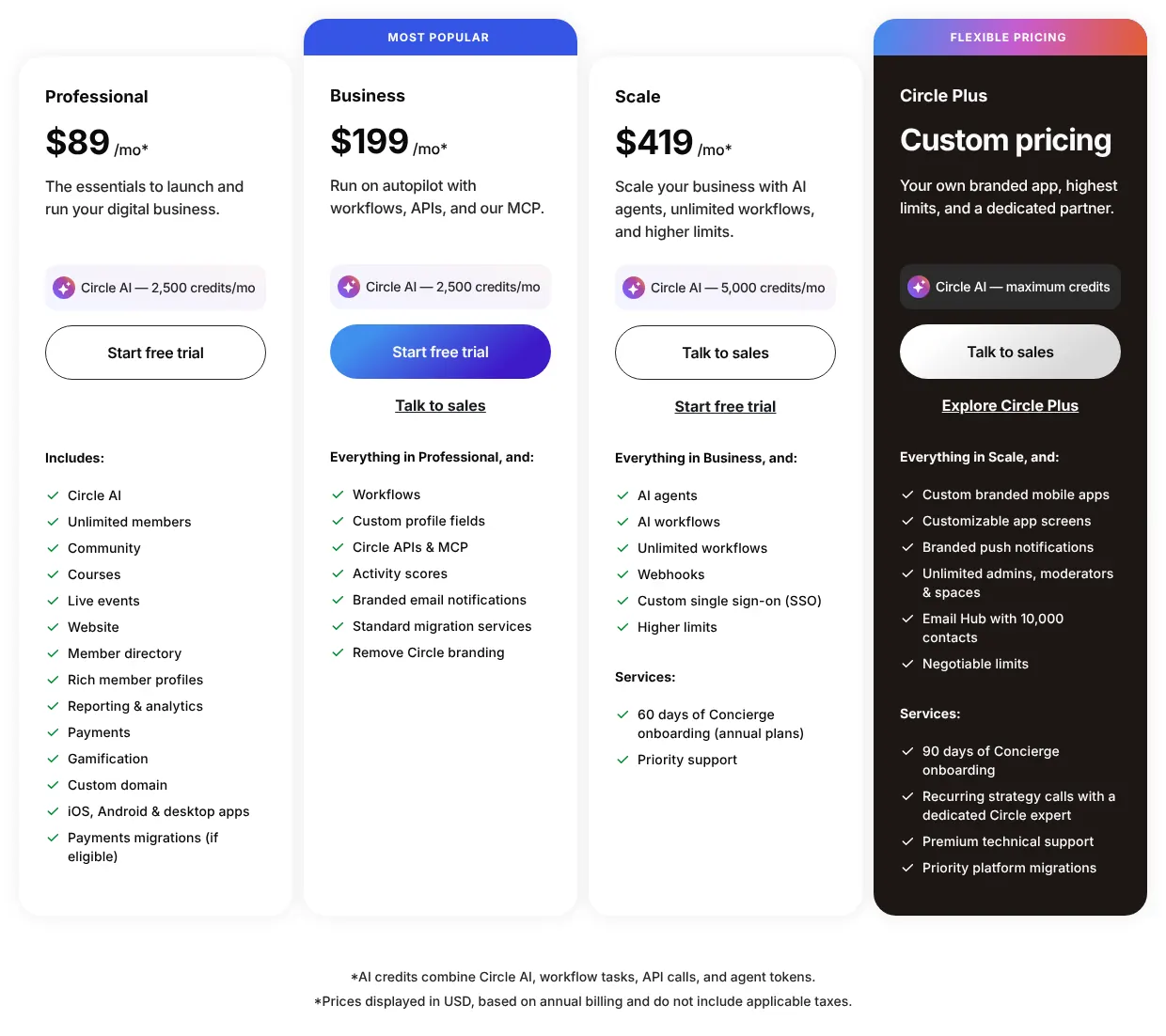
    Circle prices per community, not per member. Professional costs $89 a month billed yearly, with unlimited members, 20 spaces and live streams for 100 attendees. The pricing page says the cards are based on annual billing, and Circle says monthly billing costs more. There is no free plan, only a 14-day trial.

    Voice is the gap. Live rooms are sessions a host starts, for up to 15 people on Professional, and nobody drops into a standing room. Every participant in a live room can share a screen, one person at a time. Automatic moderation by rules runs on the Scale plan. Circle is run by CircleCo, Inc., and its services are hosted in the United States.

    Choose it if
    Your Discord server is a creator or course community, and you want members, events and live streams under one flat price.
    Skip it if
    Your community is a free group of friends or players who mainly talk in voice.
    Circle's plan cards: Professional at 89 dollars a month, Business at 199, Scale at 419 and Circle Plus with custom pricing, with a footnote saying prices are based on annual billing.
    Circle's cards show Professional at $89 a month; the footnote says the prices are based on annual billing. Source: circle.so, captured on 14 Nov 2026.

    Verdict: Circle turns a creator's Discord server into a paid community site for a flat $89 a month, billed yearly, but gives up drop-in voice and bots.

    Visit circle.soPartner link · may earn us a commission
  6. Not found on Stoat's site: Forum channelsStage rooms for an audienceEnd-to-end encrypted callsScheduled community eventsGames and apps inside callsOnly partly: Threads inside channelsAutomatic moderationDesktop, web and mobile apps

    6. Stoat

    European
    Similarity to Discord
    75%
    Starting price
    Free−$2.99/mo · cheaper
    Migration effort
    HighStoat documents no Discord importer. Channels, roles and bots are set up again by hand.

    Same as Discord

    • Servers with text channels, roles and a Discover directory of public communities
    • Voice channels with video and screen sharing, and no limit on cameras per call
    • Custom emoji, bots, webhooks, and direct messages with groups of up to 50 people

    What you lose

    • Threads, forum channels, stage channels, scheduled events and games inside calls
    • Automatic moderation beyond slow mode, which limits how often members post
    • A native iPhone app: iPhone users are sent to the web app

    Switching from Discord to Stoat

    Stoat is the new name of Revolt, and revolt.chat now sends visitors to stoat.chat. It looks and works much like Discord: servers, text channels, voice channels, roles and a Discover directory. Video and screen sharing arrived on 17 July 2026. Screen sharing runs at 720p and 30 frames a second.

    Stoat is free and open source, and its developers say it is funded through donations. Free accounts get custom emoji and a 20 MB upload limit, the same size as free Discord, with no subscription. The code is under the AGPLv3 licence, so a community can run its own Stoat server.

    The company, Revolt Platforms Ltd, is registered in England and Wales. Stoat says data is stored mainly with cloud providers in the European Union, and possibly in the United Kingdom. Both the company and the data are therefore in Europe.

    Choose it if
    You want a free, Discord-like server run by a European company, without any paid plan at all.
    Skip it if
    Your server relies on threads, forums, scheduled events or automatic moderation filters.

    Verdict: Stoat gives a Discord-style server for free, from a European company, but leaves out threads, forums, events and most moderation filters.

  7. Not found on Slack's site: Forum channelsStage rooms for an audienceEnd-to-end encrypted callsOnly partly: Drop-in voice channelsRoles and channel permissionsAutomatic moderationPublic server directoryScheduled community eventsGames and apps inside calls

    7. Slack

    Similarity to Discord
    73%
    Starting price
    $8.75/mo+$5.76/mo · pricier
    Migration effort
    HighSlack imports channels, messages and users from a CSV file (a plain table that spreadsheet programs open), and names no Discord importer.

    Same as Discord

    • Channels with threads, private messages and group messages of up to nine people
    • Video calls and screen sharing in huddles
    • Custom emoji, bots, incoming webhooks and apps for desktop, web and mobile

    What you lose

    • Drop-in voice rooms: a huddle is started in a channel and holds 50 people on paid plans
    • Forum channels, stage channels and end-to-end encrypted calls
    • History on the free plan: only the last 90 days can be seen

    Switching from Discord to Slack

    Slack is a work chat tool owned by Salesforce, and it bills per member. Its channels, threads and private messages map closely onto a Discord server's text side. Voice and video run in huddles, short calls started inside a channel, with up to 50 people on paid plans and two on the free plan.

    The free plan shows messages and files from the last 90 days and deletes those older than a year. For a community used to Discord's full history, that pushes the choice toward Pro. Pro costs $8.75 per member per month billed monthly, or $7.25 billed yearly.

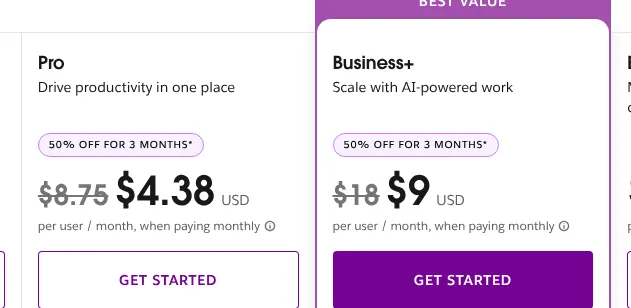
    The pricing page also shows half price for three months. That offer applies only to teams buying in the first seven days after creating the team, so the list price is used here. Slack's data is stored in the United States unless a Business+ or Enterprise plan sets another region.

    Choose it if
    Your server is a working group that writes more than it talks, and each member can be paid for.
    Skip it if
    Your community has hundreds of members: at $8.75 each a month, the bill grows with every one of them.
    Slack's Pro and Business+ cards: Pro at 8.75 dollars struck through and 4.38 dollars, Business+ at 18 dollars struck through and 9 dollars, per user per month paid monthly, under a 50% off badge.
    Slack's cards show a promotion for new teams: the list prices are the struck-through ones, $8.75 for Pro and $18 for Business+. Source: slack.com, captured on 14 Nov 2026.

    Verdict: Slack covers Discord's text side well for a team that pays per member, but it has no drop-in voice rooms and its free plan hides history after 90 days.

  8. Not found on Rocket.Chat's site: Stage rooms for an audienceEnd-to-end encrypted callsOnly partly: Forum channelsDrop-in voice channelsVideo callsScreen sharing and streamingRoles and channel permissionsPublic server directoryScheduled community eventsGames and apps inside calls

    8. Rocket.Chat

    Similarity to Discord
    72%
    Starting price
    On quote
    Migration effort
    HighRocket.Chat documents imports from Slack and from CSV files only. Each channel, role and bot is recreated.

    Same as Discord

    • Channels, threads, private messages and custom emoji
    • Automatic filtering of banned words, bots and incoming webhooks
    • Apps for desktop, web and mobile, and a server the community can run itself

    What you lose

    • Drop-in voice rooms: free plans use Jitsi or BigBlueButton calls, and native voice calls are a paid add-on (an extra bought on top of a plan)
    • Per-channel permission overrides for custom roles, which are not documented
    • A public directory of communities across servers

    Switching from Discord to Rocket.Chat

    Rocket.Chat is open source under the MIT licence, and a community runs it on its own server. Its text side is close to Discord's, with channels, threads and custom emoji. Voice and video are the weak point. On free plans, calls go through Jitsi or BigBlueButton, two outside video tools, and native voice calls are a paid add-on.

    Two free options exist. Starter allows up to 50 users. Community allows up to 100 users connected at the same time, with core messaging and 10,000 push notifications a month. Above that, Rocket.Chat sells three paid plans, Commercial, Government and Defense, and publishes no price for any of them.

    The company's registered office is in Wilmington, Delaware, and its research office is in Porto Alegre, Brazil. Rocket.Chat now presents its paid plans around deployment for companies, governments and defence.

    Choose it if
    You want to run your own server for a community of up to 50 people and keep every message.
    Skip it if
    Your members spend most of their time in voice, or your community is above 100 people online at once and you want a published price.
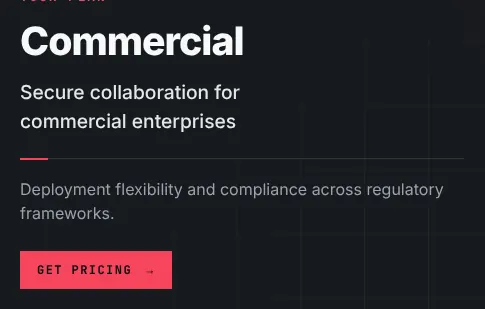
    Rocket.Chat's plans page showing the Commercial plan: secure collaboration for commercial enterprises, with a Get pricing button and no price figure.
    Rocket.Chat's Commercial plan card shows a Get pricing button instead of a price. Source: rocket.chat, captured on 14 Nov 2026.

    Verdict: Rocket.Chat gives a text-first copy of a Discord server, on the community's own server and free up to 50 users, with weak voice and no public price above that.

  9. Not found on Element's site: Forum channelsStage rooms for an audienceAutomatic moderationScheduled community eventsOnly partly: Custom emoji and reactionsDrop-in voice channelsRoles and channel permissionsIncoming webhooksGames and apps inside calls

    9. Element

    Open source
    Similarity to Discord
    70%
    Starting price
    On quote
    Migration effort
    HighElement's Discord bridge is no longer for sale. Rooms are recreated, and each room's history can be exported from Element afterwards in HTML (the format of web pages), text or JSON.

    Same as Discord

    • Rooms grouped into spaces, with threads, private messages and group chats
    • Voice and video calls with screen sharing, end-to-end encrypted by default
    • Room directories, bots and an app for desktop, web and mobile

    What you lose

    • Drop-in voice rooms: video rooms are an experimental feature
    • Custom roles: rights are numeric power levels set room by room
    • Forum channels, stage channels and scheduled events

    Switching from Discord to Element

    Element is an app for Matrix, an open standard for chat in which separate servers talk to each other. Its strength against Discord is privacy. Messages, voice and video are end-to-end encrypted by default, so only the people in a conversation can read them. History is unlimited, and a room's history can be exported in HTML, plain text or JSON.

    The community side is thinner. Roles are power levels, numbers set room by room, rather than named roles. Video rooms that people drop into are experimental. Each Matrix server keeps its own room directory, with no single directory for all of them.

    The Element app is free, and it can run on the public matrix.org server or on a server the community hosts itself. Element's paid suite for organisations is priced per seat per month, on request, with no figure published. Element Creations Ltd is based in London, and the software is open source under the AGPL licence.

    Choose it if
    Privacy comes first for your community, and you are ready to trade Discord's roles and drop-in voice for encryption.
    Skip it if
    Your server depends on custom roles, forum channels or event scheduling.
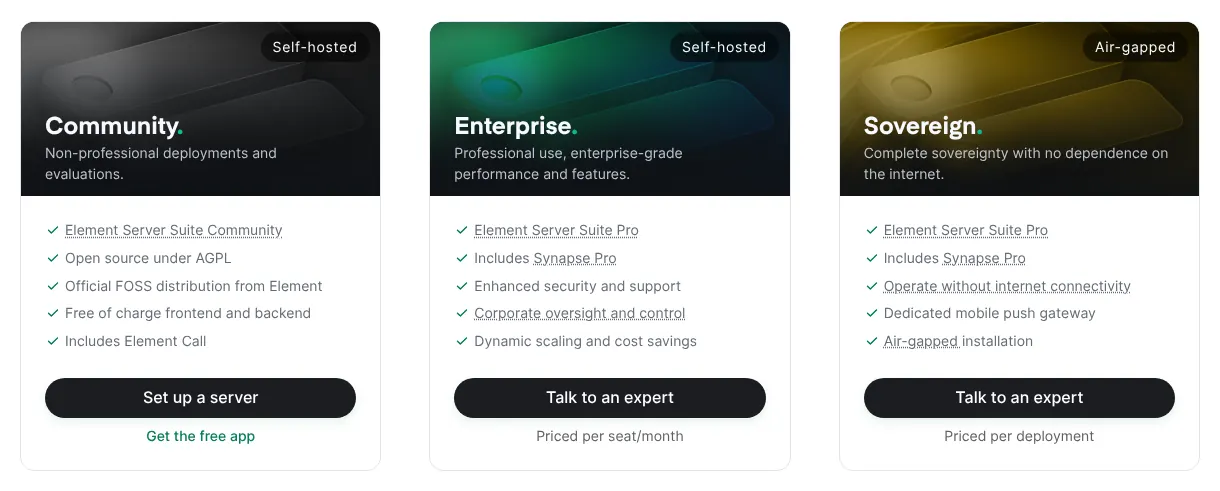
    Element's pricing page with three plans: Community, self-hosted and free of charge; Enterprise, priced per seat per month with a Talk to an expert button; and Sovereign, priced per deployment.
    Element's pricing page lists the Community plan as free of charge and the Enterprise plan as priced per seat per month, without a figure. Source: element.io, captured on 14 Nov 2026.

    Verdict: Element trades Discord's roles and voice channels for end-to-end encryption by default and a free, self-hostable app.

  10. Not found on Zulip's site: Screen sharing and streamingStage rooms for an audienceEnd-to-end encrypted callsScheduled community eventsOnly partly: Forum channelsDrop-in voice channelsVideo callsAutomatic moderationPublic server directoryGames and apps inside calls

    10. Zulip

    Similarity to Discord
    69%
    Starting price
    $8/mo+$5.01/mo · pricier
    Migration effort
    HighZulip imports from Slack, Teams, Mattermost and Rocket.Chat, and handles other products on request. Discord is not on the list.

    Same as Discord

    • Channels with named topics, private messages and group messages
    • Custom roles and permissions, custom emoji, bots and incoming webhooks
    • Apps for desktop, web and mobile, and a server the community can run itself

    What you lose

    • Drop-in voice rooms and built-in video: calls are links to an outside provider, Jitsi Meet by default
    • Stage channels, scheduled events and end-to-end encrypted calls
    • History on the free plan: only the latest 10,000 messages can be seen

    Switching from Discord to Zulip

    Zulip organises every channel into named topics, so each conversation keeps its own thread. For a community that talks in text and loses track of Discord's fast channels, that is the main change. Voice and video are links to an outside provider, Jitsi Meet by default, rather than rooms inside Zulip.

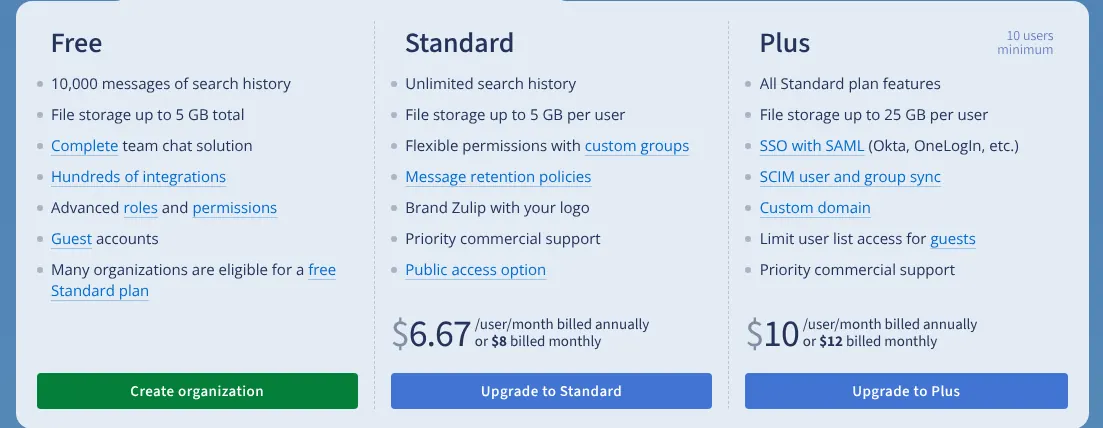
    The Cloud Free plan shows only the latest 10,000 messages and holds 5 GB of files in total. Older messages are kept and come back on an upgrade. Cloud Standard costs $8 per user per month billed monthly, or $6.67 billed yearly.

    Zulip offers a free Standard plan to most communities that need more than the free plan, and says it sponsors over 1,500 organisations. Zulip is open source under the Apache 2 licence. Kandra Labs, of San Francisco, runs it and is fully owned by the Zulip Foundation.

    Choose it if
    Your community writes long discussions and can apply for Zulip's sponsored Standard plan.
    Skip it if
    Your members spend their evenings in voice channels.
    Zulip's cloud plans: Free with 10,000 messages of search history, Standard at 6.67 dollars a user a month billed annually or 8 billed monthly, and Plus at 10 or 12 dollars.
    Zulip's Standard card gives the monthly price under the yearly one: $8 per user a month, billed monthly. Source: zulip.com, captured on 14 Nov 2026.

    Verdict: Zulip suits a text-heavy community that wants ordered topics and may get the Standard plan free, but it has no voice rooms of its own.

Comparison table: the 10 alternatives vs Discord

The table puts the ten tools side by side on the four points that decide most moves: price, free use, voice and import.

The 10 Discord alternatives compared with Discord
ToolMatchEntry priceFree useDrop-in voice channelsDiscord import
REFDiscord100%$2.99/mo (Nitro Basic, optional)Yes, any server sizeYesn/a
01Fluxer81%$4.99/mo (optional)YesYesServer template
02Microsoft Teams81%$7.00/mo per user, billed yearlyCommunities end in December 2026No, meetingsNot documented
03Telegram80%FreeYesNo, video chatsNot documented
04Root80%$9.99/mo (optional)YesYesServer template
05Circle77%$89/mo, billed yearlyNo, 14-day trialNo, live roomsDone by Circle's team
06Stoat75%FreeYesYesNot documented
07Slack73%$8.75/mo per userYes, 90 days of historyNo, huddlesNot documented
08Rocket.Chat72%On quoteYes, up to 50 usersNo, call appsNot documented
09Element70%On quoteYes, app on matrix.orgExperimentalBridge no longer sold
10Zulip69%$8/mo per userYes, 10,000 messagesNo, call linksNot documented

Entry price: first paid plan, read on each vendor's site on 2026-11-14, billed monthly unless marked. Optional: a personal subscription that a community does not need. Drop-in voice channels: voice rooms that stay open in the community, which members join without anyone starting a call.

What a Discord alternative really costs

Discord costs nothing for a server of any size, so the real question is how each tool bills a community. Five tools here are free at every size: Fluxer, Telegram, Root, Stoat and Element, the last through its free app on the public matrix.org server. Rocket.Chat is free up to 50 users on a community's own server, and the others charge per member or per community.

The table applies one rule to every price list read on 2026-11-14. For each size, it takes the cheapest plan that covers the members and shows the full message history. Personal subscriptions such as Nitro, Plutonium or Sudo are left out, because a community runs without them.

Take a server of 50 members. Slack Pro comes to $437.50 a month, and Zulip Standard to $400. Microsoft 365 Business Basic comes to $350 a month, billed yearly. Circle stays at $89 whatever the number of members.

Monthly cost of a community of 10, 50 and 250 members, in USD
Tool10 members50 members250 members
REFDiscordFreeFreeFree
01FluxerFreeFreeFree
02Microsoft Teams$70, billed yearly$350, billed yearly$1,750, billed yearly
03TelegramFreeFreeFree
04RootFreeFreeFree
05Circle$89, billed yearly$89, billed yearly$89, billed yearly
06StoatFreeFreeFree
07Slack$87.50$437.50$2,187.50
08Rocket.ChatFree, own serverFree, own serverOn quote
09ElementFreeFreeFree
10Zulip$80$400$2,000

Microsoft Teams: Microsoft 365 Business Basic at $7.00 per user a month, billed yearly, up to 300 users. Slack: Pro at $8.75 per member, because the free plan shows only 90 days. Zulip: Cloud Standard at $8 per member, because the free plan shows only the latest 10,000 messages; most communities can apply for a free Standard plan. Rocket.Chat: Starter is free up to 50 users on a self-hosted server. Its free Community plan counts users connected at the same time, up to 100, so a larger server with fewer people online at once can stay free. Element: the free app on the public matrix.org server. Circle: Professional, unlimited members.

How to migrate from Discord in five steps

The move takes five steps. Messages and members do not travel with any tool on this page, so the order is about keeping people together while the new space fills up.

  1. Request your Discord data package

    In User Settings, under Data and Privacy, you can request a copy of your data. Discord says the package arrives within 30 days, in common formats including JSON (a text format that programs read). It covers your own account, so ask each admin to request theirs early.

  2. Write down channels, roles and bots

    List every channel, every role with its permissions, and every bot with the job it does. With Fluxer or Root, a Discord server template carries the channels and roles across. With the other tools, this list is your plan for rebuilding by hand.

  3. Build the new space before announcing it

    Create the channels, set the roles and add the bots in the new tool. Then test with two or three moderators. Check that each role sees what it should, and nothing more.

  4. Reconnect webhooks and bots

    A webhook is a web address that another service uses to post messages into a channel. Each one that posted into Discord needs a new address in the new tool. Fluxer accepts webhooks in Slack's and GitHub's formats. Bots must be rebuilt or replaced, because each tool has its own interface for them.

  5. Move members and keep Discord open for a while

    Post the new invite link in every Discord channel, and pin it. Keep both spaces open until most active members have arrived. Then make the Discord channels read-only, so nothing important is said in the old place.

When it is better to stay on Discord

Staying on Discord is the better choice in four situations. The ranking on this page measures how closely a tool resembles Discord, not whether it suits a given community.

  • The server is large and free. Discord charges nothing per member. At 250 members, Slack Pro would cost $2,187.50 a month. Microsoft 365 Business Basic would cost $1,750, billed yearly.
  • Members use iPhones or web browsers. Fluxer has no iPhone app until late 2026, Stoat sends iPhone users to its web app, and Root has no browser version.
  • The server relies on stage events, scheduled events or Activities. None of the three tools with drop-in voice channels offers all three. Root has events through its Raid Planner app, but no stage.
  • The age check does not concern the members. Discord says more than 90% of users will not be asked to confirm their age. Adults placed in the adult group keep Discord as it was.

A cheaper route also exists inside Discord. Nitro Basic costs $2.99 a month, or $29.99 for a year paid upfront, for the members who want bigger uploads.

How we rank

  1. The order of this page is a similarity index: the share of Discord's features that each tool reproduces. It measures resemblance, not quality, reliability or support.Text chat 28% · 5 featuresVoice and video 28% · 5 featuresCommunity management 22% · 4 featuresApps and integrations 22% · 4 features
  2. The comparison uses a grid of 18 Discord features read on discord.com, worth 32 points in total. Each feature is weighted 3 (it defines the product), 2 (common use) or 1 (secondary). A tool gets 1 for a documented native equivalent, 0.5 for a partial one, and 0 when the feature is absent or could not be verified on the vendor's own site.
  3. Fifteen candidates were scored on 2026-11-14, and the ten highest are listed. Google Chat and Mattermost tie with Zulip at 69% and fall outside the ten; Zulip's entry price is closer to Discord's. TeamSpeak, Mumble and Signal scored lower. Guilded was not scored: its site now shows only a closing notice. Ties go to the smaller entry-price gap with Discord's $2.99, then to alphabetical order. Price, migration effort and labels do not change the rank.
  4. No entry on this page is sponsored. A sponsored entry is marked Sponsored and holds the position paid for; its percentage stays the computed one.

FAQ

Is there a free Discord alternative with voice channels?

Yes, three. Fluxer, Root and Stoat are free and have voice channels you join without a call. Fluxer and Stoat are open source too, so you can also run them on your own server.

Can Discord messages be moved to another app?

Not with any of the ten tools here. Fluxer and Root copy a Discord server template, which holds channels, roles and permissions, but no messages or members. Your own Discord data package arrives within 30 days, in formats that include JSON.

What happened to Guilded?

Guilded has closed. Its site now says it is no longer available, and points its users to Roblox Communities. That is why it is not on this page.

Which Discord alternative is based in Europe?

Stoat is run by a company registered in England and Wales, and stores data mainly with EU cloud providers. Fluxer is a Swedish company, but most of its data sits in New Jersey for now. If you need data in Europe, you can also run Fluxer, Stoat, Element, Rocket.Chat or Zulip on a server you choose.

Is Slack or Microsoft Teams cheaper than Discord for a community?

No. Discord is free for a whole server, while Slack Pro costs $8.75 per member a month and Microsoft 365 Business Basic $7.00, billed yearly. For a server of 10 people, that comes to $87.50 or $70 a month.