top10alternative

Top 10 Dropbox Alternatives (2026)

The closest alternative to Dropbox is pCloud, which does everything Dropbox does on the list of 20 features below, from $4.99 a month. This page ranks ten cloud storage services by how much of Dropbox each one replaces, with prices read on vendor pages on 20 November 2026.

Short answer · top 3 of 10

See all 10 ↓
  1. pCloudClosest match
    100%From $4.99/moMigration Low
    Visit
  2. 97%From $16/moMigration Medium
    Visit
  3. 97%From $6.99/moMigration Medium
    Visit

Ranked by similarity to Dropbox on 20 Dropbox features. Prices in USD unless marked, billed monthly unless marked, read on 20 November 2026.

Dropbox in three lines

What it is
Cloud storage that keeps a folder in sync between computers, phones and the web, with share links, file requests and large file transfers.
Price
Basic is free with 2 GB and up to three devices. Plus costs $11.99 a month, or $9.99 a month billed yearly, for one person and 2 TB. Standard costs $18 per user a month for teams.
Used for
Keeping the same files on every device, sending links to clients, collecting files from others, and getting back deleted or older files.

Why teams look for a Dropbox alternative

Five limits explain most searches for a Dropbox alternative. Each one is written on dropbox.com, and each has tools on this page that answer it.

The free plan is small

Dropbox Basic gives 2 GB, and it can be signed in on three devices at a time. A fourth phone or laptop means signing out of another one. MEGA starts with 20 GB for free. Koofr, Icedrive and IDrive start with 10 GB.

2 TB costs $11.99 a month

Plus is the Dropbox plan made for one person, and it costs $11.99 billed monthly. pCloud sells 2 TB for $9.99 a month. Icedrive sells 2 TB for $10.99. MEGA gives 3 TB for €9.99, which it estimates at $10.96. Someone who stores 300 GB still pays for 2 TB on Dropbox. pCloud has a 500 GB plan at $4.99.

Password links need a business plan

On Dropbox, a password on a shared link starts with Professional, Essentials or Standard. Plus does not have it. Proton Drive lists passwords and expiry dates for links on its pricing page. Koofr offers links that expire from its smallest paid plan.

End-to-end encryption is for teams on top plans

End-to-end encryption means files are locked on the device before upload, so the provider cannot open them. Dropbox offers it only to teams on Business Plus, Advanced and Enterprise. Proton Drive applies it on every plan, including the free one. Tresorit, Sync.com and MEGA are built around it too.

Files sit in the United States by default

Dropbox stores files in data centres across the United States. Storage in Australia, the EU, Japan and the UK is offered to eligible users. Koofr is a Slovenian company with servers in Germany. Proton Drive keeps data in Switzerland, Germany or Norway. pCloud offers a choice of Luxembourg or Dallas at sign-up.

How to choose a Dropbox alternative

Five checks bring the ten tools down to one or two. They come in the order that removes the most tools first.

1. Measure how much you store

Open your Dropbox account settings and read how much space you use. If you use far less than 2 TB, a smaller plan elsewhere costs less than Plus. Microsoft 365 Basic gives 100 GB for $1.99 a month. Proton Drive Plus gives 200 GB for $4.99. If you need 2 TB or more, compare the middle column of the cost table.

2. Decide whether the provider may read your files

Dropbox Plus encrypts stored files, but end-to-end encryption, which keeps even Dropbox out, is kept for teams on top plans. If you want to be the only one able to open your files, choose Proton Drive, Tresorit, Sync.com or MEGA. With pCloud, that protection is a paid extra on personal plans. OneDrive and Egnyte do not offer it.

3. List the sharing features you use

Write down what you do with Dropbox besides storing. Share links, upload links for clients, links with passwords and folders shared with editing rights all differ between tools. Each card below lists what is missing under What you lose. Check that line first.

4. Check how the files will move

Four tools copy files straight from a Dropbox account: pCloud, MEGA, Koofr and IDrive. IDrive does it 100 files at a time. Sync.com, Tresorit and Proton Drive document a download from Dropbox and an upload through their own apps. For a business, Microsoft and Egnyte have tools that an administrator runs. Share links never move: you create them again.

5. Count the people who need an account

Dropbox Standard costs $18 per user a month. Most team plans here cost less per person, but several ask for three users at least. A team of five pays $90 a month on Dropbox Standard. The same team pays $40 on Sync.com Teams, or $42 on Microsoft 365 Business Basic. Koofr and Icedrive sell no team plan.

Which Dropbox alternative for which situation

  • You want the closest copy of Dropbox, for lesspCloud · 500 GB for $4.99 a month
  • You want your files end-to-end encrypted without thinking about itSync.com · 1 TB for $16 a month
  • You share confidential documents with clientsTresorit
  • You need the most free storageMEGA · 20 GB free
  • You want a private, encrypted drive from a Swiss companyProton Drive · Free plan with 5 GB
  • You already pay for Microsoft 365OneDrive · From $1.99 a month for 100 GB
  • You want a European company and servers in GermanyKoofr · Prices in euros, billed yearly
  • Your company needs controls on files across a teamEgnyte · $10 per user a month, billed yearly
  • You mainly want a backup of several computers, plus syncIDrive · 5 TB for $11.99 a month
  • You want 2 TB for one person at a monthly priceIcedrive · $10.99 a month

The 10 alternatives

by similarity to Dropbox
What can you not lose?Tick the Dropbox functions you need. The tools where a ticked function was not found fade, with the reason.
Sync and access
Sharing
Safety and recovery
Working together

The ranks do not change: they measure how much of Dropbox each tool replaces.

  1. 1. pCloud

    Closest match
    Similarity to Dropbox
    100%
    Starting price
    $4.99/mo−$7.00/mo · cheaper
    Migration effort
    LowpCloud imports a Dropbox or Dropbox Business account from its Backups menu, once every 28 days. Share links and shared folders are set up again by hand.

    Same as Dropbox

    • A desktop app that syncs folders, and a virtual drive that keeps files online until they are opened
    • Share links with a password on paid plans, and upload links that collect files from anyone
    • Rewind, which rolls a folder or the whole account back to a moment of the last 30 days
    • Automatic upload of photos and videos from the phone

    What you lose

    • End-to-end encryption on Premium plans: pCloud Encryption is bought separately
    • Free space: 2 GB at sign-up, and up to 10 GB only after tasks such as inviting friends

    Switching from Dropbox to pCloud

    pCloud is the only tool on this page with all 20 Dropbox features on the list, a 100% match. It syncs folders like Dropbox, and its desktop app also mounts the cloud as a drive that does not fill the disk. Share links, upload links, earlier versions of a file and a Rewind of the whole account are all there. The company is registered in Baar, Switzerland, and each customer picks Luxembourg or Dallas for the data at sign-up.

    The price is the main difference. Premium gives 500 GB for $4.99 a month. Dropbox Plus costs $11.99 for 2 TB. Premium Plus costs $9.99 a month, $2.00 less than Plus, for the same 2 TB. pCloud also sells plans paid once for life.

    One Dropbox habit costs extra. pCloud Encryption, the folder that pCloud itself cannot open, is not included in Premium or Premium Plus. On Business plans it is included. The move itself is short: the Backups menu copies a Dropbox account into a dated folder, without a download to the computer.

    Choose it if
    You use Dropbox Plus mostly to sync and share, and you want the same habits for less money.
    Skip it if
    You need end-to-end encryption on a personal plan without paying for an extra.
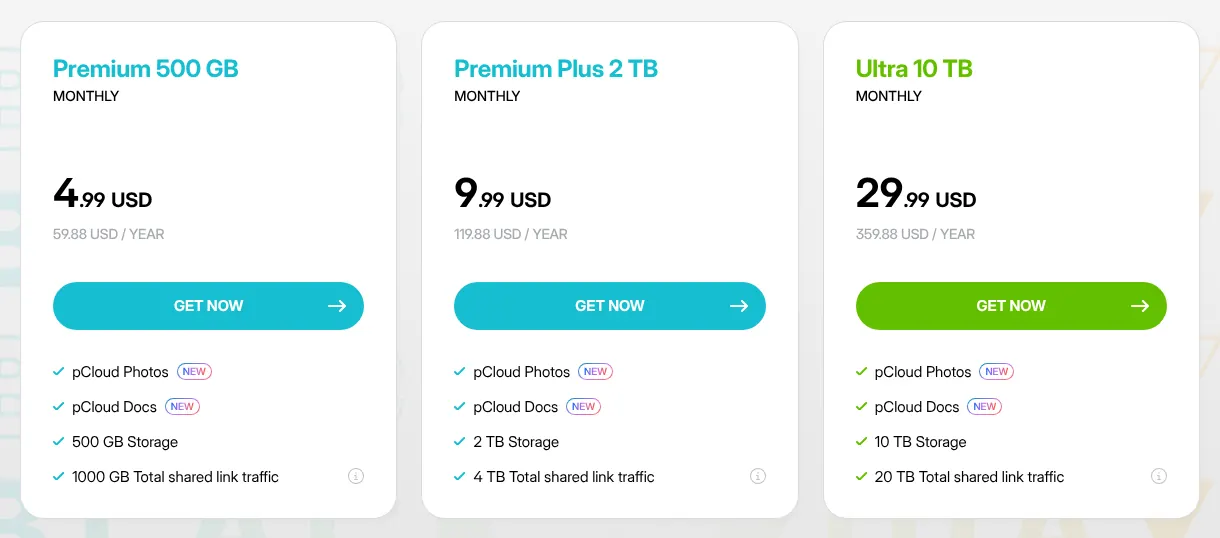
    pCloud's monthly plans: Premium 500 GB at 4.99 dollars, Premium Plus 2 TB at 9.99 dollars and Ultra 10 TB at 29.99 dollars a month.
    pCloud's plans on the Monthly tab: Premium Plus, in the middle, gives 2 TB, the same space as Dropbox Plus. Source: pcloud.com, captured on 20 Nov 2026.

    Verdict: pCloud is the closest copy of Dropbox on this page, with a 2 TB plan at $9.99 a month and a direct import from a Dropbox account.

  2. Only partly: Roll back folders to a dateEdit documents in the browser

    2. Sync.com

    Similarity to Dropbox
    97%
    Starting price
    $16/mo+$4.01/mo · pricier
    Migration effort
    MediumSync.com documents a download from Dropbox, then an upload through its desktop app. The browser route suits up to 250 GB and fewer than 10,000 files.

    Same as Dropbox

    • End-to-end encryption on every plan, so only the account holder can open the files
    • Files-on-demand that keep files in the cloud until they are opened
    • Links with a password, and upload requests that do not show one sender's files to another
    • Shared folders with view or edit rights set per person

    What you lose

    • Rolling back a folder without help: an account rewind is requested from customer service, on Pro plans
    • An editor of its own: documents open in Microsoft Office apps, which need a separate Microsoft 365 licence
    • Single files above 100 GB

    Switching from Dropbox to Sync.com

    Sync.com is a Canadian service, based in Toronto, built around end-to-end encryption. Every file is encrypted before it leaves the computer, on every plan. That is the protection Dropbox reserves for teams on Business Plus, Advanced and Enterprise. At 97%, it ties with Tresorit for second place.

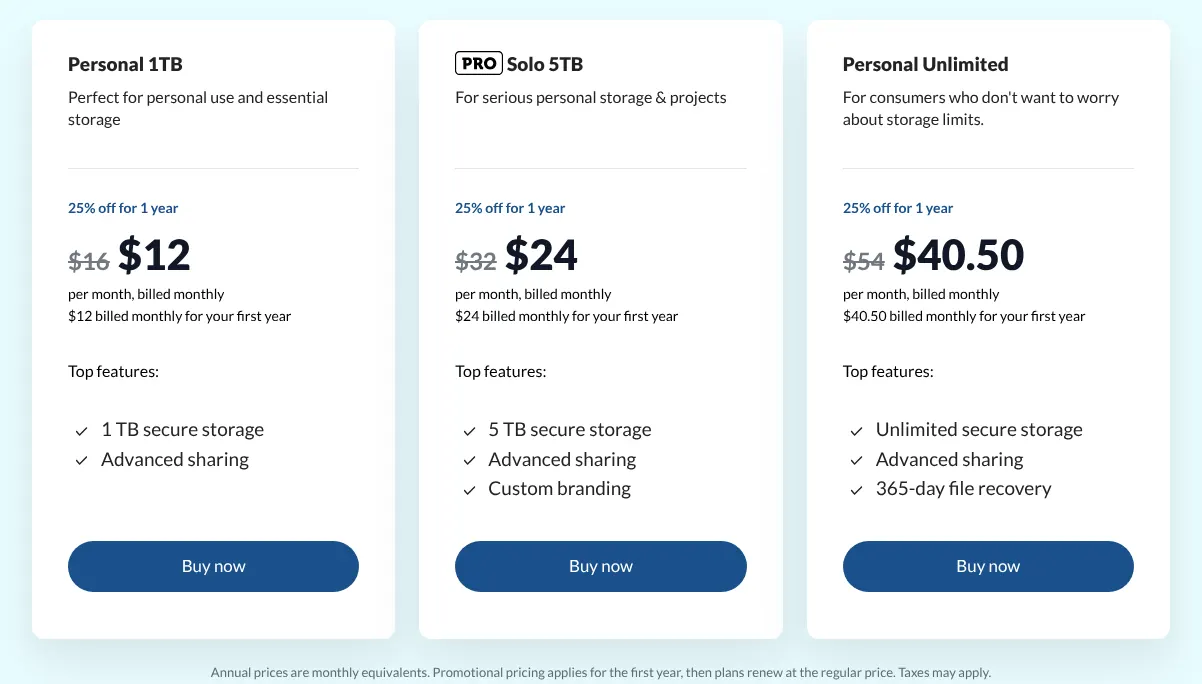
    Personal 1TB costs $16 a month, billed monthly, which is $4.01 more than Dropbox Plus for half the space. On the reading date, Sync.com shows a first-year offer of 25% off. The capture shows $12 in large type and $16 struck through: $16 is the price that applies after the first year.

    Sync.com keeps 90 days of file history on Personal 1TB, against 30 days on Dropbox Plus. Its free plan has 5 GB. Data is stored in Canada or the United States.

    Choose it if
    You want end-to-end encryption on a personal account, and longer file history than Dropbox Plus.
    Skip it if
    You need 2 TB at a low price, or you edit documents in the browser without Microsoft 365.
    Sync.com's individual plans billed monthly: Personal 1TB at 16 dollars struck through and 12 dollars, Solo 5TB at 32 and 24, Personal Unlimited at 54 and 40.50.
    Sync.com's monthly view: the struck-through figure on each card is the regular price, and the large one applies for the first year only. Source: sync.com, captured on 20 Nov 2026.

    Verdict: Sync.com gives Dropbox users end-to-end encryption and 90 days of history, at a monthly price above Dropbox Plus for 1 TB.

  3. Not found on Tresorit's site: Comments on files

    3. Tresorit

    Similarity to Dropbox
    97%
    Starting price
    $6.99/mo−$5.00/mo · cheaper
    Migration effort
    MediumTresorit's help explains the move: sync Dropbox to the computer, turn off Dropbox sync, then drag the folders into the Tresorit app.

    Same as Dropbox

    • End-to-end encryption of every file, with no access for Tresorit itself
    • Links with a password, an expiry date or a download limit
    • Restore of deleted items over a date range, from the Windows and Mac apps
    • Automatic upload of camera photos, and offline files on the phone

    What you lose

    • Comments on files: not found on Tresorit's site
    • Room on the entry plan: Personal Lite holds 50 GB, files of up to 2 GB, on 2 devices
    • Upload links on personal plans: only Personal Pro has file requests

    Switching from Dropbox to Tresorit

    Tresorit is a Swiss company, based in Zurich, that sells encrypted storage for confidential files. Every plan encrypts files end to end, and Tresorit says it cannot see them. Links can carry a password, an expiry date and a limit on downloads. Its 97% resemblance to Dropbox equals Sync.com's.

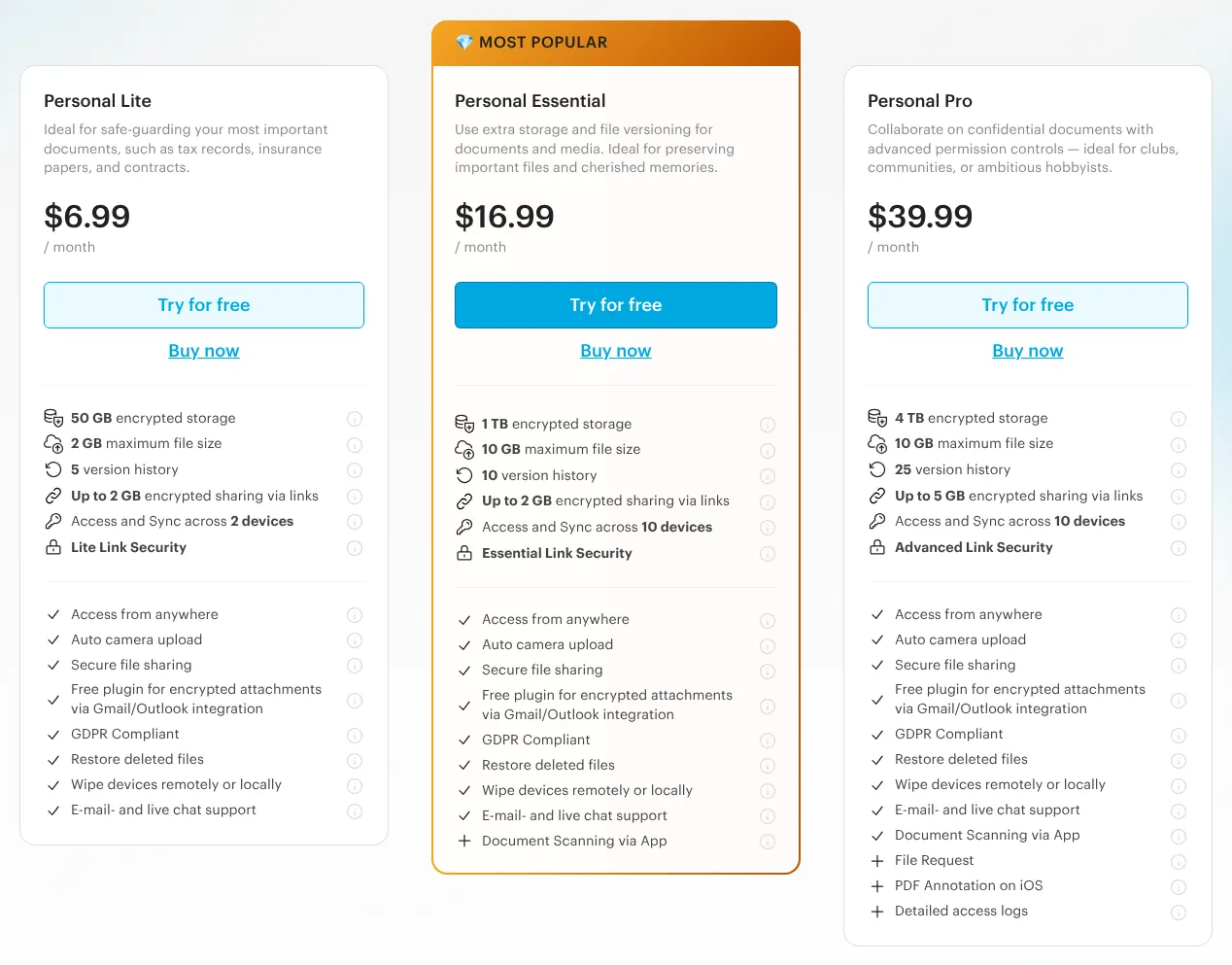
    Personal Lite costs $6.99 a month, but it is much smaller than Dropbox Plus. It holds 50 GB, accepts files of up to 2 GB, and syncs on two devices. To match 2 TB, a Dropbox user needs Personal Pro, priced at $39.99 a month with 4 TB. Personal Essential sits between them, with 1 TB for $16.99.

    Teams pay $29 per user a month on Business, for three users or more. Business customers can choose where data is stored among twelve regions. Others are placed in Ireland by default.

    Choose it if
    You share contracts, medical or legal files with clients, and the encryption matters more than the price.
    Skip it if
    You store more than 50 GB and want to pay less than Dropbox Plus.
    Tresorit's personal plans with prices per month: Personal Lite at 6.99 dollars with 50 GB, Personal Essential at 16.99 with 1 TB, Personal Pro at 39.99 with 4 TB.
    Tresorit's monthly prices: Personal Lite holds 50 GB on 2 devices, and Personal Pro, on the right, holds 4 TB. Source: tresorit.com, captured on 20 Nov 2026.

    Verdict: Tresorit adds end-to-end encryption and controlled links to the Dropbox model, but storage close to Plus costs $39.99 a month.

    Visit tresorit.comPartner link · may earn us a commission
  4. Not found on MEGA's site: Comments on filesOnly partly: Online-only files save disk spaceEdit documents in the browser

    4. MEGA

    Best free plan
    Similarity to Dropbox
    94%
    Starting price
    $10.96/mo (charged €9.99)−$1.03/mo · cheaper
    Migration effort
    LowMEGA's web app imports a Dropbox account: Upload, then Import from another cloud service. Files are end-to-end encrypted once they arrive, not while they travel.

    Same as Dropbox

    • End-to-end encryption: files are encrypted on the device with keys MEGA does not hold
    • Upload links that collect files from people without a MEGA account
    • Rewind, which restores a folder's deleted files from up to 60 days back on paid plans
    • Links with a password and an expiry date, on paid accounts

    What you lose

    • Online-only files: only through MEGA CMD, a program run by typed commands, which opens the MEGA drive as a network folder
    • Comments on files: absent from MEGA's plan comparison
    • Office documents in the browser: only text and Markdown files can be edited

    Switching from Dropbox to MEGA

    MEGA is an encrypted storage service with offices in Auckland, New Zealand. Files are encrypted on the device before upload, and MEGA says only the user holds the keys. On the list of Dropbox features, it reaches 94%.

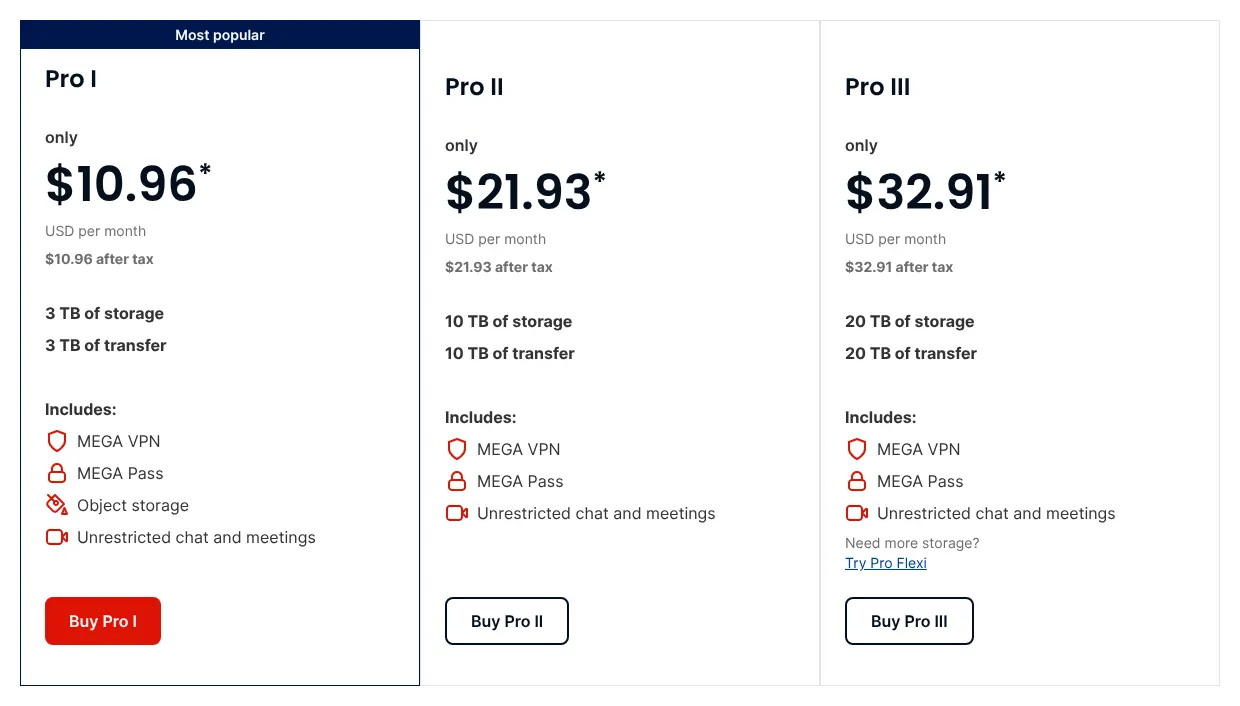
    The free plan is the largest on this page: 20 GB, with a limit on transfer. The first Pro plan gives 3 TB for €9.99 a month. MEGA charges in euros and shows $10.96 as its own estimate in dollars, after tax. The cheaper Essential plan, 200 GB for €3.33 a month, is sold yearly only.

    Each plan also caps transfer, the amount of data downloaded or shared through links: 3 TB on Pro I. MEGA's privacy policy says personal data is stored in Japan, Canada or the European Union, and none in the United States.

    A Dropbox account can be imported straight from MEGA's web app. During that copy, files pass through MEGA's servers before MEGA encrypts them. The import stops if the MEGA account runs out of space.

    Choose it if
    You want more than 2 TB at a price close to Dropbox Plus, with end-to-end encryption.
    Skip it if
    You rely on comments on files, or on editing Office files in the browser.
    MEGA's three Pro plans billed monthly: 10.96 dollars a month with 3 TB of storage and transfer, 21.93 with 10 TB, and 32.91 with 20 TB.
    MEGA's monthly plans: the dollar figures are MEGA's own estimates of prices charged in euros, and the first plan holds 3 TB. Source: mega.io, captured on 20 Nov 2026.

    Verdict: MEGA gives 3 TB with end-to-end encryption for €9.99 a month and imports a Dropbox account, but it leaves out comments on files.

  5. Not found on Proton Drive's site: Roll back folders to a dateOnly partly: Upload links to collect filesComments on files

    5. Proton Drive

    Similarity to Dropbox
    94%
    Starting price
    $4.99/mo−$7.00/mo · cheaper
    Migration effort
    MediumProton's guide moves Dropbox files by hand: download everything from dropbox.com, unzip it, then upload it with Proton's desktop or web app.

    Same as Dropbox

    • End-to-end encryption on every plan, the free one included
    • Share links with a password and an expiry date
    • Up to 200 versions of each file, kept for up to 10 years on paid plans
    • On-demand sync on Windows, which shows cloud files without filling the disk

    What you lose

    • Upload-only links: people upload through a public folder link with editor rights, so they also see the folder
    • Rolling back a folder or the account to a date: not found in Proton's help
    • Comments on files: only inside Proton's own documents, not on PDFs or images

    Switching from Dropbox to Proton Drive

    Proton Drive comes from Proton AG, the Geneva company behind Proton Mail. Every file is end-to-end encrypted, on the free plan too, and data stays in Switzerland, Germany or Norway. Like MEGA and OneDrive, it reproduces 94% of what Dropbox does.

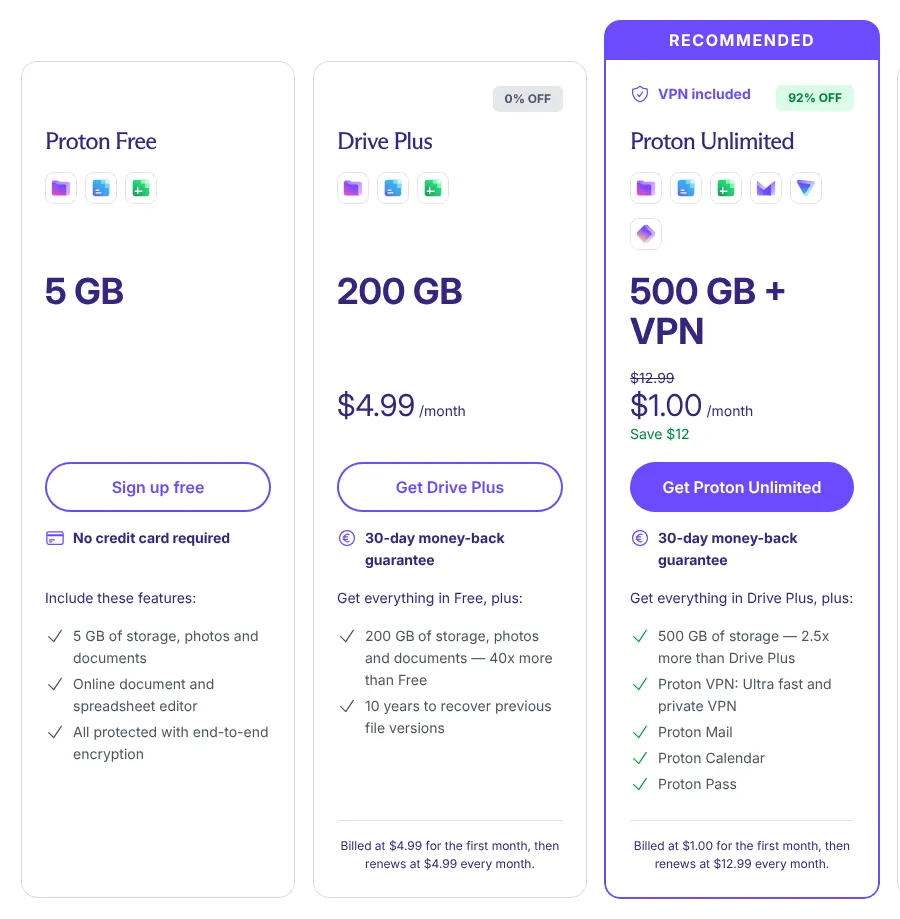
    Drive Plus costs $4.99 a month for 200 GB, $7.00 less than Dropbox Plus. It keeps up to 200 versions of a file for up to 10 years. For 2 TB, Proton Duo costs $14.99 a month billed yearly, shared by up to two users. The capture also shows Proton Unlimited at $1.00, a first-month offer: the plan then renews at $12.99 a month.

    Two Dropbox features work differently. An upload link is a public folder link with editor rights, so senders see what is already there. Comments exist inside Proton Docs, its document editor, but not on uploaded files.

    Choose it if
    You want a private, encrypted drive and store less than 200 GB.
    Skip it if
    You collect files from clients who must not see each other's uploads.
    Proton Drive's monthly plans: Proton Free with 5 GB, Drive Plus with 200 GB at 4.99 dollars a month, and Proton Unlimited at 12.99 dollars struck through and 1.00 dollar.
    Proton's Monthly view: the Drive Plus price is the regular one, while the large figure on Proton Unlimited is a first-month offer. Source: proton.me, captured on 20 Nov 2026.

    Verdict: Proton Drive brings end-to-end encryption to every plan for $4.99 a month, but its upload links expose the folder to the people who send files.

    Visit proton.mePartner link · may earn us a commission
  6. Not found on OneDrive's site: End-to-end encryption

    6. OneDrive

    Similarity to Dropbox
    94%
    Starting price
    $1.99/mo−$10.00/mo · cheaper
    Migration effort
    MediumMicrosoft's Migration Manager moves Dropbox business accounts to OneDrive, run by an administrator. No import for personal accounts was found on Microsoft's pages.

    Same as Dropbox

    • Files On-Demand, which shows every file on the computer without downloading it
    • Links that need a password, for Microsoft 365 subscribers
    • A restore feature that rolls the whole drive back to a date in the last 30 days
    • Web and mobile versions of Word, Excel and PowerPoint

    What you lose

    • End-to-end encryption: Microsoft encrypts files with keys it manages
    • Upload links for personal accounts: file requests work on work or school accounts only

    Switching from Dropbox to OneDrive

    OneDrive is Microsoft's cloud storage, sold on its own or inside Microsoft 365 plans. Its share of Dropbox's features is 94%. Files On-Demand works like Dropbox's online-only files, and a restore feature rolls the whole drive back to a date. Word, Excel and PowerPoint open in the browser.

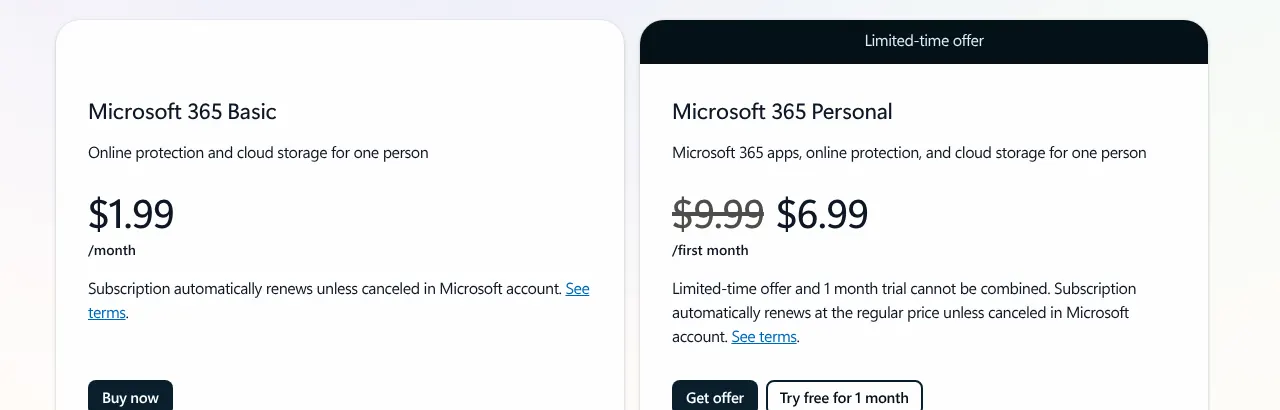
    Microsoft 365 Basic costs $1.99 a month for 100 GB. Microsoft 365 Personal costs $9.99 a month and holds 1 TB. The capture also shows $6.99, which applies to the first month only. Family costs $12.99 a month and shares 2 TB between up to six people.

    Teams use Microsoft 365 Business Basic, at $8.40 per user a month with a monthly subscription. An administrator can then bring Dropbox business accounts across with Migration Manager. It needs a Dropbox administrator account and maps each Dropbox user to a Microsoft 365 user.

    Choose it if
    You already pay for Microsoft 365, or you store less than 100 GB and want the lowest price.
    Skip it if
    You need end-to-end encryption, or a single person needs 2 TB of their own.
    Microsoft's OneDrive plans billed monthly: Microsoft 365 Basic at 1.99 dollars a month, and Microsoft 365 Personal at 9.99 dollars struck through and 6.99 for the first month.
    Microsoft's Monthly view: the Basic price is regular, while Personal shows a first-month offer beside its struck-through price. Source: microsoft.com, captured on 20 Nov 2026.

    Verdict: OneDrive replaces Dropbox for most everyday uses from $1.99 a month, and is the obvious move for a team already on Microsoft 365.

  7. Not found on Koofr's site: Roll back folders to a dateAdmin console for team accountsOnly partly: Edit documents in the browserComments on files

    7. Koofr

    European
    Similarity to Dropbox
    91%
    Starting price
    €0.50/mo, billed yearly
    Migration effort
    LowKoofr connects a Dropbox account in its web app and copies files across without a download. A paid Koofr plan is needed for the connection.

    Same as Dropbox

    • Links that expire, and upload links that work for people without an account
    • A network drive that shows files without syncing them, plus two-way sync
    • Automatic upload of photos from the phone, and offline files on Android
    • Earlier versions of a file, and deleted files kept 30 days on paid plans

    What you lose

    • Rolling back folders to a date: Koofr keeps deleted files and up to five versions per file
    • A team plan with user management: only personal plans are sold
    • Monthly billing: subscriptions are yearly only, in euros

    Switching from Dropbox to Koofr

    Koofr is run from Slovenia, and its servers are in Germany, in the EU. Its resemblance to Dropbox is 91%. Links can expire, upload links work for anyone, and photos upload from the phone by themselves.

    Koofr is one of four tools here that copy straight from a Dropbox account. After connecting a Dropbox account in the web app, files are copied into Koofr without passing through the computer. The connection needs a paid plan. The smallest one allows three Dropbox accounts.
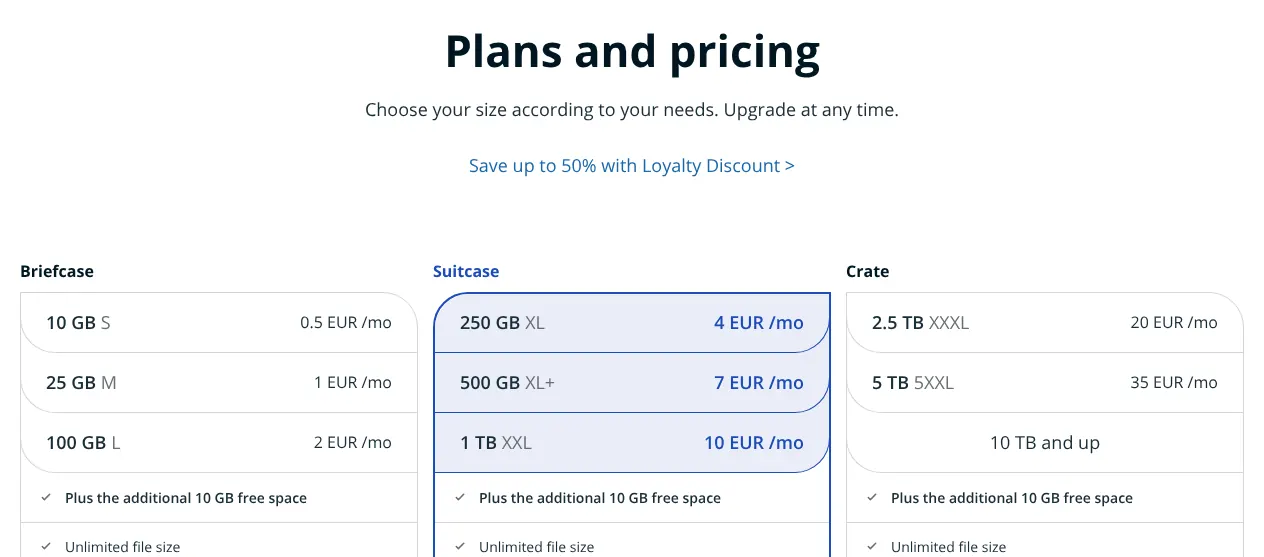
    Prices are in euros, include 22% VAT, and are billed yearly only. Briefcase S gives 10 GB for €0.50 a month, plus the 10 GB free space. To match Dropbox Plus, Crate XXXL gives 2.5 TB for €20 a month. Koofr publishes no dollar prices, so this card shows no price gap with Dropbox.

    Choose it if
    You want a European provider, and you want to copy your Dropbox across without downloading it.
    Skip it if
    You work in a team that needs accounts managed by an administrator.
    Koofr's plans and pricing: Briefcase from 0.5 euro a month for 10 GB, Suitcase from 4 euros for 250 GB, Crate from 20 euros for 2.5 TB.
    Koofr's price list in euros: the Crate plan starts at 2.5 TB, the size closest to Dropbox Plus's 2 TB. Source: koofr.eu, captured on 20 Nov 2026.

    Verdict: Koofr is the European pick for one person, with servers in Germany and a direct copy from Dropbox, but it has no team plan.

  8. Not found on Egnyte's site: End-to-end encryptionOnly partly: Automatic photo upload from phoneEdit documents in the browser

    8. Egnyte

    Similarity to Dropbox
    89%
    Starting price
    $10/user/mo, billed yearly−$1.99/mo · cheaper
    Migration effort
    MediumEgnyte's Cloud Migration has a Dropbox connector in limited availability, turned on by request. It does not move permissions.

    Same as Dropbox

    • A desktop app that works on cloud files without using the hard drive
    • Password-protected links, and upload links for people outside the account
    • Admin roles that set who can access and share each folder

    What you lose

    • End-to-end encryption: customer-held keys exist on Egnyte's highest plan only
    • Backup of the whole camera roll: Smart Upload sends only photos taken at a project's location
    • A free plan: Egnyte offers a trial only, limited to 20 GB

    Switching from Dropbox to Egnyte

    Egnyte is a business file server in the cloud, from Mountain View, California. It suits a company more than a person. It covers 89% of Dropbox's features, with desktop access, password links, upload links and admin roles.

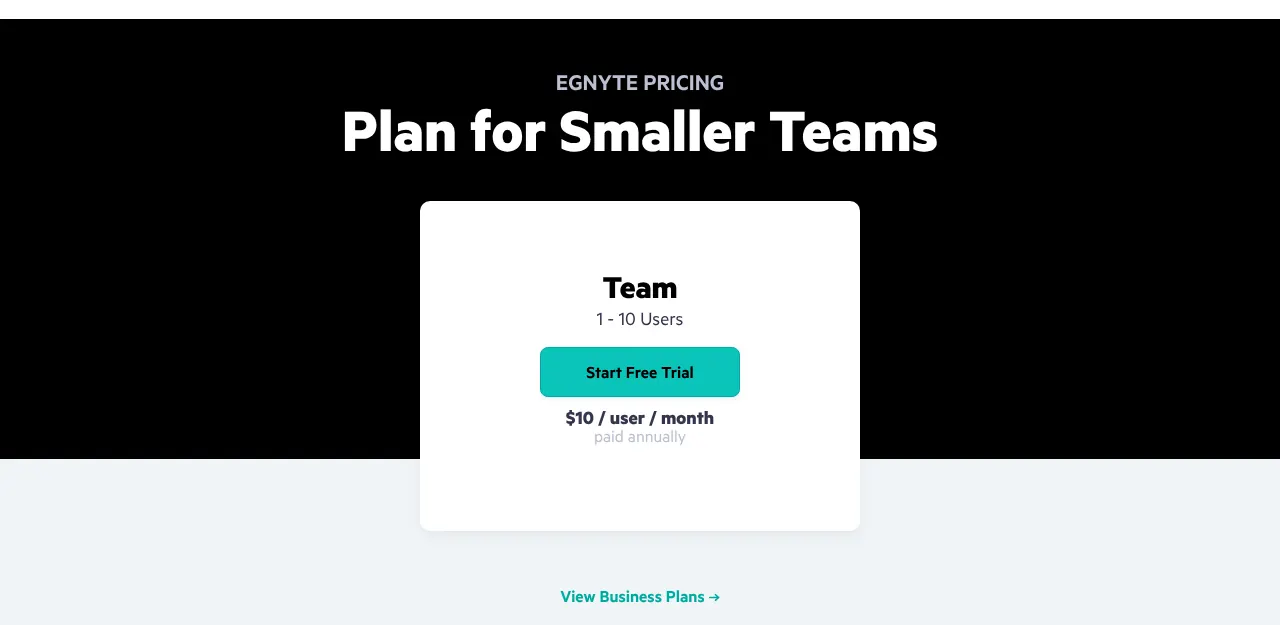
    The Team plan costs $10 per user a month, for 1 to 10 users, paid yearly. That is less than Dropbox Standard, which costs $15 per user a month billed yearly. The pricing pages do not state how much storage Team includes. Business costs $22 per user a month, paid yearly.

    Egnyte keeps deleted files 30 days by default, and administrators can raise it to 180 days. It keeps three versions of a file by default, which an administrator can raise.

    Choose it if
    Your company runs Dropbox Standard for up to 10 people and wants admin control at a lower price.
    Skip it if
    You are one person, or you need monthly billing.
    Egnyte's plan for smaller teams: Team, for 1 to 10 users, at 10 dollars per user per month, paid annually.
    Egnyte's Team plan costs $10 per user a month and is paid annually; no monthly option is shown. Source: egnyte.com, captured on 20 Nov 2026.

    Verdict: Egnyte fits a small company leaving Dropbox Standard, at $10 per user a month paid yearly, but it is not built for personal use.

  9. Not found on IDrive's site: Online-only files save disk spaceUpload links to collect filesComments on filesOnly partly: Shared folders with edit rights

    9. IDrive

    Similarity to Dropbox
    88%
    Starting price
    $11.99/mo= $11.99/mo · same price
    Migration effort
    MediumIDrive's web app imports from Dropbox into Cloud Drive, its sync service, up to 100 files and 10 GB at a time. A large Dropbox takes many rounds.

    Same as Dropbox

    • Share links with a password
    • Up to 30 earlier versions of each synced file, and deleted files kept 30 days
    • Restore of backed-up data to a point in time before an infection
    • An optional private encryption key, chosen at sign-up

    What you lose

    • Files-on-demand and upload links: neither found in IDrive's help
    • Shared folders others can add to: only Office files shared with edit rights are documented
    • Sharing with a private key: links work only with the default key

    Switching from Dropbox to IDrive

    IDrive is a backup service first. Its plans copy whole computers to the cloud, and Cloud Drive, a separate sync service, has to be activated. Cloud Drive storage matches the backup storage and does not reduce it. With both, IDrive reaches 88% of Dropbox's features.

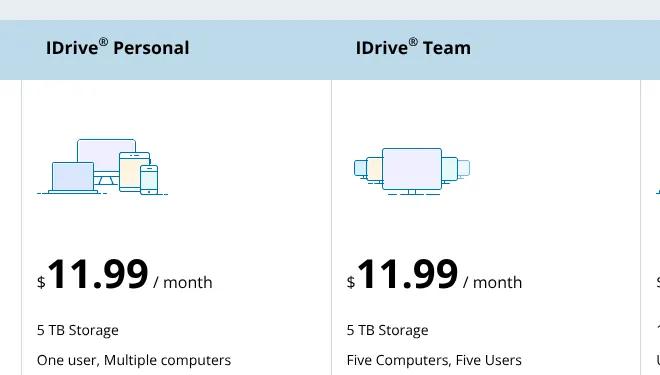
    IDrive Personal costs $11.99 a month, the same as Dropbox Plus, for 5 TB. It covers one user and several computers. The IDrive Team plan costs the same $11.99 a month for five users and 5 TB in total.

    A private encryption key is offered at sign-up, but it turns sharing off. The web interface accepts files of up to 2 GB each. Its Dropbox import copies 100 files at most per round, into a new folder. IDrive's data centres are in the United States.

    Choose it if
    You want one subscription that backs up several computers and syncs a folder, with more space than Dropbox Plus.
    Skip it if
    You share many files with clients and need upload links or private encryption.
    IDrive's monthly plans: IDrive Personal at 11.99 dollars a month for 5 TB, one user and multiple computers, and IDrive Team at 11.99 dollars for five computers and five users.
    IDrive's Monthly tab: Personal and Team both cost $11.99 a month, for 5 TB. Source: idrive.com, captured on 20 Nov 2026.

    Verdict: IDrive gives 5 TB of backup and sync for the price of Dropbox Plus, but it shares files less well.

    Visit idrive.comPartner link · may earn us a commission
  10. Not found on Icedrive's site: Files kept offline on phoneRoll back folders to a dateEdit documents in the browserAdmin console for team accounts

    10. Icedrive

    Similarity to Dropbox
    88%
    Starting price
    $10.99/mo−$1.00/mo · cheaper
    Migration effort
    HighIcedrive's pages describe no import from Dropbox. Files are downloaded from Dropbox, then uploaded with Icedrive's apps.

    Same as Dropbox

    • A virtual drive that opens cloud files without waiting for a sync
    • Links with passwords, expiry dates and download limits, on paid plans
    • Upload links that let other people send files into a folder, on paid plans

    What you lose

    • A team plan and admin console: only individual plans are sold
    • Document editing: Icedrive Docs is announced as coming soon
    • Offline files on the phone and folder roll-back: neither found in Icedrive's help

    Switching from Dropbox to Icedrive

    Icedrive is published by Ice Privacy LTD, of Gibraltar. Its desktop app mounts the cloud as a drive, so files open without waiting for a full sync. Paid plans add Twofish encryption on the device for an encrypted space, plus protected links and upload links. Icedrive and IDrive share the same 88% resemblance to Dropbox.

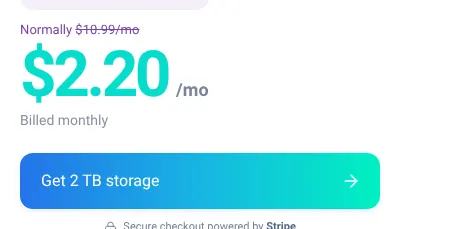
    On the Pro plan, the same 2 TB as Dropbox Plus costs $10.99 a month, $1.00 less. On the reading date, the monthly view shows 80% off the first month, $2.20 in large type. From the second month, the price is $10.99. The smaller Starter plan, 100 GB, is sold yearly only.

    Pro keeps 90 days of file versions, against 30 days on Dropbox Plus. Deleted files stay until the trash is emptied. The free plan gives 10 GB, without encryption or file history.

    Choose it if
    You are one person who wants 2 TB with a monthly price, and longer file history than Dropbox Plus.
    Skip it if
    You need a team account, document editing, or offline files on your phone.
    Icedrive's 2 TB plan billed monthly: normally 10.99 dollars a month, struck through, and 2.20 dollars a month in large type.
    Icedrive's monthly view of 2 TB: the struck-through figure is the regular price, and the large one applies to the first month only. Source: icedrive.net, captured on 20 Nov 2026.

    Verdict: Icedrive gives one person 2 TB and 90 days of versions for $1.00 less than Dropbox Plus, without team features.

Comparison table: the 10 alternatives vs Dropbox

The table puts the ten tools side by side on what decides most moves away from Dropbox: price, space, free use and how files arrive.

The 10 Dropbox alternatives compared with Dropbox
ToolMatchEntry priceStorage on that planFree planImport from Dropbox
REFDropbox100%$11.99/mo (Plus)2 TB2 GB, 3 devicesn/a
01pCloud100%$4.99/mo500 GB2 GB, up to 10 GBCopies a Dropbox account
02Sync.com97%$16/mo1 TB5 GBDownload, then upload (guide)
03Tresorit97%$6.99/mo50 GB3 GBDownload, then upload (guide)
04MEGA94%$10.96/mo (charged €9.99)3 TB20 GBCopies a Dropbox account
05Proton Drive94%$4.99/mo200 GB5 GBDownload, then upload (guide)
06OneDrive94%$1.99/mo100 GB5 GBBusiness accounts, run by an admin
07Koofr91%€0.50/mo, billed yearly10 GB + 10 GB free10 GBCopies a Dropbox account
08Egnyte89%$10/user/mo, billed yearlyNot statedNone, trial onlyOn request, limited availability
09IDrive88%$11.99/mo5 TB10 GB100 files per import
10Icedrive88%$10.99/mo2 TB10 GBNot found

Entry price: first plan sold with monthly billing, read on each vendor's site on 2026-11-20, unless marked billed yearly. Regular prices, without first-month or first-year offers. MEGA's dollar figure is its own estimate of a price charged in euros. Koofr's euro prices include 22% VAT. Not found: no Dropbox import on the vendor's pages read. MEGA's import is not end-to-end encrypted during the copy.

What a Dropbox alternative really costs

For one person who needs as much room as Dropbox Plus, three tools cost less than its $11.99 a month, and a fourth costs the same. pCloud gives 2 TB for $9.99. MEGA asks €9.99 for 3 TB. Icedrive charges $10.99 for 2 TB. IDrive gives 5 TB for the same $11.99.

Small users pay much less than on Dropbox. Someone who stores 80 GB pays $1.99 a month on Microsoft 365 Basic. That plan holds 100 GB. On Dropbox, the same person pays $11.99 for Plus, because no smaller paid plan exists.

Teams change the order. Five people pay $90 a month on Dropbox Standard. They pay $40 on Sync.com Teams, and $42 on Microsoft 365 Business Basic. Tresorit Business is the dearest at $145.

Monthly cost for one person and for a team of five, in USD unless marked
ToolEntry plan, one person2 TB or more, one personTeam of 5, per month
REFDropbox$11.99 (Plus, 2 TB)$11.99 (Plus, 2 TB)$90 (Standard)
01pCloud$4.99 (500 GB)$9.99 (2 TB)$49.95 (Business)
02Sync.com$16 (1 TB)$32 (5 TB)$40 (Teams 1TB)
03Tresorit$6.99 (50 GB)$39.99 (4 TB)$145 (Business)
04MEGA$10.96 (3 TB, charged €9.99)$10.96 (3 TB, charged €9.99)Not published for 5 users
05Proton Drive$4.99 (200 GB)$14.99 (2 TB for 2 users, billed yearly)$49.95 (Drive Professional)
06OneDrive$1.99 (100 GB)$12.99 (2 TB shared, Family)$42 (Business Basic)
07Koofr€0.50 (10 GB, billed yearly)€20 (2.5 TB, billed yearly)No team plan
08Egnyte$10 (billed yearly)Storage not stated$50 (billed yearly)
09IDrive$11.99 (5 TB)$11.99 (5 TB)$11.99 (Team, 5 users)
10Icedrive$10.99 (2 TB)$10.99 (2 TB)No team plan

Monthly billing at regular prices, before tax, unless marked. Team of 5: price per user times five on Dropbox Standard ($18), pCloud Business ($9.99), Sync.com Teams 1TB ($8), Tresorit Business ($29), Proton Drive Professional ($9.99), Microsoft 365 Business Basic ($8.40) and Egnyte Team ($10). pCloud, Sync.com and Tresorit ask for three users at least. IDrive Team is a fixed price for five users. MEGA Business starts at €15 a month for three users and publishes no price per user.

How to migrate from Dropbox in five steps

The move takes five steps. Files travel easily, but links, upload requests and shared folders do not, so the order protects the people who receive them.

  1. List what you share before moving anything

    Write down every shared folder, every share link you sent to someone, and every file request. None of them moves to another tool. This list becomes your plan for sending new links once the files have arrived.

  2. Bring every file onto one computer

    In the Dropbox desktop app, make your folders available offline, because online-only files exist only in the cloud. From dropbox.com, a folder downloads only if it is under 250 GB and holds fewer than 10,000 files. Sync.com advises about twice as much free disk space as your Dropbox holds.

  3. Copy the files into the new tool

    With pCloud, MEGA or Koofr, connect your Dropbox account and copy it across without the computer. IDrive does the same in rounds of 100 files. With the other tools, move the files into the new app's folder and let it upload them. Tresorit warns against syncing one folder to both services at once, which can cause errors and lost files.

  4. Recreate links and shared folders

    Invite people to the new shared folders and send the new links from your list. Add a password or an expiry date where the new tool allows it. Tell your contacts which old links will stop working.

  5. Check, then downgrade or close Dropbox

    Compare file counts in a few large folders on both sides. Then downgrade to Basic or cancel. On Basic, an account over 2 GB can lose its least recently changed files, after warning emails from Dropbox.

When it is better to stay on Dropbox

Staying on Dropbox is the better choice in four situations. The order of this page measures how closely a tool resembles Dropbox, not whether it suits a given person or team.

  • Very large single files. Dropbox accepts files of up to 2 TB each. Sync.com stops at 100 GB, OneDrive at 250 GB and Tresorit Personal Lite at 2 GB.
  • Large deliveries to clients. Dropbox Transfer, a tool for sending big files, sends files of up to 50 GB on Plus and 100 GB on Standard.
  • Many devices on one account. Plus syncs across unlimited devices. Tresorit Personal Lite syncs on two, and Microsoft 365 Personal works on up to five at the same time.
  • Yearly billing is acceptable. Billed yearly, Plus costs $9.99 a month for 2 TB. That is the monthly price of pCloud Premium Plus for the same space, so the saving disappears.

For a team already on Dropbox Standard, the move also costs time. Shared folders, links and permissions are rebuilt by hand with almost every tool on this page.

How we rank

  1. The order of this page is a similarity index: the share of Dropbox's features that each tool reproduces. It measures resemblance, not quality, reliability or support.Sync and access 33% · 6 featuresSharing 27% · 5 featuresSafety and recovery 27% · 5 featuresWorking together 12% · 4 features
  2. The comparison uses a grid of 20 Dropbox features read on dropbox.com, worth 33 points in total, in four groups: sync and access, sharing, safety and recovery, and working together. Each feature is weighted 3 (it defines the product), 2 (common use) or 1 (secondary). A tool gets 1 for a documented native equivalent on any of its plans, 0.5 for a partial one, and 0 when the feature is absent or could not be verified on the vendor's own site.
  3. Sixteen candidates were scored on 2026-11-20, and the ten highest are listed. Ties go to the smaller gap between the tool's entry price and Dropbox Plus at $11.99, then to alphabetical order. Sync.com and Tresorit tie at 97%; Sync.com's gap is $4.01, Tresorit's $5.00. MEGA, Proton Drive and OneDrive tie at 94%. MEGA's gap is the smallest at $1.03, against $7.00 for Proton Drive and $10.00 for OneDrive. IDrive, Icedrive and Google Drive tie at 88%; Google Drive's $1.99 is the furthest from $11.99, so it is eleventh. Box (86%), Filen (83%), Internxt (82%), Apple iCloud (74%) and Jottacloud (73%) scored lower. Price, migration effort and labels do not change the rank.
  4. No entry on this page is sponsored. A sponsored entry is marked Sponsored and holds the position paid for; its percentage stays the computed one.

FAQ

Is Google Drive a good Dropbox alternative?

For many people, yes, but it is not in the ten. It ties with IDrive and Icedrive at 88% and comes eleventh on price. Google Drive has no password on share links. Its free 15 GB is shared with Gmail.

Which Dropbox alternative has the most free storage?

MEGA, with 20 GB on its free plan, against 2 GB on Dropbox Basic. Koofr, Icedrive and IDrive give 10 GB. Proton Drive, Sync.com and OneDrive give 5 GB.

Can Dropbox files be moved without downloading them first?

Yes, with four tools. pCloud copies a Dropbox account from its Backups menu, once every 28 days. MEGA imports a Dropbox account from its web app. Koofr connects your Dropbox account on a paid plan and copies files between the two clouds. IDrive imports up to 100 files and 10 GB at a time. With the other six, you download your files, then upload them. A business can instead have an administrator run Microsoft's Migration Manager, or Egnyte's Dropbox connector on request.

Which Dropbox alternative keeps files in Europe?

Koofr keeps files in Germany, and Proton Drive in Switzerland, Germany or Norway. pCloud offers Luxembourg as a choice at sign-up. Tresorit places customers without a chosen region in Ireland.

What happens to files when Dropbox Plus is downgraded to Basic?

Basic holds 2 GB. Over that limit, you may not be able to sync, upload or share. If the account stays over the limit, Dropbox sends warning emails, then deletes the least recently changed files first. Deleted files stay in the Deleted files tab for 30 days.