Why Teams Leave Dropbox (2026)
Price is the reason cited most often for leaving Dropbox, together with support: each is raised by 8 of the 25 sources read for this page. Renewals, refunds and cancellations come next, with 7. The limits of the free plan, storage and features that Dropbox removed, and sync problems close the list. The sources are 10 Dropbox pages, 12 threads from the Dropbox Community forum, a page of Capterra reviews and two Hacker News discussions. All were read on November 20, 2026. None gives a share of departures per reason, so the ranking counts how many sources cite each one.
The reasons, ranked
- Cited in 8 of 25 sources
- Cited in 8 of 25 sources
- Cited in 7 of 25 sources
- Cited in 6 of 25 sources
- Cited in 6 of 25 sources
- Cited in 4 of 25 sources
Ranked by the number of sources citing each reason, out of 25 read on November 20, 2026. Price and support have the same count, as do the free plan and removed features; each pair is shown in alphabetical order. No published source gives a percentage share, so none is shown.
1. The price of the paid plans, and the jumps between them
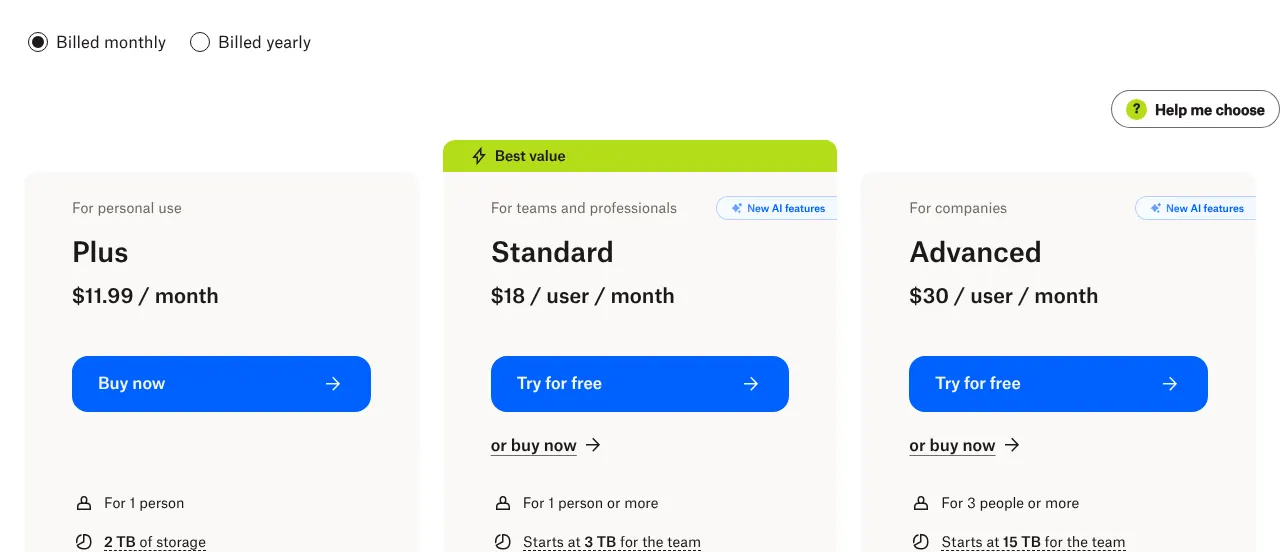
Price is the reason raised most often, tied with support: 8 of the 25 sources read for this page mention it. Dropbox has a free plan, Basic, with 2 GB of storage. The first paid plan for one person is Plus, at $11.99 a month billed monthly, with 2 TB of storage (Dropbox pricing). Billed yearly, Plus costs $9.99 a month, or $119.88 a year.
For teams, Standard costs $18 per user a month and Advanced $30 per user a month, both billed monthly. Advanced is sold to teams of 3 people or more. Team plans are billed per user, so the bill grows with each person added.
Customers describe the cost on the Dropbox Community, the forum where Dropbox users post questions and Dropbox moderators answer. In September 2026, a couple on Standard Classic wrote that they paid £518.40 a year for 3 licenses (paid user accounts), which they found "far too expensive". Standard Classic is the older version of Standard, sold with a minimum of 3 team members. In July 2026, a customer who needed more than 4 TB called the jump to the next plan "prohibitive". In December 2025, a former Unlimited business customer wrote that the monthly price had gone from about £70 to more than £154.
Value for money comes up as well. A Plus customer who moved to Google Drive in July 2026 wrote that Google Drive and OneDrive "offer a lot more with their subscriptions". On Capterra, a software review site, a reviewer called the lowest plan "a little expensive" in November 2026. On Hacker News, a discussion site, users compared Dropbox's prices with other storage services in 2019, and again in 2023.
Signs this applies to you
- You use a few gigabytes, and you pay for the 2 TB of Plus.
- You pay Plus monthly, so a year costs you $143.88 instead of $119.88.
- Your team needs more storage, and the next plan is billed per user.
Alternatives that answer it

pCloud
pCloud Premium Plus has 2 TB, like Dropbox Plus, for $9.99 a month billed monthly. That is −$2 a month.

OneDrive
Microsoft 365 Family costs $12.99 a month billed monthly, for 2 TB shared by up to six people. Dropbox Plus costs $11.99 a month for one person.
2. Support that is hard to reach, and limited by plan
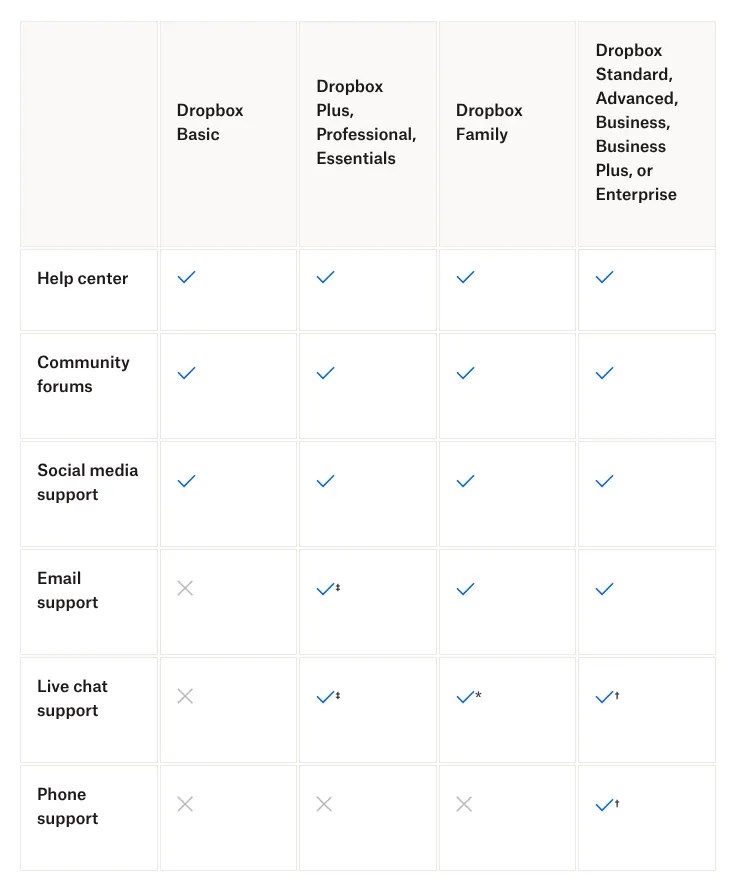
Support is cited as often as price: 8 of the 25 sources raise it. What a customer can reach depends on the plan (Dropbox support options). Basic users get the help center, the community forum and social media, but no email, chat or phone support. Plus customers get email and live chat during business hours, after a first exchange with a Dropbox AI assistant. Phone support is listed only for team plans such as Standard and Advanced, and only for their admins (the people who manage the team account).
On paid plans, email answers arrive within one business day, according to the same page. Forum posts describe longer waits. In October 2026, a Standard customer wrote of dealing with a fourth support agent in nine days, while the company had no working file server. A moderator answered that the advanced support team works by email, not by phone. The same month, a customer on a Standard trial wrote of more than 24 hours without a reply to an urgent request.
Other posts concern the channel and the tone. In September 2026, a customer wrote that a phone technician insisted on screenshots instead of a screen share. In July 2026, a customer who emailed about a renewal charge got a reply saying that the inbox was not monitored. In March 2026, a Plus customer lost access to chat support once the account was downgraded. A former Unlimited customer was told there was "no room for escalation" after losing storage. A Capterra reviewer wrote in October 2026 that support "is not reliable for individual users".
Signs this applies to you
- You are on Basic, and the only help you can get is the help center and the forum.
- Your last billing question took several emails and several days.
- You need to call someone, and you are not the admin of a team plan.
Alternatives that answer it

Tresorit
Tresorit lists email and live chat support on its personal plans. Personal Lite costs $6.99 a month billed monthly, for 50 GB on two devices.

Egnyte
Egnyte states that a support plan is included with every plan. Its Team plan costs $10 per user a month, paid annually, for 1 to 10 users.
3. Renewals, refunds and cancellations
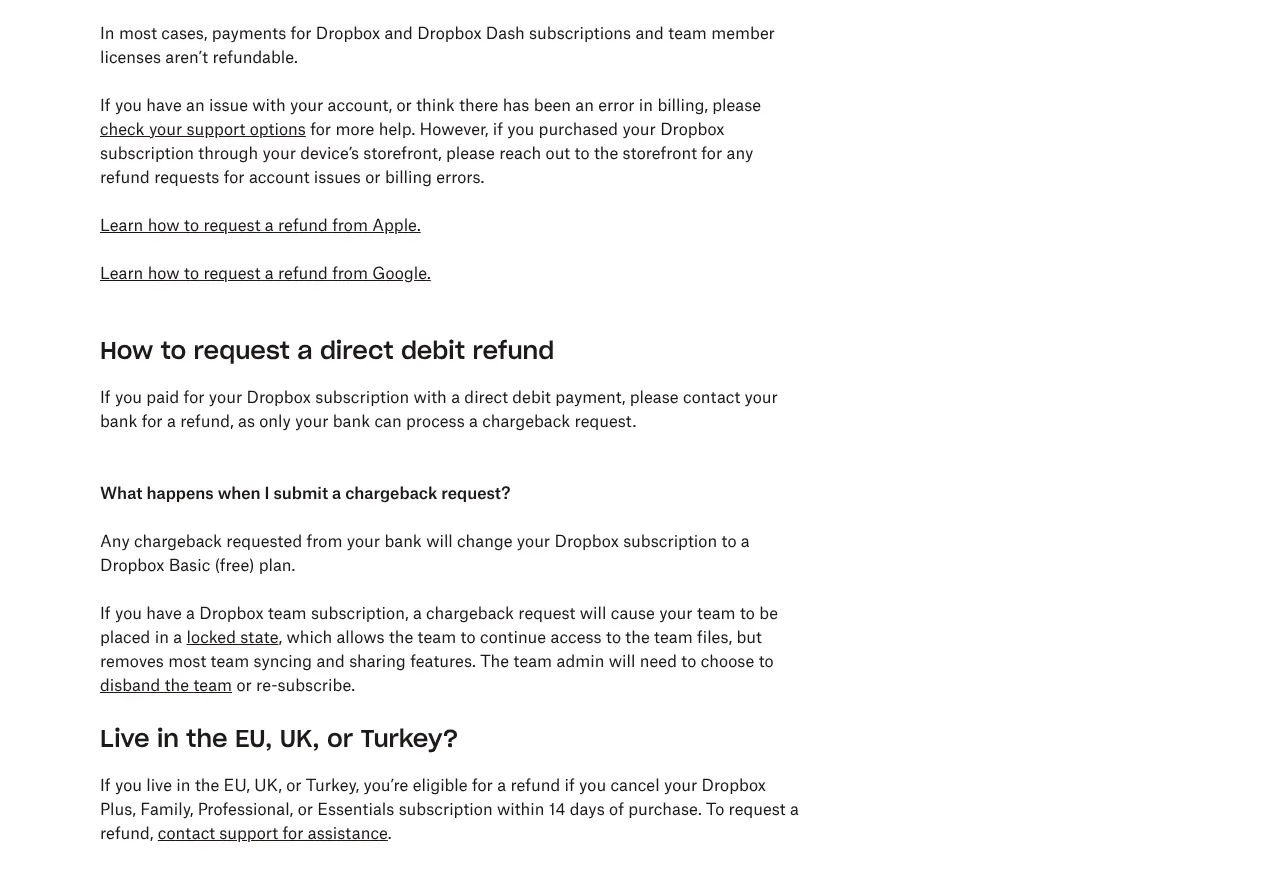
Billing comes third, with 7 of the 25 sources. The rule behind most complaints is on Dropbox's refund page: in most cases, payments for Dropbox subscriptions are not refundable (Dropbox refunds). Customers in the EU, the UK and Turkey can get a refund if they cancel Plus, Family, Professional or Essentials within 14 days of purchase. A separate 14-day money-back guarantee covers some purchases, when it was shown at checkout. It does not cover a renewal, or a free trial that turned into a paid plan.
Cancelling does not stop a plan at once. An individual plan turns into the free Basic plan at the end of the billing period already paid. For teams, removing licenses (paid user accounts) only takes effect on the renewal date.
Forum threads show where it goes wrong. In January 2026, a customer whose free trial had just ended was charged $621 for a year, while sure of having chosen monthly billing. In July 2026, a customer found a plan renewed after cancelling it. The same month, another customer who had paid for a year got no refund for the unused months. In September 2026, a Standard Classic customer wrote that the renewal notice usually arrived after the renewal.
Moving abroad can also cost money. In March 2026, a Plus customer since 2014 had to cancel and subscribe again to change the billing country, and lost older benefits in the process. That customer later wrote on the same thread that the billing team had granted a discount.
Signs this applies to you
- You plan to cancel close to your renewal date.
- You started a free trial of Standard or Advanced, and you are not sure which billing period you chose.
- You expect a refund for the months left on a yearly plan.
Alternatives that answer it

Sync.com
Sync.com offers a full 30-day money-back guarantee. Personal 1TB costs $16 a month billed monthly, at list price (the normal price, outside offers).

Proton Drive
Proton Drive offers a 30-day money-back guarantee on its paid plans. Drive Plus costs $4.99 a month billed monthly, for 200 GB.
4. A free plan with 2 GB and three devices
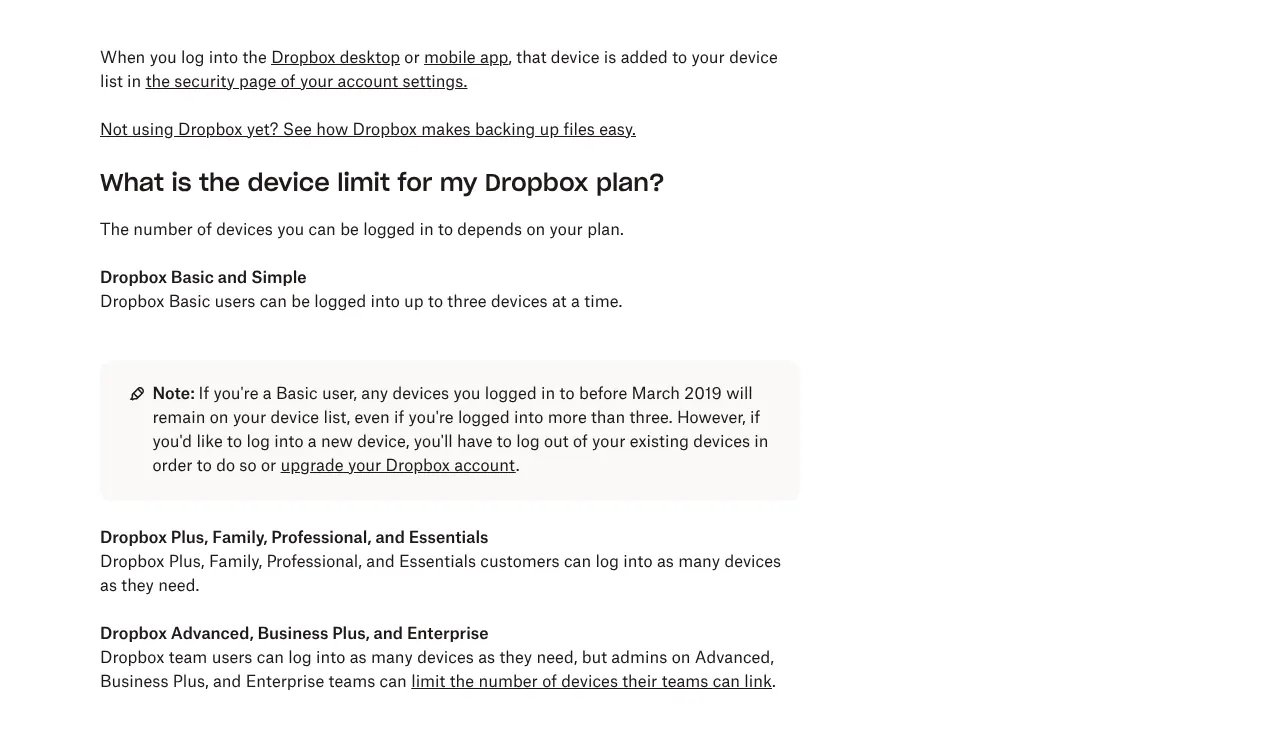
The limits of the free plan come fourth, with 6 of the 25 sources. Basic, the free plan, includes 2 GB of storage (Dropbox pricing). Basic users can be logged in on up to three devices at a time, for example two computers and a phone (Dropbox device limit). Logging in on dropbox.com, in a browser, does not count. Devices linked before March 2019 stay on the list, even beyond three. Plus and the other paid plans for individuals have no device limit.
Going over the storage limit has consequences. An account above its limit may stop syncing, uploading and sharing files. If it stays over the limit, Dropbox may delete files, starting with those modified least recently, after several notices (Dropbox help). This matters to anyone who stops paying with more than 2 GB stored.
The device limit drew 181 comments on Hacker News when it was reported in May 2019. In August 2023, a Basic user with four devices asked on the forum how to keep using all of them. A moderator confirmed that the limit is three. A Capterra reviewer wrote in October 2026 that the free storage "feels limited".
Signs this applies to you
- You use Dropbox on a work computer, a home computer and a phone, and a fourth device asks you to log out of one.
- Your account shows more than 2 GB used after the end of a paid plan.
- Dropbox emails you about being over your storage limit.
Alternatives that answer it
MEGA
MEGA's free plan has 20 GB of storage, ten times Dropbox Basic, with a limit on transfers.

Koofr
Koofr's free plan has 10 GB, free forever, five times Dropbox Basic.
5. Storage and features that Dropbox took away
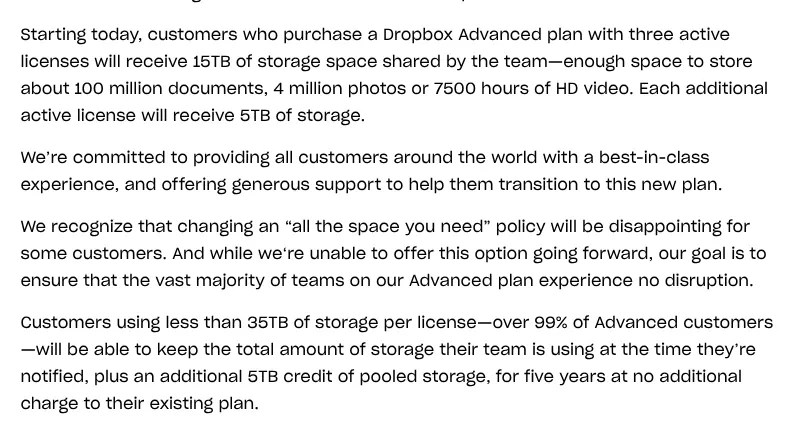
Changes to what a plan includes come fifth, with 6 of the 25 sources. The largest was the end of unlimited storage on Advanced, announced on Dropbox's blog on August 24, 2023 (Dropbox blog). Customers using less than 35 TB per license kept their storage, plus a 5 TB credit, for five years at no extra charge. Today, Advanced includes 15 TB for a team, or 5 TB per license with a minimum of three.
That retained storage can still be lost. In December 2025, a former Unlimited customer wrote that a declined card payment led to a downgrade. On upgrading again, the account was placed on the current Advanced plan, without the retained storage. Support first answered that it could not be restored. The next day, the customer wrote that support had opened an internal investigation, whose outcome is not public.
Features have gone too. Dropbox Capture, a tool for screenshots and screen recordings, was discontinued on March 24, 2025. Dropbox Passwords, a password manager, ended on October 28, 2025, and its saved entries were deleted. In July 2026, a Plus customer who left for Google Drive named the end of Capture and of Vault, a folder for sensitive files. On Hacker News, the end of unlimited storage drew 136 comments in August 2023.
Signs this applies to you
- You kept extra storage from an older plan, and your card payments sometimes fail.
- You relied on Capture, Passwords or Vault.
- Your team on Advanced already stores close to 5 TB per license.
Alternatives that answer it
pCloud
pCloud sells a lifetime plan: Premium 500 GB for a one-time payment, with a list price of $279.
MEGA
A MEGA Pro plan with 3 TB costs €9.99 a month billed monthly, charged in euros. That is 1 TB more than Dropbox Plus.
6. Sync that slows the computer down
Sync problems close the list, with 4 of the 25 sources. Dropbox's help center explains that its desktop app uses the computer's processor (CPU) to store, sync and update files, and that this can slow the computer down (Dropbox help). Syncing many files at once, especially the first time, raises that load. Performance in File Explorer and Finder starts to decrease at around 300,000 synced files.
In December 2025, a Mac user reported Dropbox stuck syncing more than 60,000 files. The app was using 180 to 200% of the processor. The same user wrote in January 2026 that the sync had finished on its own after a few days. A Capterra reviewer wrote in October 2026 of files that sometimes fail to sync when they change quickly. On Hacker News in 2019, a user wrote that the app kept "bogging down" File Explorer.
Signs this applies to you
- Your computer slows down whenever Dropbox starts syncing.
- Your Dropbox folder holds hundreds of thousands of files.
- The Dropbox icon shows syncing for days, and the file count does not go down.
Alternatives that answer it
pCloud
pCloud Drive works as a virtual drive: files open on demand and take no space on your computer unless you make them available offline.
OneDrive
OneDrive's Files On-Demand shows all your files in File Explorer as online-only files, which take no space on the computer.
Before you leave: can it be fixed inside Dropbox?
Billing and the free plan's limits can be managed inside Dropbox. Price and sync can be reduced. Support depends on the plan, and discontinued features do not come back.
Price
Partly. Yearly billing brings Plus from $11.99 to $9.99 a month. That is $119.88 a year instead of $143.88. Standard falls from $18 to $15 per user a month on yearly billing. The catch is the refund rule: in most cases, a yearly payment is not refunded.
Support
Partly, by plan. Moving from Basic to Plus adds email and live chat during business hours. Phone support needs a team plan such as Standard, and only its admins can call.
Renewals, refunds and cancellations
Yes, with dates. A plan cancelled before its renewal date turns into Basic at the end of the period already paid. Customers in the EU, the UK and Turkey have 14 days after purchase to cancel Plus with a refund. Elsewhere, the 14-day guarantee applies only when Dropbox showed it at checkout, and never to a renewal.
The free plan
Partly. More free storage can be earned by inviting other people to Dropbox. Logging in on dropbox.com does not count toward the three devices. Unlimited devices start with Plus.
Storage and features taken away
No fix for discontinued tools. On Plus and Standard, storage can be added in 1 TB steps, at a price shown only on the account's billing page. Retained storage from an older plan depends on payments going through: after one declined payment, a customer saw it removed, and the outcome of the investigation that followed is not public.
Sync
Partly. Selective sync removes chosen folders from the computer while keeping them on dropbox.com. Online-only files stay in the cloud until they are opened. Dropbox's help center suggests both to lower memory use, and selective sync to lower processor use.
What a move off Dropbox involves
A move takes five steps, and the free plan's storage limit sets the order. An account that falls back to Basic with more than 2 GB stored may stop syncing. The steps follow Dropbox's help center and the guides of pCloud, Koofr, Sync.com, Proton Drive and Microsoft. How long a full move takes is not documented, and is not estimated here.
Find your renewal date
Check when your plan renews. When you cancel, an individual plan turns into Basic at the end of the period you already paid. In most cases Dropbox does not refund the rest of a yearly plan, so plan the move for the weeks before your renewal.
Download your files
On dropbox.com, you can download a folder in one go if it is smaller than 250 GB and holds fewer than 10,000 files. Single files have no size limit. For more, use the desktop app, which shows everything in your account in the Dropbox folder on your computer. Online-only files take no space on the computer, so check that none are left before you copy the folder.
Move the files into the new service
pCloud can import files directly from Dropbox, and you can repeat the import every 28 days. Koofr can connect your Dropbox account to a paid Koofr account and copy files across in its web app. Sync.com and Proton Drive document a manual move: download from Dropbox, then upload. For a business on Microsoft 365, Microsoft's Migration Manager moves Dropbox files to OneDrive, and needs a Dropbox admin account.
Empty the account before the plan ends
Once the plan ends, an account with more than 2 GB stored is over the Basic limit. It may stop syncing, uploading and sharing files. If it stays over the limit, Dropbox may delete files you own, starting with the least recently modified, after several emails. Delete what you have moved and checked, or keep paying until the last copy is safe.
Cancel the plan
Cancel once your files are in the new service and you have checked them. Your plan stays active until the end of the period you paid for. In the EU, the UK or Turkey, cancelling Plus within 14 days of purchase gives you a refund: ask support for it.
FAQ
Why do people leave Dropbox?
Price and support come first, each raised by 8 of the 25 sources read for this page. Renewals, refunds and cancellations follow with 7. No source gives a share of departures, so the ranking counts sources.
How many devices can you use with free Dropbox?
Three at a time on Basic, the free plan. Logging in on dropbox.com in a browser does not count. Plus and the other paid plans for individuals have no device limit.
Can you get a refund from Dropbox?
In most cases, no. In the EU, the UK and Turkey, you can get a refund if you cancel Plus, Family, Professional or Essentials within 14 days of purchase. A 14-day money-back guarantee also covers some purchases when it was shown at checkout, but never a renewal or a converted free trial.
Does Dropbox have phone support?
Only on team plans such as Standard and Advanced, for admins, during local business hours. Plus gets email and live chat, after a first exchange with an AI assistant. Basic has no email, chat or phone support.
What happens to your files if you stop paying for Dropbox?
The account turns into Basic at the end of the paid period, with 2 GB of storage. If you store more than that, you may not be able to sync, upload or share files. If the account stays over the limit, Dropbox may delete files you own, after several notices.
Does Dropbox still offer unlimited storage?
No. Dropbox ended unlimited storage on Advanced in August 2023. Advanced now includes 15 TB for a team, or 5 TB per license with a minimum of three licenses.
When is it better to stay on Dropbox?
Stay when your problem is price and yearly billing solves it: Plus costs $119.88 a year billed yearly, against $143.88 billed monthly. Stay also while a yearly plan has months left, because in most cases that money is not refunded.