top10alternative

Top 10 AI Transcription Software (2026)

Ten AI transcription tools, which turn recorded speech into text, compared on what they include and what they cost per hour of audio. They are ranked by how many of 21 common features each one covers.

The best AI transcription software for your situation

Each line matches a situation with the tool whose published facts fit it. The score out of 100 counts how many of 21 features expected of transcription software a tool documents. It measures coverage, not the accuracy of the text it produces.

  • You transcribe interviews or videos in many languagesHappyScribe · It covers 150+ languages; Basic costs $17 a month for 120 minutes of uploads.
  • You have only a few files a monthSonix · You pay $10 per hour of audio, with no subscription.
  • You need some transcripts checked by a personRev · A human transcript costs $1.99 a minute in the same account as the AI one.
  • You record many hours and want a small billNotta · Pro costs $13.49 a month for 1,800 minutes.
  • Your recordings are mostly online meetingsFireflies.ai · Its bot records every call, and Pro adds 3,000 minutes of uploads.
  • You want to start free with short meetingsOtter.ai · Basic is free for 300 minutes a month.
  • Your team edits quotes togetherTrint · Team costs $90 per seat a month for 2 to 5 members.
  • You also need subtitles or a dubbed voiceMaestra · Transcripts, subtitles and voiceovers come from one vendor.
  • Your files must stay in the EUAmberscript · It is a Dutch company and stores files on EU servers.
  • You only need meeting transcripts, at the lowest priceTactiq · Pro costs $12 a month with unlimited meeting transcripts.

How to choose AI transcription software

A high score says a tool covers many common features, not that it fits every recording. Six checks bring the list down to one or two tools. Each one rests on facts read on vendor pages on 16 November 2026.

1. Count your hours of audio before you compare prices

Add up how many hours you record in a month, because every plan here counts minutes. Ten hours a month is 600 minutes. Notta Pro covers that for $13.49, since it includes 1,800 minutes. On HappyScribe, the same 600 minutes need Pro at $29. Sonix sells 20 hours for $50 on Advanced. Trint sets no minute limit, but starts at $100 a month.

2. Check the length limit on a single file

Look at the cap per file if you record lectures, court hearings or long podcasts. Otter.ai Pro stops at 90 minutes per conversation. Fireflies.ai accepts files of up to 150 minutes. Notta Pro takes recordings of up to 5 hours. A three-hour seminar fits on Notta in one piece. On Otter.ai Pro, with its cap per conversation, you would have to cut it into two files first.

3. Decide whether you record meetings or upload files

Pick a meeting tool if most of your audio comes from video calls, and a file tool if it comes from a recorder or a camera. Fireflies.ai, Otter.ai and Notta send a bot (an automated participant) into Zoom, Meet or Teams. Tactiq transcribes the same calls from a browser extension, with no bot. Trint has no meeting bot at all. On Amberscript and Maestra, meetings need a second product with its own price.

4. List the languages your recordings use

Check the language list before you pay, because the gap between tools is wide. Otter.ai lists 17 languages in its help centre. Rev Essentials transcribes English and Spanish only; the other languages need Pro at $59.99. HappyScribe lists 150+ languages and Maestra 125+. If your recordings mix languages, test one real file on the free minutes first.

5. Plan for subtitles or a human check

Say what the text is for, because a subtitle file and a checked transcript are two separate needs. Subtitles are exported as SRT or VTT files (text with the time each line appears on screen). Nine of the ten export them; Tactiq does not. For a human check, Rev charges $1.99 a minute and Amberscript from €1.85. HappyScribe proofreading starts at $2.00 a minute. A one-hour interview checked by a person on Rev costs $119.40.

6. Read the refund line before you pay

Note the refund rule on the day you subscribe, because several are strict. Sonix gives no refunds at all; its 30 free minutes are the test. Amberscript bills two months if you cancel after the first one. Fireflies.ai refunds a monthly plan in full within 7 days if 3 meetings or fewer were recorded. HappyScribe refunds a subscription cancelled within its first 7 days.

The 10 AI transcription software

by overall score
  1. 1. HappyScribe

    HappyScribe suits people who transcribe and subtitle recorded interviews or videos in several languages, a few hours a month.

    Score
    94/100
    Best for
    Interviews and videos in many languages
    From
    $17/mo
    Free plan
    No · 10 free upload minutes, once

    HappyScribe turns uploaded audio and video into text and subtitles in more than 150 languages. It covers 20 of the 21 features checked here, fully or in part. The Basic plan costs $17 a month, billed monthly, or $8.50 a month billed yearly. Basic includes 120 minutes of uploaded files each month, enough for two one-hour interviews. Extra minutes cost $0.20 each, and Pro raises the allowance to 600 minutes for $29.

    A notetaker also joins online meetings, and those recordings do not use the upload minutes. Transcripts can be checked by a person for an extra fee, from $2.00 a minute. HappyScribe cannot transcribe a meeting live: the text arrives after the call. Its data centre is in the European Union, and it holds a SOC 2 Type 2 report (an outside audit of its security controls).

  2. 2. Sonix

    Sonix suits someone with a few files a month who wants to pay per hour of audio, with no plan to manage.

    Score
    94/100
    Best for
    Occasional files, paid by the hour
    From
    $25/mo
    Free plan
    No · 30 free minutes on sign-up

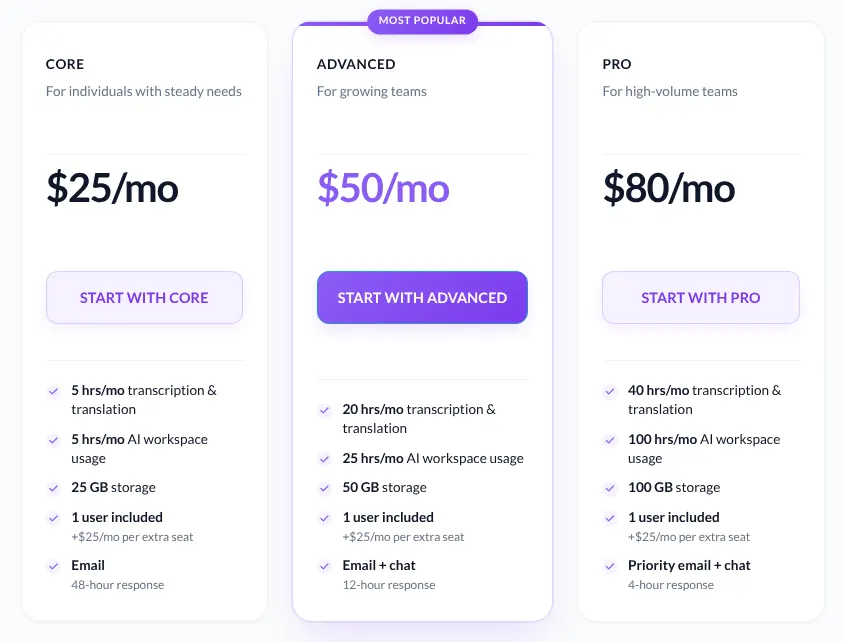
    Sonix is a transcription and subtitle service that works in the web browser on uploaded files. Sonix can also be used without a plan: audio is billed at $10 per hour. The Core plan costs $25 a month for 5 hours, and each extra hour costs $10. Advanced, at $50 a month, adds shared team folders and 20 hours.

    Transcripts can be translated into the same 54+ languages, using the plan's hours. Every new account gets 30 free minutes, and Sonix gives no refunds afterwards. Sonix has no mobile app; phone uploads go through the mobile browser. It does not sell human transcription itself: it lists freelancers who do it.

    Sonix Core, Advanced and Pro plan cards on the monthly tab: Core at $25/mo with 5 hours of transcription, then two larger plans.
    The Core card shows $25/mo for 5 hours a month; the hourly-rate card sits to its left, outside the frame. Source: sonix.ai, captured on 16 Nov 2026.
  3. 3. Rev

    Rev suits legal, research and media work where some transcripts must be checked by a person.

    Score
    94/100
    Best for
    A human-checked transcript when accuracy matters
    From
    $29.99/mo
    Free plan
    Yes · 45 AI minutes a month, English only

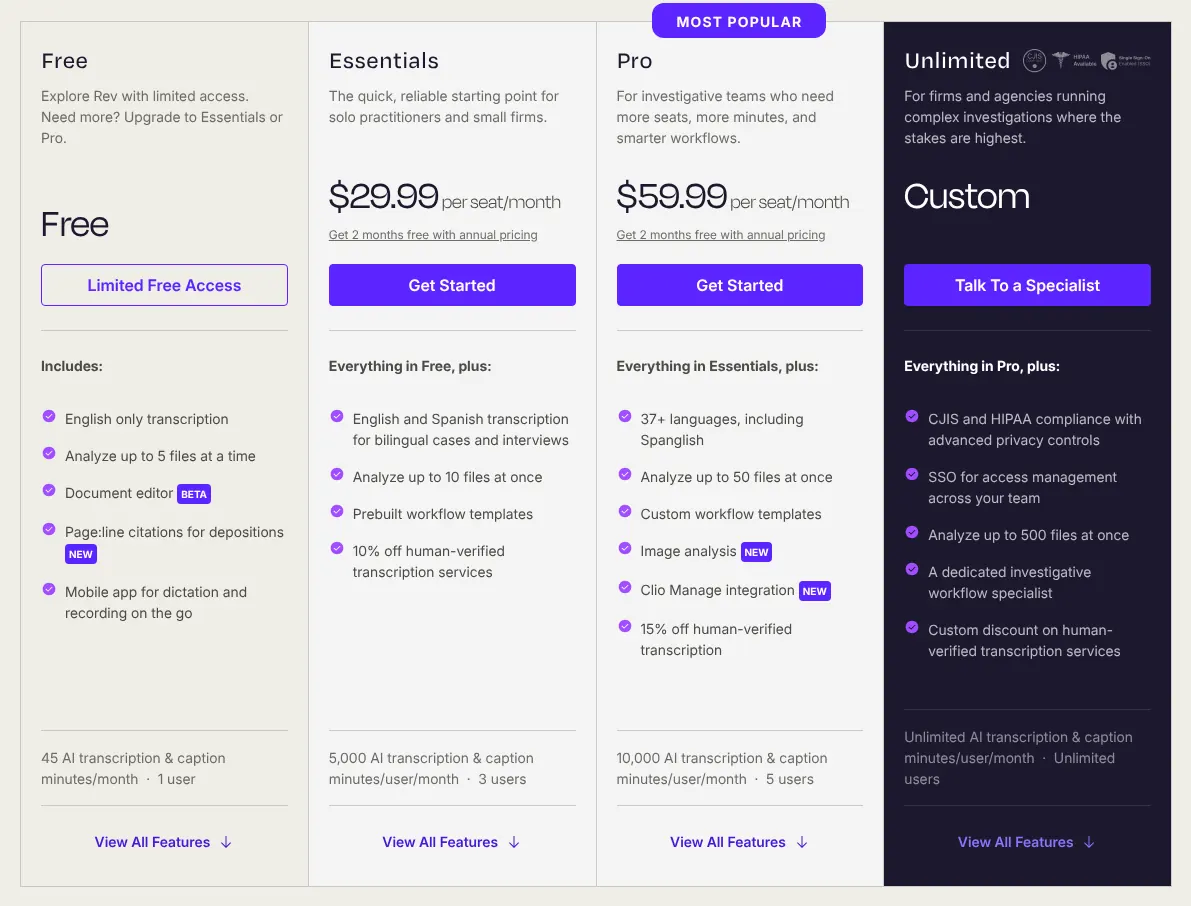
    Rev sells both AI transcripts and transcripts typed by people, and now presents itself as a platform for legal and investigative work. Essentials costs $29.99 per seat (one paid user) a month. It includes 5,000 AI minutes per user each month, in English and Spanish only. Transcription in 37+ languages needs Pro, at $59.99 per seat a month.

    Without a plan, an AI transcript costs $0.25 a minute. A human transcript costs $1.99 a minute, and Rev guarantees 99%+ accuracy within 12 hours. Rev says customer content is not used to train outside AI models.

    Rev Free, Essentials, Pro and Unlimited plan cards with monthly prices: Essentials at $29.99 per seat a month with 5,000 AI minutes per user.
    With the Monthly switch on, Essentials shows $29.99 per seat a month and lists English and Spanish transcription only. Source: rev.com, captured on 16 Nov 2026.
  4. 4. Notta

    Notta suits a person who records many hours of meetings and files and wants the lowest bill for that volume.

    Score
    90/100
    Best for
    The most minutes for a small monthly bill
    From
    $13.49/mo
    Free plan
    Yes · 120 minutes a month, 3 minutes per recording

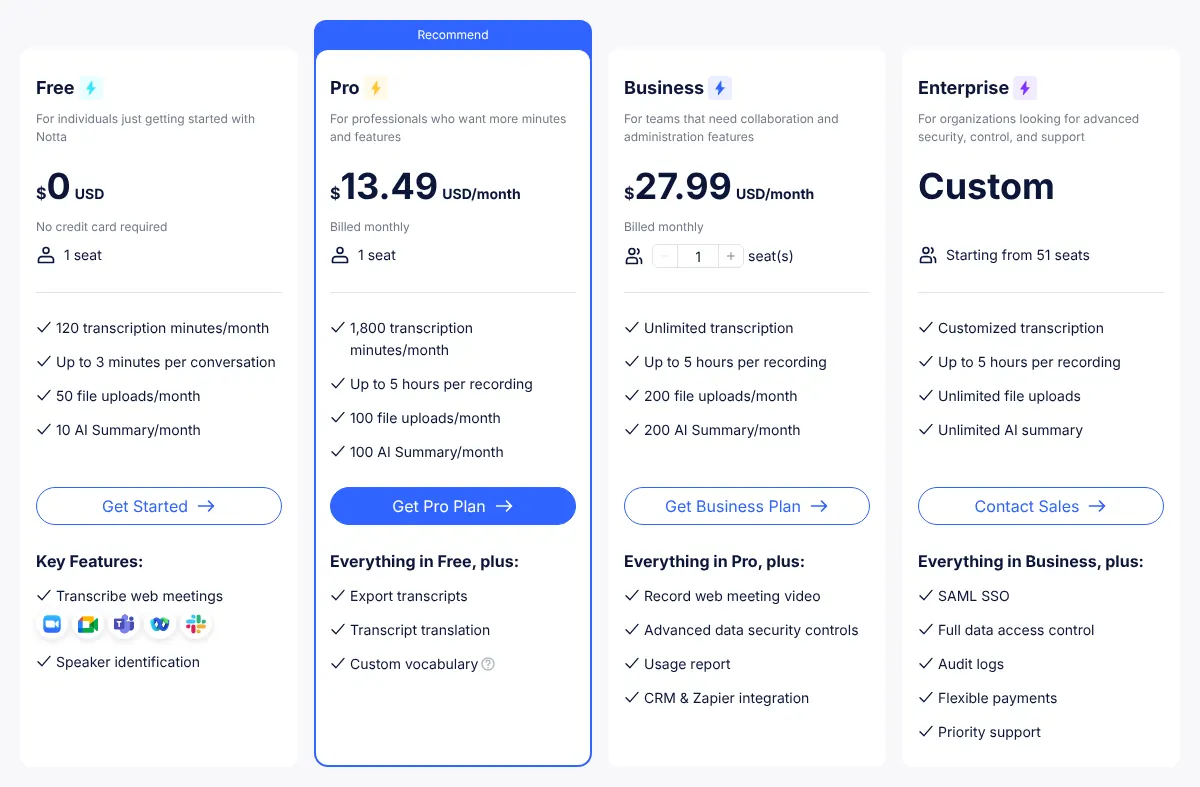
    Notta transcribes uploaded files, YouTube links and online meetings, then writes a summary. Pro costs $13.49 a month, or $8.17 a month billed yearly. It includes 1,800 minutes a month, 100 file uploads and recordings of up to 5 hours. Unused minutes do not roll over to the next month.

    The free plan gives 120 minutes, but cuts each recording at 3 minutes, so it only serves as a test. Notta transcribes 58 languages and translates transcripts on Pro. Business, at $27.99 a month, removes the minute cap and adds team features. Notta sells no human transcription.

    Notta Free, Pro, Business and Enterprise plan cards billed monthly: Pro at $13.49 a month with 1,800 transcription minutes.
    After the Monthly switch, the Pro card reads $13.49 billed monthly, with 1,800 minutes and up to 5 hours per recording. Source: notta.ai, captured on 16 Nov 2026.
  5. 5. Fireflies.ai

    Fireflies.ai suits a team that wants every call transcribed and summarised, with files as a side use.

    Score
    90/100
    Best for
    Teams whose recordings are mostly online meetings
    From
    $18/mo
    Free plan
    Yes · unlimited meeting transcripts, uploads limited

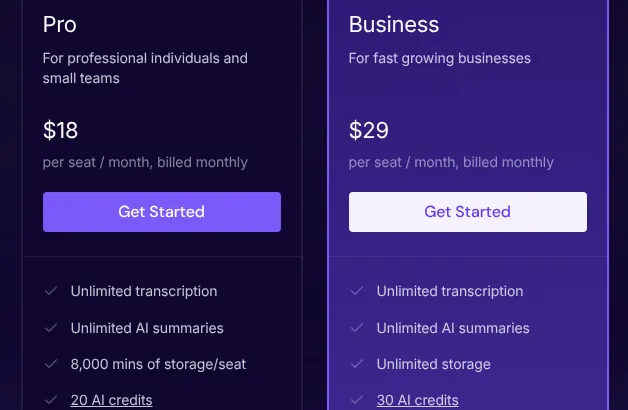
    Fireflies.ai sends a bot (an automated participant) into Zoom, Google Meet or Teams calls to record and transcribe them. Pro costs $18 per seat a month, or $10 billed yearly. Meeting transcription is unlimited on Pro. Uploaded files share a separate allowance of 3,000 minutes a month, then $0.01 a minute.

    Each uploaded file can last up to 150 minutes, so a long lecture must be cut first. Fireflies.ai transcribes 100+ languages but does not translate a transcript into another language. The free plan transcribes meetings, but each upload uses one of a few credits. A monthly plan is refunded in full within 7 days if 3 meetings or fewer were recorded.

    Fireflies.ai Pro and Business plan cards billed monthly: Pro at $18 and Business at $29 per seat a month, each with unlimited transcription.
    Pro reads $18 and Business $29 per seat a month on the monthly view; the yearly view shows lower figures. Source: fireflies.ai, captured on 16 Nov 2026.
  6. 6. Otter.ai

    Otter.ai suits people whose recordings are mostly meetings under 90 minutes, in one of its 17 languages.

    Score
    89/100
    Best for
    Short English meetings, free to start
    From
    $16.99/mo
    Free plan
    Yes · 300 minutes a month, 30 minutes per meeting

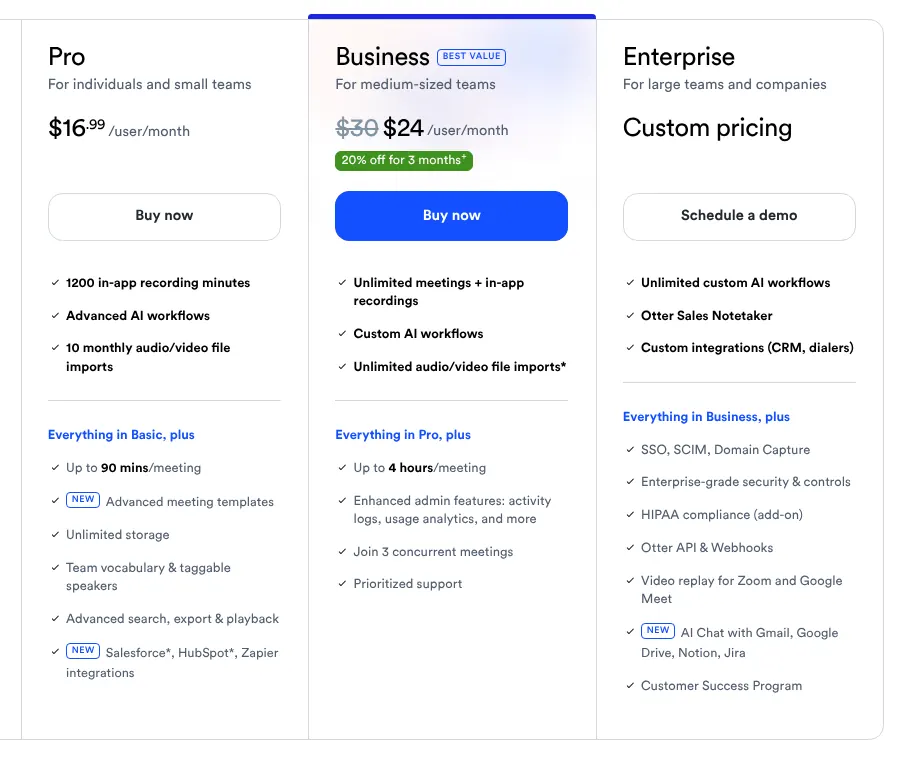
    Otter.ai is first a meeting notetaker: it joins calls, transcribes them live and writes a summary. Pro costs $16.99 per user a month, or $8.33 billed yearly. It includes 1,200 minutes a month, but only 10 imported files and 90 minutes per conversation. Business costs $30 a month, with an offer of $24 for the first 3 months shown on its card.

    Its help centre lists 17 transcription languages, the fewest of the ten. Its AI chat can also translate a transcript or a summary into another language. The free Basic plan keeps 300 minutes a month and 3 file imports in total. Otter.ai holds a SOC 2 Type 2 report and stores data on Amazon's servers.

    Otter.ai Pro, Business and Enterprise plan cards billed monthly: Pro at $16.99 per user a month with 1,200 minutes and 10 file imports.
    Pro shows $16.99 per user a month; the Business card shows its list price struck through and a lower price for the first 3 months. Source: otter.ai, captured on 16 Nov 2026.
  7. 7. Trint

    Trint suits a newsroom or research team that transcribes a lot and edits quotes together.

    Score
    87/100
    Best for
    Newsrooms editing transcripts together
    From
    $100/mo
    Free plan
    No · 7-day trial, 3 files of 5 minutes

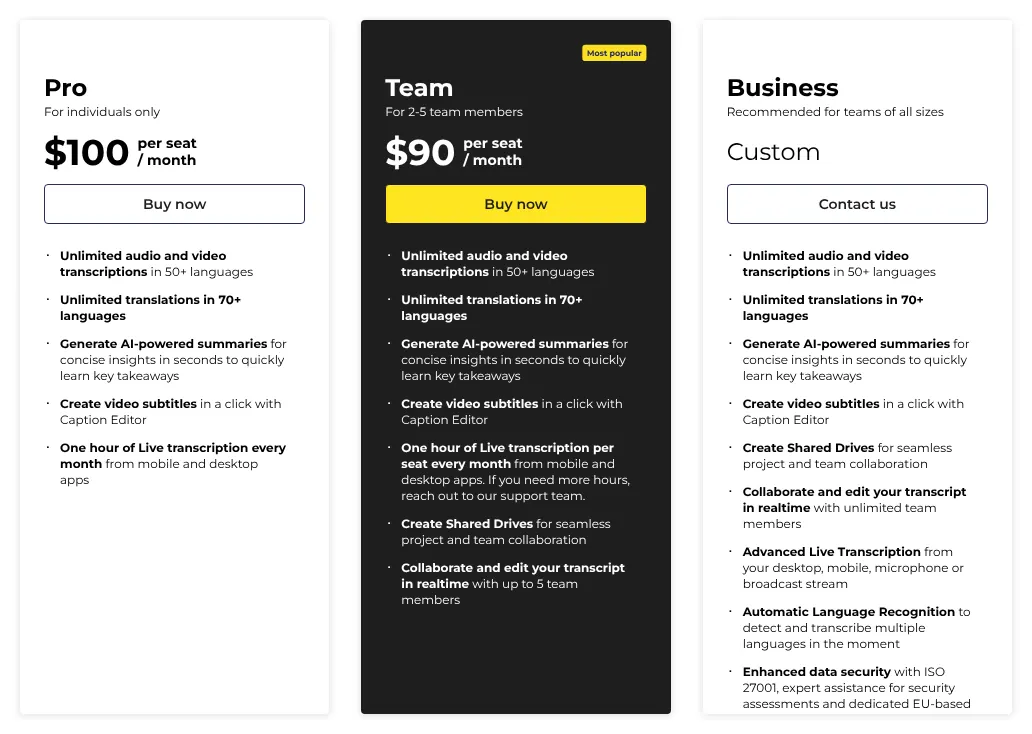
    Trint pairs the transcript with the audio in one editor, so a reporter can check a quote by clicking it. Pro costs $100 per seat a month, the highest starting price of the ten. Team costs less per person, $90 per seat a month, for 2 to 5 members who edit together. Both plans transcribe without a minute limit, within a fair-use cap (a ceiling the vendor sets for unusual volumes).

    That cap excludes archive projects and bulk volumes, so a large back catalogue needs a quote. Trint transcribes 50+ languages and translates into 70+. No bot joins meetings: Trint imports Zoom cloud recordings instead. Trint is certified ISO 27001, an international security standard.

    Trint Pro, Team and Business plan cards billed monthly: Pro at $100 per seat a month, Team for 2 to 5 members, Business on quote.
    On the monthly view, Pro shows $100 per seat a month and Team shows a lower price per seat for 2 to 5 members. Source: app.trint.com, captured on 16 Nov 2026.
  8. 8. Maestra

    Maestra suits video makers who need transcripts, subtitles and voiceovers from one vendor, a few hours a month.

    Score
    84/100
    Best for
    Subtitles and dubbing alongside transcripts
    From
    $29/mo
    Free plan
    Yes · free account to try, minutes not stated

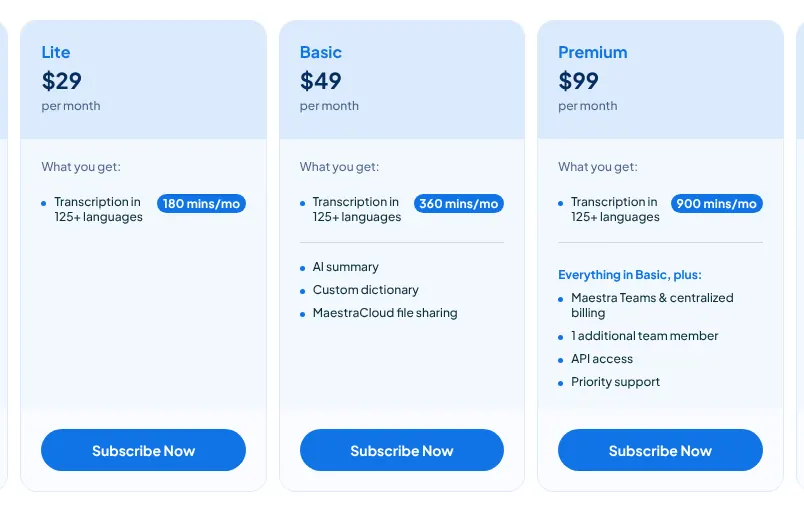
    Maestra transcribes audio in 125+ languages and also makes subtitles and AI voiceovers (a synthetic voice reading a translated script). Lite costs $29 a month for 180 minutes. Basic, at $49, doubles the minutes and adds the AI summary and a custom dictionary. Without a plan, credits cost $12 for 60 minutes.

    A transcript cannot be translated where it is: the file goes again through the subtitle tool, which has its own plans. Live meeting transcription is a separate subscription, Maestra Meetings, at $49 per user a month. Maestra has no AI chat about a transcript. Its security page names the certifications of its host, Amazon Web Services, not its own.

    Maestra transcription plan cards billed monthly: Lite at $29 for 180 minutes, then Basic with 360 minutes and Premium with 900 minutes.
    The Lite card shows $29 per month for 180 minutes; Basic and Premium add minutes and features. Source: maestra.ai, captured on 16 Nov 2026.
  9. 9. Amberscript

    European

    Amberscript suits European organisations that need files kept in the EU and the option of a human transcript.

    Score
    83/100
    Best for
    Files that must stay in the EU
    From
    €19/mo
    Free plan
    No · 10 free minutes on sign-up

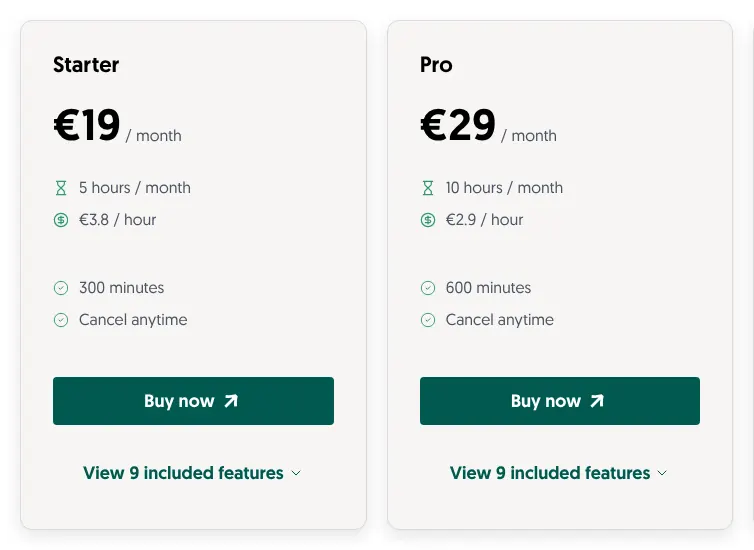
    Amberscript is a Dutch service that transcribes uploaded files by machine or by people, and stores them on servers in the EU. Starter costs €19 a month for 5 hours of audio. Pro doubles the hours for €29. Extra minutes are billed at the plan's hourly rate, and unused hours do not roll over. Without a plan, credits cost €10 an hour.

    Human transcription starts at €1.85 a minute, with 99%+ accuracy stated by Amberscript. The meeting bot, mobile app and AI chat belong to Amber Notes, a separate product with its own subscription. A monthly plan cancelled after its first month is still billed for two months. Prices are in euros only.

    Amberscript Starter and Pro plan cards billed monthly: Starter at €19 a month for 5 hours, Pro with 10 hours a month.
    Starter shows €19 a month for 5 hours, which is 300 minutes; the price per hour drops on larger plans. Source: amberscript.com, captured on 16 Nov 2026.
  10. 10. Tactiq

    Cheapest

    Tactiq suits someone who only needs meeting transcripts and wants the cheapest paid plan here.

    Score
    79/100
    Best for
    Meeting transcripts on a small budget
    From
    $12/mo
    Free plan
    Yes · 10 transcripts a month

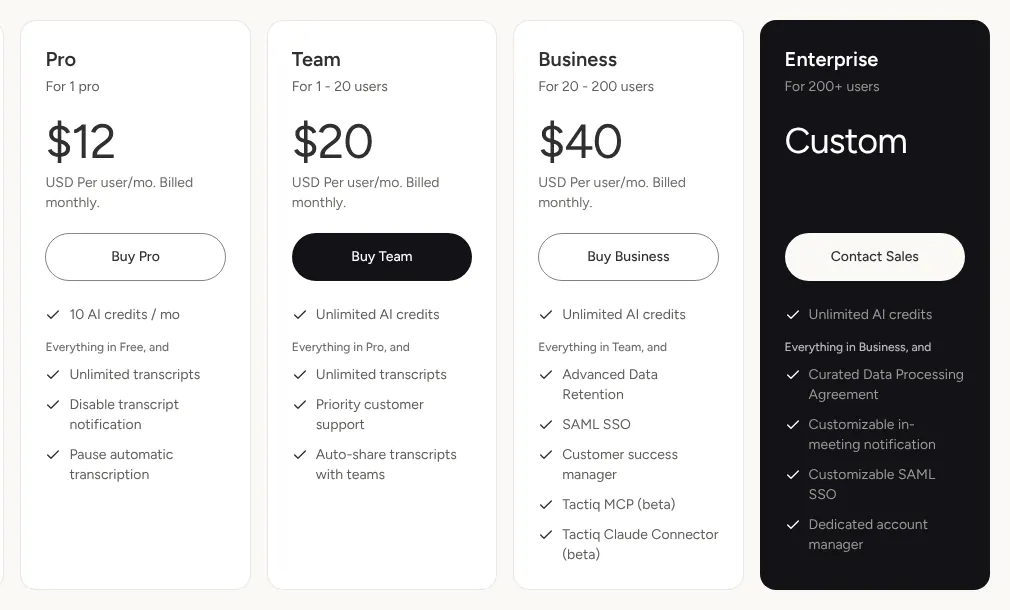
    Tactiq transcribes Google Meet, Zoom and Teams calls from a browser extension or a Mac app, with no bot in the call. Pro costs $12 per user a month, the lowest starting price of the ten, or $8 billed yearly. Meeting transcripts are unlimited on Pro, with 10 AI credits a month for summaries. Files under 2 GB can also be uploaded.

    Tactiq makes no subtitle files and has no phone app. No public API (a way for other software to send it files) was found. The free plan gives 10 transcripts a month, whatever their length. Tactiq holds SOC 2 and ISO 27001 certifications.

    Tactiq Pro, Team, Business and Enterprise plan cards billed monthly: Pro at $12 per user a month with 10 AI credits.
    With monthly billing selected, Pro shows $12 per user a month and Team adds unlimited AI credits. Source: tactiq.io, captured on 16 Nov 2026.

Summary table

The table sets the ten tools side by side. The price shown is the first paid plan billed monthly. Several plans are priced per seat (one paid user), so a team of three pays three times the seat price.

The 10 AI transcription tools side by side: score, entry price, minutes included, free plan and subtitle export
ToolScoreEntry priceIncluded on entry planFree plan or trialSubtitle export
01HappyScribe94$17/mo120 min of uploads10 minutes, onceYes
02Sonix94$25/mo5 hours30 minutes on sign-upYes
03Rev94$29.99/mo per seat5,000 AI min, English and Spanish45 min a month, EnglishYes
04Notta90$13.49/mo1,800 min120 min a month, 3 min per recordingYes
05Fireflies.ai90$18/mo per seatUnlimited meetings, 3,000 min of uploadsMeetings, few uploadsYes
06Otter.ai89$16.99/mo per user1,200 min, 10 file imports300 min a monthYes
07Trint87$100/mo per seatUnlimited, fair use7-day trialYes
08Maestra84$29/mo180 minFree account, minutes not statedYes
09Amberscript83€19/mo5 hours10 minutes on sign-upYes
10Tactiq79$12/mo per userUnlimited meeting transcripts10 transcripts a monthNo

Prices in US dollars, except Amberscript in euros, read on vendor pages on 16 November 2026, before taxes. HappyScribe's page refused the capture tool, so it has no image above. Notta's and Tactiq's monthly prices appear only after the Monthly switch on their pricing pages.

What AI transcription costs for your hours of audio

For 10 hours of audio a month, one person pays from $12 on Tactiq to $100 on Trint. Notta stays at $13.49 up to 30 hours, because Pro includes 1,800 minutes. Sonix and HappyScribe cost little for 2 hours and rise with volume. Maestra costs the most at 25 hours, at $219, because its plans include few minutes.

Monthly cost for one person at 2, 10 and 25 hours of uploaded audio, with the cheapest published plans
ToolPlans used2 hours10 hours25 hours
01HappyScribeBasic, Pro, Business$17$29$89
02SonixHourly rate, Advanced, Pro$20$50$80
03RevEssentials (English and Spanish)$29.99$29.99$29.99
04NottaPro$13.49$13.49$13.49
05Fireflies.aiPro$18$18$18
06Otter.aiPro, then Business$16.99$16.99$30
07TrintPro$100$100$100
08MaestraCredits, then Basic or Premium plus credits$24$97$219
09AmberscriptStarter, Pro, Power€19€29€49
10TactiqPro (meetings and uploads)$12$12$12

Prices in US dollars, except Amberscript in euros, billed monthly, read on 16 November 2026, before taxes. Each cell uses the cheapest mix of published plans and credits for one user. Otter.ai Pro assumes 10 files or fewer, each under 90 minutes; Fireflies.ai assumes files under 150 minutes. Rev Essentials covers English and Spanish only. Maestra assumes pay-as-you-go credits can be added to a plan. Trint's unlimited plans have a fair-use cap that excludes bulk and archive projects.

How we rank

  1. The ten tools are ranked by a score out of 100. It measures how many of 21 features expected of AI transcription software each vendor documents on its own site. It does not measure the accuracy of the transcripts, the speed or the support.Transcription 34% · 6 featuresEditing and AI 26% · 5 featuresMeetings and live 11% · 3 featuresExport and integrations 17% · 4 featuresTeam and security 11% · 3 features
  2. The 21 features fall into five groups: transcription, editing and AI, meetings and live use, export and integrations, and team and security. Three define the category and weigh 3: transcribing uploaded audio and video, labelling each speaker, and an editor synced to the audio. The others weigh 2 or 1. A tool scores 1 for a feature documented on its free plan or on a plan sold online at a published price. A feature counts for half when it is a paid add-on, sold only on a plan priced on request, part of a separate product, in beta, or reached through another service. It scores 0 when it is absent or could not be verified. The score is the weighted sum over the total weight, rounded.
  3. At equal scores the lower entry price ranks first, then the alphabet. HappyScribe, Sonix and Rev all score 94, and their entry prices are $17, $25 and $29.99. Notta and Fireflies.ai both score 90, and Notta's $13.49 comes before $18. Tactiq and Riverside both score 79, and Tactiq's $12 comes before Riverside's $35. Nineteen tools were looked at and 17 were scored. Riverside scores 79, Descript and Sembly 77, Krisp 74, VEED 73, tl;dv 67 and Fathom 64. TurboScribe and Transkriptor refused every page request, so their prices and features could not be checked.
  4. No entry on this page is sponsored. A sponsored entry is marked Sponsored and holds the position paid for; its score stays the computed one.

FAQ

Is there free AI transcription software that is not just a trial?

Yes, for meetings. Otter.ai Basic gives 300 minutes a month, with each conversation cut at 30 minutes. Tactiq gives 10 meeting transcripts a month and Notta 120 minutes. For uploaded files, the free offers are small: 10 minutes on HappyScribe and Amberscript, 30 on Sonix. If you transcribe files often, a paid plan is hard to avoid.

Can these tools tell speakers apart?

Yes. All ten document speaker labels, which mark who said each line of the transcript. Notta lists speaker identification on its free plan, so you can test it at no cost. Where two people talk at once, check the passage against the audio before you quote it.

How accurate is AI transcription?

Vendors state their own figures, and none was measured for this page. Rev states 96%+ for its AI transcripts and Notta up to 98%. Otter.ai states 85 to 90% on clear audio, and Amberscript 90%+ for machine-made text. If a quote will be printed or filed in court, pay for a human check or read it against the audio yourself.

Which tools keep data in Europe?

Amberscript stores files on EU servers and is headquartered in the Netherlands. HappyScribe states a data centre in the European Union. Trint hosts on Amazon's servers in the EU or the US, depending on the account. Fireflies.ai stores data in the US; only private storage on its Enterprise plan can keep it in the EU. If your organisation needs EU hosting, ask for it in writing before you upload anything.

Do the vendors train their AI on my recordings?

Rev and Fireflies.ai state on their sites that they do not. Rev says customer content is not used to train outside AI models. Fireflies.ai says it does not train AI models on meeting data. For the other eight, read the privacy page before you upload sensitive recordings.

What happens to my transcripts when I cancel?

It depends on the tool, so download what you need before the plan ends. Notta keeps the transcripts, but a free account only shows the first 3 minutes of each. Maestra keeps existing transcripts and subtitles accessible. Trint deletes the files shortly after the account closes, unless you archive them for a monthly fee.