The score shortlists; it does not make the choice. All ten offer a drag-and-drop editor, templates, lead forms and A/B testing on at least one plan. The six checks below separate them, each based on vendor pages read on 17 November 2026.
1. Find the plan where A/B testing starts
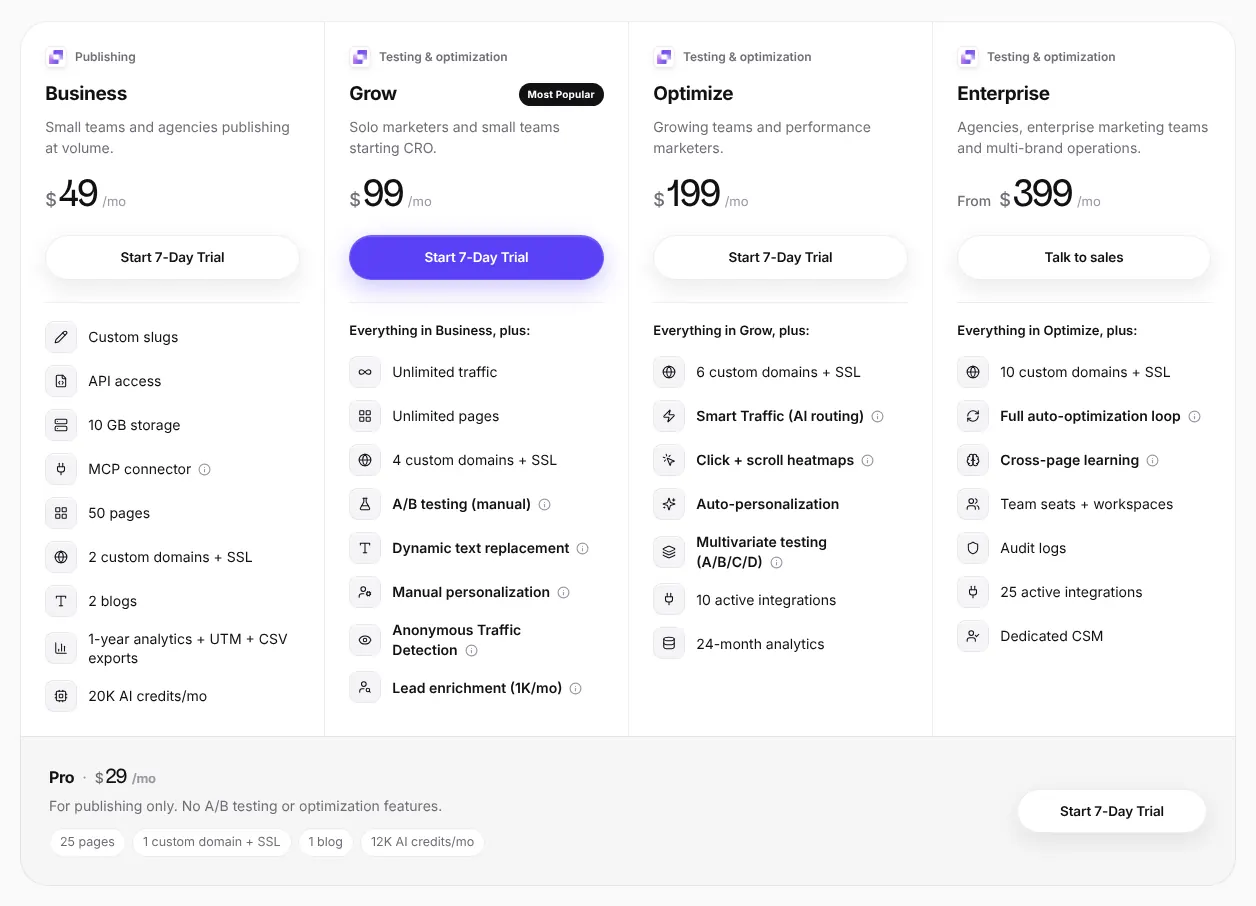
A/B testing is the main reason to pay for a landing page tool, and it is often missing from the entry plan. The price jump can be large. Leadpages goes from $29 on Pro to $99 on Grow. Landingi goes from $29 on Build to $149 on Optimize.
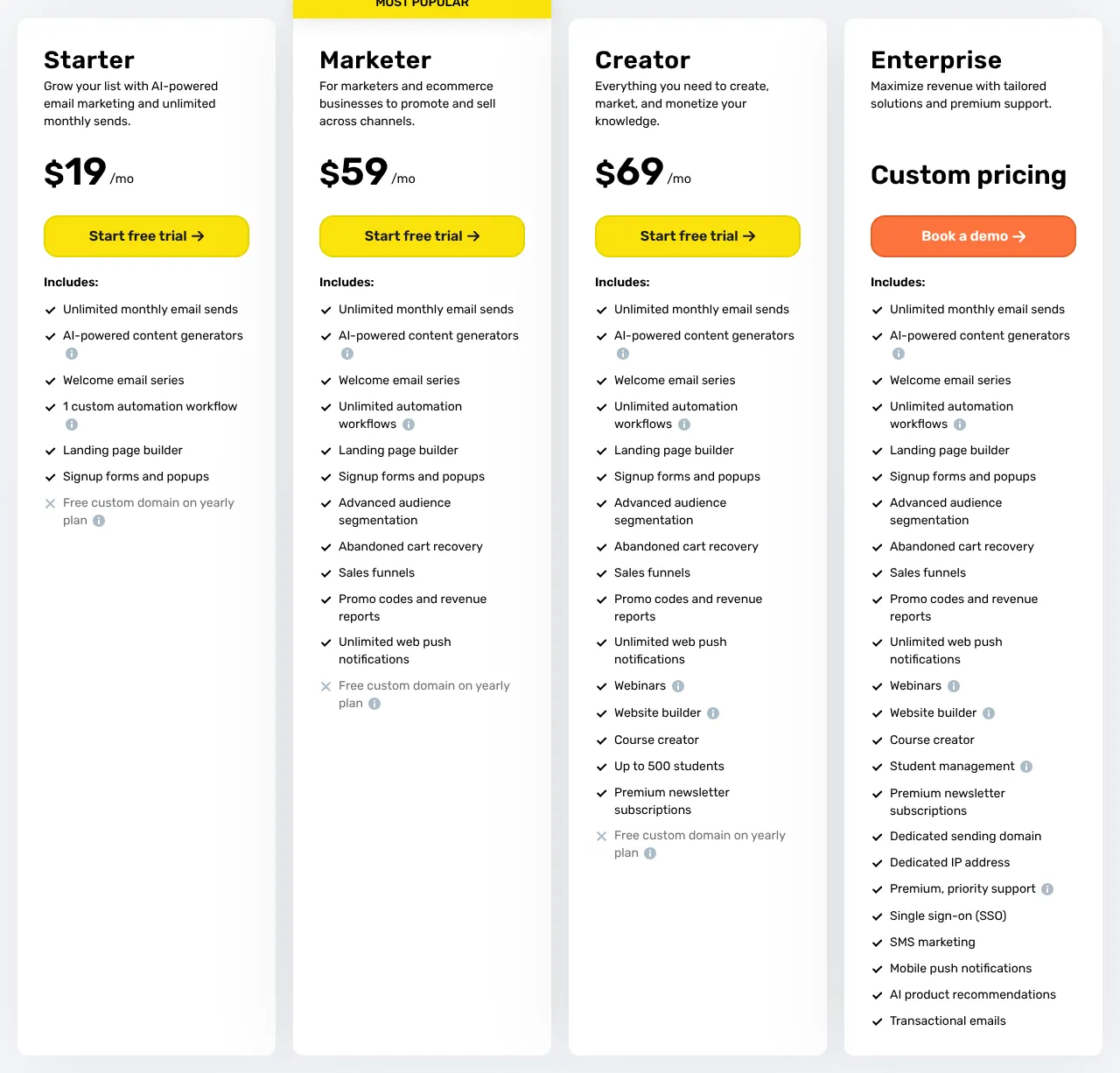
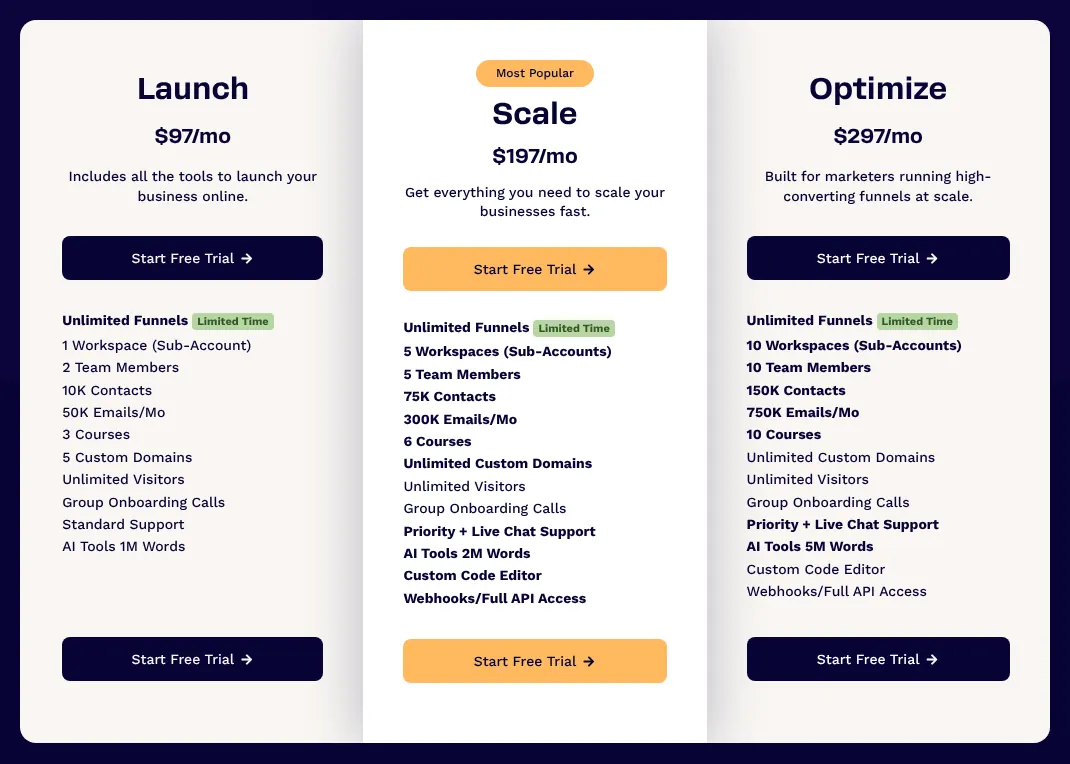
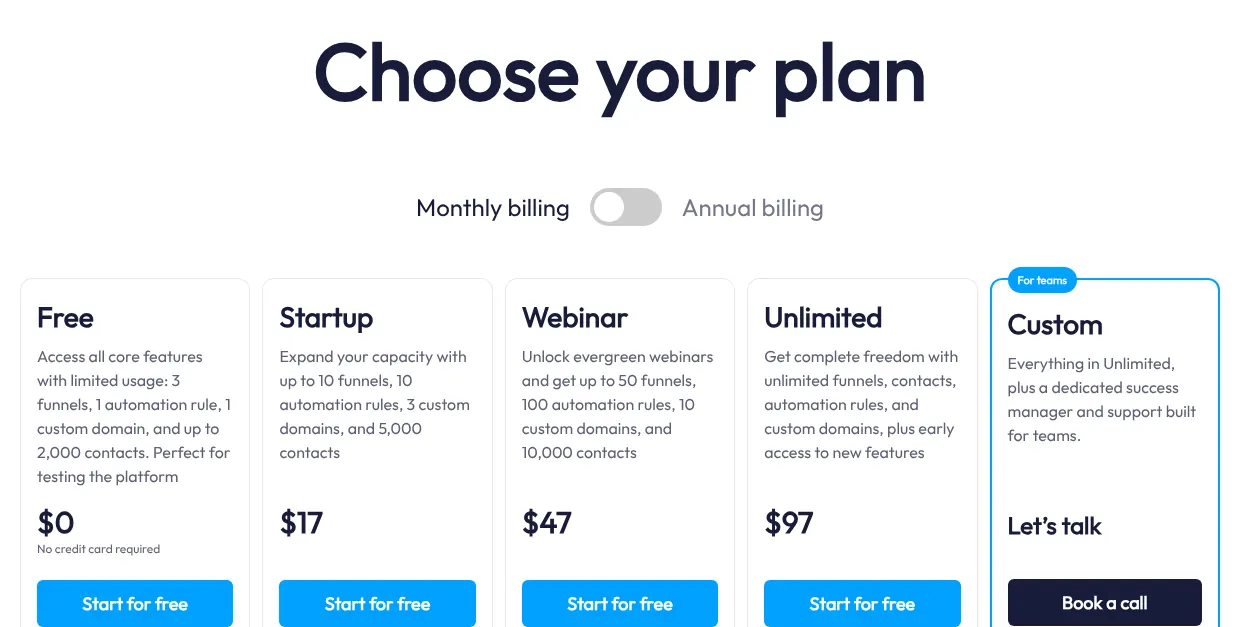
GetResponse and ClickFunnels include testing from their first paid plan. On systeme.io, even the free plan runs 1 A/B test. If you plan to test from the first campaign, compare the A/B testing column of the cost table, not the entry prices.
2. Check how the plan counts your traffic
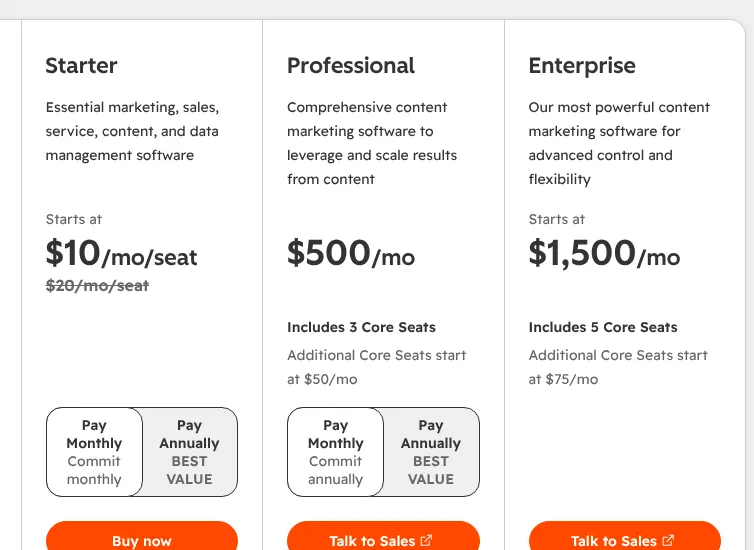
Each tool measures use differently, and the measure decides when the bill rises. Leadpages, ClickFunnels and the paid GetResponse plans set no cap on visitors. Swipe Pages allows 20,000 visitors on Startup and bills $5 for every 5,000 extra visits. Landingi's Build plan allows 2,000 visits a month.
Heyflow counts responses instead, meaning completed forms. Starter includes 50 a month, then €0.18 per extra response. Estimate your monthly ad clicks before you choose: an ad budget that buys 10,000 clicks would pass Landingi Build five times over.
3. Make sure pages can use your own address
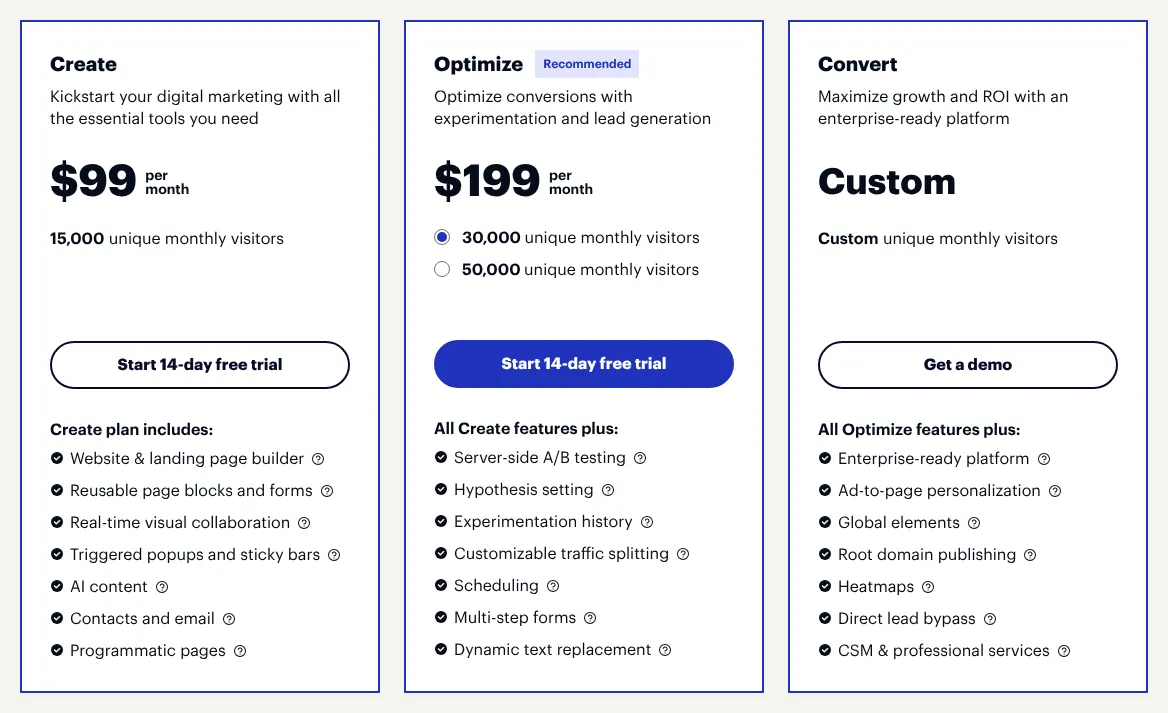
A page on the builder's address looks less trustworthy than one on your own domain. Most plans include at least one custom domain, but the details differ. Instapage's Create plan publishes only on subdomains such as go.yourbrand.com; the root domain is kept for Convert.
GetResponse gives a free custom domain only with yearly billing. Leadpages Pro and Landingi Build include 1 domain, and Landingi charges $5 a month for each extra one. If you run campaigns for several brands, count the domains you need first.
4. Compare the monthly price with the yearly one
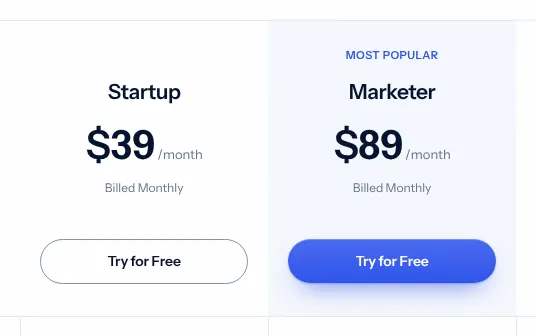
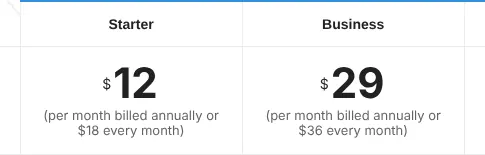
Many vendors show the yearly price first, because it is lower, and yearly billing means paying twelve months at once. Swipe Pages shows Startup at $29 on the yearly view and $39 billed monthly. Instapage shows Create at $79 and $99. Heyflow's page opens on euros and yearly billing, and its monthly price could not be read.
This page uses the monthly price wherever the vendor shows one. Pay monthly while a campaign is new, and switch to yearly billing once the tool has proved itself.
5. Count the people who will edit pages
Seats, meaning the number of people who can log in and edit, vary widely. HubSpot charges each Starter seat separately. Leadpages includes 1 editing seat on Business and Grow, and Swipe Pages has no team members on Startup. Instapage includes 10 team members on Create, and Landingi 5 users on Build.
On Leadpages, a team of three editors needs Optimize: it includes 3 editing seats, while Business and Grow include 1. Count your editors, then check the seat line before you compare prices.
6. Read the trial terms before you sign up
Among the ten, HubSpot, GetResponse and systeme.io show a free plan; the others show a trial. Some trials need a card and turn into a paid plan. Leadpages asks for a card and starts billing on day 7 unless the trial is cancelled. Instapage also asks for a card and caps the trial at 2,500 visitors.
Swipe Pages, Heyflow and Simvoly run 14-day trials without a card. Build the same page on two tools during their trials, and send real traffic to both before you pay.