top10alternative

Top 10 Presentation Software (2026)

Ten presentation tools compared on what they include and what they cost a team. They are ranked by how many of 21 common presentation features each one covers.

The best presentation software for your situation

Each line matches a situation with the tool whose published facts fit it. The score out of 100 counts how many of 21 features expected of presentation software a tool documents. It measures coverage, not how good the slides look.

  • You want polls and quizzes inside the talkPrezi · Standard costs $7 a month, billed yearly; Prezi lists live polls with Teams, at $39 per user.
  • Your team makes slides alongside social posts and other designsCanva · Pro costs $18 a month for one person; each extra editor needs a Business seat at $25.
  • You exchange PowerPoint files with clients every dayMicrosoft PowerPoint · The web version is free; the desktop apps come with Personal at $9.99 a month.
  • Your decks are full of charts and infographicsVisme · Starter costs $12.25 a month, billed yearly.
  • You want paid features at the lowest priceZoho Show · Zoho Workplace Standard costs US$4 per user a month.
  • You send decks to clients and want to see what they readPitch · Team links track time on each slide, at $19 per seat a month billed yearly.
  • Your team needs shared editing at no costGoogle Slides · It is free with a Google account; company accounts start at $8.40 per user.
  • You want every slide laid out for youBeautiful.ai · Pro costs $14.50 a month billed yearly, or $45 on the monthly option.
  • Everyone on your team uses Apple devicesKeynote · It is free; Creator Studio adds AI and premium themes for $12.99 a month.
  • You want a first draft written from a short descriptionGamma · Plus costs $12 a month on the App Store.

How to choose presentation software

A high score says a tool covers many common features, not that it fits every team. Six checks bring the list down to one or two tools. Each one rests on facts read on vendor pages on 17 November 2026.

1. Start with the devices your team uses

Pick a tool that runs where your team works, because two of the ten are tied to a platform. Keynote has apps for Apple devices only; on Windows it opens in a browser. Google Slides has no Windows or Mac app at all. PowerPoint runs on Windows, Mac, the web and phones. A team of 20 pays $0 for Keynote, but only if everyone accepts those limits.

2. Count who must edit at the same time

Check the team plan before the entry price, because editing together is often a paid extra. On Pitch each person who edits is billed as a seat, while people who only comment are free. On Prezi, shared editing belongs to Teams. A team of 5 pays $95 a month on Pitch Team and $195 on Prezi Teams, both billed yearly. Google Slides and Keynote let several people edit at once for free.

3. Compare the yearly and the monthly price

Look at which billing period a price belongs to, because several pricing pages open on yearly prices. Visme, Pitch and Prezi show yearly prices first, and Prezi shows no monthly option. One person on Beautiful.ai Pro pays $45 for a single month. The same person pays $174 for a whole year on yearly billing. If you need a deck for one event, the month can be the cheaper choice.

4. Check that PowerPoint files go in and out

Test one of your real decks before you commit, because clients and colleagues will keep sending .pptx files. All ten tools import PowerPoint files, but the result differs. Google Slides turns the charts and videos of an imported file into images. Visme Starter, at $12.25 a month billed yearly, cannot export to PowerPoint; Business, at $24.75, can. Gamma adds a badge to PowerPoint exports from its free plan.

5. Find out what the AI features really cost

Check which plan carries the AI, because it is often not the entry plan. On Google Slides, drafting a deck with Gemini needs Business Standard at $16.80 per user a month, not Starter at $8.40. On Keynote, the AI draft needs Creator Studio at $12.99 a month. Prezi Standard caps its AI at 500 credits. If AI drafting is the main reason you are switching, budget for the plan that includes it.

6. Ask your IT team about company sign-in

Ask early whether staff must log in with their company account, because that rules out entry plans. SSO (single sign-on, one company login for every tool) comes with the business accounts of PowerPoint and Google Slides, and with Zoho Workplace from Standard. Gamma includes it in Business at $40 per member a month, billed yearly. Canva, Visme, Pitch and Beautiful.ai keep it for plans priced by their sales teams. Pitch Enterprise starts at 30 seats.

The 10 Presentation software

by overall score
  1. 1. Prezi

    Prezi fits a talk built around audience polls and quizzes, which come with Teams at $39 per person a month billed yearly.

    Score
    99/100
    Best for
    Talks with polls and quizzes built in
    From
    $7/mo billed yearly
    Free plan
    Yes · public sharing, watermark on exports

    Prezi moves between ideas by zooming across one large canvas instead of flipping from slide to slide. Of the 21 features, only the phone app falls short. Polls, quizzes and audience questions run inside the presentation itself, with no separate tool. Standard costs $7 a month, billed yearly; the pricing page shows no monthly option. Standard caps Prezi AI at 500 credits, and Plus, at $19 a month billed yearly, removes the cap.

    Plus adds PowerPoint import, PDF export and recording. Shared editing, live polls, comments, the brand kit and company sign-in belong to Teams, at $39 per user a month billed yearly. On Teams, two people can edit separate slides of the same deck at the same moment. The free plan shares decks publicly only and puts a watermark on exports.

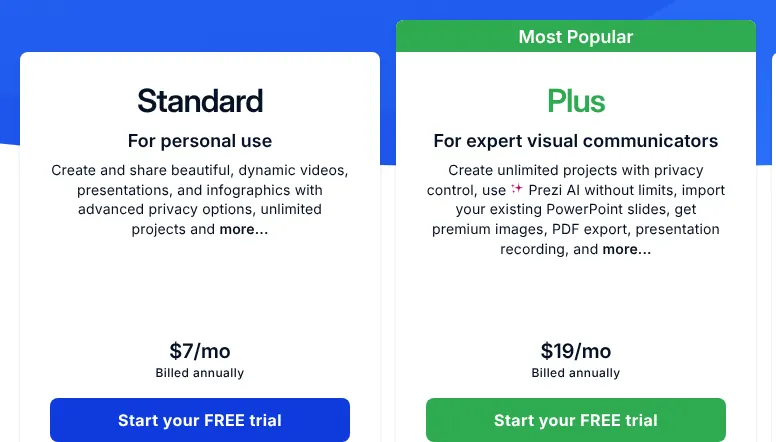
    Prezi Standard and Plus plan cards: Standard for personal use at $7/mo billed annually, Plus for expert visual communicators at $19/mo billed annually.
    Both cards read billed annually: Standard at $7/mo and Plus at $19/mo, the plan that adds PowerPoint import, PDF export and recording. Source: prezi.com, captured on 17 Nov 2026.
  2. 2. Canva

    Canva shares the top score with Prezi and fits a team that already designs its other material there, as long as each editor gets a paid seat.

    Score
    99/100
    Best for
    Teams that make slides alongside social posts and other designs
    From
    $18/mo
    Free plan
    Yes · 1 person, 5GB of storage

    Canva is a design platform where presentations sit next to social posts, videos and documents. Of the 21 features checked here, it lacks only full company sign-in. Canva's site refused every request from this site's reader on 17 November 2026. Its facts therefore come from Canva's own app store listings and from other sites, and each price was confirmed on a second site. Pro costs $18 a month for one person, as read on Moda and confirmed on SocialRails. A Pro account serves one person only, so a team pays for Business, at $25 per person a month.

    The free plan serves one person, with 5GB of storage and one brand kit limited to 3 colours. A brand kit is the saved set of a company's colours, fonts and logos. Presenter view shows the speaker's notes on one screen while the audience sees only the slides. Decks can be imported from PowerPoint files and downloaded back as PowerPoint or PDF. SSO (single sign-on, where staff log in with their company account) needs the Enterprise plan, priced by Canva's sales team.

  3. 3. Microsoft PowerPoint

    PowerPoint suits anyone who sends and receives .pptx files daily, since every other tool on this list converts to or from its format.

    Score
    97/100
    Best for
    Organisations that exchange .pptx files every day
    From
    $9.99/mo
    Free plan
    Yes · PowerPoint for the web, 5 GB

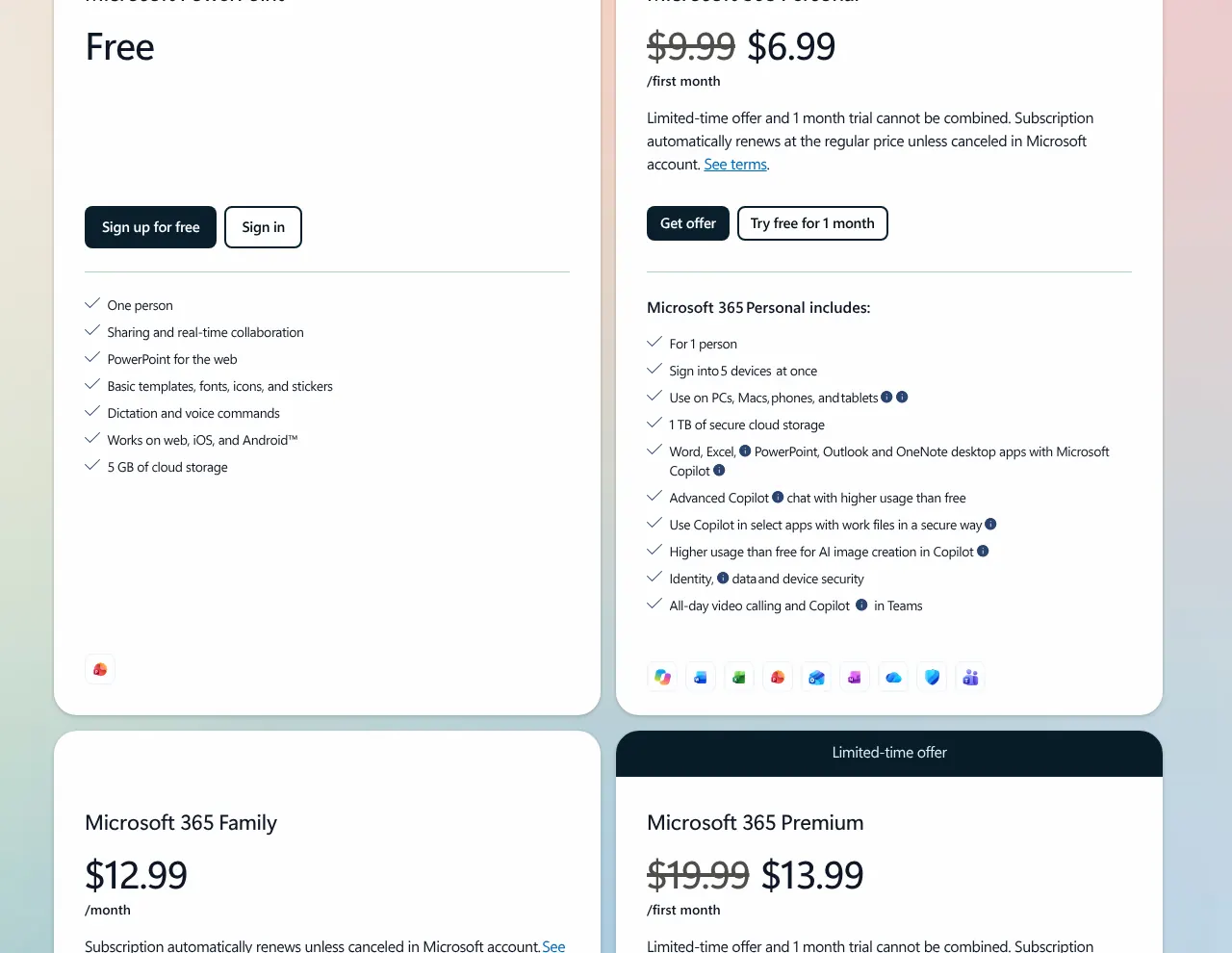
    PowerPoint is Microsoft's presentation app, with versions for Windows, Mac, the web, iPhone and Android. Two features are only partly there, view tracking and live polls; the other 19 are built in. PowerPoint for the web is free with any email address, with basic templates and 5 GB of storage. The desktop apps come with Microsoft 365 Personal, at $9.99 a month for one person. In November 2026 the plan card also shows a first-month offer at $6.99, after which the regular $9.99 applies.

    Microsoft 365 Family costs $12.99 a month for up to 6 people, but its AI features belong to the account owner only. The cheapest business plan, Business Basic, costs $7.00 per user a month with a yearly commitment. It includes only the web and mobile versions of PowerPoint. An earlier version of a deck can be restored only when the file is saved in OneDrive or SharePoint, Microsoft's online storage. Live polls come from Microsoft Forms, a separate product open to work and school accounts.

    Microsoft PowerPoint plan cards: the free web version, then Microsoft 365 Personal with its regular $9.99 a month struck through next to a first-month offer, then the top of the Family card.
    The Personal card shows the regular $9.99 a month struck through next to a first-month offer; the plan name appears in its list of what is included. Source: microsoft.com, captured on 17 Nov 2026.
  4. 4. Visme

    Visme suits a small team that builds data-heavy decks and infographics, but a team of 6 or more people has to ask for a quote.

    Score
    97/100
    Best for
    Presentations full of charts and infographics
    From
    $12.25/mo billed yearly
    Free plan
    Yes · 10 AI credits a month

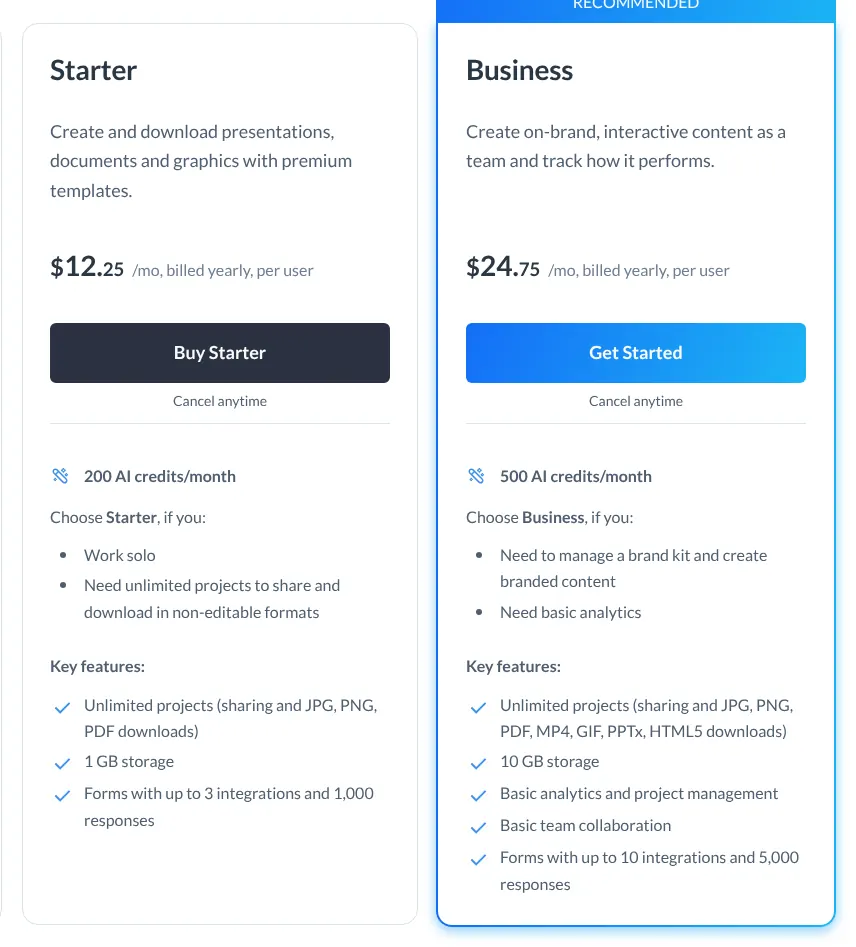
    Visme makes presentations, infographics and documents in the browser, and also offers desktop apps for Windows and Mac. Nineteen features out of 21 are built in. Audience polls are only partly there, and company sign-in is limited to the Enterprise plan. A poll is a Visme form that the audience opens on their phones, and its answers fill a chart linked to the deck. Starter costs $12.25 per user a month, billed yearly at $147. The pricing page opens on yearly prices. Visme's help centre says the yearly plan costs close to half the month-to-month price.

    Starter downloads JPG, PNG and PDF files only. PowerPoint export, the brand kit and analytics on shared decks start on Business, at $24.75 per user a month billed yearly. The free plan gives 10 AI credits a month, the units that Visme's AI features use up. Visme sends organisations of 6 or more people to Enterprise, priced on request.

    Visme Starter and Business plan cards: Starter at $12.25 a month billed yearly per user with 200 AI credits, Business at $24.75 a month billed yearly per user with 500 AI credits.
    Starter shows $12.25 a month billed yearly; Business at $24.75 lists PPTx among its downloads and Starter does not. Source: visme.co, captured on 17 Nov 2026.
  5. 5. Zoho Show

    Cheapest

    Zoho Show suits a small business that wants paid features at the lowest price, especially if it already uses Zoho for email.

    Score
    96/100
    Best for
    Teams on a tight budget, or already on Zoho
    From
    US$4/mo per user
    Free plan
    Yes · for individuals

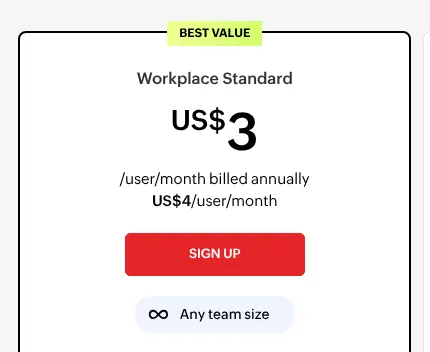
    Zoho Show is free for individuals, and its paid version comes inside Zoho's bundles (packages of several Zoho apps sold together). It documents all 21 features, three of them only in part. The cheapest of these bundles billed monthly is Zoho Workplace Standard, at US$4 per user a month. That is the lowest paid entry price of the ten tools on this page. Workplace Standard also includes email, file storage, chat and video meetings, and is sold for any team size.

    Zoho WorkDrive Starter shows the lowest yearly price for Show, US$2.50 per user a month, but it is sold from 3 users. A shared link can ask viewers for their name, email or phone number before they open the deck, so the owner knows who viewed it. Zoho documents no view counts and no time per slide. Recording covers audio or video clips placed on a slide, not a narrated talk. During a live broadcast, the audience can send questions in a chat, but Zoho Show's own pages document no polls. Generating images with its AI needs the user's own key from OpenAI, a paid account with that AI company.

    Zoho Workplace Standard plan card marked Best value: a large yearly rate per user, and below it US$4 per user a month, for any team size.
    The large figure is the yearly rate; the line below it, US$4 per user a month, is the monthly price this page uses. Source: zoho.com, captured on 17 Nov 2026.
  6. 6. Pitch

    Pitch suits a team of up to 25 that sends decks to clients and wants to see how long each slide is read.

    Score
    94/100
    Best for
    Sales and startup teams that track who opens their decks
    From
    $13/mo billed yearly
    Free plan
    Yes · up to 5 members

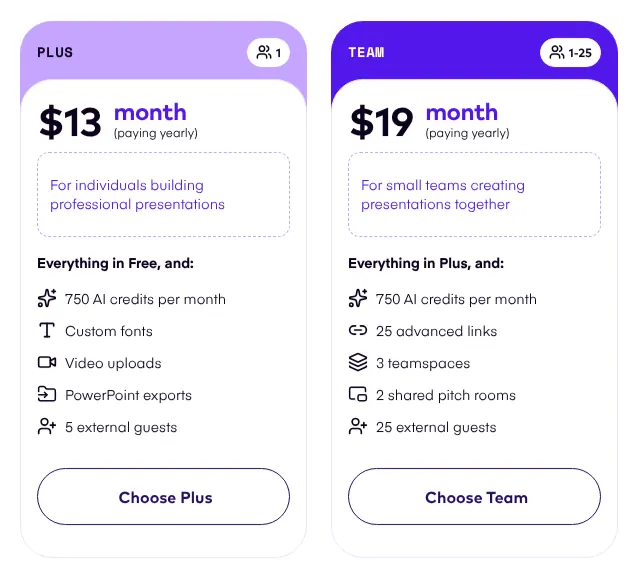
    Pitch is a presentation workspace for teams that build decks together. Live polls are the one feature missing outright. Plus costs $13 a month for one seat, billed yearly. A seat is one member who can edit, and commenters and guests are free. Monthly billing also exists, at a higher price. The free plan holds up to 5 members, all with admin rights, and 500 AI credits that do not renew.

    Team costs $19 per seat a month, billed yearly, for up to 25 members. Its links track visits, slide views and the time spent on each slide. Pitch has no live polls, and its phone apps open and comment on decks without editing slides. SSO (company sign-in) is only on Enterprise, priced on request from 30 seats. PDF exports from the free plan carry a small Pitch watermark.

    Pitch Plus and Team plan cards in the default yearly view: Plus at $13 a month paying yearly for 1 seat, and the Team card for 1 to 25 members.
    The default yearly view: Plus at $13 a month for one seat, next to the Team card for teams of up to 25. Source: pitch.com, captured on 17 Nov 2026.
  7. 7. Google Slides

    Google Slides suits a team that needs shared editing at no cost, but its AI drafting needs a paid Workspace plan above the entry one.

    Score
    93/100
    Best for
    Teams that want free shared editing in the browser
    From
    $8.40/mo per user
    Free plan
    Yes · any Google account

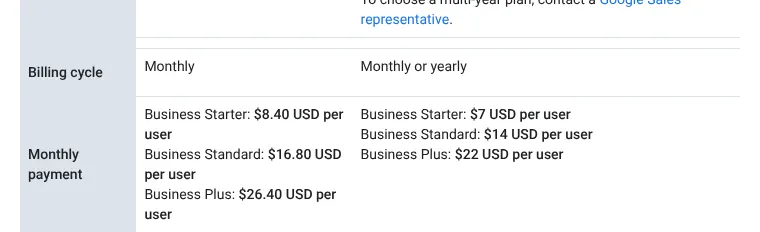
    Google Slides runs in the browser and is free with any Google account. Several people can edit the same deck at once. A company account comes with Google Workspace: Business Starter costs $8.40 per user a month on the Flexible plan, which bills monthly. The annual plan lowers it to $7.00.

    Drafting a whole deck with Gemini, Google's AI, needs Business Standard or higher, at $16.80 per user a month on the Flexible plan. Slides has no Windows or Mac app. A custom theme is reused by importing it from another deck, not saved as a brand kit. Audience questions can be collected during a talk, but there are no built-in polls. When a PowerPoint file is imported, its charts and videos become images.

    Google Workspace billing table: the left column, billed monthly, lists Business Starter at $8.40 USD per user; the right column, billed monthly or yearly, lists Business Starter at $7 USD per user.
    The left column, billed monthly, is the Flexible plan: Business Starter at $8.40 USD per user, against $7 USD on the annual plan to its right. Source: knowledge.workspace.google.com, captured on 17 Nov 2026.
  8. 8. Beautiful.ai

    Beautiful.ai suits a person who wants clean slides without layout work and pays yearly, since the monthly option costs more than three times as much.

    Score
    93/100
    Best for
    People who want each slide laid out automatically
    From
    $45/mo
    Free plan
    No · 14-day trial, card required

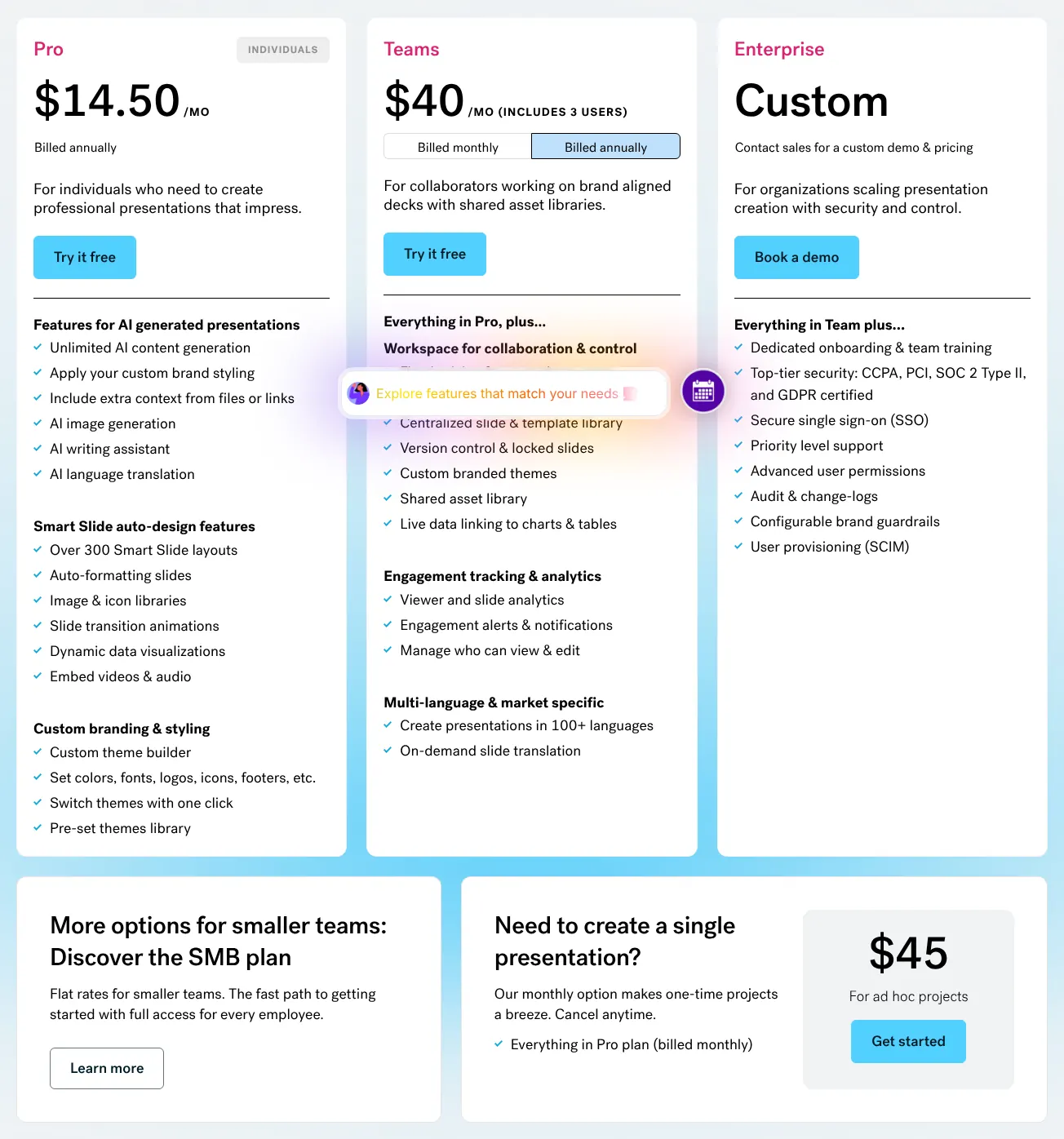
    Beautiful.ai lays out each slide on its own: text and images snap into place as they are added. Pro costs $45 on the monthly option, which Beautiful.ai presents for one-off projects. Billed yearly, Pro costs $14.50 a month. There is no free plan, and the 14-day trial needs a credit card that is charged if the trial is not cancelled.

    Team adds editing by several people at once and a shared slide library. Its price is stated two ways on the same page. The FAQ gives $50 per user a month on monthly billing, and the plan card reads $50 a month including 3 users. SSO (company sign-in) is on Enterprise, priced on quote. The Mac and Windows app only presents decks offline; editing happens in the browser.

    Beautiful.ai pricing: Pro at $14.50 a month billed annually, the Teams card including 3 users, Enterprise custom, and below them a monthly option at $45 for ad hoc projects.
    The Pro card shows the yearly $14.50; the monthly price, $45, is in the box at the bottom right. Source: beautiful.ai, captured on 17 Nov 2026.
  9. 9. Keynote

    Keynote suits a team that works on Apple devices and wants polished slides at no cost, but a team on Windows gets only the browser version.

    Score
    90/100
    Best for
    Teams where everyone works on a Mac, iPhone or iPad
    From
    Free
    Free plan
    Yes · free app

    Keynote is Apple's free presentation app for Mac, iPhone and iPad. Creating, editing and editing together in real time need no subscription. Keynote comes with every new iPhone, Mac and iPad. Windows users work in a web browser with Keynote for iCloud.

    Apple Creator Studio, an optional subscription at $12.99 a month, adds premium themes, a stock media library and AI features. The AI draft of a deck is in beta and needs Creator Studio. Keynote has no view tracking and no audience polls. Company sign-in goes through Apple Business, a separate Apple service. Custom themes saved on a Mac do not appear in the browser version.

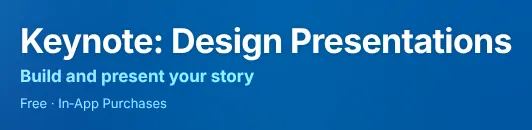
    The Keynote listing header on the App Store, with the app name, its subtitle and the price line Free, In-App Purchases.
    The App Store lists Keynote as Free, with in-app purchases for the optional Creator Studio subscription. Source: apps.apple.com, captured on 17 Nov 2026.
  10. 10. Gamma

    Gamma suits someone who wants a first draft from a few lines of text, then light editing, rather than slides built by hand.

    Score
    84/100
    Best for
    A fast first draft from a short description
    From
    $12/mo
    Free plan
    Yes · 400 AI credits, once

    Gamma builds a whole presentation, document or web page from a prompt, a short text that describes what is needed. Four of the 21 features were not found, among them slide transitions. Gamma's site refused this site's reader on 17 November 2026, so its prices were read elsewhere. Plus costs $12 a month, as listed on Gamma's App Store page and confirmed by Recurdash. Its features were read in Gamma's own help centre.

    Every paid plan bills each member of a workspace. The free plan gives 400 AI credits once, and its PDF and PowerPoint exports carry a Made by Gamma badge. Gamma has no slide transitions or text animations, and no recording or live polls were found in its help centre. Its phone app is in early access, in the US and Canada only. Business, with company sign-in, costs $40 per member a month and is billed yearly only.

Summary table

The table sets the ten tools side by side. The entry price is the first paid plan, billed monthly when the vendor shows a monthly price, otherwise billed yearly as marked. Several plans are priced per user, so a team of three pays three times the price shown.

The 10 presentation tools side by side: score, entry price, free plan, PowerPoint export and live audience features
ToolScoreEntry priceFree plan or trialExports to PowerPointLive polls or Q&A
01Prezi99$7/mo, billed yearlyYes, public decksYes, paid plansYes
02Canva99$18/mo, 1 personYes, 1 personYesYes
03Microsoft PowerPoint97$9.99/mo, 1 personWeb versionYesPartly, via Microsoft Forms
04Visme97$12.25/mo per user, billed yearlyYes, 10 AI credits a monthFrom BusinessPartly, via Visme Forms
05Zoho Show96US$4/mo per userYes, individualsYesPartly, chat only
06Pitch94$13/mo per seat, billed yearlyYes, up to 5 membersYesNo
07Google Slides93$8.40/mo per userYes, Google accountYesQuestions only
08Beautiful.ai93$45/mo14-day trial, card neededYesPartly, embedded page
09Keynote90FreeFree appYesNo
10Gamma84$12/mo per memberYes, 400 credits onceYesNot found

Prices in US dollars, before taxes, read on 17 November 2026. Canva's prices come from Moda and SocialRails, and Gamma's from its App Store listing and Recurdash, because both vendors' sites refused this site's reader; neither has an image above. Visme, Pitch and Prezi prices are the yearly rates their pricing pages show by default.

What presentation software costs for your team

For a team of 5 where everyone edits, the monthly bill runs from $0 on Keynote to $250 on Beautiful.ai. Zoho Show costs US$20 for the same team. Google Slides costs $42 with company accounts, and $0 with personal Google accounts. At 20 people, Visme stops publishing a price and Beautiful.ai reaches $1,000 a month.

Monthly cost for 1, 5 and 20 people who all edit, with the cheapest published paid plan that fits
ToolPlans used1 person5 people20 people
01PreziStandard, then Teams (yearly)$7$195$780
02CanvaPro, then Business (monthly)$18$125$500
03Microsoft PowerPointPersonal, Family, then Business Basic$9.99$12.99$140
04VismeStarter, then Business (yearly)$12.25$123.75On request
05Zoho ShowWorkplace Standard (monthly)US$4US$20US$80
06PitchPlus, then Team (yearly)$13$95$380
07Google SlidesBusiness Starter (Flexible, monthly)$8.40$42$168
08Beautiful.aiPro, then Team (monthly)$45$250$1,000
09KeynoteFree app$0$0$0
10GammaPlus, per member (monthly)$12$60$240

Prices in US dollars, before taxes, read on 17 November 2026. Microsoft 365 Family covers up to 6 people; Business Basic, used at 20, is the yearly-commitment rate and includes only the web and mobile apps. Visme sends organisations of 6 or more people to Enterprise. Beautiful.ai's page gives two readings of the Team price; the table uses the per-user one, the higher. Gamma's figures multiply the App Store price of Plus by the number of members.

How we rank

  1. The ten tools are ranked by a score out of 100. It measures how many of 21 features expected of presentation software each vendor documents. It does not measure design quality, ease of use or support.Creating slides 34% · 7 featuresPresenting and sharing 23% · 5 featuresWorking together 17% · 3 featuresFiles and devices 26% · 6 features
  2. The 21 features fall into four groups: creating slides, presenting and sharing, working together, and files and devices. Three define the category and weigh 3: ready-made templates, a presenter view with speaker notes, and several people editing at once. The others weigh 2 or 1. A tool scores 1 for a feature documented on its free plan or on a plan sold at a published price. A feature counts for half when it is a paid extra, sold only on a plan priced on request, part of a separate product, in beta, or limited. It scores 0 when it is absent or could not be verified. The score is the weighted sum over the total weight, rounded.
  3. At equal scores the lower entry price ranks first, then the alphabet. Prezi and Canva both score 99, and Prezi's $7 comes before Canva's $18. PowerPoint and Visme both score 97, and $9.99 comes before $12.25. Google Slides and Beautiful.ai both score 93, and $8.40 comes before $45. Eighteen tools were scored. Slides (slides.com) scores 83, Genially 80, Mentimeter 70, Slidebean 67, Storydoc 66 and Plus AI 63. Haiku Deck and Decktopus both score 53. Canva's and Gamma's sites refused this site's reader. Both lead the category, so their prices were read on two other sites, named on this page.
  4. No entry on this page is sponsored. A sponsored entry is marked Sponsored and holds the position paid for; its score stays the computed one.

FAQ

Can a team use presentation software for free?

Yes, with limits. Google Slides and Keynote let several people edit the same deck at no cost. Pitch's free plan holds up to 5 members. PowerPoint for the web is free too, with 5 GB of storage per person. If your team needs company sign-in or admin controls, plan for a paid account.

Which free plans put a watermark or badge on my slides?

Several do, so check before you send a deck to a client. Prezi's free plan puts a watermark on exports. Gamma adds a Made by Gamma badge to PDF and PowerPoint exports. Pitch puts a small watermark on PDF exports from its free plan. If a Visme subscription is cancelled, Visme branding appears on the material already published online.

Why do Canva's and Gamma's prices come from other sites?

Both sites refused this site's reader on 17 November 2026, so their pricing pages could not be read. Canva's $18 Pro price was read on Moda and confirmed on SocialRails. Gamma's $12 Plus price comes from Gamma's own App Store listing and was confirmed on Recurdash. Check the price on the vendor's site before you pay.

Can I cancel and keep my presentations?

Download your decks before the plan ends, because what stays editable differs by tool. Keynote keeps working if you cancel Creator Studio; only its AI features stop. Beautiful.ai does not refund monthly subscriptions. On free plans, export options shrink: Visme's free plan, for example, has no downloads at all.