top10alternative

Top 10 QuickBooks Alternatives (2026)

The closest alternative to QuickBooks is Odoo, which has all 20 QuickBooks features compared here, from $38.90 per user a month. Xero and Zoho Books follow at 99%, from $27 and $20 a month. This page ranks ten accounting tools by how much of QuickBooks Online each one replaces, with prices read on vendor pages on 17 November 2026.

Short answer · top 3 of 10

See all 10 ↓
  1. OdooClosest match
    100%From $38.90/user/moMigration Medium
    Visit
  2. 99%From $27/moMigration Low
    Visit
  3. 99%From $20/moMigration Medium
    Visit

Ranked by similarity to QuickBooks Online on 20 QuickBooks features. Prices in USD, billed monthly, regular price without first-months offers.

QuickBooks in three lines

What it is
QuickBooks Online, Intuit's cloud accounting software for small businesses. It runs in a browser, so the books are reachable from any device with an internet connection.
Price
Simple Start costs $38 a month for one user and two accountants. Essentials costs $85 for 3 users, Plus $140 for 5 and Advanced $340 for 25. A free plan sends two invoices a month. The pricing page leads with a discount on the first 3 months, whose rate changed from day to day in November 2026.
Used for
Recording income and expenses, matching them with bank accounts, sending invoices, paying bills, tracking sales tax and producing the profit and loss and the balance sheet.

Why teams look for a QuickBooks alternative

Five limits explain most searches for a QuickBooks alternative. Each one is written on intuit.com, and each has tools on this page that answer it.

Each extra user means a higher plan

QuickBooks has no price per extra user: Simple Start has one, Essentials three, Plus five. A team of five therefore pays $140 a month for Plus. Xero, Kashoo and Manager include unlimited users for $27, $30 and $59. Zoho Books costs $26 for five users.

Budgets, projects and stock start at $140

Budgets, project profitability and inventory tracking come with Plus, at $140 a month. On Simple Start or Essentials, inventory needs a paid add-on (an option billed on top of the plan) or an upgrade. Manager includes all three in its $59 cloud edition. Zoho Books Professional has projects and inventory for $50, and Odoo has them all in Standard.

Multicurrency is missing from Simple Start

Intuit's help centre says multicurrency is not available on Simple Start. A business that bills in other currencies moves to Essentials, at $85. Akaunting handles several currencies from its $12 plan, and Kashoo in its single $30 plan.

Payroll is a second subscription

QuickBooks payroll is a separate product. Workforce Payroll costs $50 a month plus $7 per employee, on top of the accounting plan. Odoo includes its payroll app in Standard, with a US version for a list of states. Xero adds payroll for $36 plus $6 per person.

The free plan sends two invoices a month

QuickBooks Free allows two invoices a month, unless the business uses QuickBooks Payments, and one user without an accountant. Wave Starter and ZipBooks Starter send unlimited invoices for free. Zoho Books is free while yearly revenue stays under $50K.

How to choose a QuickBooks alternative

Five checks bring the ten tools down to one or two. They come in the order that removes the most tools first.

1. Count the people who need a login

Start with users, because they change the price order more than features do. Count everyone who enters or approves figures, then add your accountant. Xero, Kashoo and Manager charge nothing per user. Odoo and FreshBooks charge for each person, from $38.90 and $11 a month.

2. List what you would pay Plus for

If you use budgets, inventory or project profitability, compare the plan that includes them, not the cheapest one. Zoho Books has inventory and projects from $50, Xero has projects from $97. Manager and Kashoo put everything in a single price.

3. Check payroll and where you are based

If you pay employees, check payroll before anything else. Kashoo has no payroll of its own, Manager documents no payroll tax calculation, and FreeAgent's payroll is for UK accounts. Odoo's US payroll covers a list of states, so check that yours is on it.

4. Decide how much history must move

Xero, through Q2X, and Akaunting, through a free app, document an import of QuickBooks records. With most other tools, you move opening balances and keep old years in QuickBooks exports. That is often enough for a business that switches at the start of a year.

5. Read the limits of the entry plan

Several low prices hide a limit that matters to a QuickBooks user. Xero Early sends 20 invoices a month, and Zoho Books Standard has no bills. FreshBooks Lite has no chart of accounts, and Akaunting's $12 plan has no double-entry books: no chart of accounts and no balance sheet. Read the plan list before the trial starts.

Which QuickBooks alternative for which situation

  • You want accounting, stock and payroll in one subscriptionOdoo · All 20 features compared, $38.90 per user a month
  • Your whole team needs a login and your history must moveXero · Unlimited users from $27, free Q2X migration if eligible
  • You want Essentials-level features for three people for lessZoho Books · $20 a month with 3 users
  • You work alone in the US, without employeesFreeAgent · One plan at $27 a month
  • You want one fixed price with every featureKashoo · $30 a month, unlimited users
  • Your accounting is mostly invoicing clientsFreshBooks · From $23, accounting tools from $43
  • You keep books for several businessesManager · $59 a month for unlimited businesses and users
  • You want the smallest bill and a QuickBooks importerAkaunting · $12 a month, free QuickBooks app
  • You want to start free and add bank feeds laterWave · Starter free, Pro $19 a month
  • You run a small service business on a tight budgetZipBooks · 5 team members for $15 a month

The 10 alternatives

by similarity to QuickBooks
What can you not lose?Tick the QuickBooks functions you need. The tools where a ticked function was not found fade, with the reason.
Books and reports
Banking
Sales and purchases
Team and tools

The ranks do not change: they measure how much of QuickBooks each tool replaces.

  1. 1. Odoo

    Closest match
    Similarity to QuickBooks
    100%
    Starting price
    $38.90/user/mo+$0.90/mo per user · dearer
    Migration effort
    MediumRecords move in and out through CSV or Excel files (plain spreadsheet formats). No QuickBooks importer is documented.

    Same as QuickBooks

    • Editable chart of accounts, manual journal entries and an audit trail of who changed what
    • Bank synchronization, reconciliation, customer invoices, bills to pay and sales tax
    • Budgets compared with actual figures, inventory and project profitability
    • A payroll app with a US version that covers federal taxes and a list of states

    What you lose

    • A flat price: Standard is billed per user, where Simple Start's $38 covers one user and two accountants
    • A free accountant login: Odoo's pricing FAQ lists a third-party accountant among paying users
    • A QuickBooks importer: data moves through spreadsheet files

    Switching from QuickBooks to Odoo

    Odoo offers all 20 QuickBooks features compared on this page, so its similarity reaches 100%. Accounting is one app in a larger suite. Inventory, projects, payroll and sales are other apps of the same subscription.

    The Accounting app alone is free on the One App Free plan, for unlimited users, with unlimited invoices and bills. Installing a second app, such as Inventory or Payroll, moves the account to Standard. Standard costs $38.90 per user a month on monthly billing. The pricing page shows a lower figure first, $31.10, which is a discount for the first 12 months.

    Two points deserve a check before moving. Odoo's documentation says bank synchronization needs a valid Enterprise subscription, and the pricing page does not say whether the free plan counts. A team of five on Standard pays $194.50 a month, more than QuickBooks Plus.

    Choose it if
    You want accounting, stock, projects and payroll in one subscription, and only a few people need a login.
    Skip it if
    Five or more people need access and you only want bookkeeping: per-user billing then costs more than QuickBooks.

    Verdict: Odoo matches every QuickBooks feature on this page, and its per-user price makes it a better fit for a small team that wants more than accounting.

  2. Only partly: Payroll from the same vendor

    2. Xero

    Similarity to QuickBooks
    99%
    Starting price
    $27/mo−$11/mo · cheaper
    Migration effort
    LowFor eligible new customers, Xero's partner Q2X moves contacts, the chart of accounts, invoices, bills and journals from QuickBooks Online, at Xero's cost.

    Same as QuickBooks

    • Bank feeds, bank reconciliation, invoices, bills and sales tax
    • Profit and loss, balance sheet, cash flow statement and budget variance reports
    • Unlimited users on every plan, the accountant included, at no extra cost
    • Inventory tracking, a public API and a mobile app

    What you lose

    • Room on the entry plan: Early sends 20 invoices and handles 5 bills a month
    • Payroll in the plan: Xero Payroll, powered by Gusto, costs $36 a month plus $6 per employee or contractor
    • Multi-currency and project tracking below the top plan: both need Established, at $97 a month

    Switching from QuickBooks to Xero

    Xero has every QuickBooks feature listed here except payroll, which it sells as an add-on, so it reaches 99%. The difference with QuickBooks lies in users. Every Xero plan includes unlimited users, so five people pay $27 a month on Early, where QuickBooks asks $140 for Plus.

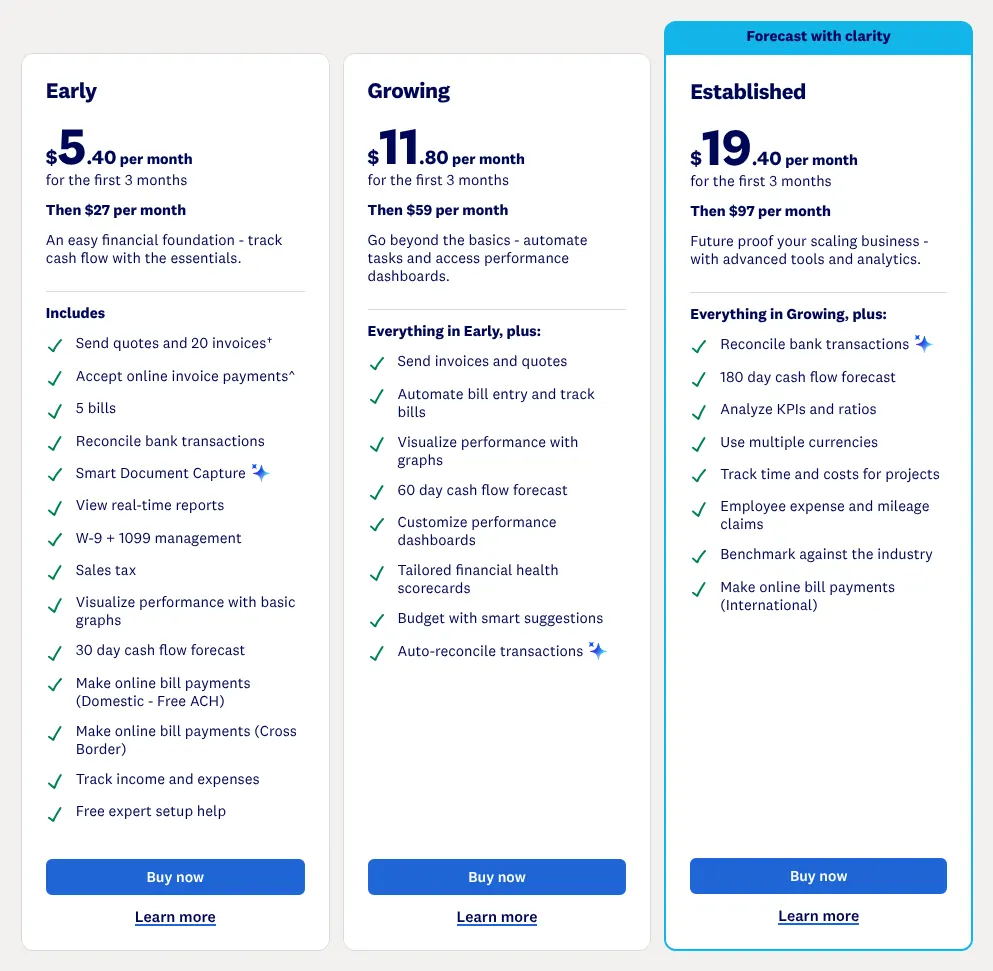
    Early has firm limits. It sends 20 invoices and handles 5 bills a month, and automatic reconciliation costs $5 more. Growing, at $59 a month, lifts those limits and allows three budgets. The pricing page leads with an 80% discount for the first 3 months; the regular price is the line that starts with Then.

    Xero documents a free move from QuickBooks Online for eligible new customers, run by its partner Q2X. It brings the whole history of contacts, accounts, invoices, bills and journals. Attachments, budgets and bank rules are set up again in Xero.

    Choose it if
    Several people work in the books, and either 20 invoices a month are enough or $59 for Growing fits the budget.
    Skip it if
    You pay employees through QuickBooks today and want payroll inside the same subscription.
    Xero's three US plans: Early, then $27 per month, Growing, then $59 per month, and Established, then $97 per month, each with a 3-month offer in large type.
    The large figures are a 3-month offer; the regular price is the bold line under it, Then $27 per month for Early. Source: xero.com, captured on 17 Nov 2026.

    Verdict: Xero keeps nearly everything QuickBooks does and adds unlimited users, as long as Early's 20 invoices a month are enough.

    Visit xero.comPartner link · may earn us a commission
  3. Only partly: Payroll from the same vendor

    3. Zoho Books

    Similarity to QuickBooks
    99%
    Starting price
    $20/mo−$18/mo · cheaper
    Migration effort
    MediumA step-by-step guide covers the move from QuickBooks Online. Data comes in as CSV, TSV or XLS files, and Zoho helps by email.

    Same as QuickBooks

    • Chart of accounts, manual journals, an audit trail, and profit and loss with the balance sheet
    • Bank feeds, bank reconciliation and sales tax
    • Three users on Standard, and an accountant role
    • Multi-currency, inventory and project profitability, from Professional

    What you lose

    • Bills to pay (accounts payable) on the entry plan: they start on Professional, at $50 a month
    • Budgets below Premium, which costs $70 a month
    • Payroll in Zoho Books: it is a separate product, Zoho Payroll, from $39 a month plus $6 per employee

    Switching from QuickBooks to Zoho Books

    Zoho Books shares Xero's 99%: only payroll sits outside it, in a separate Zoho product. Xero ranks above it on this page because its starting price is closer to QuickBooks'. Standard costs $20 a month for the whole organization, $18 less than Simple Start, and includes three users.

    A team of five pays $26 a month, with two extra users at $3 each. Standard sends up to 5,000 invoices a year.

    Standard has one gap a QuickBooks user notices at once: bills to pay start on Professional, at $50. Professional also adds multi-currency, inventory and project profitability. Budgets need Premium, at $70. A free plan exists for businesses with yearly revenue under $50K, for one user and one accountant.

    Choose it if
    You use QuickBooks Essentials features today and want them for a team of three to five at a lower price.
    Skip it if
    You enter suppliers' bills every week and do not want to start on the $50 plan.
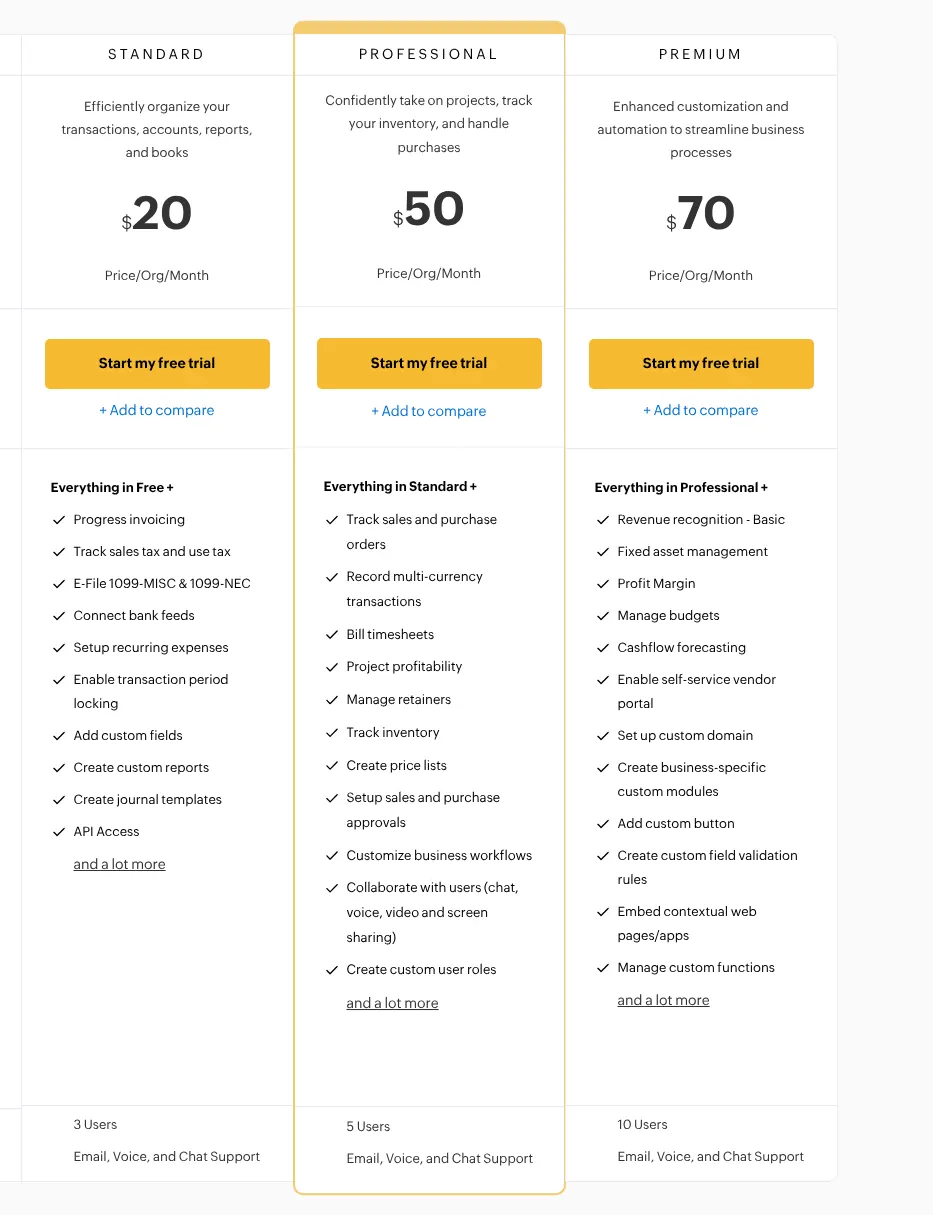
    Zoho Books plans: Standard at $20, Professional at $50 and Premium at $70 per organization per month, with 3, 5 and 10 users.
    Standard shows $20 per organization per month for 3 users; multi-currency, inventory and project profitability appear in the Professional list, at $50. Source: zoho.com, captured on 17 Nov 2026.

    Verdict: Zoho Books keeps almost all of QuickBooks for $20 a month and three users, once the missing bills on Standard are accepted.

  4. Only partly: Budgets compared with actualsPayroll from the same vendor

    4. FreeAgent

    Similarity to QuickBooks
    97%
    Starting price
    $27/mo−$11/mo · cheaper
    Migration effort
    MediumBank feeds bring in up to two years of transactions, contacts import in one click, and opening balances are typed from the old software's trial balance (the list of every account with its balance).

    Same as QuickBooks

    • Bank feeds, reconciliation, invoices, bills and expense tracking
    • Invoices in other currencies, with exchange-rate gains and losses
    • Sales tax rates applied to sales and purchases, in the US account
    • Access for an accountant or bookkeeper

    What you lose

    • Payroll: documented for UK accounts and filed with HMRC, the UK tax office; the US pricing page lists none
    • Budgets for the whole business: FreeAgent documents budgets on projects only
    • Unlimited receipt reading: Smart Capture reads 10 receipts and bills a month, unless $6 a month is added

    Switching from QuickBooks to FreeAgent

    FreeAgent was built in the UK and also sells a US account, priced in dollars. It reaches 97%. Two features are only partly there for a US business: budgets exist for projects, and payroll belongs to the UK accounts.

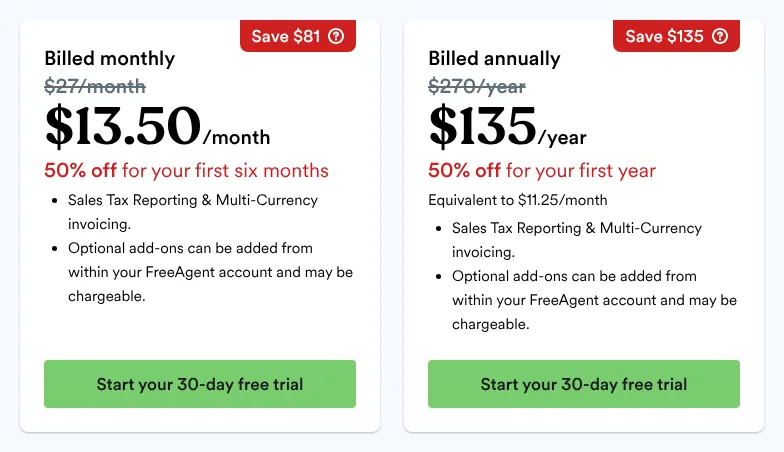
    The US account has one plan, at $27 a month or $270 a year. Its pricing page shows the regular price struck through, above the offer in large type: 50% off for the first six months. Sales tax reporting and invoices in other currencies are part of that plan.

    The number of users included is not written on freeagent.com, and its knowledge base refused the browser used by this site. That point needs a direct answer from FreeAgent before a team moves. FreeAgent advises moving only the current year, with opening balances, active customers and suppliers.

    Choose it if
    You run a small US business or a freelance activity without employees and want one flat price.
    Skip it if
    You pay employees, or you need the user limit in writing before you commit.
    FreeAgent's US pricing: billed monthly, $27/month struck through above $13.50/month, and billed annually, a struck-through yearly price above $135/year.
    The struck-through $27/month is the regular price on monthly billing; the large $13.50 below it is the offer for the first six months. Source: freeagent.com, captured on 17 Nov 2026.

    Verdict: FreeAgent's US account covers QuickBooks' bookkeeping for $27 a month, without payroll and with an unpublished user limit.

  5. Not found on Kashoo's site: Budgets compared with actualsOnly partly: Inventory trackingPayroll from the same vendor

    5. Kashoo

    Similarity to QuickBooks
    94%
    Starting price
    $30/mo−$8/mo · cheaper
    Migration effort
    HighOnly bank transactions come over from QuickBooks. Contacts, invoices and bills cannot be imported and are added by hand.

    Same as QuickBooks

    • Double-entry books with journal entries, a general ledger and a trial balance
    • Bank feeds, reconciliation, invoices, bills, sales tax and multi-currency
    • Project tracking in the single plan
    • Unlimited users, with a view-only role suited to an accountant

    What you lose

    • Budgets: no budget feature appears on kashoo.com or in its help centre
    • Stock quantities: inventory is tracked by its money value only
    • Payroll: a Canadian payroll service connects to Kashoo; US payroll is entered by hand

    Switching from QuickBooks to Kashoo

    Kashoo sells one plan with every feature, for $30 a month per business. That is $8 less than Simple Start, and the price stays the same whatever the number of users. Each additional business needs its own subscription.

    Its 94% comes from three gaps. No budget feature is mentioned anywhere on its site. Inventory is valued in money without quantities on hand, and payroll relies on an outside service in Canada.

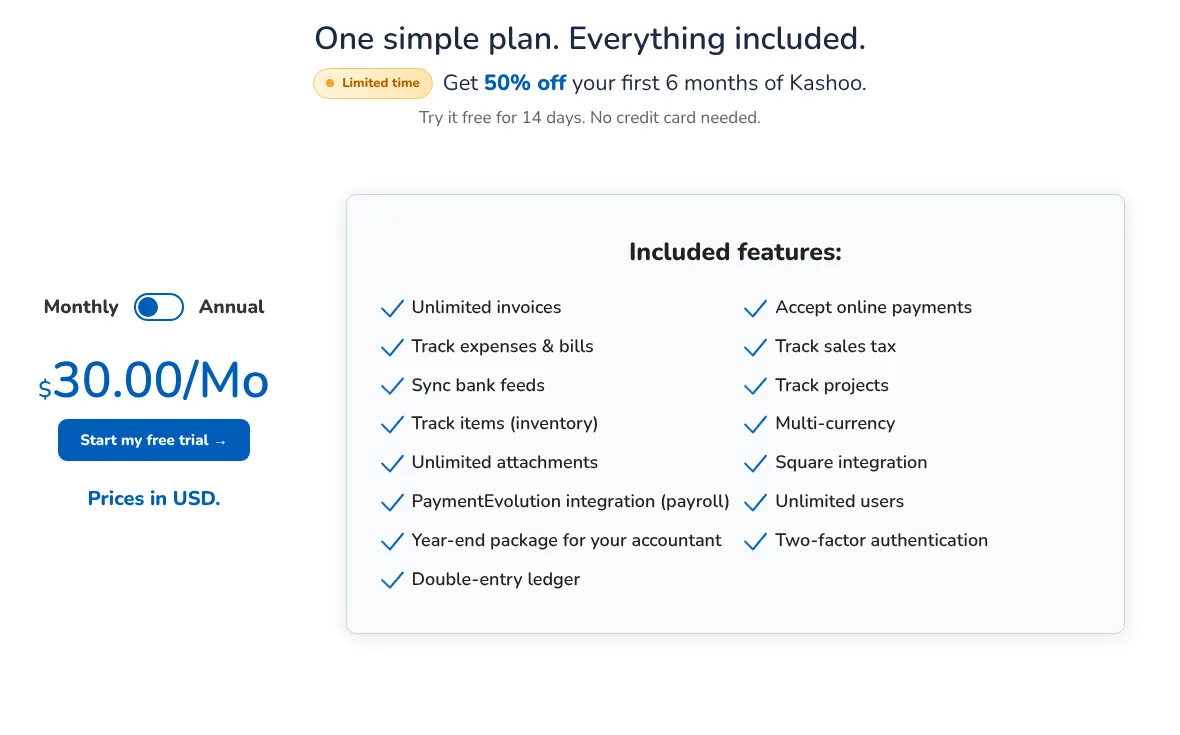
    Leaving QuickBooks for Kashoo is mostly manual work. Kashoo's own pricing FAQ says that only bank transactions come over. The pricing page shows a 50% offer for the first 6 months next to the regular $30.00.

    Choose it if
    You keep the books of one business with several people and want a fixed $30 a month.
    Skip it if
    You need several years of invoices and bills inside the new software from the first day.
    Kashoo's single plan: $30.00/Mo on monthly billing, prices in USD, a banner with 50% off the first 6 months, and the list of included features.
    The plan costs $30.00 a month on monthly billing; the 50% banner above it is an offer for the first 6 months. Source: kashoo.com, captured on 17 Nov 2026.

    Verdict: Kashoo replaces QuickBooks' daily bookkeeping for one flat price, but history stays behind and budgets are missing.

  6. Only partly: Audit trail of changesBudgets compared with actualsMulti-currency transactionsPayroll from the same vendor

    6. FreshBooks

    Similarity to QuickBooks
    94%
    Starting price
    $23/mo−$15/mo · cheaper
    Migration effort
    MediumClients import in bulk from a file. A guided migration, Easy Switch, comes only with Select, the plan priced on request.

    Same as QuickBooks

    • Invoices, expense tracking and automated bank import
    • Chart of accounts, journal entries, balance sheet and bank reconciliation, from Plus
    • Bills to pay and project profitability, from Premium
    • Free access for accountants on plans with accounting

    What you lose

    • Accounting on the entry plan: Lite invoices 5 clients and has no chart of accounts or reconciliation
    • Free extra logins: each team member costs $11 a month
    • Combined currency reports: reports run one currency at a time, with no conversion

    Switching from QuickBooks to FreshBooks

    FreshBooks started as invoicing software, and its plans are still sized by the number of clients billed. Lite costs $23 a month and invoices 5 clients. Plus costs $43 for 50 clients, and Premium $70 for unlimited clients.

    For someone leaving QuickBooks, Plus is the real starting point. Chart of accounts, journal entries, the balance sheet, reconciliation and accountant access start there. Bills to pay and project profitability start on Premium.

    Every extra person costs $11 a month on any plan. Five people on Lite therefore pay $67 a month. The pricing page leads with 90% off for 4 months; the regular prices follow the word was. FreshBooks reaches 94% on this page.

    Choose it if
    You bill a small number of clients for services, and invoicing is most of your accounting work.
    Skip it if
    Several colleagues need a login, or you need double-entry accounting below $43 a month.

    Verdict: FreshBooks suits a service business that mostly sends invoices, and its accounting features start on Plus at $43 a month.

  7. Not found on Manager's site: Mobile appOnly partly: Receipt capture from photosPayroll from the same vendor

    7. Manager

    Similarity to QuickBooks
    94%
    Starting price
    $59/mo+$21/mo · dearer
    Migration effort
    HighBank statement files import; starting balances, customers and open invoices are entered by hand.

    Same as QuickBooks

    • Chart of accounts, journal entries, budgets and an audit trail
    • Bank feeds, reconciliation, invoices, bills and sales tax
    • Inventory, project profitability and multiple currencies
    • Unlimited users and unlimited businesses on the cloud version

    What you lose

    • A mobile app: none was found, and the cloud version runs in a browser
    • Receipt reading: scanned receipts are attached as files, without their content being read
    • Payroll taxes: payslips are recorded, but no tax calculation or filing is documented

    Switching from QuickBooks to Manager

    Manager comes in three editions (versions of the same software). The desktop edition is free, with every feature, for one user on one computer. The server edition is free to install on a company's own machine. The cloud edition costs $59 a month for unlimited users and businesses.

    For one person, that is $21 more than Simple Start. For five people the order flips, because QuickBooks then needs Plus at $140. An accountant who keeps the books of several companies also pays the same $59.

    Manager reaches 94%: mobile use, receipt reading and payroll are its weak points. Moving in is manual. Bank statements import as files, and opening balances are typed in.

    Choose it if
    You want to start free on one computer, or you keep books for several businesses with a team.
    Skip it if
    You record receipts from a phone or want payroll taxes calculated for you.
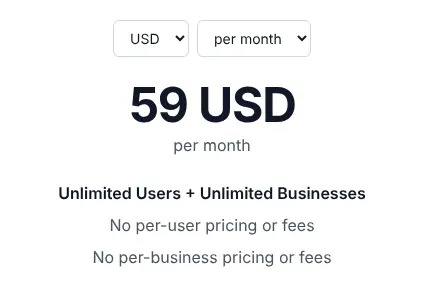
    Manager cloud edition price set to USD and per month: 59 USD per month, Unlimited Users + Unlimited Businesses, no per-user and no per-business fees.
    The cloud edition shows 59 USD per month, with no extra charge per user or per business. Source: manager.io, captured on 17 Nov 2026.

    Verdict: Manager costs more than Simple Start for one person, but a team or a multi-company bookkeeper pays $59 for everything.

  8. Not found on Akaunting's site: Mobile appOnly partly: Audit trail of changesPayroll from the same vendor

    8. Akaunting

    Cheapest
    Similarity to QuickBooks
    94%
    Starting price
    $12/mo−$26/mo · cheaper
    Migration effort
    LowA free QuickBooks app moves customers, suppliers, products, services, invoices and past records.

    Same as QuickBooks

    • A free importer for QuickBooks data
    • Multiple currencies on every plan, from Standard Cloud
    • Double-entry, bank feeds and user roles, from Premium Cloud
    • Inventory, projects and receipt scanning, from Elite Cloud or as separate apps

    What you lose

    • Double-entry on the entry plan: Standard Cloud has no chart of accounts, balance sheet or bank connection
    • A log of every change to the books: sold apart as the Microscope app, $5 a month; no mobile app was found on akaunting.com
    • Payroll taxes: the payroll app makes payslips; no tax calculation or filing is documented

    Switching from QuickBooks to Akaunting

    Akaunting is open source (its code is public and free to reuse). It can run free on a company's own server, or be hosted by Akaunting for a monthly fee. Standard Cloud costs $12 a month, the lowest starting price of the ten.

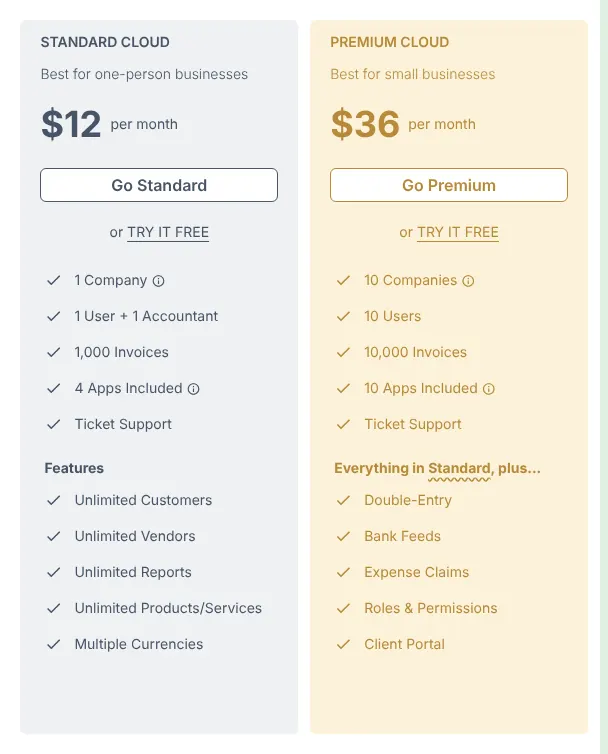
    That price covers one user and one accountant, without the double-entry tools a QuickBooks user relies on. Premium Cloud, at $36, adds the chart of accounts, bank feeds and roles for 10 users. Inventory, projects and payroll come with Elite Cloud, at $84, or as apps bought one by one.

    Akaunting reaches 94% and makes the move easy: its QuickBooks app is free. The self-hosted version (installed on the company's own server) includes no app at all, so each extra feature is a purchase.

    Choose it if
    You are ready to pay $36 for Premium Cloud, or to run software on your own server.
    Skip it if
    You expected QuickBooks' full bookkeeping for $12 a month.
    Akaunting's monthly cloud plans: Standard Cloud at $12 per month for 1 user and 1 accountant, and Premium Cloud at $36 per month adding double-entry and bank feeds.
    Standard Cloud costs $12 a month; double-entry and bank feeds appear only in the Premium Cloud list, at $36. Source: akaunting.com, captured on 17 Nov 2026.

    Verdict: Akaunting has the lowest starting price and a free QuickBooks importer, but full accounting starts on the $36 plan.

  9. Not found on Wave's site: Audit trail of changesBudgets compared with actualsOnly partly: Inventory trackingPayroll from the same vendor

    9. Wave

    Similarity to QuickBooks
    92%
    Starting price
    $19/mo−$19/mo · cheaper
    Migration effort
    HighWave's QuickBooks guide describes re-entering data. Customers and bank statements import from CSV files.

    Same as QuickBooks

    • Unlimited invoices, estimates, bills and bookkeeping records, free on Starter
    • Automatic bank import and unlimited receipt capture, on Pro
    • Admins, editors and viewers, an accountant among them, on Pro
    • A mobile app for invoicing

    What you lose

    • A change history and budget reports: neither was found in Wave's help centre
    • Stock quantities: inventory is tracked by its money value only
    • Payroll in the plan: it is an add-on at $40 a month plus $6 per active employee

    Switching from QuickBooks to Wave

    Wave's free plan, Starter, removes the limit that QuickBooks Free sets on invoices. Invoices, estimates and bills are unlimited there, where QuickBooks Free sends two invoices a month. Bank transactions are typed or uploaded by hand on Starter.

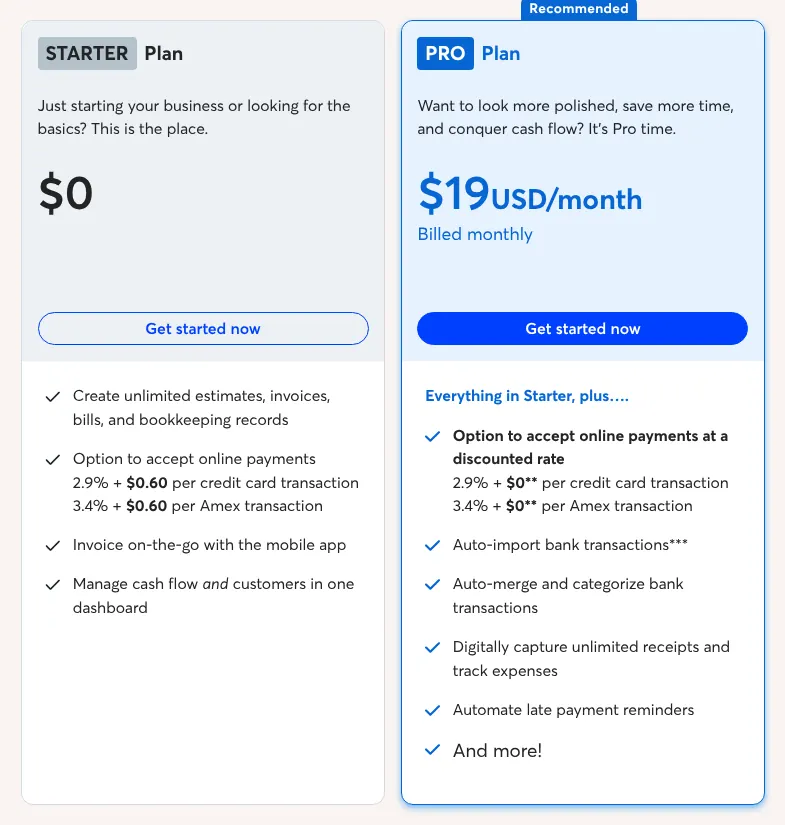
    Pro costs $19 a month per business and adds automatic bank import, receipt capture and invited users. Wave publishes no price per user, so a team pays the same $19. That is $121 a month less than QuickBooks Plus for five people.

    Wave reaches 92%. It has no budget reports, and no change history was found. Its inventory follows value, not quantities. Wave's guide for leaving QuickBooks asks to recreate unpaid invoices and bills first, so balances are not counted twice.

    Choose it if
    You own a small business with simple books, no stock to count and no need for budgets.
    Skip it if
    Your accountant relies on a history of changes, or you sell products from stock.
    Wave's two plans on monthly billing: Starter at $0 with unlimited estimates, invoices and bills, and Pro at $19 USD/month, billed monthly, with automatic bank import.
    Pro shows $19 USD a month, billed monthly; automatic bank import appears only in the Pro list. Source: waveapps.com, captured on 17 Nov 2026.

    Verdict: Wave gives a small business most of QuickBooks for $19 a month, or for free without bank feeds.

  10. Not found on ZipBooks's site: Audit trail of changesInventory trackingMobile appOnly partly: Budgets compared with actualsMulti-currency transactionsPublic APIPayroll from the same vendor

    10. ZipBooks

    Similarity to QuickBooks
    86%
    Starting price
    $15/mo−$23/mo · cheaper
    Migration effort
    MediumCSV templates cover transactions, invoices, contacts and the chart of accounts. A full QuickBooks Online migration is documented for accountants.

    Same as QuickBooks

    • Unlimited invoices, vendors and customers, free on Starter
    • Bank feeds and reconciliation, with one bank account on the free plan
    • Five team members on Smarter, with an accountant setting
    • Journal entries, expense tracking and sales tax

    What you lose

    • Inventory: ZipBooks' help centre says items do not serve as inventory tracking
    • A mobile app: the app was discontinued, and ZipBooks runs in a phone's browser
    • Exchange rates: invoices can carry another currency, but reports show the default one only

    Switching from QuickBooks to ZipBooks

    ZipBooks reaches 86%, the lowest score of the ten. Inventory and a mobile app are missing, and no change history was found. Budgets, multi-currency, the API (the link other software uses to read its data) and payroll are only partly there.

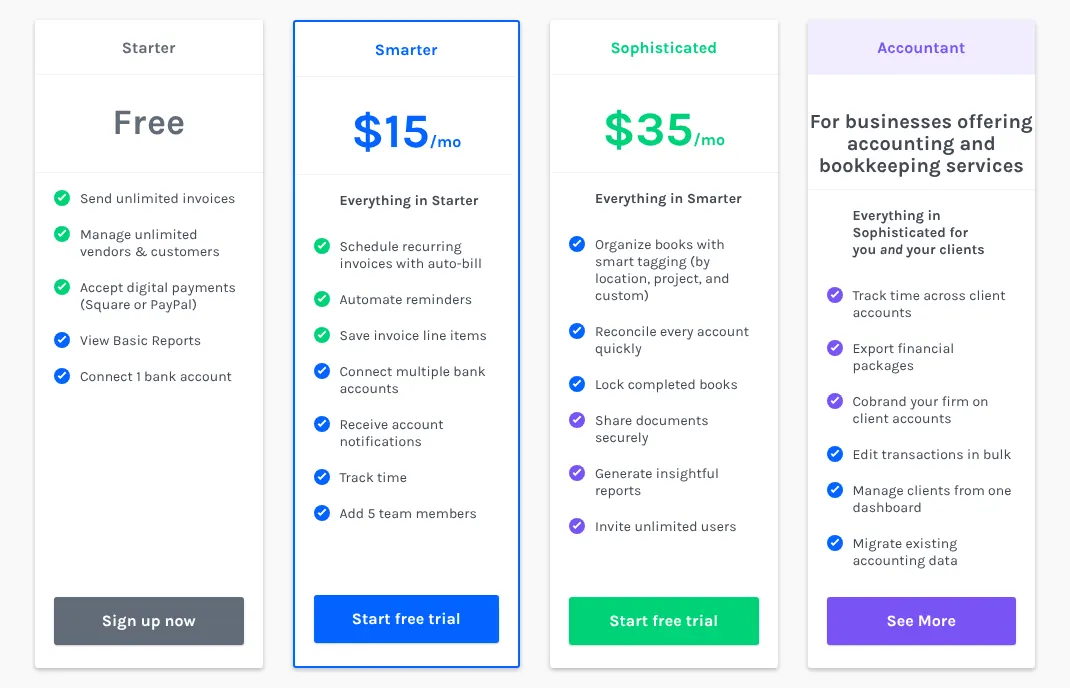
    The free Starter plan sends unlimited invoices and connects one bank account. Smarter costs $15 a month, $23 less than Simple Start, and adds five team members. Sophisticated, at $35, adds unlimited users, tags by project or location, and reconciliation of every account.

    Payroll runs in Gusto, an outside service that ZipBooks connects to. Moving in relies on CSV templates, including one for the chart of accounts.

    Choose it if
    You run a service business without stock and want up to five people in the books for $15 a month.
    Skip it if
    You sell products from stock or work mostly from a phone.
    ZipBooks pricing cards: Starter free, Smarter with 5 team members, Sophisticated with unlimited users, and an Accountant plan for bookkeeping firms.
    Smarter, the first paid plan, adds 5 team members; Sophisticated adds unlimited users and reconciliation of every account. Source: zipbooks.com, captured on 17 Nov 2026.

    Verdict: ZipBooks keeps QuickBooks' core books for $15 a month and five people, without inventory or a phone app.

Comparison table: the 10 alternatives vs QuickBooks

The table sets the ten tools side by side on the four points that decide most moves: price, logins, a free plan and the import. The starting price is the cheapest paid plan, billed monthly, at its regular price.

The 10 QuickBooks alternatives compared with QuickBooks Online
ToolMatchEntry priceUsers on entry planFree planImport from QuickBooks
REFQuickBooks100%$38/mo (Simple Start)1 + 2 accountantsYes, 2 invoices a monthn/a
01Odoo100%$38.90/user/mo (Standard)Each user billedYes, Accounting app aloneCSV or Excel files
02Xero99%$27/mo (Early)UnlimitedNo, one month freeQ2X migration, free if eligible
03Zoho Books99%$20/mo (Standard)3, then $3/mo eachYes, revenue under $50KGuide, CSV, TSV or XLS files
04FreeAgent97%$27/mo (US account)Not publishedNo, 30-day trialBank history, contacts, opening balances
05Kashoo94%$30/mo (single plan)UnlimitedNo, 14-day trialBank transactions only
06FreshBooks94%$23/mo (Lite)Owner, then $11/mo eachNo, 30-day trialClient list by file
07Manager94%$59/mo (cloud)UnlimitedYes, desktop, one userBank statement files
08Akaunting94%$12/mo (Standard Cloud)1 + 1 accountantYes, on own serverFree QuickBooks app
09Wave92%$19/mo (Pro)Invited users on ProYes, StarterCSV statements and customers
10ZipBooks86%$15/mo (Smarter)5 team membersYes, StarterCSV templates

Prices read on each vendor's site on 2026-11-17, regular price without introductory offers. Users: the logins of the entry plan. Free plan: a plan with no time limit. Import from QuickBooks: what each vendor documents for bringing QuickBooks data in.

What a QuickBooks alternative really costs

For one person, eight of the ten tools cost less than Simple Start's $38 a month. The gap grows with the team, because QuickBooks changes plan as users are added. Five people pay $140 a month on QuickBooks Plus.

The table applies one rule to every price list read on 2026-11-17. For each team size, it takes the cheapest paid plan billed monthly that gives each person a login. Extra users are added at the price each vendor publishes.

At five people, six of the ten stay under $40 a month. ZipBooks costs $15, Wave $19 and Zoho Books $26. Odoo, billed per user, reaches $194.50.

Monthly cost for 1, 3 and 5 users, in USD
Tool1 user3 users5 users
REFQuickBooks$38$85$140
01Odoo$38.90$116.70$194.50
02Xero$27$27$27
03Zoho Books$20$20$26
04FreeAgent$27Not publishedNot published
05Kashoo$30$30$30
06FreshBooks$23$45$67
07Manager$59$59$59
08Akaunting$12$36$36
09Wave$19$19$19
10ZipBooks$15$15$15

QuickBooks: Simple Start, Essentials and Plus. Odoo: Standard at $38.90 per user; the Accounting app alone is free for unlimited users on One App Free. Xero: Early, with its 20-invoice monthly limit. Zoho Books: Standard with 3 users, plus 2 users at $3. FreeAgent: users per plan not published. FreshBooks: Lite plus $11 per team member. Akaunting: Standard Cloud for one user, Premium Cloud for 3 to 10. Wave: Pro, no per-user fee published. ZipBooks: Smarter, 5 team members.

How to migrate from QuickBooks in five steps

The move takes five steps. What moves is the chart of accounts, the customer and supplier lists, open invoices and bills, and the opening balances. Past years can stay in QuickBooks exports.

  1. Pick a switch date

    Choose the first day of a month, ideally of a financial year. Everything before that date stays in QuickBooks; everything after goes into the new tool.

  2. Export reports and lists from QuickBooks

    Export the trial balance (the list of every account with its balance), the profit and loss, the balance sheet and the customer and supplier lists at the switch date. QuickBooks exports to Excel. Do it while the subscription runs, even though a paid account stays readable after cancelling.

  3. Import the chart of accounts and contacts

    Load the chart of accounts and the contact lists into the new tool, with its importer or its CSV templates. With Xero's Q2X or Akaunting's QuickBooks app, this step and the next are done for you.

  4. Enter opening balances and open items

    Type the balances of the trial balance at the switch date. Then recreate unpaid invoices and bills, so customers and suppliers still owe the right amounts.

  5. Connect the bank and reconcile one month

    Connect your bank feeds and reconcile the first month. Compare the new balance sheet with QuickBooks' for the same date before you cancel.

When it is better to stay on QuickBooks

Staying on QuickBooks is the better choice in three situations. The ranking on this page measures how closely a tool resembles QuickBooks, not which one suits a given business.

  • Payroll runs inside QuickBooks. Among the ten, only Odoo includes payroll with US tax calculation in its subscription, for a list of states. Xero, Zoho Books, FreshBooks and Wave sell payroll as an add-on. Kashoo, Manager and Akaunting document no US payroll tax calculation.
  • One person keeps the books with an outside accountant. Simple Start, at $38, includes two accountant logins that do not count as users. Odoo's pricing FAQ counts a third-party accountant as a paying user.
  • Years of history must stay in one place. Xero, through Q2X, and Akaunting document a move of QuickBooks history for any business, and ZipBooks for accountants only. With the other tools, past years stay in QuickBooks exports.

A paid QuickBooks account stays readable for one year after cancelling. That makes a gradual move possible.

How we rank

  1. The order of this page is a similarity index: the share of QuickBooks Online's features that each tool reproduces. It measures resemblance, not quality, reliability or support.Books and reports 28% · 5 featuresBanking 19% · 3 featuresSales and purchases 33% · 7 featuresTeam and tools 19% · 5 features
  2. The comparison uses a grid of 20 QuickBooks features read on intuit.com, worth 36 points in total, in four groups: books and reports, banking, sales and purchases, and team and tools. Five features weigh 3: an editable chart of accounts, the balance sheet and profit and loss, automatic bank feeds, bank reconciliation and customer invoices. Six weigh 2 and nine weigh 1. A tool gets 1 for a feature documented on any of its plans. A partial feature counts half: a documented limit, a paid add-on, a separate product of the same vendor, or an outside service the vendor documents. It gets 0 when the feature is absent or could not be found on the vendor's own site.
  3. Thirteen candidates were scored, and the ten highest are listed. Patriot Accounting (82%), Puzzle (82%) and ZarMoney (79%) score lower. Sage Accounting and NetSuite were not scored: on 16 November, their pages refused both tools this site uses to read vendor pages, a download script and a browser. Xero and Zoho Books tie at 99%, and Kashoo, FreshBooks, Manager and Akaunting tie at 94%. Ties go to the smaller gap between entry prices and the $38 of Simple Start, then to alphabetical order. Price, migration effort and labels do not change the rank.
  4. Facts and marks were first read on 16 November 2026 for this site's ranking of accounting software, and every source was read again on 17 November. FreeAgent is priced on its US account, so its UK payroll counts half. Odoo's pricing page refused the browser, so its prices were read in the text its server sends.
  5. No entry on this page is sponsored. A sponsored entry is marked Sponsored and holds the position paid for; its percentage stays the computed one.

FAQ

Is there a free alternative to QuickBooks?

Several, with limits. Wave Starter and ZipBooks Starter send unlimited invoices for free, without automatic bank import on Wave. Zoho Books is free while yearly revenue stays under $50K, for one user and one accountant. Odoo's Accounting app is free for unlimited users if it is the only app. Manager's desktop edition is free for one user on one computer.

What happens to my QuickBooks data after I cancel?

A cancelled paid subscription keeps read-only access to the data for one year, and you can export it to Excel during that time. A cancelled or expired trial keeps the data for 90 days. Intuit recommends exporting or printing the data before cancelling.

Which alternative costs least for a team of five?

Among paid plans, ZipBooks Smarter, at $15 a month for five team members. Wave Pro costs $19 with no per-user fee, and Zoho Books $26 with two extra users. Check the limits: ZipBooks has no inventory, and Wave has no budget reports.

Can my accountant work in the new software for free?

In most of them, yes. Xero and Kashoo include unlimited users, FreshBooks adds accountants for free from Plus, and Akaunting includes one accountant on Standard Cloud. Odoo is the exception: its pricing FAQ counts a third-party accountant as a paying user.

Which alternative includes payroll?

Odoo includes a payroll app in its Standard plan, with a US version that covers a list of states. Xero, Zoho Books, FreshBooks and Wave sell payroll as a separate subscription, from $36 a month plus a fee per person. Manager and Akaunting produce payslips, with no payroll tax calculation documented.