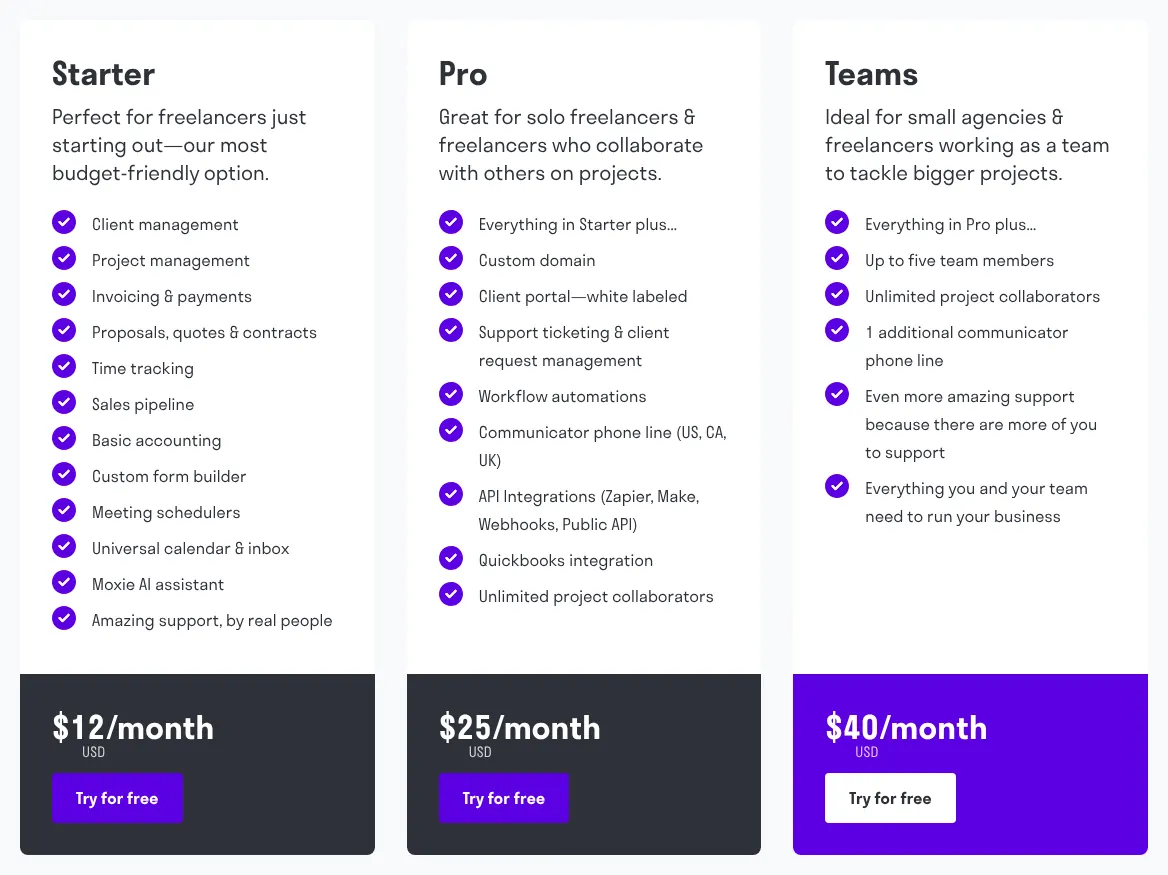
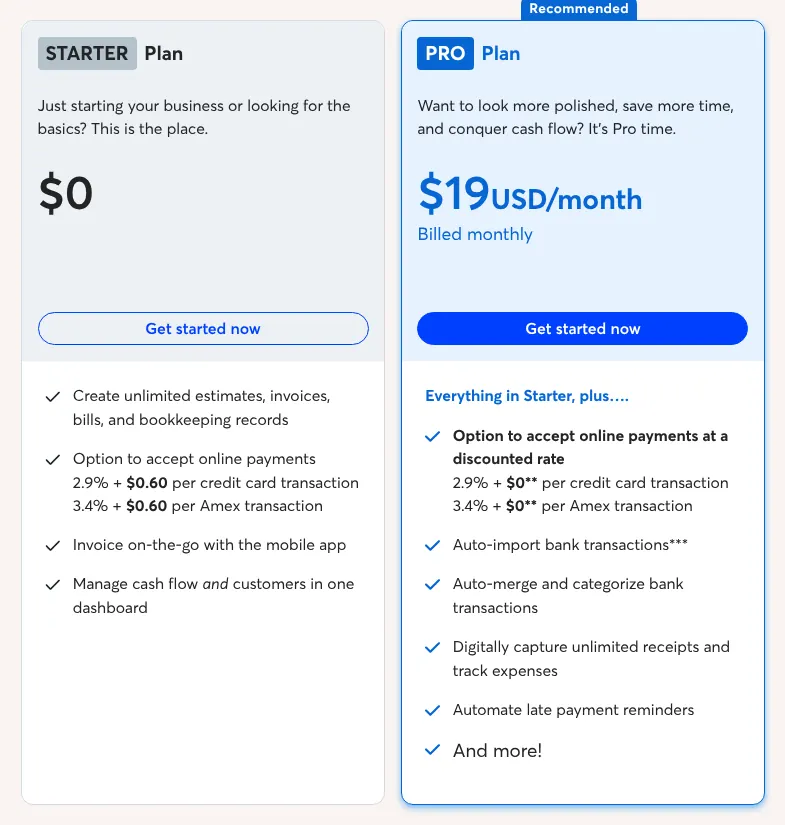
All ten send a branded invoice that a client can pay online, so the score only builds the shortlist. Six checks narrow it to one or two tools. Each check rests on vendor pages read on 16 November 2026.
1. Start from the number of invoices you send
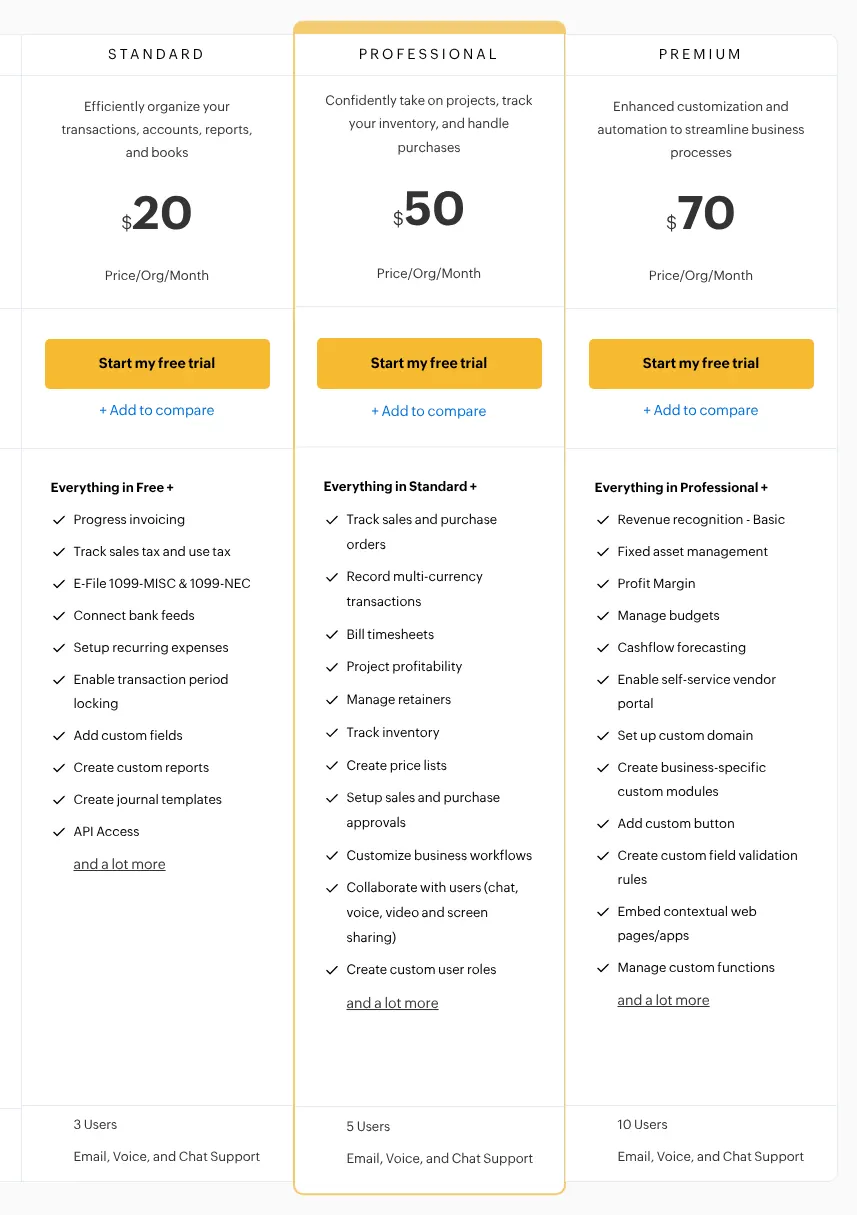
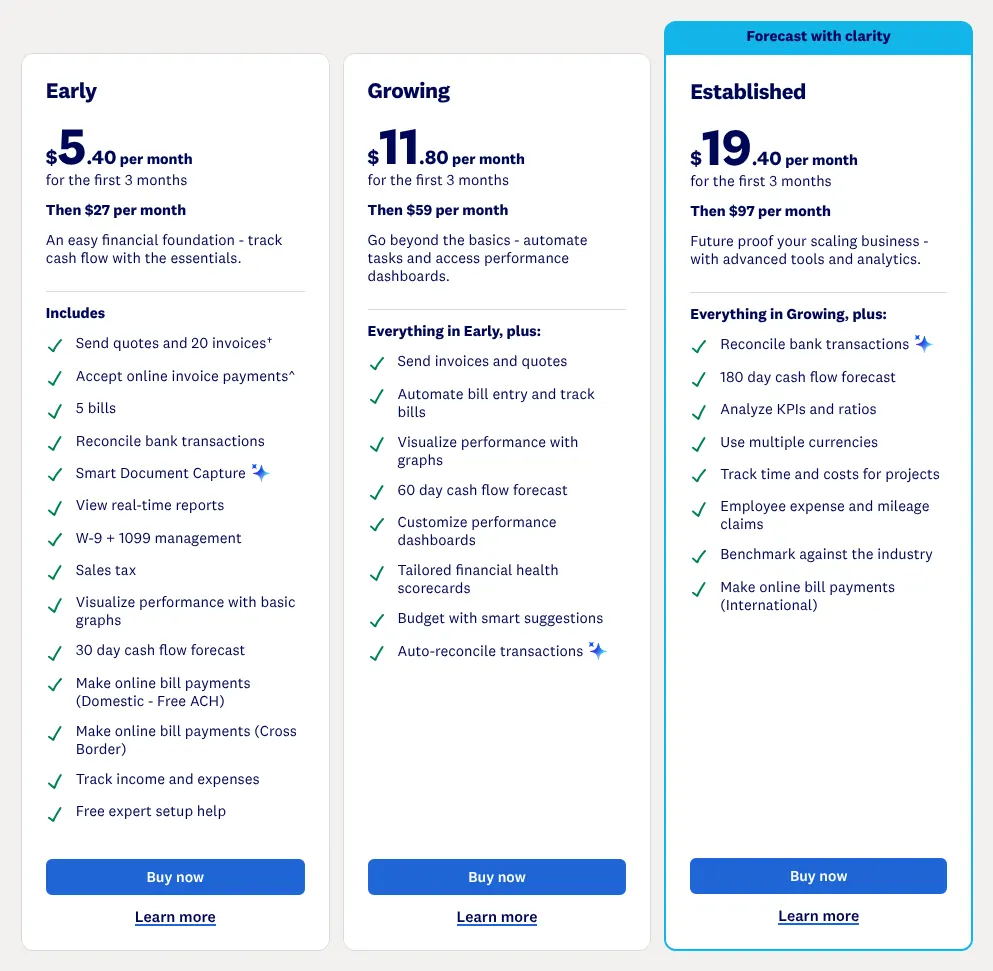
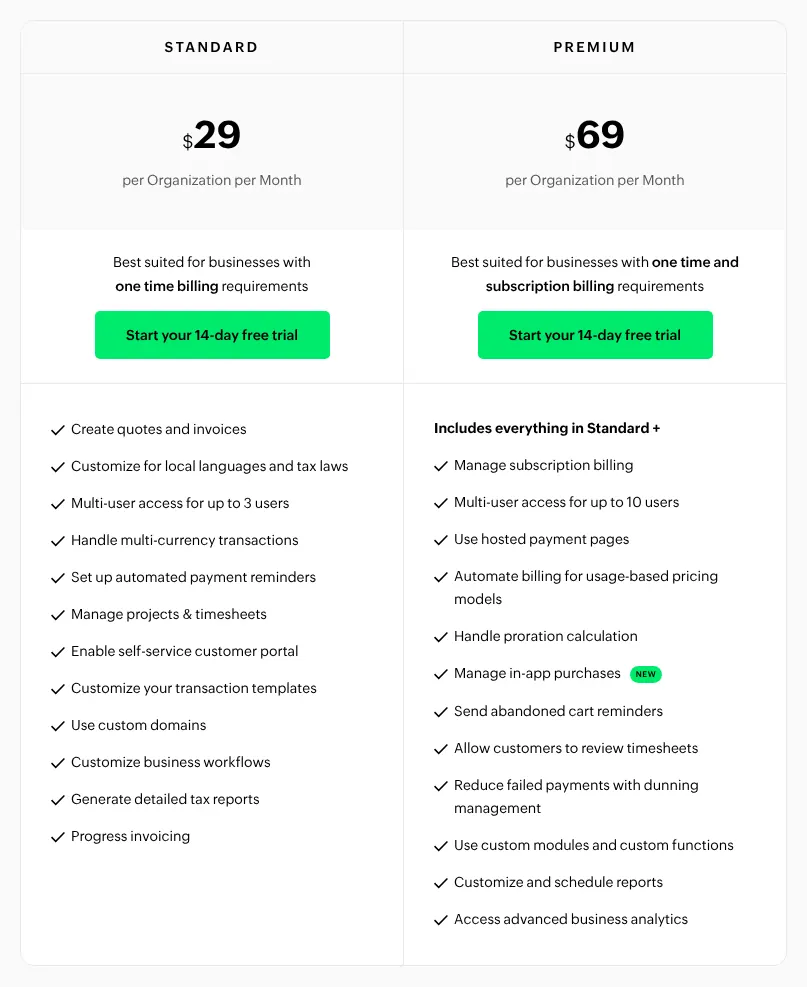
The entry plans cap volume, so count your invoices before you compare prices. Xero Early sends 20 invoices a month. FreshBooks Lite bills 5 clients. Zoho Invoice stops at 500 invoices a year, and Zoho Books Standard at 5,000.
Take a business that sends 40 invoices a month, or 480 a year. It outgrows Xero Early in the first month. It fits under the Zoho Invoice cap, but with little room to grow. Check the cap of the plan you can afford, not the one on the home page.
2. Decide whether the same tool keeps the accounts
Some of these tools only bill; others also keep the books. Bookkeeping here means a full set of accounts: a balance sheet, a profit and loss statement and a chart of accounts (the list of categories every sale and cost is filed under). An accountant works from those at tax time.
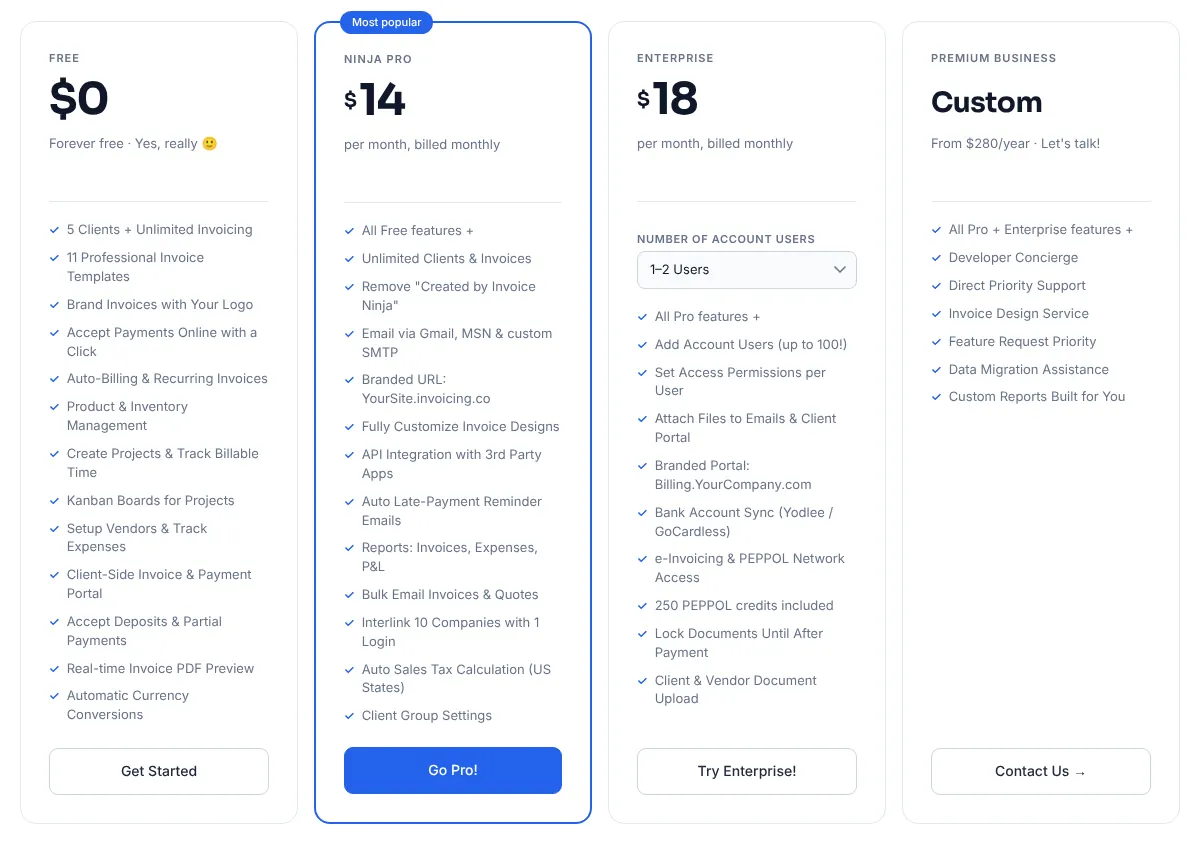
Zoho Books, Xero, QuickBooks Online and Wave keep full accounts, and FreshBooks does from Plus. Zoho Billing and Zoho Invoice hand the accounts to Zoho Books. Invoice Ninja, Moxie and Bonsai stop at simpler reports. A business that takes Zoho Billing and Zoho Books together pays $29 plus $20, so $49 a month. Zoho Books alone costs $20, so start there unless you need Zoho Billing's extras.
3. Count the people who need a login
Prices move the most when colleagues join. Xero includes unlimited users on every plan. Zoho Books Standard includes 3 and charges $3 for each extra user. FreshBooks charges $11 a month per team member, and Bonsai bills every plan per user. QuickBooks Online changes plan instead: 3 users means Essentials.
For five people on monthly billing, Xero still costs $27 a month. Zoho Books costs $26 with two extra users. FreshBooks Lite with four team members costs $67. QuickBooks Plus, the plan for 5 users, costs $140. If your accountant only reads the books, look for a free accountant login first.
4. Check who approves an invoice before it leaves
With an approval step, one person prepares an invoice and another checks it before the client sees it. It catches a wrong amount before it reaches a client. Five of the ten offer it. Zoho Invoice includes it for free, and Zoho Billing from Standard. Zoho Books needs Professional, Xero uses a draft-only role, and QuickBooks Online keeps it for Advanced.
The plan that unlocks approvals changes the bill. A team of five that needs approvals pays $47 a month on Zoho Billing Standard with two extra users. The same need costs $340 a month on QuickBooks Online Advanced. If two people must sign off on invoices, compare those plans, not the entry ones.
5. Compare the fee on each card payment
The subscription is only part of the cost: each online payment pays a fee to the payment service. Zoho Payments, FreshBooks, Xero and Bonsai charge 2.9% + 30¢ on a standard US card. QuickBooks charges 2.99%. Wave charges 2.9% + $0.60 on Starter. Invoice Ninja and Moxie leave the fee to the service connected, such as Stripe.
ACH payments (the US system for paying straight from a bank account) cost less. Take a $2,000 invoice. Paid by card at 2.9% + $0.30, it costs $58.30 in fees. Paid by ACH through Xero, at 1% capped at $9, it costs $9. If your clients pay large invoices, offer bank payment and check that your plan includes it.
6. Read the regular price, not the welcome offer
Three of the ten lead their pricing page with an offer for new customers. FreshBooks shows 80% off for 4 months. Xero shows 80% off for 3 months. QuickBooks Online shows 50% off for 3 months. The regular price applies afterwards, and it is the one this page uses.
QuickBooks Simple Start costs $19 a month during the offer, then $38. Yearly billing also lowers the price but asks for twelve months up front: Zoho Books Standard falls from $20 to $15 a month. Pay monthly while you test a tool, then switch to yearly once you are sure.